


Access forms allow users to interact with data. One of the most ingenious setups is the main form, subform configuration. The main form displays information about an entity, whereas the subform displays information related to that entity. You might display a customer’s orders or a student’s grades in such a configuration.
They’re helpful for displaying related data and easy to create, unless you want some action or condition in the main form to update something in the subform. In this situation, you must reference the subform or one of its controls using an expression from the main form. This can be troublesome because Visual Basic for Applications treats a subform as just another control within the main form, which requires a syntax that might not be familiar.
In this article, you’ll learn the syntax for referencing subforms and their controls. Knowing the proper syntax will help you avoid pitfalls and produce efficient code quicker. We’ll be working with forms and subforms, but the same syntax and strategy apply to reports and subreports.
The syntax for referencing VBA objects and properties
When using VBA to automate forms and reports, you must deal with a hierarchy of objects and properties. At the top of the hierarchy is the form or report. That form has properties you can use to customize it. You can add controls (objects) to the form, and those controls also have properties.
You can also add a subform to a form, which we’ll call the main form. Access interprets the subform (an object) as another control, and the subform, like other controls, has properties.
Regardless of where you are on a form, report or control, you must use the proper syntax so Access knows if you’re referencing an object — a form, report, control or sub — or one of the many properties. And there’s one more wrench to throw into the mess: The type of module you’re using matters.
ACADEMY: Buy and learn how to use the applications in Microsoft Office Pro Plus 2019.
The syntax that will work from both a standard and a class module follows:
Forms!mainform!subform.property
where Forms identifies the object as a Form object, mainform is the name of your main form, subform is the name of your subform and property identifies the property you’re changing. You’ll always use this syntax when calling code from a standard module.
Notice that an exclamation point ( ! ) separates the objects, the main form and the subform. In VBA, this character is known as a bang. In addition, the period ( . ) character separates objects (forms and controls) from their properties. This character is called a dot.
When working in a class module (the module behind the actual form), you can substitute the Forms!mainform element with the Me element, as follows:
Me!subform.property
The form knows it’s a form and it knows its name, so you don’t have to specify it. You’ll continue to use the dot and bang identifiers the same, but references will be much shorter.
How to reference a subform from the main form
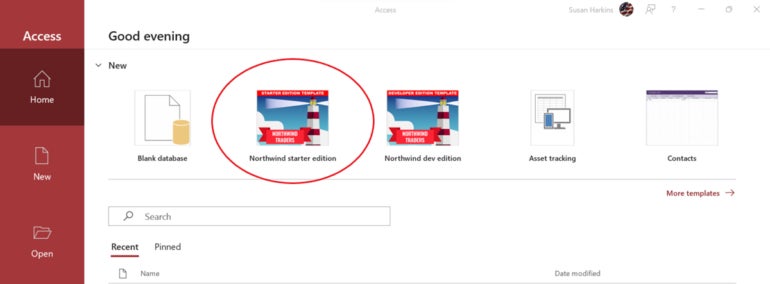
Now, let’s apply the syntax rules from above to a simple example. You can use almost any form and subform configuration. I’m using the Northwind Traders Starter Edition 2.3 database that comes with Access 365. If you want to follow along, open a new database, and choose Northwind starter edition (Figure A).
If you use your own database, remember to update the following object names in each listing, accordingly: frmOrderDetails is the main form, sfrmOrderDetails is the subform, and txtPrice is a control on the subform. You might need to change the properties as well, because not all objects have the same properties.
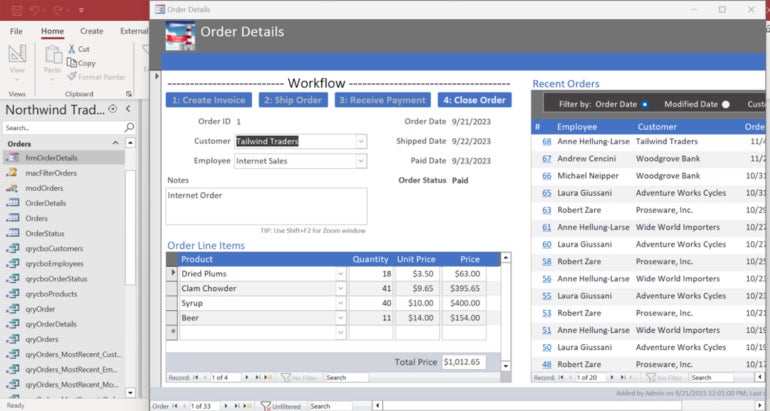
Figure B shows frmOrderDetails. In this simple exercise, we’ll use a double-click event procedure in the main form’s header section to change the border properties of the Order Line Items subform. Initially, the subform’s border properties are set to a solid, hairline line. It’s clean, but nearly invisible.
In truth, this is a contrived example, and it’s unlikely you’ll ever need to do this, but we’re focusing on the syntax, not the result of the code. However, in a real-world situation, you might want to update the border to draw the attention of others using the database for any number of reasons. A border’s color might represent something important, such as an unfilled order or a student’s failing grade point average.
Referencing a subform using a form’s class module
To begin, open frmOrderDetails in Design view, and do the following to open the form’s module and enter the appropriate code for the double-click event procedure:
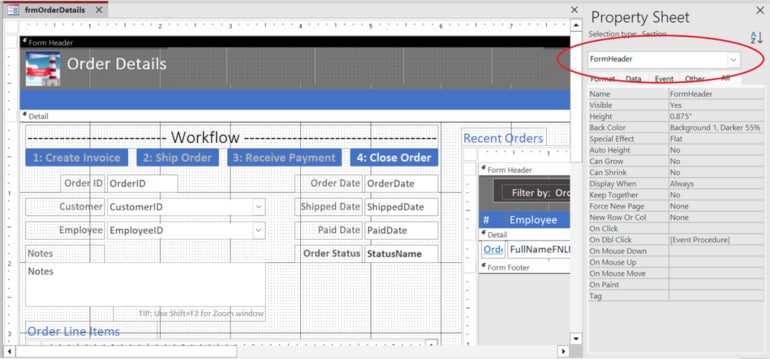
- With frmOrderDetails in Design view, click the header section to update the Property sheet. You’ll know you’ve selected the right section if the Property sheet displays FormHeader near the top (Figure C). If the Property sheet doesn’t open automatically, double-click the form. Selecting objects on the form will update the properties in the Property sheet, accordingly.
- In the property sheet, find the On Dbl Click property, and click [Event Procedure] from the dropdown list (Figure D).
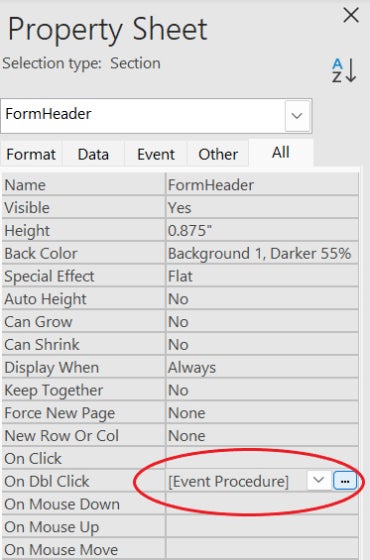
- Click the ellipsis button to the right to open the module to open the form’s module.
- In the module, add the code shown in Listing A to the module (Figure E). Note the use of the shorter Me! Notation. This is possible because the code is in the form’s class module.
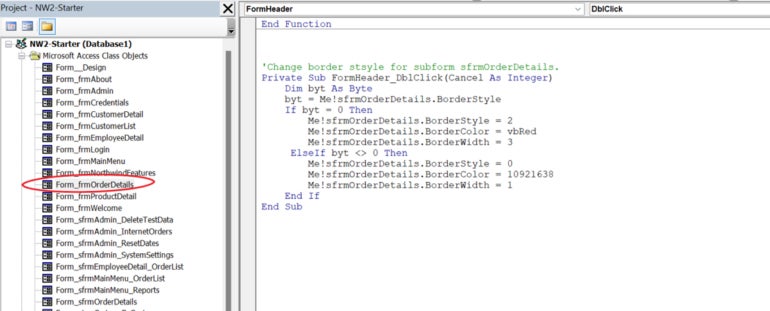
Listing A
'Change border style for subform sfrmOrderDetails.
Private Sub FormHeader_DblClick(Cancel As Integer)
Dim byt As Byte
byt = Me!sfrmOrderDetails.BorderStyle
If byt = 0 Then
Me!sfrmOrderDetails.BorderStyle = 2
Me!sfrmOrderDetails.BorderColor = vbRed
Me!sfrmOrderDetails.BorderWidth = 3
ElseIf byt <> 0 Then
Me!sfrmOrderDetails.BorderStyle = 0
Me!sfrmOrderDetails.BorderColor = 10921638
Me!sfrmOrderDetails.BorderWidth = 1
End If
End Sub
Tip: Don’t try to copy the code directly from this web page into the code module because VBA will object to phantom characters you can’t see or remove. Instead, drop it into any text editor and then copy it from there into the module. |
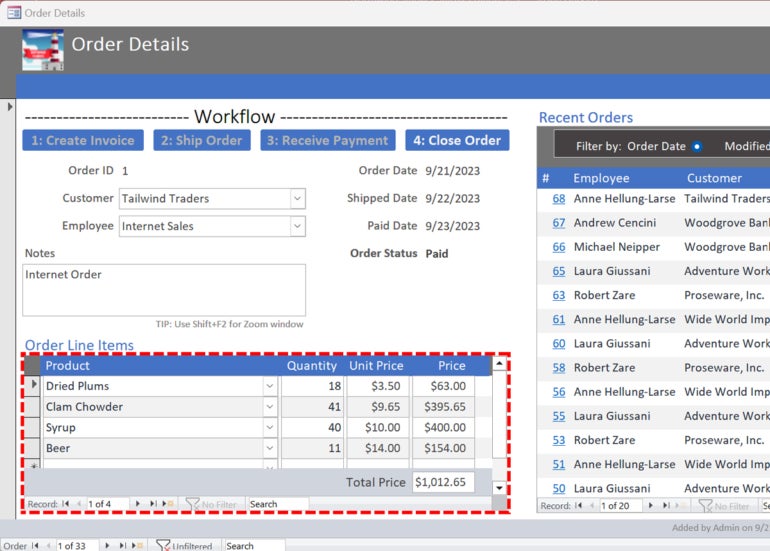
To run the code, open the main form in Form View, and double-click anywhere in the header section. As you can see in Figure F, doing so updates the subform’s border properties. Although, you may have to double-click twice. Specifically, the subform displays a thick, red, dashed line. Double-click to return the subform’s border properties to the original settings.
Referencing a subform using a form’s standard module
If you’re using a standard module to call the procedure, you must use the longer form that explicitly specifies the main form shown in Listing B. The logic is the same.
Listing B
Public Sub ChangeBorder()
Dim byt As Byte
byt = Forms!frmOrderDetails!sfrmOrderDetails.BorderStyle
If byt = 0 Then
Forms!frmOrderDetails!sfrmOrderDetails.BorderStyle = 2
Forms!frmOrderDetails!sfrmOrderDetails.BorderColor = vbRed
Forms!frmOrderDetails!sfrmOrderDetails.BorderWidth = 3
ElseIf byt <> 0 Then
Forms!frmOrderDetails!sfrmOrderDetails.BorderStyle = 0
Forms!frmOrderDetails!sfrmOrderDetails.BorderColor = 10921638
Forms!frmOrderDetails!sfrmOrderDetails.BorderWidth = 1
End If
End Sub
How to reference a control on a subform from the main form
The above syntax works because the code references the subform as a control. It’s easy, and even someone unfamiliar with the syntax might get it right without much effort. When referencing a control on the subform, you must include the Form property, in the following forms:
Forms!mainform!subform.Form.controlname.property
Me!subform.Form.controlname.property
This is where users can get lost — they don’t know about the Form property. Instead, they try one of the following:
Forms!mainform!subform.controlname.property
Me!subform.controlname.property
Both will return an error.
Listing C shows the previous code updated to change the price control in the subform.
Listing C
'Change border style for subform sfrmOrderDetails.
Private Sub FormHeader_DblClick(Cancel As Integer)
Dim byt As Byte
byt = Me!sfrmOrderDetails.Form.txtPrice.BorderStyle
If byt = 0 Then
Me!sfrmOrderDetails.Form.txtPrice.BorderStyle = 2
Me!sfrmOrderDetails.Form.txtPrice.BorderColor = vbRed
Me!sfrmOrderDetails.Form.txtPrice.BorderWidth = 3
ElseIf byt <> 0 Then
Me!sfrmOrderDetails.Form.txtPrice.BorderStyle = 0
Me!sfrmOrderDetails.Form.txtPrice.BorderColor = 10921638
Me!sfrmOrderDetails.Form.txtPrice.BorderWidth = 1
End If
End Sub
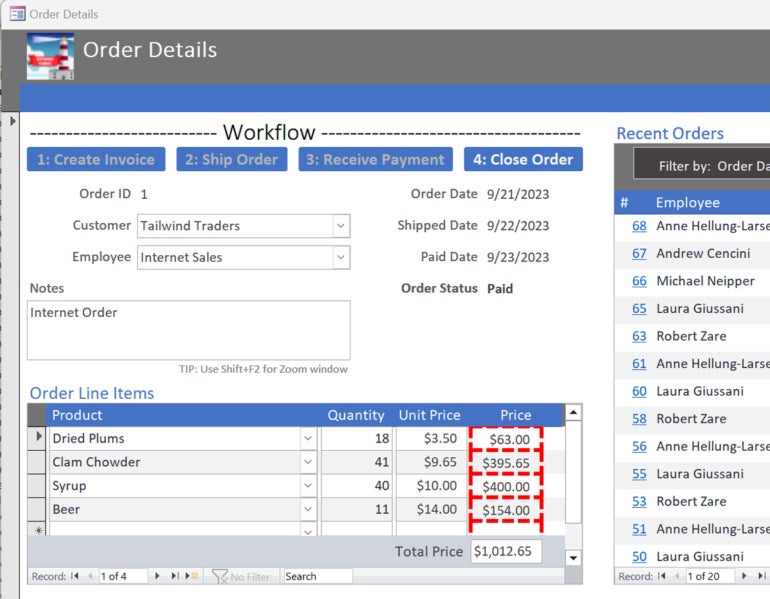
Figure G shows the result of double-clicking the main form’s header using this latest code. As you can see, it changes the border color of the price control on the subform.
How to shorten the code a bit
I’ve deliberately used the explicit references in each statement to avoid confusion. The good news is, doing so isn’t necessary; you can create a variable that references the form and then replace each explicit reference with the variable to simplify the code (Listing D). The resulting code will be more efficient and easier to maintain. I’ve updated only Listing C, but you can update them all in the same way.
Listing D
'Change border style for subform sfrmOrderDetails.
Private Sub FormHeader_DblClick(Cancel As Integer)
Dim byt As Byte
Dim sfrm As SubForm
Set sfrm = Me!sfrmOrderDetails
byt = sfrm.Form.txtPrice.BorderStyle
If byt = 0 Then
sfrm.Form.txtPrice.BorderStyle = 2
sfrm.Form.txtPrice.BorderColor = vbRed
sfrm.Form.txtPrice.BorderWidth = 3
ElseIf byt <> 0 Then
sfrm.Form.txtPrice.BorderStyle = 0
sfrm.Form.txtPrice.BorderColor = 10921638
sfrm.Form.txtPrice.BorderWidth = 1
End If
End Sub
The importance of proper syntax
Referencing a subform from the main form isn’t difficult if you properly identify each element in the reference as either an object or a property. When referencing a control on the subform, you must remember to include the Form property, or the code simply won’t work.