


Simple Network Management
Protocol (SNMP) continues to dominate when it comes to capturing information
about a device and reporting that information back to a central authority. The
popular and versatile open source Multi Router Traffic Grapher
(MRTG) tool, for example, relies solely on SNMP to capture information from various
network devices — including Windows Server 2003 servers — and then displays
graphs detailing system parameters.
In order for a tool like
MRTG to work and to gather statistics from your Windows Server 2003 system, you
need to enable SNMP on each of your servers. Use Add/Remove Programs to
accomplish this task.
-
Go to Start |
Control Panel | Add Or Remove Programs. -
Choose
Add/Remove Windows Components. -
In the Windows
Components window, scroll down and select Management And
Monitoring Tools. Don’t put a check mark in the selector box; simply select the
entry. - Click Details.
-
Scroll down and
select the check box next to Simple Network Management Protocol. -
Click OK to
return to the Windows Component window. - Click Next and, if prompted, insert the Windows CD.
|
Figure A |
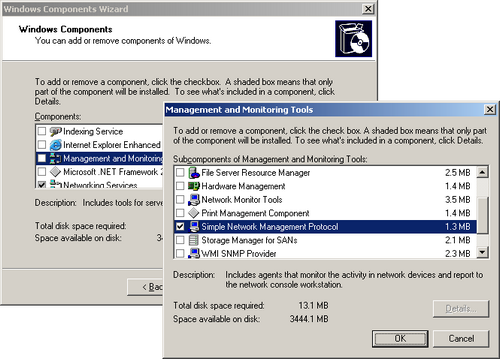 |
| Enable SNMP via Add/Remove Programs |
When you’re done with these
steps, configure SNMP with the appropriate community strings by opening the
Services Control Panel applet and locating the SNMP Service. Open the service’s
Properties page by double-clicking the service.
Miss a column?
Check out the Windows Server 2003 archive, and catch up on the most recent tips from this newsletter.
Stay on top of the latest WS2K3 tips and tricks with our free Windows Server 2003 newsletter, delivered each Wednesday. Automatically sign up today!