


Ubuntu 13.04 has recently hit and, from my perspective, it’s a “raring” hit. And though I find Unity one of the finest user interfaces available, there are those that haven’t had the same experience. For those people, I’m going to run a short series on installing other desktops, so you don’t have to avoid the Ubuntu experience.
In this first entry, I’m going to illustrate how you can get the latest release of GNOME installed and running. It’s not even remotely difficult — but must be done through the command line.
But first… why GNOME? Isn’t GNOME 3 just a launcher away from being Unity? Yes and no. Some might find that the built-in compositor, Mutter, is far smoother than that of Unity. The desktop also takes a much more minimalist approach (without losing functionality). Other features to 3.8 that have made improvements over previous iterations, are:
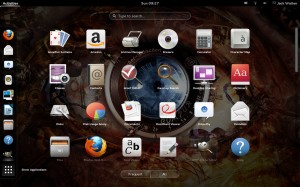 Easier application launch: When you view the application overlay, you will notice a new tab at the bottom — Frequent/All (Figure A, click to enlarge). With this tab you can more easily find the apps you frequently open (without having to clutter up your launcher with too many apps).
- Docs: Is the default document viewer for GNOME and includes built-in support for Google Docs.
- Search optimization: From within the Search Settings pane (in the Settings tool), you can fine-tune search results.
- Message Tray accessibility: Click Super+M to open and close the message tray and click Super+N to expand a notification.
- Privacy: There’s a new settings pane (in the Settings tool), where you can configure privacy and notification.
- ownCloud support: Connect to your ownCloud account directly through the GNOME online accounts management tool.
- Improved graphics rendering: You should find 3.8 to be a vast improvement over previous iterations of GNOME 3 in the way of graphics rendering. Video playback is much smoother and animations are seamless and slick.

If I’ve managed to tempt you enough to try, let’s install.
Installation
Here are the steps for installing GNOME 3.8 on your Ubuntu desktop:
- Open up a terminal window.
- Add the GNOME PPA repository with the command: sudo add-apt-repository ppa:gnome3-team/gnome3
- Hit Enter.
- When prompted, hit Enter again.
- Update and install with this command: sudo apt-get update && sudo apt-get install gnome-shell ubuntu-gnome-desktop
- When prompted, select the login manager of choice (LightDM is the default Unity manager and GDM is the GNOME default — either will work).
- When the installation completes, close the terminal and reboot the system.
- Select GNOME at the login screen and log in.
To test to make sure you have the latest version, open up a terminal window and issue the command gnome-shell –version. You should see something like GNOME Shell 3.8.1.
But if there are those that prefer the old GNOME, you can get your Classic GNOME on with a simple command. Do this:
- Open up a terminal window.
- Issue the command: sudo apt-get install gnome-session-fallback
- Log out.
- Select GNOME Fallback.
- Log in.
You can now enjoy the old-fashioned, two-panel GNOME.
You don’t have to avoid Ubuntu 13.04, just because you’re not a fan of Unity. Remember, one of Linux’s strong points has always been choice. Give GNOME 3.8 (or GNOME Classic) a try and see if you don’t find a desktop that better suits your needs. I would, of course, highly recommend you give Unity another try. With the continued improvements seen in 13.04, I believe Unity has become one of the most efficient and user-friendly desktops available. But… everyone has their own opinion (and I highly respect those opinions).