


Microsoft has expanded testing for system recovery features and UI refinements in Windows 11.
The firm has released Windows 11 Insider Preview Build 26220.7271 (KB5070307) to users in both the Dev and Beta Channels, continuing the unified testing wave for Windows 11 version 25H2. The company emphasized that this dual-channel alignment provides a temporary opportunity for Dev Channel users to switch to the more stable Beta Channel before Dev moves to higher, less-stable build numbers.
The update includes wide-ranging enhancements—reflecting Microsoft’s ongoing strategy to modernize Windows through incremental, toggle-controlled feature rollouts.
Point-in-time restore introduced
In the announcement, Microsoft says it is introducing a new restore mechanism allowing users to return their devices to an earlier point—including apps, files, and settings—in the event of a malfunction or outage. The company describes point-in-time restore as helping users “minimize downtime and simplify troubleshooting when disruptions strike.”
Unlike traditional Windows Restore Points, this system appears to unify operating system state, user configuration, and application data into a more complete snapshot. The capability is especially significant for managed business environments, where rapid workstation recovery can reduce IT overhead and improve compliance.
This feature is now visible in Windows Recovery Environment (WinRE), signaling its integration into the core Windows troubleshooting workflow.
Refinements to File Explorer
The tech titan continues experimenting with File Explorer, a central part of the OS that has undergone waves of redesign in the Windows 11 era.
The latest build introduces:
- A reorganized context menu that groups actions more logically.
- A new Manage file flyout for less frequently used operations.
- Consolidation of cloud provider actions.
- Adjustments intended to reduce clutter while improving discoverability.
Microsoft is also “exploring preloading File Explorer in the background” to speed up launch times. Although not visible to users, this change signals the company’s effort to address performance complaints that have persisted through multiple redesigns.
Dictation and voice typing
The update extends Fluid Dictation—previously available for voice access—to the standard voice typing experience on NPU-equipped devices. Powered by on-device small language models (SLMs), the new dictation system corrects grammar, punctuation, and filler words automatically.
Microsoft highlights that this approach ensures data privacy because processing happens locally. Users can activate the feature with Windows + H, where Fluid Dictation is enabled by default.
The move further positions Windows as an AI-enhanced operating system, aligning with Microsoft’s broader direction of integrating more on-device processing tied to NPUs in modern hardware.
Cross-device continuity for Android users
The update expands the ability to resume mobile app experiences on Windows PCs. This includes:
- vivo users being able to continue browsing sessions from vivo Browser on their PC.
- Honor, Huawei, Oppo, Samsung, and vivo users being able to continue files opened in the M365 Copilot app from phone to PC.
This is part of Microsoft’s long-running push to align Android–Windows workflows, especially as the company downplays Windows Phone legacy offerings. Notably, only online files are supported in this phase.
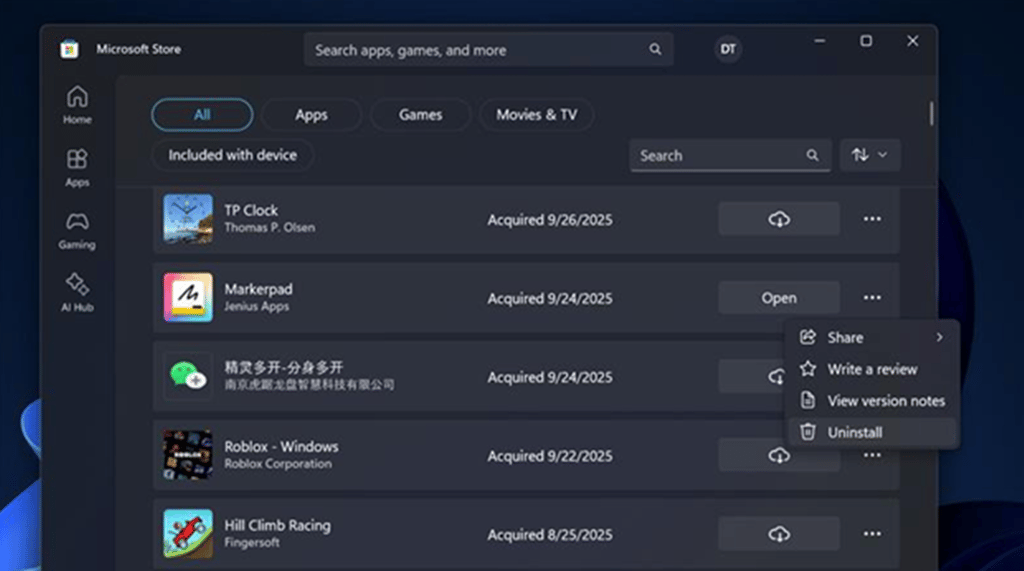
Microsoft Store gains app uninstall capability
Users can now uninstall Store-managed apps directly from the Store’s library page. This change simplifies app management and aligns Store functionality more closely with traditional desktop software workflows.
The update is available to all Windows Insiders on Store version 22510.1401.x.x and above.
Implications for the Windows roadmap
The overall update indicates Microsoft is deepening its focus on three strategic pillars:
1. AI on-device experiences: Features like Fluid Dictation showcase Microsoft’s commitment to bringing more intelligent processing directly onto NPUs, reducing cloud dependency and improving privacy.
2. System reliability and modernization: Point-in-time restore, File Explorer improvements, and background-preloading experiments show a clear push to make Windows faster, more stable, and easier to manage.
These developments paint a picture of Windows evolving into a more resilient, performance-focused, and AI-enhanced operating system heading into 2026.
Microsoft, Nvidia, and Anthropic recently sealed a multibillion-dollar AI pact, scaling Claude on Azure with Nvidia chips to bring frontier models to more enterprises.