


If you’re a Google Drive power user, you’ll be quite pleased with the new search features Google has added to the tool. Previously, you could run a search query against your Drive account to see all matching results appear. If you’ve got a terrabyte of data stored on Drive, that meant combing through your search results for what you want to find.
Thankfully, Google has added more power to that search tool. Now you can search by:
- File type
- Date modified
- Item name
- Keywords
- Owner
- Shared with
- Located in
Two ways to search in Google Drive
The quickest way is to use wildcards in the Drive search bar. Say, for example, you’re looking for .jpg files that have the keyword “linux” in the file name (or are found in related folders). Open Google Drive and enter:
linux *.jpg
Look in the search bar to see the results (Figure A).
Figure A
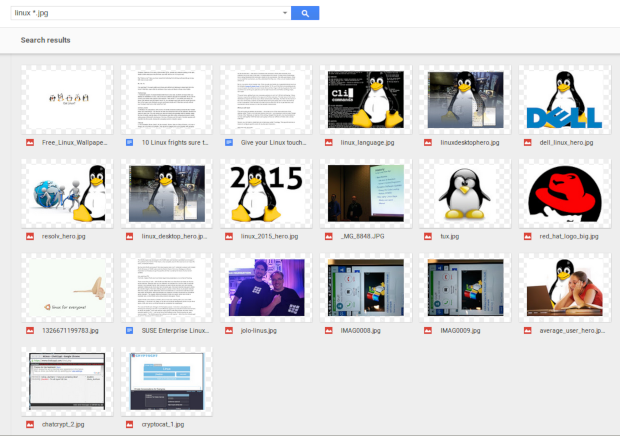
Search results for .jpg images with the word “linux” in the file name or found in related folders.
The second method is the most powerful approach. If you click the drop-down arrow in the search bar, a new search box will appear (Figure B).
Figure B
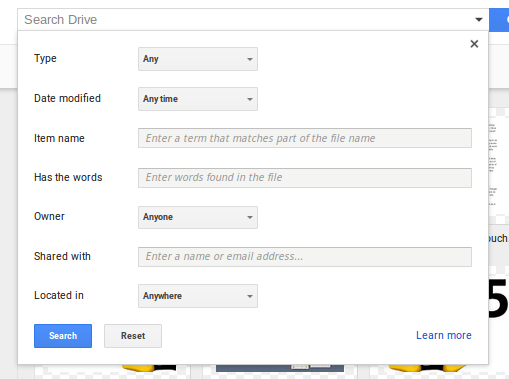
The new Google Drive search box.
Enter any/all data you want in the search box fields and click Search to run the query against your Google Drive data. As you might expect, the standard rules for searching in the Google search engine apply. For example, if you want to match an exact phrase, use quotes. If you want to search for cloud, but leave out, say, Android, you could search for cloud -android. You get the idea.
Summary
For anyone who depends upon Google Drive to store and manage their data, the new search tool will be a major plus. No longer will you have to dig through a vast array of search results to find what you’re looking for. Narrow the field down with the new Drive search box.
What Google Drive feature do you use the most? Let us know in the discussion.