


You can protect the data on your phone to the point where no one can access it without knowing the various codes or have the exact biometric pattern of your fingerprint. But what about your phone number or your voice/data plans? Even with the best protection on your smartphone directory structure, someone could simply remove your SIM card — which holds your phone number, security data, billing information, and other bits of data — and place it in their device.
- That password lock on your phone — doesn’t protect your SIM card.
- That filesystem encryption — doesn’t protect your SIM card.
So, how can you protect your precious data? There’s only one way: a SIM card PIN. Now that we’ve established the why, before we get into the how of this, I need to lay down a warning or two.
A SIM card typically comes with a default PIN, but it’s not used for locking purposes. The SIM card also has an associated PIN Unlock Key (PUK). If you attempt to do a SIM PIN Lock, and you fail to guess the original PIN, the SIM will be locked with the PUK. If you run into this situation, you’ll most likely have to log into your mobile account to retrieve this information.
Here are the steps for retrieving a PUK on an AT&T device:
- Log into myAT&T from your computer
- Select Wireless from the myAT&T tab at the top of the page
- Select Phone/Device
- Click Unblock SIM Card
- A new page will open, containing the PUK code for your phone. Enter the code on your phone’s screen to unblock the SIM, and create a new PIN
And here are the steps for retrieving a PUK on a Verizon device:
- Log into My Verizon from your computer
- Locate the I Want To… section
- Click on More Actions
- In the Device column, select Phone Details
- Select Unlock SIM (PUK) Now to display the default PIN and PUK
If you cannot find your PUK, you’ll most likely have to call your carrier.
If your carrier doesn’t offer up the default PIN, most often it’s either 0000 or 1111. But remember, you get three attempts. If the three attempts fail, you must enter the PUK. Without that PUK, your device will not be able to access the SIM card. Without the SIM card, you cannot use either your voice or data plan with the device.
Setting up the SIM lock
Now, we get to the fun part. Here are the steps for setting up a SIM PIN lock. I’ll demonstrate on a Verizon-branded Samsung Galaxy S4. Follow these steps:
- Go to Settings
- Tap on the More tab
- Tap Security
- Tap Set up SIM card lock
- Tap Lock SIM card (Figure A)
- Enter the default SIM PIN
- Tap OK
Figure A

Locking a Verizon-branded Samsung Galaxy S4 SIM.
Once you have the lock enabled, you’ll want to change the SIM PIN (otherwise people could guess the default). Here are the steps to change the PIN:
- Tap Change SIM PIN
- Enter the default PIN
- Tap OK
- When prompted, enter a new four-digit PIN
- Tap OK
- Confirm the four-digit PIN
- Tap OK
That’s it. When you restart your device, you’ll be prompted to enter the SIM PIN (Figure B) before your phone can access the SIM.
Figure B
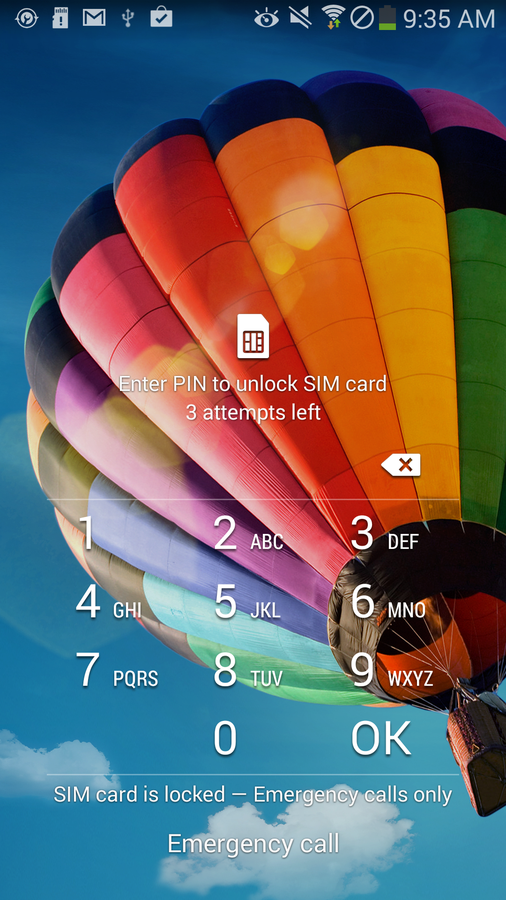
You have to enter the PIN before you’re let in.
At this point, you’ve secured the data on your SIM. You could remove that SIM and place it in another phone, but without that PIN, the SIM is useless.
Is this level of security necessary for you — or is the standard lock screen enough? How secure is your device? Let us know in the discussion thread below.