


With the release of KitKat 4.4, the default SMS client has become Hangouts. This means all of your SMS messages (traditional text, SMS, Hangouts, and more) are handled through the Google Hangouts app. For many, this is fine. In fact, I prefer the integration into one app (I miss fewer messages and don’t have to juggle apps to handle all of my messages). But there are users who prefer a third-party SMS client (or even the old default Android messaging client). So, how can you change back to your old SMS client (after you’ve given Hangouts a try and decided that it’s not the app for you)?
Fortunately, this is quite simple. To go back to the original default app (or any third-party SMS app you have installed), here are the steps:
- Open up Hangouts
- Tap the settings button (top right corner)
- Tap SMS Enabled
- If you don’t find the listing for Default SMS app (such as with the HTC M8), tap More
- Tap Default SMS app
- Select your SMS app from the listing (Figure A)
Figure A
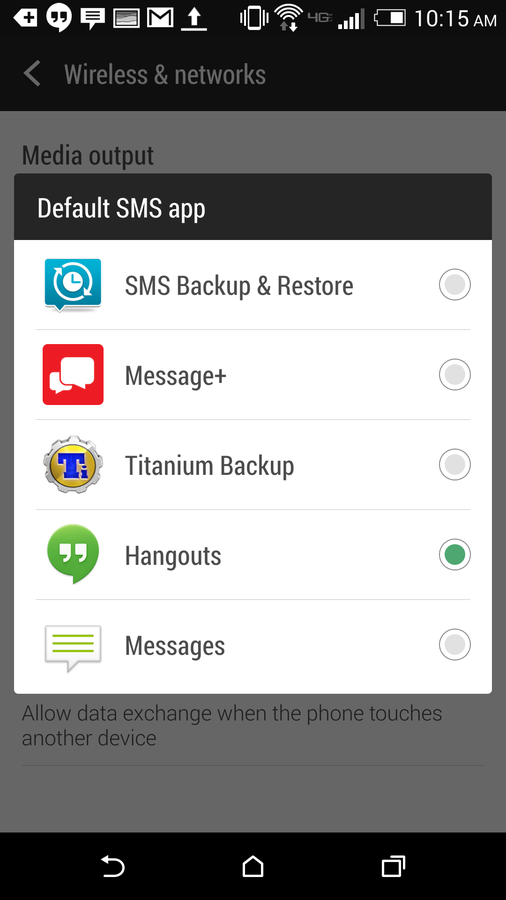
Switching back to the default SMS app on a Verizon-branded HTC M8.
Test the newly ordained default app to make sure the original default is used when you open an SMS from the notification pull-down. If not, you may have to walk through a few more steps:
- Open up settings
- Open up the App Manager
- Swipe the All tab
- Locate and tap Hangouts
- Scroll down and tap Clear defaults
Test the action again. Now, the device should revert back to the original (or third-party) SMS app instead of Hangouts.
Hangouts is a great app — one that handles your Google Hangouts discussions and your SMS chats. However, some users prefer to keep those two worlds separate. If you’re one of those people, you now know how to unset Hangouts as the default app and keep those discussions sandboxed in their own playgrounds.
Do you like the route Google took with Hangouts and SMS — or do you think certain apps and functionalities should be separate? Share your thoughts in the discussion thread below.