


- Best overall: Nanonets
- Best for ease of use: Zoho Forms
- Best for team collaboration: ProntoForms
- Best for electronic data capture: Phoenix Entrypoint
- Best for custom templates: Typeform
- Best for centralized document management: Fluix
- Best for data reporting: Conexiom
- Best for Quickbooks users: Zed Axis
The collection and organization of data, especially for big organizations, has always been a daunting task that can overwhelm even the fastest of data entry clerks. No big organization wishes to rely on manual gathering, sorting and computation of data in a business landscape that is becoming increasingly automated with data entry software.
In the software market today, there are multiple data entry tools laden with features that can automate data entry for business organizations. But which are the top data entry automation tools in 2023?
Jump to:
- Top data entry tools for automation comparison
- What are data entry automation tools?
- Features of data entry tools
- Benefits of data entry software
- How to choose top the right data entry solution for your business
- Methodology
Top data entry tools for automation comparison
| Software | Real-time collaboration | Data capture | Customizable forms | Data import and export | Data validation with AI | Starting price for paid tiers |
|---|---|---|---|---|---|---|
| Nanonets | Yes | Yes | Yes | Yes | Yes | $0.30 per page after the first 500 pages |
| Zoho Forms | Yes | Yes | Yes | Yes | No | $10 per month for a single user |
| ProntoForms | Yes | Yes | Yes | Yes | No | Custom quote |
| Phoenix Entrypoint | Yes | Yes | Yes | Yes | Yes | Custom quote |
| Typeform | Yes | No | Yes | Yes | No | $25 per month for a single user |
| Fluix | Yes | Yes | Yes | Yes | No | $30 per user per month, minimum of 10 users to sign up |
| Conexiom | Yes | Yes | Yes | Yes | No | Custom quote |
| Zed Axis | Yes | Yes | Yes | Yes | No | $145 for the annual import software subscription license |
Nanonets: Best overall

Nanonets is an AI-powered document automation software designed to streamline manual data entry processes without the need for coding. The platform utilizes its built-in optical character recognition software to extract data from various sources, including PDFs, documents and handwritten files. The tool offers seamless integration with over 5,000 applications through application programming interfaces and Zapier, making it highly versatile.
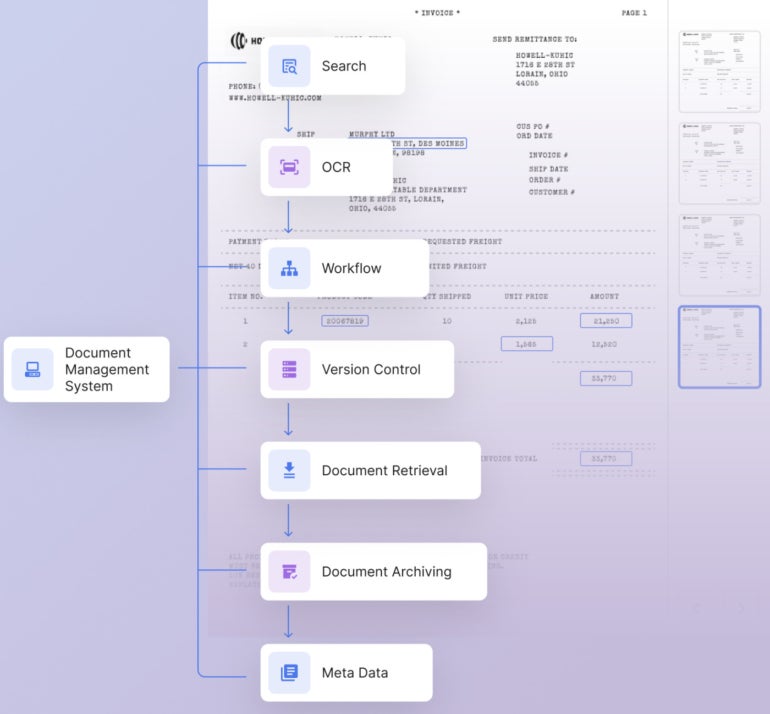
With Nanonets, you can efficiently capture data from incoming sources and export transformed data by leveraging in-app integrations. Nanonets also helps with data validation for unstructured data captured from different documents and provides a Document Management System that unifies different document processing functions for easy access (Figure A).
Figure A
Pricing
Nanonets offers the following subscription plans:
- Starter: Free for the first 500 pages, then billed at $0.30 per page.
- Pro: Starts at $499 per month at a cap of 5,000 pages per month.
- Enterprise: Contact Nanonets for pricing details.
Features
- Ability to auto structure and extract data from various sources like forms, documents, PDFs, scanned and handwritten files with a few clicks.
- Captures unstructured data from any document.
- Automates data entry processes, including invoicing, expense management and workflows.
- Ability to migrate or integrate data from 5,000+ applications using API connections and Zapier.
- Offers a document management system for easy access to different document processing tools.
Pros
- AI-powered data automation for capturing data from documents.
- Validates extracted data for accuracy.
- Continuous learning AI that improves accuracy with usage.
- Data fields are customizable.
- Offers ready-to-use solutions for common document types.
Cons
- Pricing is expensive.
- The Starter Plan lacks a collaboration feature.
Visit Nanonets
Zoho Forms: Best for ease of use

Another data entry automation software your organization can try is Zoho Forms. This data entry tool is packed with features that can improve data management in organizations of any size.
One of the main features of Zoho Form comes from its customization tools that allow organizations to customize their data with the company logo, colors and themes. This feature gives uniqueness and some legitimacy to organizational data.
Zoho Forms also supports email notification alerts to notify you of every activity in your data. This feature can be customized to exclude some notifications on some changes to your data. With a supportive drag-and-drop user interface, Zoho Forms could be a great tool for beginner-level admin assistants in organizations.
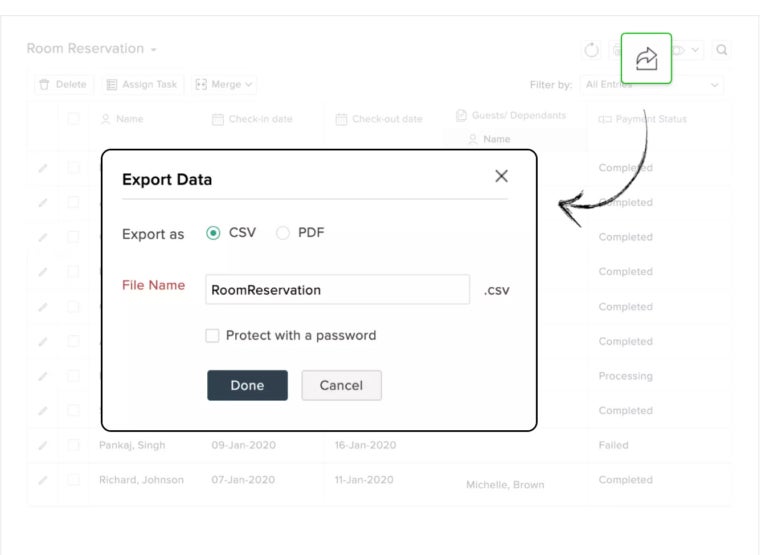
The tool even lets you export documents in easy-to-read and printable formats like PDF and CSV, with an option to share the documents with members of your team (Figure B).
Figure B
Pricing
Zoho Forms offers the following subscription plans.
- Basic Plan: Starts at $8 per month for a single user, billed annually.
- Standard Plan: Priced at $25 per month for 10 users, billed annually.
- Professional Plan: Available for $50 per month for 25 users, billed annually.
- Premium Plan: Priced at $90 per month for unlimited users, billed annually.
Features
- Supports email alerting for changes made to the data.
- Offers drag-and-drop dashboard.
- Users can customize the tools to reflect their company themes and logo.
- Provides collaboration features for teams.
- You can import and export data from other tools.
Pros
- User-friendly form builder with drag-and-drop functionality.
- Customization and branding options available.
- Integration capabilities for automated workflows.
- Mobile app for on-the-go access to forms.
- Instant email and SMS notifications for form submissions.
- Detailed analytics and export options for form data.
Cons
- CSS customization may be challenging for non-technical users.
- CAPTCHA for spam prevention might inconvenience users.
- Offline forms may have limitations.
Visit Zoho Forms
ProntoForms: Best for team collaboration

ProntoForms may be the ideal choice for a data entry tool if your organization prefers cloud-based automation tools. You can leverage it to pull data from different sources across the internet. In addition, ProntoForms offers much flexibility in allowing users to customize their form templates and dashboard to fit their needs.
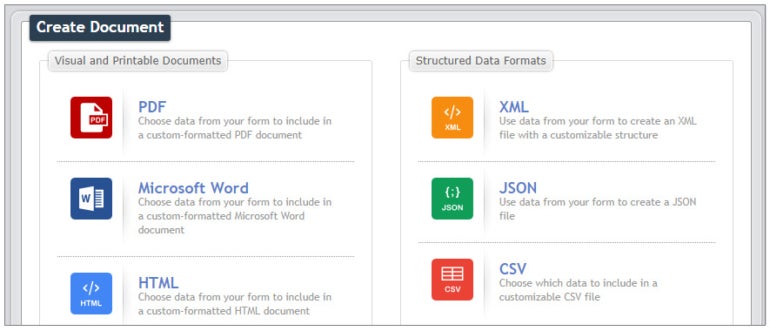
If you’re worried about how you can turn your data into a professional-looking document, ProntoForms handles this process automatically, saving you more time to focus on other complex tasks (Figure C). Notable integrations include Salesforce, Microsoft, ServiceNow, Google Drive and more.
Figure C
Pricing
Those interested in ProntoForms will need to contact its sales team for a custom quote. In the meantime, ProntoForms offers a one-month free trial users can take advantage of before making any purchasing decisions.
Features
- Offers visual mapping capability.
- Provides QR code and barcode scanning of documents.
- Comes with a pre-built template library.
- Image capture capability.
- Ability to interact with your calendar.
Pros
- Supports mobile forms app for iOS, Android and Windows.
- Offers offline mode for form submission.
- Maps and time stamps for precision auditing.
- Mobile search for quick data retrieval.
- Photos and sketches for visual details.
- Teamwork for work sharing and management.
Cons
- No pricing information on the website.
Visit ProntoForms
Phoenix Entrypoint: Best for electronic data capture
Phoenix-owned Entrypoint is a tool that helps users to create, implement and utilize a diverse range of personalized data entry applications. The solution is equipped with built-in validation, editing and export functionalities, simplifying data capturing and management.
Entrypoint is packaged to enhance data processing activities by automating data transfer, verification, abbreviation detection, form checking and image capturing. Furthermore, users can export data in CSV, PDF and XML as well as have the capacity to configure a function key to determine what data and in what order they want to import or export their data.
Pricing
Phoenix Entrypoint pricing is based on a custom quote. However, it offers a 30-day free trial to businesses interested in testing out its features first.
Features
- Offers data verification.
- Detects data duplication easily.
- Supports image capture.
- Detects wrong data variation.
- Keyboard can be configured for advanced usage.
Pros
- Interacts with MySQL or Microsoft SQL Server.
- Built-in validation, editing, and export options.
- EntryPointScript for extensive customization.
- Ensures data integrity with error detection and flagging functionality.
- Clear and concise documentation.
- Technical support and product updates available.
Cons
- Pricing is not information not mentioned on the website.
- The tool might be difficult to use for nontechnical users.
Visit Phoenix Entrypoint
Typeform: Best for custom templates

Typeform is another feature-packed data entry automation that has gained huge popularity over the years for its focus on improving data extraction with forms. The software can fit businesses of any size and integrates fluidly with popular tools like SalesForce, Zapier, Mailchimp and Google Sheets.
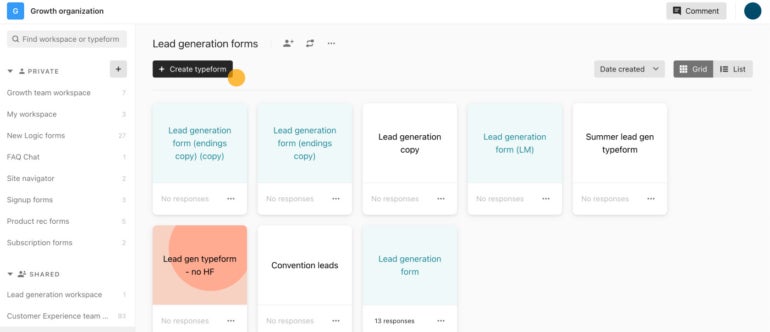
In addition to the automation features, which users can leverage for data processing activities, Typeform offers the flexibility to create custom fields and templates that suit your business requirements (Figure E). Users have access to over 3,000 templates for different purposes.
Figure E
Pricing
Typeform offers free and paid subscription plans. Pricing are as follows:
- Basic: $25 per month for a single user, billed annually, or $29 billed monthly.
- Plus: $50 per month for three users, billed annually, or $59 billed monthly.
- Business: $83 per month for five users, billed annually, or $99 billed monthly.
- Enterprise: Contact Typeform for a quote.
Features
- Supports the addition of custom fields.
- Provides tools for survey management.
- Access to multiple templates.
- Offers notifications on changes made to your data.
- Easily import and export data from other sources.
Pros
- Easy customization options for videos, logos, etc.
- Embedded forms for web pages and emails.
- Compatibility with 120+ integrations.
- More than 3,000 templates available.
- Has a free plan.
Cons
- Pricing might be of concern for some users.
Visit Typeform
Fluix: Best for centralized document management

Fluix is a no-code platform that allows you to digitize document processes and automate data entry tasks. The tool can help your organization gather data, structure the data and create additional secure protection over your data. Built to support organizations with data management and workflow automation needs, Fluix can enhance the speed and accuracy with which you gather and deliver data projects from the field.
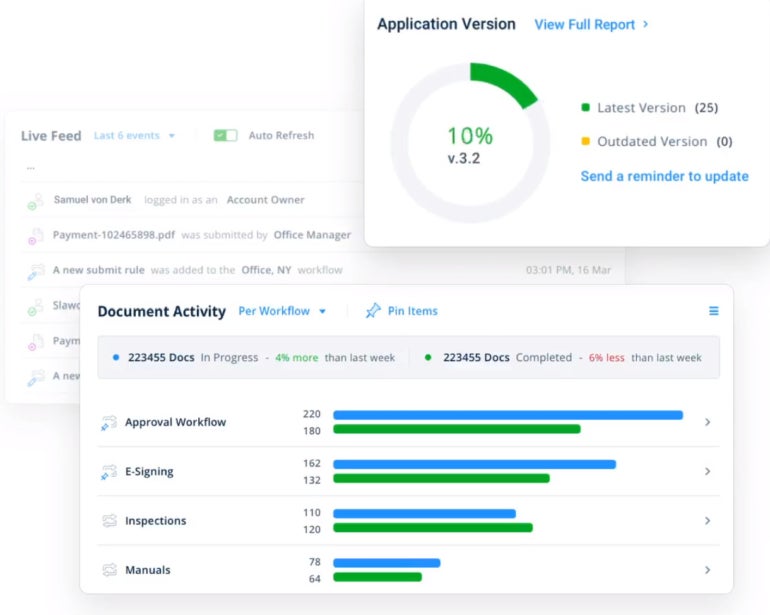
Further, Fluix offers collaborative tools and integrates perfectly with notable applications such as PowerBI and Tableau, which enable you to derive better insights from your data. Fluix also has a central document management functionality that enables users to store documents, distribute the latest versions and manage project documentation in real time (Figure F).
Figure F
Pricing
Fluix offers a Core Plan, which starts at $30 per user per month for a minimum of 10 users. The price per user is reduced the more users sign up, which means you get a bigger discount when you purchase more slots.
In addition, there are add-ons available at the following rates:
- Conditional Logic: $5 per user per month.
- Power Analytics: $10 per user per month.
- Form and Document Prefill: $10 per user per month.
- Quarterly Review: $50 per user per month.
Features
- Offers barcode scanning to users.
- You can build custom forms with the form builder features.
- Data extraction is supported.
- Offers API integrations.
- Automatically reports activities on your data.
Pros
- Offers built-in cloud storage capabilities.
- Integrate with 3rd party web services.
- You can sign documents digitally.
- Reporting & analytics for insights.
Cons
- The pricing might be of concern for some users.
Visit Fluix
Conexiom: Best for data reporting

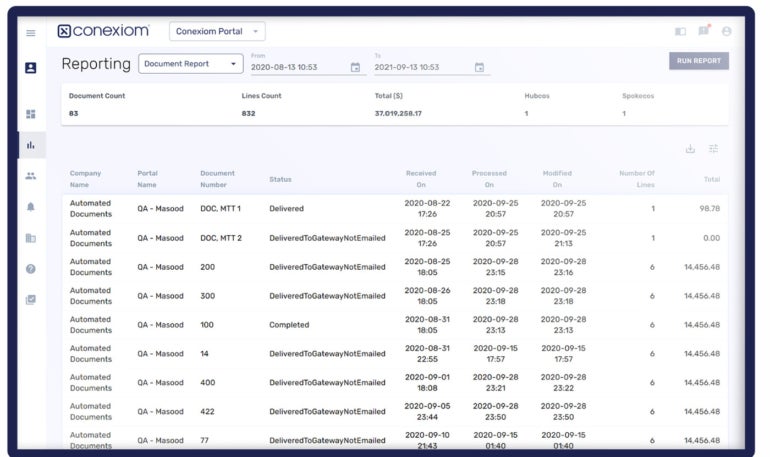
Conexiom is another data entry tool that supports data in multiple formats such as CVV, PDF, HTML PCL and GDI. It’s a cloud-based tool designed mainly for trade document automation. The tool can facilitate the conversion of sales, email and other forms of reports and deliver them in data forms (Figure G).
There is also support for third-party collaboration and inventory applications to enhance productivity. Conexiom data automaton workflow includes data ingestion, data extraction from documents of any format, data contextualization or identification and data rendering or delivery in a structured format.
Figure G
Pricing
Contact Conexiom for a quote.
Features
- Supports accurate data extraction.
- Converts digital documents into structured data of your choice.
- Custom configurations to fit your needs.
- Data visibility and reporting.
- Supports image scanning.
Pros
- Instant data extraction from unstructured documents.
- Customizable business rules and logic.
- Fast processing time.
- Easy management with intuitive tools and dashboards.
- Dedicated team for assistance.
Cons
- No specific pricing details provided.
Visit Conexiom
Zed Axis: Best for Quickbooks users
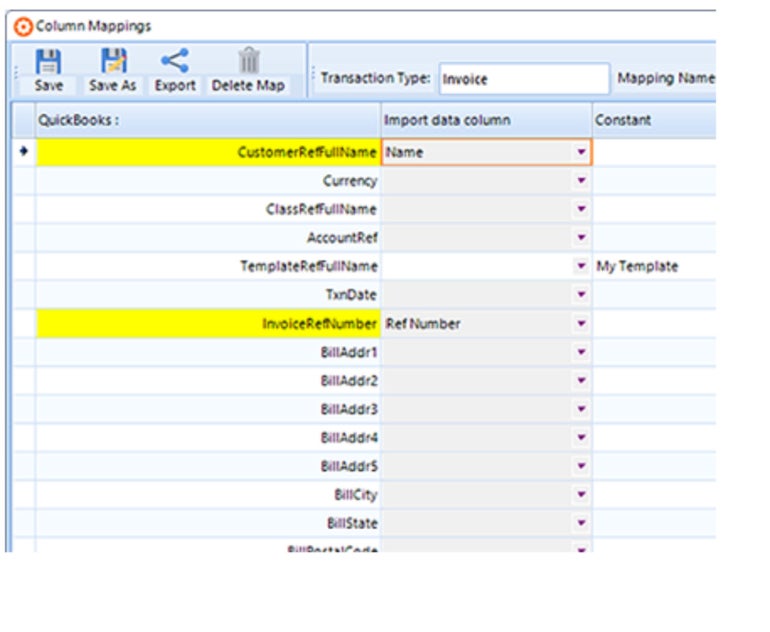
ZedSystems’ Zed Axis is one of the best data import and export utilities for Quickbook users (Figure H). It’s ideal for data entry and management for organizations looking to import and structure several data types such as QBO, Excel, IIF, bank statement sheets, QIF, OFX and QFX.
In addition, Zed Axis helps organizations to facilitate the conversion of reports, purchase orders and bills from third-party apps into well-classified data. You can use this tool by purchasing the license or using the annual subscription method.
Figure H
Pricing
Zed Axis has an array of pricing plans for both Software License and Software License & Support.
Annual Subscription — Software License Only:
- Import: $145
- Import & Export: $235
- Import, Export & Auto: $325
Annual Subscription — Software License & Support:
- Import: $285.
- Import & Export: $390.
- Import, Export & Auto: $495.
Features
- Captures documents in any format.
- Seamless integration with Quickbooks.
- Supports advanced importing features.
- Supports updates and upgrades to include more innovations.
Pros
- Easy to set up and use.
- Provides improved business insights
- Offers great customer support.
Cons
- The subscription fee might be of concern for some users.
Visit Zed Axis
What are data entry automation tools?
Data entry tools are robust software designed to eliminate the manual handling of data from gathering, sorting, inputting and sharing. In addition, these tools are very fast and can drastically reduce human error, inefficiencies and the cost your organization may incur in paying skilled data entry clerks.
Features of data entry tools
Data entry tools are loaded with amazing features that can help your organization automate many data entry processes. Getting acquainted with some of these features is a sure way to make the right choice for your organization when faced with multiple data entry tools from which to choose.
Data classification
Must-read big data coverage
- What Powers Your Databases? Take This DZone Survey Today!
- New AI Data ‘Universal Translator’ From Salesforce, Snowflake, Others
- Top Tech Conferences & Events to Add to Your Calendar in 2025
- Google Releases Data Commons MCP Server to Supercharge AI Agents
Modern data entry tools can categorize your data, regardless of the volume, making it easy for you to use. Classification of organizational data makes it easy for organizations to track, manipulate and use individual pieces of data.
Electronic forms
With the availability of electronic forms, you can easily create form fields according to your needs and use the autofill function to fill up these custom fields. These forms can even allow you to convert the data entered into other types of data for better usage.
Ability to scan
With data entry software, you can easily scan data regardless of the form they are saved. The scanning ability is crucial in storing visual data elements. You can also pick these scanned visual images, convert them to other data forms and use them where appropriate.
Data extraction
Data extraction is one of the most challenging aspects of data processing. It involves retrieving different data types from varying sources and organizing them in a structured whole. With a data entry software tool, your organization can easily automate this process while increasing efficiency and reducing completion time.
Validation of data
Another thing manual data entry will never guarantee is data validation. Data validation feature ensures that the data entered is correct and valid for the purpose it is meant for. So, with a data entry tool, your organization can easily automate this process and ensure that your data sets are entirely correct.
Data cleaning
Here is another feature every good data entry tool can give your organization. Data cleaning involves the process of scanning and ridding data records of errors and invalid data.
Integration and real-time synching
Another feature that sets powerful data entry tools apart is the ability to integrate with other tools. In addition, they feature the ability to collect and sync content in real-time.
Benefits of data entry software
Below are some benefits you can derive from automating your data entry processes.
Increases accuracy
The accuracy of data is essential in every organization. Data entry tools automatically scan every data entered with given parameters to ensure they are valid.
Saves money
Data entry tools help organizations save money that would have been used to pay skilled data entry clerks. With a data entry tool, your organization improves efficiency while paying less for the tool.
Saves time
With improved efficiency, automation and speed, data entry tools help businesses to save time. Plus, businesses can easily manage a high volume of data and process them in a few seconds without manual delays.
Easy data modification
Data can be easily modified and transformed from one type to another using a data entry tool. The tools can also allow you to change your data from graphs to charts and more with ease.
Reduces paperwork
Deploying data entry automation tools can help organizations cut down the cost of paper as there is hardly any need to print out data pages before sending them to a recipient. Besides reducing paper costs, using data entry tools limits the need for things like file cabinets, printers and office operators who ensure that your files are well arranged.
Improved data clarity with digital copies
As digital copies continue to replace physical copies in many areas of business, data entry tools help your business to organize data records, save them digitally and distribute them in digital forms. In other words, with data entry tools, it becomes easy for organizations to locate data records without having to ransack the office space, as is obtainable when you store data files in physical copies.
How to choose the best data entry automation tool?
To choose the best data entry automation tool for your business, you should start by analyzing your data entry requirements, such as the types and volume of data to be processed, as well as the complexity of tasks involved. Taking this initial step will help you understand the features and capabilities needed in the data entry automation tool.
In addition, you should compare different options available in the market, considering factors such as scalability, error handling, ease of use, security and integration with existing systems and databases. For solutions with trial and demo versions, you should consider using the trial version to determine the performance in real-world scenarios. This will allow you to evaluate their usability, accuracy and integration capabilities before making any financial commitments.
Methodology
To come up with this review, we started by performing a thorough assessment of the top data entry automation tools in the market. While we utilized some information from verified user reviews on reputable review websites, we also reviewed each solution’s official website, analyzing features, user-friendliness, pricing, scalability and other relevant details. This approach provided us with valuable insights on which tool to feature on the list.