Five free Android time-tracking tools - TechRepublic

Five free Android time-tracking tools

  • 00stress-391662640.jpg

    Introduction

    If you’re an independent contractor or a small shop in need\r\nof an easy method of keeping tabs of work-related time, your tablet or\r\nsmartphone and a free app might be all you need to ensure you’re billable time is\r\nup to date and ready for invoicing. Of course, not all time-tracking apps are\r\ncreated equal, but there are plenty of apps in the Google Play Store that offer\r\nall the features you need — and in some cases, more than you need.

    But which\r\napps are best suited for the job? I tested a lot of them to find five I\r\nconsider to be at the top of the list. Let’s dig in and see if any of my picks\r\nwill suit your purposes.

    Note: This gallery is also available as an article.

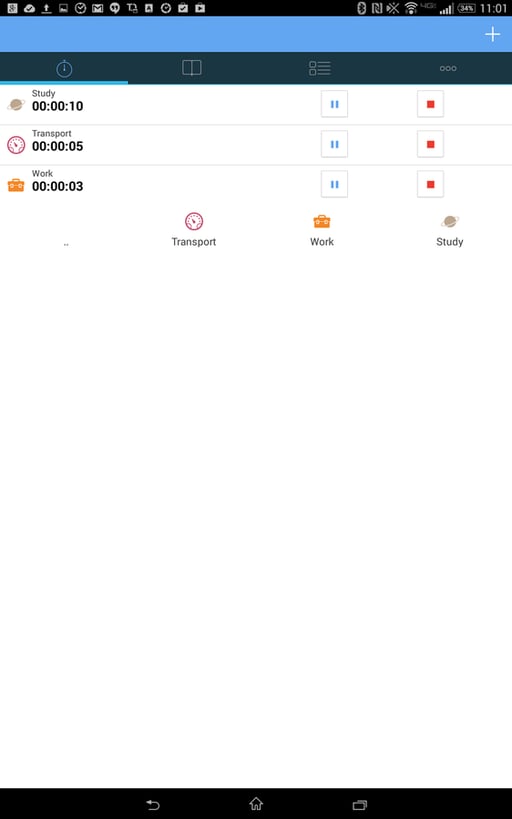
  • aTimeLogger

    By default, there is a Work group, but it’s generic. You’ll\r\nwant to create groups for each project so you can keep track of time for\r\nspecific tasks. (Otherwise, you’re just keeping time for Work, Sleep,\r\nTransport, etc.)

    From the Groups tab, tap the + button and create a new group\r\nspecific to a certain project or job. With that new group created, you can\r\nassociate items (such as work, travel, etc.) and track that time (and even\r\ntrack time for multiple items). The aTimeLogger app takes a bit of acclimation,\r\nbut once you’re accustomed to its usage, you’ll be good to go.

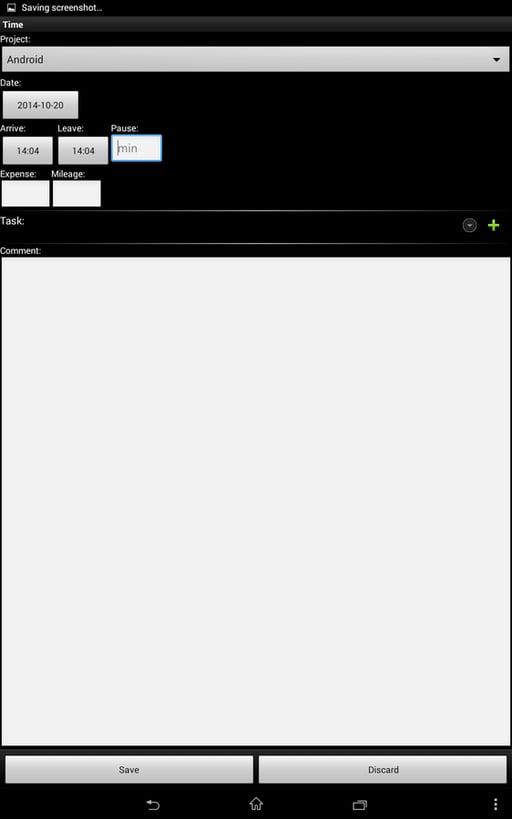
  • Timesheet (same name, different app)

    In the window where\r\nyou add time to a project, you can add expense costs and mileage driven, as\r\nwell as notes and tasks. I will warn you about this app: Consider it a generic\r\ntime-tracking tool. You won’t be adding a lot of subtasks to projects. In fact,\r\nI have been able to add only three tasks to select from. Because of this, you’ll\r\nwant to create tasks like Sysadmin, Networking, Maintenance, or other generic\r\ntasks you regularly do and need to keep track of. What I really like about this\r\napp is that its no-frills approach makes it easy for you to manually keep track\r\nof time on your main projects or jobs. Sometimes, manual tracking is all you\r\nneed.

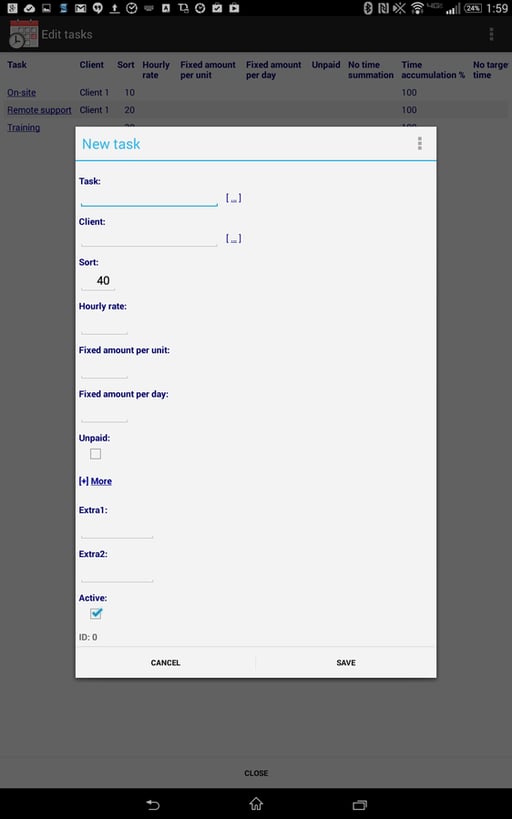
  • Time Recording

    The interface does a bit of a learning curve. Just adding clients and\r\ntasks takes awhile to figure out, so be sure you read through the website to get your bearings first. Once you’re\r\nup to speed, however, Time Recording is a powerful time-tracking tool.

1 of 4
Jack Wallen

Jack Wallen is an award-winning writer for TechRepublic, The New Stack, and Linux New Media. He's covered a variety of topics for over twenty years and is an avid promoter of open source. For more news about Jack Wallen, visit his website jackwallen.com.