


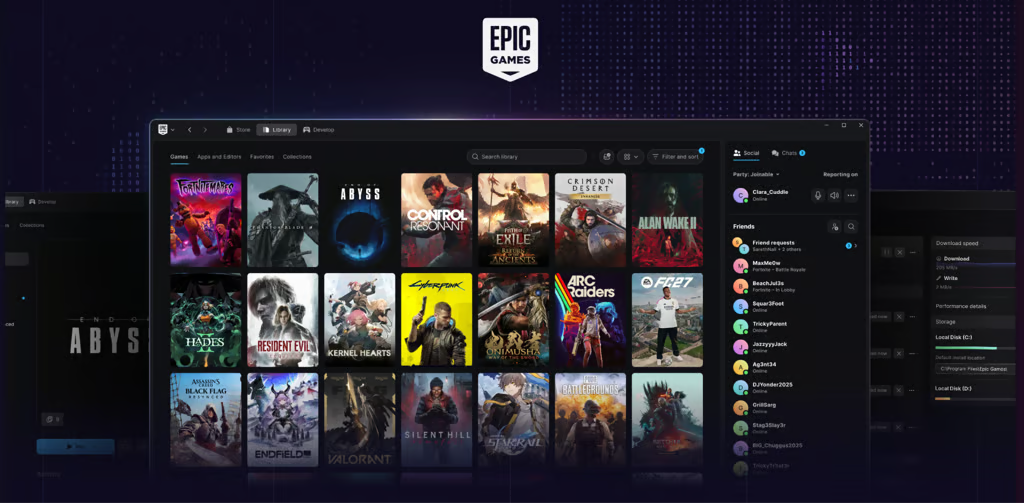
Epic Games wants PC gamers to spend less time waiting for their libraries to load and more time playing, and its redesigned launcher is taking an AI-assisted route to get there.
The company released a preview of its redesigned Epic Games Launcher on Oct. 14 for Windows, macOS and, for the first time, Linux. Epic describes the rebuild as “vibe coded,” referring to the use of AI tools to generate code, and says it delivers a faster, more responsive interface.
Epic-commissioned testing by Keywords Studios recorded a 5.47-second cold start, compared with Steam’s 10.07 seconds, and a 0.36-second return from the background to the library, versus 0.42 seconds. The results averaged five tests per machine across 13 machines, excluding the three lowest-end systems. Individual results will vary.
These measurements concern launcher responsiveness; they do not establish faster game loading or higher frame rates. The AI-assisted development approach also involves its own planning, testing, and security considerations.
Epic also says its game library loads 30 times faster than in the previous launcher. The company has redesigned game pages, search tools and download controls while reducing the application’s background resource usage.
Better game management, fewer waiting times
The new launcher gives each game a dedicated page containing its status, activity, details and launch controls. Players can connect other PC game libraries, organize titles into collections, switch between grid and list views, and pin favorite games and applications to a customizable top bar.
Search results update as users type, while download monitoring now displays download speeds, disk read and write activity, and active, queued, scheduled and failed downloads. Party and voice chat also connect players across Fortnite, the Epic Games Store and supported Epic applications.
However, this is an early preview rather than a complete replacement. Some social features and account-management options remain unavailable. Epic’s updated guidance says the preview should not prevent development or casual or competitive play once users are inside a game or developer tool, although the launcher itself may have bugs.
Linux support opens a new door for Epic
The launcher runs natively on Linux, but that does not make every game Linux-compatible. Windows-only games may still need a compatibility layer, so users should check individual titles before installing.
Fortnite is not available on Linux yet. Epic is developing EAC Linux v2, with requirements including Secure Boot, TPM 2.0, and signed kernels and modules. Epic says Steam Deck currently lacks the features required for this implementation.
The company plans to make its improved anti-cheat technology available to other developers, potentially helping more games reach Linux users. Epic has not announced a release date for Fortnite on Linux.
What this means for PC gamers
For players managing several storefronts, the practical test is whether the preview makes their existing routine easier: finding installed games, monitoring downloads, and moving between titles. Connecting libraries can simplify navigation, but users should still check which games require another client or additional software.
For software teams evaluating Epic’s broader AI development push, launcher speed answers only part of the question. The preview’s performance does not establish how much development time AI saved or how much review and maintenance the generated code requires.
Players can assess responsiveness and reliability on their own machines. Development teams should evaluate total delivery time, defects, maintenance effort, and security risks associated with AI coding platforms before treating the launcher as evidence that a similar AI workflow would improve their projects.
How to try the preview
Players can download the launcher through Epic’s Preview website and sign in with their existing accounts. Installation automatically uninstalls the legacy launcher. The macOS preview requires Apple Silicon; Intel Macs are not supported. Purchased games, installed titles, cloud saves and progress carry over. Because the software is still being tested, users may encounter bugs, and Epic encourages them to report problems through the launcher’s feedback button.
Read more: AI-assisted development is also reaching game creators, with Google’s Playground turning text prompts into playable browser games.