


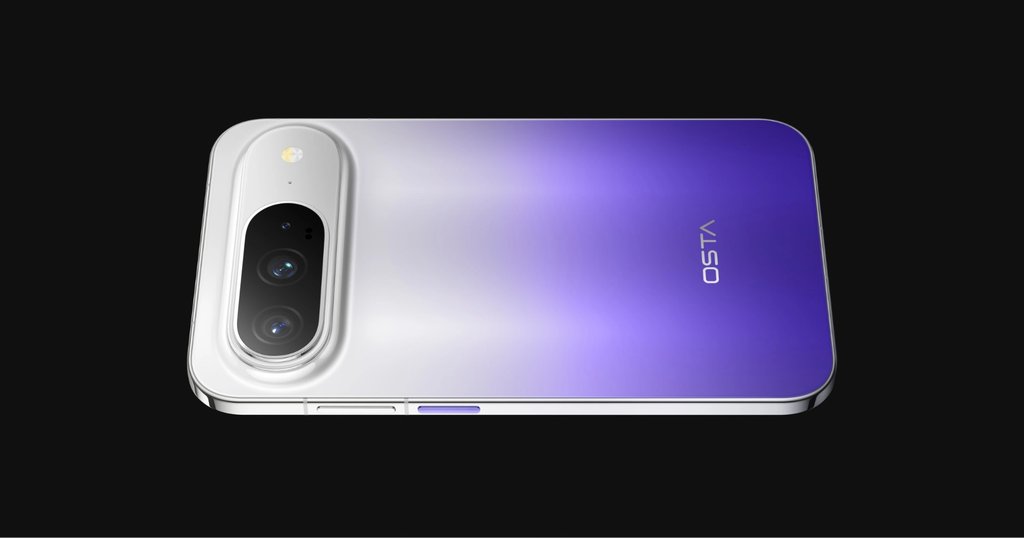
The OSTA O1 Pro launched in China on Nov. 20 as the debut release from Huawei’s new OSTA brand.
According to IT Home’s on-site launch reporting, it pairs a wide 6.39-inch display with a 7,000mAh battery. The base model was announced at 5,499 yuan under a limited-time offer in China, compared with a list price of 5,699 yuan.
The screen is the reason to look closer. A wider phone can give you more room for a keyboard or video, but the payoff depends on the apps you use and how often you need to reach across the screen with one hand.
OSTA O1 Pro specs at a glance
These are the specifications and prices reported at the China launch. This is a specs-based guide, not a hands-on review.
| Spec | OSTA O1 Pro |
|---|---|
| Display | 6.39-inch flat LTPS display, 1.5K class, 16:9.5 aspect ratio |
| Processor | Kirin 9030S |
| Memory and storage | 12GB or 16GB RAM; 256GB, 512GB, or 1TB storage, depending on configuration |
| Battery and charging | 7,000mAh; up to 66W wired charging; wireless charging supported |
| Rear cameras | 200MP main camera and 50MP periscope telephoto with 3.7x optical zoom, plus a color sensor |
| Software at launch | HarmonyOS 7 AI Pioneer Edition |
| China starting price | 5,699 yuan list; 5,499 yuan introductory |
Launch reporting puts the phone at 6.68mm thick and about 200 grams. That’s useful for comparing it with what you carry now, but thickness won’t tell you whether it fits your hand or pocket. The screen proportions are the more meaningful difference.
How much does the OSTA O1 Pro cost?
The announced introductory prices are 200 yuan below list for each configuration. Beijing News reported from the launch that the China offer runs Nov. 20 through Dec. 31, 2026. These are launch figures, not live checkout prices. Neither column includes a trade-in or subsidy.
| RAM and storage | China list price | China launch offer |
|---|---|---|
| 12GB / 256GB | 5,699 yuan | 5,499 yuan |
| 12GB / 512GB | 6,699 yuan | 6,499 yuan |
| 16GB / 512GB | 7,499 yuan | 7,299 yuan |
| 8,999 yuan | 8,799 yuan |
Huawei also lists a separate protection offer for qualifying buyers in China. Check the final price and terms at checkout rather than assuming a retailer’s lowest advertised figure applies to everyone. There’s no confirmed US release or price.
If you’re choosing between trims, the first price jump is 1,000 yuan at launch, for twice the storage with the same 12GB of RAM. At 512GB, upgrading from 12GB to 16GB of RAM costs an additional 800 yuan. Check how much space your current photos, apps, and offline files actually use before paying for more. The 16GB figure on its own doesn’t tell you which apps will benefit.
What does the wider screen change?
A screen diagonal doesn’t tell you how much room you have across a line of text.
Along the same diagonal, the O1 Pro’s 16:9.5 aspect ratio gives you more width in portrait and less height than a taller 20:9 display. That can mean more room for keys on a keyboard or spreadsheet columns, depending on how the app lays them out. Turn the phone sideways, and the screen is closer to a standard 16:9 aspect ratio, which can leave less unused space than on a tall phone rotated into landscape.
The trade-off is reach. Extra width can make the far side of the screen harder to hit with one thumb. And software still has to make good use of the space. That’s the same question raised by Xiaomi’s reported wider phone, but here buyers have a finished phone to evaluate. Unlike Huawei’s Pura X Max foldable, the O1 Pro’s screen is always that shape.
There’s also a more direct comparison in Huawei’s own lineup: The non-folding Pura X View has the same published 6.39-inch diagonal and 16:9.5 aspect ratio. So the O1 Pro is a new option in an existing wide-phone category, rather than Huawei’s first attempt at the shape.
Compare the actual camera hardware, software, and checkout price before choosing between them. A similar silhouette doesn’t make the two phones interchangeable.
What should you expect from the battery and cameras?
The 7,000mAh figure describes battery capacity, not how many hours you’ll get on a charge.
If you’re comparing it with another phone, look for tests that use similar screen brightness, network conditions, and workloads. The 66W rating is for wired charging, and you’ll need compatible equipment to reach it. Huawei lists the supported charging protocols for the O1 Pro. It supports wireless charging, but we couldn’t verify its maximum wireless rate.
The 200MP main camera and 3.7x telephoto lens handle different tasks. If you mostly shoot documents, food, or people indoors, look for sample images from the main camera. If you care about concerts, travel, or subjects across a room, check what the telephoto can do.
Neither megapixels nor optical zoom tells you how well the phone handles a moving subject in dim light. The additional color sensor is not a third framing option like an ultrawide camera.
What does HarmonyOS mean for your apps?
The O1 Pro ships with HarmonyOS 7 AI Pioneer Edition. Huawei emphasized new ways to interact with the system and more proactive assistance at the launch, according to IT Home’s on-site software coverage. Huawei also documents HarmonyOS 7 more broadly, but that doesn’t establish which features will work with a particular app, account, or language on an imported O1 Pro.
If you’re coming from Android or iPhone, start with your least replaceable apps rather than your most familiar ones. Confirm you can sign in to your bank, approve a work login, receive notifications, and back up your messages or photos where you expect. For a work device, ask IT to confirm enrollment and access before using your own money. The app’s name appearing in a store doesn’t tell you whether every feature you rely on will work.
What to check before buying or importing:
- Try the layout with a task you do daily. In a store, open a long email, type a reply one-handed, and rotate a video. If most of your use is one-thumb messaging, how comfortably you can reach the keyboard matters more than the aspect ratio on paper.
- Verify your apps and carrier before importing. Ask the seller for the exact model number and check it with your carrier, including calls and data. Then confirm in writing who handles warranty repairs, where you’d ship a return, and whether the China protection offer applies to your purchase. TechRepublic’s China flagship comparison can help put the price in context, but check software and support for the model you’ll actually buy.
- Check the monitor connection if you work from your phone. Huawei’s support guidance says the O1 Pro doesn’t support wired display output. If your workflow depends on plugging into a monitor, verify wireless casting with your equipment before buying, or choose another phone.
If you can try the O1 Pro locally, let your everyday apps and grip decide. If you’re importing it sight unseen, a wider screen is only worth paying for once you’ve verified the basics.
Related reading: For another China-market flagship with an unconventional display, see TechRepublic’s Xiaomi 18 Pro Max cheat sheet.