


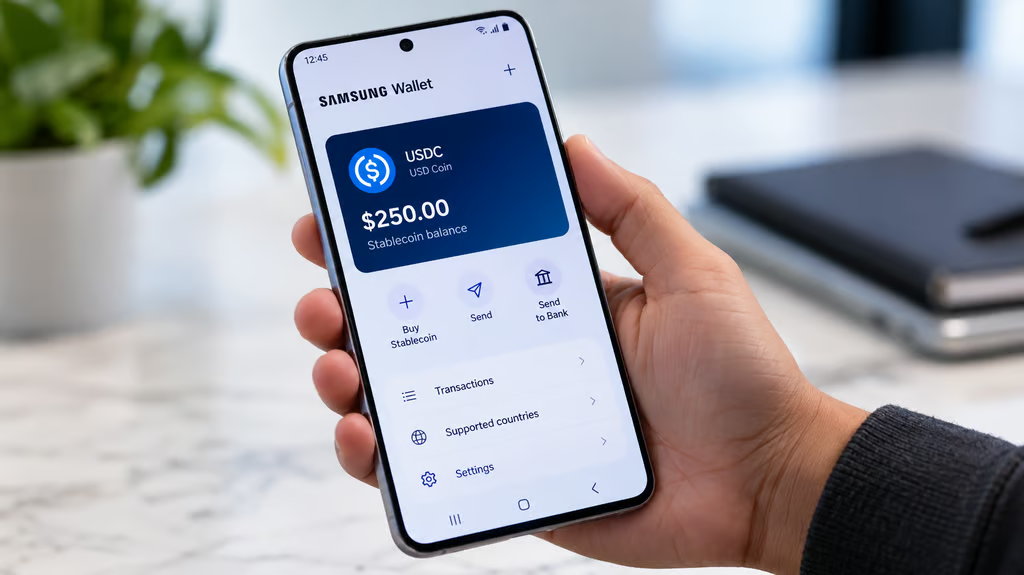
Samsung Wallet will let eligible Galaxy owners in the US send USDC stablecoins to crypto wallets and overseas bank accounts starting in the last week of October 2026. The feature will be available across 82 million compatible Galaxy devices, bringing international money transfers into Samsung’s existing digital wallet app.
Users will have two options: send USDC directly to a compatible crypto wallet without a Samsung transfer fee or send money to eligible bank accounts in more than 60 countries. Bank transfers will carry fees, and recipients can receive funds in their local currency.
Samsung announced the feature on Oct. 7, naming USDC as the only supported stablecoin at launch. Bastion and Coinbase will provide the underlying custody infrastructure, while Solana and Sui are among the partners supporting blockchain network capabilities.
“Sending money abroad should feel as convenient as using the wallet already on your phone,” said Woncheol Chai, EVP and head of the Digital Wallet Team in Samsung’s Mobile eXperience business.
Samsung Wallet originally combined Samsung Pay and Samsung Pass into one app for payment cards, digital IDs, tickets, and other credentials. The USDC feature adds the ability to hold and transfer dollar-denominated digital assets without installing another crypto app or managing private keys.
USDC is a stablecoin designed to maintain a value of $1 per token, backed by cash and short-term US Treasury assets. Unlike conventional bank transfers, USDC can move between compatible crypto wallets over blockchain networks.
How Samsung Wallet USDC transfers work and who qualifies
Eligible users will find a “Buy Stablecoin” option inside Samsung Wallet, with USDC appearing as the default dollar-denominated stablecoin.
Samsung has not disclosed which payment methods will be supported for purchasing USDC or whether purchase fees will apply.
Once users have USDC, they can choose between two transfer methods.
Direct crypto-wallet transfers: Users can send USDC to compatible external crypto wallets or exchange accounts that support the stablecoin on a blockchain network supported by Samsung Wallet.
Samsung says these transfers can complete in seconds without a Samsung transfer fee. However, receiving wallet providers or exchanges may impose charges, and transfer speeds depend on blockchain conditions. Transfers to sanctioned jurisdictions are prohibited.
International bank transfers: Users can send money to qualifying bank accounts in more than 60 countries, with recipients receiving funds in their local currency.
These transfers are not free. Fees vary by destination country and amount, and Samsung says the app will display the applicable charges and estimated delivery time before users confirm a transaction.
The list of supported countries will appear inside Samsung Wallet. Some banks and account types may not qualify, and delivery times may vary.
The feature is limited to US residents aged 18 or older with a Samsung Account and a compatible Galaxy device running Android 13 or higher. Users must complete registration, identity verification, and biometric authentication setup.
Samsung’s 82 million figure represents compatible devices, not confirmed users. The company has not published a separate estimate of how many people will complete the requirements.
Samsung Wallet fees, security, and what users should check
Samsung Wallet requires biometric authentication on a registered Galaxy device for every USDC transfer. The authentication requirement connects transfer approval to the user’s enrolled device.
The financial services operate through Samsung’s partners rather than Samsung itself.
According to Bastion, the company manages stablecoin accounts, custody, compliance checks, and international remittance processing. Coinbase acts as sub-custodian, safeguarding USDC through Coinbase Prime Vault.
Bastion also verifies customer identities, screens blockchain addresses, monitors transactions for fraud and money laundering, and checks sanctions exposure. Its systems verify the registered device’s signature before authorizing transfers.
Samsung says it is not a bank, money transmitter, or digital asset custodian and does not hold customer funds. The company has not detailed how disputed transfers will be resolved or what protections would apply if a custody provider failed.
The launch follows the passage of the GENIUS Act, signed into law in July 2025. The legislation established a federal regulatory framework for payment stablecoins, including requirements for permitted issuers and reserve backing.
For users, the immediate consideration is the total cost of transferring money.
Samsung’s no-fee offer applies to direct USDC transfers to compatible crypto wallets, although receiving providers may charge fees. International bank transfers involve additional charges that depend on the destination and amount.
Samsung has not publicly specified the cost of purchasing USDC or the exchange rates that will apply when transfers are converted into local currency.
Before sending money, users should check the destination country’s availability, recipient-bank eligibility, total fees, exchange rate, and estimated delivery time. These details will determine whether Samsung Wallet offers better value than established peer-to-peer payment services or international remittance providers.
Samsung has also discussed future stablecoin payments for online purchases and in-store transactions, along with expansion into additional markets. No launch dates have been announced for those capabilities.
For Galaxy owners considering international transfers, the deciding figure will be how much money reaches the recipient after fees and currency conversion. Samsung Wallet may make the process easier to access, but its cost advantage will depend on the rates displayed when the service launches.
Also read: Galaxy owners comparing digital wallet features can see how Google Wallet vs Samsung Wallet differ in compatibility, payments, digital IDs, and device support.