


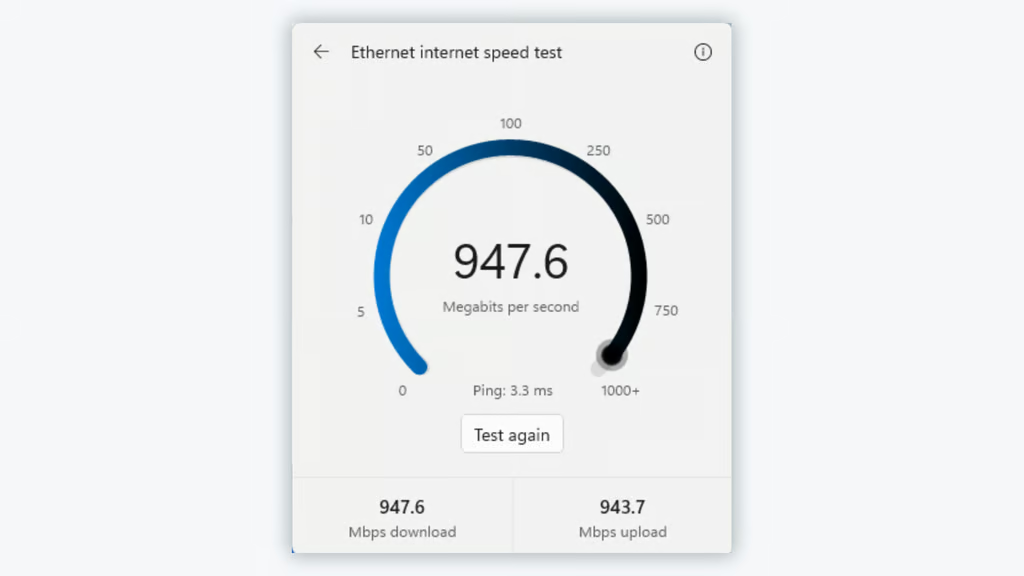
Checking your internet speed in Windows 11 may soon stop requiring a trip to your browser. Microsoft is testing a way to run the check directly from the taskbar, with results displayed inside Windows.
Announced October 23, the feature is rolling out through Windows 11 Insider Experimental Preview Build 26340.9767. It replaces an earlier speed-test shortcut that opened a Bing webpage, giving users a way to check connection performance without leaving their current workspace.
For IT teams troubleshooting slow connections, the change could simplify an initial diagnostic check. However, the redesigned tool remains experimental, and Microsoft has not announced when it will reach general availability.
How the new Windows 11 speed test works
According to Microsoft’s release notes, eligible Insiders can launch the speed test in three ways:
- Quick Settings: Open Quick Settings and select the new Speed test control.
- Network flyout: Start a test from the Wi-Fi or Cellular flyout.
- System tray: Right-click the network icon and select “Test internet speed.”
Once launched, Quick Settings displays the test’s progress and results, including download speed, upload speed, and ping.
Download speed measures how quickly a PC receives data, while upload speed indicates how quickly it sends information. Ping measures latency, which can affect video calls and other real-time applications.
The test now displays its controls and results inside Windows instead of opening a browser tab. Separately, Microsoft is testing new Windows 11 Search actions that let Insiders adjust settings without opening separate menus.
Microsoft has not detailed the speed test’s underlying measurement technology. However, testing by Windows Latest found that the interface identifies Speedtest as its provider.
The earlier speed-test shortcut began testing in September 2025 before reaching the Release Preview channel in February 2026. Microsoft’s February announcement confirmed that the older tool opened the default browser, directing users to a Bing-hosted speed test.
Who can use it, and what IT teams should know
The browser-free speed test is currently limited to the Experimental Insider channel. Microsoft’s October 23 announcement confirms a gradual rollout, meaning not every eligible tester will receive it immediately.
Microsoft has not provided a public release date or a complete compatibility list. Windows Latest successfully tested the interface over Ethernet, but support for every connection type remains undocumented.
The limited availability also highlights the difference between preview features and production updates. Microsoft’s Windows 11 26H2 upgrade guidance explains how eligible PCs receive the annual update, but that release does not establish when this experimental speed test will become generally available.
For help desks, the tool could provide an initial check when employees report slow downloads, unstable video calls, or poor cloud application performance. However, speed and latency readings cannot pinpoint whether problems originate from Wi-Fi interference, ISP congestion, or another network component.
Not every network problem is a speed issue. A July Windows 11 preview update addressed SMB credential failures affecting network shares, illustrating why connection-speed readings alone cannot diagnose every failure.
More detailed investigations still require tools such as ping, tracert, and iperf3. Administrators do not need to change existing troubleshooting procedures or install experimental builds for the feature.
If Microsoft brings the redesigned test to regular Windows 11 installations, users will gain a simpler way to check connection speeds without relying on a browser.
Read more: Microsoft is also exploring automatic dark mode switching in Windows 11, another experimental feature aimed at reducing routine manual adjustments.