


QuickBooks Online is ideal for small and growing businesses that want comprehensive accounting software with room to scale. Its standout features include bank feeds, invoicing, reporting, inventory, and project profitability, while QuickBooks Online Advanced adds more sophisticated reporting, permissions, workflow automation, and AI capabilities for businesses with more complex needs.
For this QuickBooks Online review, I evaluated its accounting features, pricing, AI tools, and limitations to determine where it delivers the most value. I also draw from my hands-on experience using QuickBooks for US-based businesses to show how its features perform in actual bookkeeping workflows.
 |
|
|---|---|
| Overall rating: 4.67 out of 5 | |
| ✓ Comprehensive accounting, invoicing, bill management, and reporting in one platform | ✕ Inventory tracking requires Plus or Advanced |
| ✓ Automated bank feeds, matching, rules, and reconciliation reduce manual bookkeeping | ✕ Project profitability requires Plus or Advanced |
| ✓ Extensive financial and management reporting | ✕ Advanced reporting and custom permissions are concentrated in Advanced |
| ✓ Strong financial and management reporting, with deeper customization on higher plans | ✕ No native multicompany consolidation in standard QBO plans |
| ✓ Useful accounts payable and bill management workflows | ✕ Built-in inventory isn't designed for complex manufacturing |
| ✓ Growing set of AI-powered accounting and automation tools | ✕ Mobile app can't handle several advanced accounting tasks |
| ✓ Large ecosystem of third-party integrations | |
| Deciding factors | |
| Best for | Small businesses that want comprehensive accounting with strong automation and room to scale |
| Starting price | Free; paid plans start at $38/month (QuickBooks Online's standard monthly prices are currently $38 for Simple Start, $85 for Essentials, $140 for Plus, and $340 for Advanced. Intuit also offers QuickBooks Free at $0 per month.) |
| Free plan | ✓ Yes |
| Free trial | 30 days for paid plans |
| Users | 1 to 25, depending on the paid plan |
| Accountant access | ✓ Included with paid plans |
| Bank feeds | ✓ Yes |
| Inventory tracking | ✓ Plus and Advanced |
| Project profitability | ✓ Plus and Advanced |
| Financial reporting | ✓ Yes; capabilities increase by plan |
| AI capabilities | ✓ Intuit Intelligence and specialized AI tools |
| Payroll | Available as a separate subscription |
| Mobile app | ✓ iOS and Android |
QuickBooks Online covers most of the accounting workflows a small business is likely to need, and its biggest strengths are in the areas I use most often as a bookkeeper: bank feeds and reconciliation, accounts receivable and payable, and financial reporting. Its limitations become more noticeable when a business needs specialized inventory or manufacturing functionality, more advanced permissions, or features that Intuit reserves for the higher-tier plans.
Why you can trust TechRepublic
TechRepublic follows a strict editorial policy, combining rigorous research with practical analysis to help IT and business leaders make informed technology purchasing decisions.
I bring more than five years of hands-on QuickBooks experience, including QuickBooks Online and QuickBooks Desktop. My bookkeeping work has included setting up accounting systems, managing accounts payable and receivable, reconciling bank and credit card accounts, invoicing, and preparing monthly financial reports for US-based businesses.
I’ve also handled full-cycle bookkeeping for a US-based manufacturing business using QuickBooks Online. This experience lets me evaluate QuickBooks Online from a practical accounting perspective — not just by checking whether a feature exists, but by considering how useful it is in actual bookkeeping workflows.
–JR Suralta, QuickBooks Online ProAdvisor and Xero-certified Advisor
What is QuickBooks Online?
QuickBooks Online is Intuit’s cloud-based accounting software for small and midsize businesses. It brings core bookkeeping tasks — including income and expense tracking, invoicing, bill management, bank reconciliation, and financial reporting — into one system, with more advanced capabilities available as you move to higher-tier plans.
QuickBooks Online is a good fit for
- Businesses that want to automate routine bookkeeping: Bank feeds bring transactions into QuickBooks, while bank rules, matching, and AI-assisted categorization can reduce the amount of manual transaction entry required.
- Businesses that need strong financial reporting: QuickBooks provides standard financial statements such as the profit and loss, balance sheet, and statement of cash flows, along with operational reports for receivables, payables, sales, and other areas. Reporting and customization become more sophisticated in the higher plans.
- Growing businesses with increasingly complex accounting needs: A business can start with basic income and expense tracking and move into features such as bill management, inventory, project profitability, budgets, and more advanced reporting as its needs change.
- Businesses working with a bookkeeper or accountant: Paid QuickBooks Online plans include accountant access, allowing an accounting professional to work directly in the books without using one of the regular user seats.
- Project-based businesses that need profitability tracking: Plus and Advanced can track income and costs by project, making it easier to determine whether individual jobs are actually profitable rather than relying only on companywide results.
QuickBooks Online is less suited for
- Businesses needing advanced manufacturing accounting: QuickBooks Online can track inventory, purchase orders, and cost of goods sold, but manufacturers needing features such as bills of materials, production planning, shop-floor management, or more sophisticated manufacturing costing may need dedicated manufacturing software or an ERP.
- Companies managing multiple legal entities: A standard QuickBooks Online company file is designed around a single company. If you operate several entities that require separate books, you’ll generally need separate subscriptions, which makes consolidated accounting less convenient.
- Businesses needing advanced inventory management: Plus and Advanced cover the inventory basics well, but businesses needing capabilities such as complex warehouse management, detailed manufacturing workflows, or more sophisticated inventory planning may eventually outgrow the built-in tools.
- Very small businesses with only basic bookkeeping needs: If you mainly need to send occasional invoices and track straightforward income and expenses, the breadth of the paid QuickBooks Online plans may be more than you need. A free or simpler accounting product may cover those requirements at a lower cost.
Related read:
- QuickBooks Free: How Automatic Expense Sorting Works
- QuickBooks Free Can Support Unlimited Invoices: Here’s How It Works
- QuickBooks Online Advanced vs Enterprise
QuickBooks Online pricing
QuickBooks Online now covers a wide range of accounting needs, from a new free plan for basic bookkeeping to Advanced for businesses needing more sophisticated reporting, permissions, and automation.
| Simple Start | $38/month | 1 | Small businesses needing core accounting and invoicing |
| Essentials | $85/month | 3 | Businesses that need bill management and additional users |
| Plus | $140/month | 5 | Businesses that need inventory, budgets, and project profitability |
| Advanced | $340/month | 25 | Growing businesses needing advanced reporting, permissions, automation, and analytics |
Moving from Simple Start to Essentials adds capabilities for businesses with more complex workflows, while Plus becomes the more practical choice once you need inventory and project profitability. Advanced is aimed at businesses needing substantially greater control over reporting, permissions, workflows, and analytics.
QuickBooks Online alternatives
QuickBooks Online is a strong all-around accounting platform, but it may not be the right fit if you need unlimited users, tighter integration with an existing business software ecosystem, or simpler tools for a service-based business. Here are three alternatives worth considering.
| Xero | Businesses with multiple accounting users | Includes unlimited users across its plans, making it attractive for businesses that need broader team access without moving to a higher tier for more seats | $27 per month | Xero review |
| Zoho Books | Businesses using other Zoho applications | Connects accounting with Zoho's broader ecosystem of CRM, inventory, expense, and other business applications | $0 or $20 for paid plan | Zoho Books review |
| FreshBooks | Freelancers and service-based businesses | Provides a simpler approach to invoicing, time tracking, expenses, and client-based project management | $23 per month | FreshBooks review |
If QuickBooks Online or these alternatives don’t quite fit your needs, read our best accounting software guide to compare more options for different business types and accounting needs.
QuickBooks Online key features
QuickBooks Online combines everyday bookkeeping with invoicing, reporting, inventory, forecasting, integrations, and increasingly capable AI tools, although some advanced capabilities are limited to higher-tier plans.
| Accounting and bookkeeping | Automates bank feeds, transaction categorization and matching, reconciliation, bill management, recurring transactions, and other core bookkeeping workflows |
| Invoicing, estimates, and quotes | Creates customizable estimates and invoices, tracks receivables, sends payment reminders, and accepts online payments |
| Financial reporting | Provides core financial statements, AR/AP reports, management reports, customizable reporting, and advanced analytics |
| Inventory management | Tracks inventory quantities and costs, purchase orders, cost of goods sold, and inventory valuation |
| Sales channel connections | Connects ecommerce sales channels and brings sales, fees, and payout information into QuickBooks |
| Cash flow forecasting | Uses accounting data to help monitor expected cash inflows and outflows and anticipate future cash positions |
| AI and automation | Uses Intuit Intelligence and other AI tools to assist with accounting, transaction categorization, reconciliation, invoicing, forecasting, and repetitive workflows |
| Integrations | Connects QuickBooks with third-party ecommerce, CRM, payments, inventory, payroll, and other business applications |
Accounting and bookkeeping
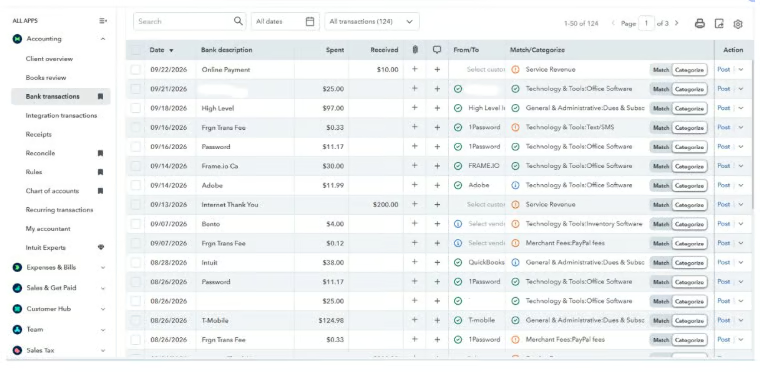
QuickBooks Online covers the accounting essentials, including bank feeds, transaction categorization, bills and expenses, journal entries, recurring transactions, and bank reconciliation. Connect your bank and credit card accounts to match downloaded transactions with existing records or assign the appropriate accounting category. You can also create bank rules for recurring transactions to reduce repetitive bookkeeping work.
Invoicing, estimates, and quotes
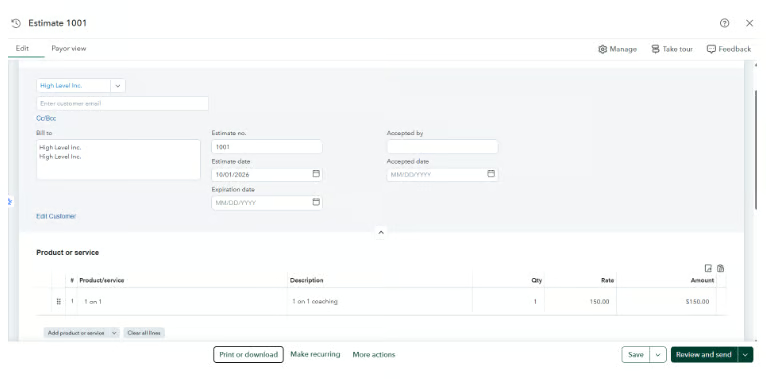
Create and customize estimates and convert approved estimates directly into invoices without reentering the details. You can also schedule recurring invoices, set payment terms, send automatic payment reminders, track outstanding balances, and accept online payments through QuickBooks Payments.
QuickBooks records the accounting throughout the process. Send an invoice to record accounts receivable, apply the customer’s payment against the open invoice, and match the resulting deposit when it appears in your bank feed. This gives service businesses a connected estimate → invoice → payment → reconciliation workflow.
Financial reporting
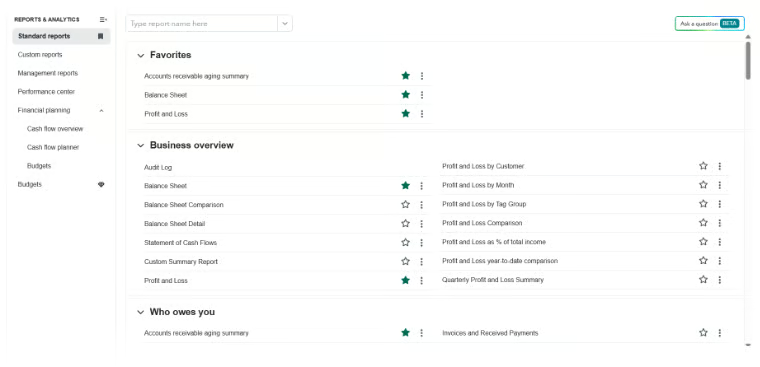
Run standard financial statements such as the profit and loss, balance sheet, and statement of cash flows, along with reports for receivables, payables, sales, expenses, customers, and vendors. Customize reports by period and other available filters, and drill down into many balances to review the underlying transactions.
Some reports are particularly useful for day-to-day financial management:
- Profit and loss: Monitor revenue, expenses, and profitability.
- AR aging: Identify overdue customer invoices and prioritize collections.
- AP aging: Review upcoming and overdue vendor bills for cash planning.
- Balance sheet: Monitor assets, liabilities, and equity.
- General ledger: Investigate the transactions behind individual account balances.
Learn more: See our guide to reading financial statements to understand what your financial reports reveal about your business.
Inventory management
Track inventory quantities, costs, purchase orders, cost of goods sold, and inventory valuation with QuickBooks Online Plus and Advanced. Record products as inventory items and let QuickBooks update quantities as you buy and sell them, keeping inventory activity connected to your accounting records.
For more complex manufacturing, QBO’s built-in inventory tools may not be enough. Businesses that need bills of materials, production planning, shop-floor management, or advanced warehouse functionality may need dedicated inventory software or an ERP.
Sales channel connections
Connect supported ecommerce and sales channels to QuickBooks and bring sales activity into your accounting system. Depending on the integration, you can track sales, fees, taxes, refunds, and payouts without manually recreating every online order in your books.
This is especially useful for businesses processing a high volume of ecommerce transactions. Instead of entering individual sales manually, use the connected sales data to record activity and reconcile platform payouts with deposits received in your bank account.
Cash flow forecasting
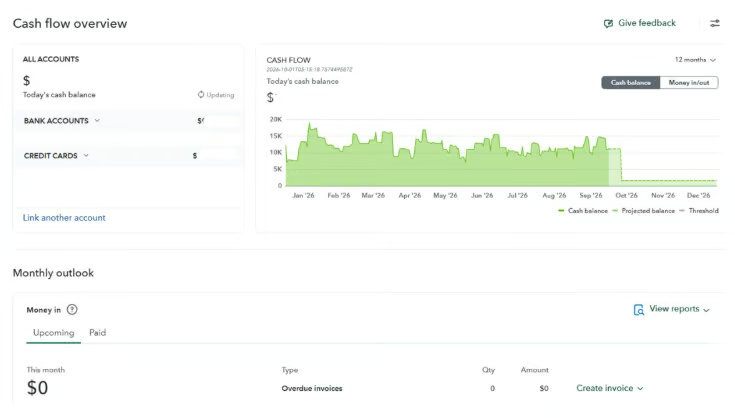
Use QuickBooks’ Cash Flow Planner to project money coming in and going out based on your accounting data, including upcoming invoices, bills, and expenses. You can also add planned transactions or test different scenarios without changing your books.
For business owners, this is useful for spotting potential cash shortages before they happen and planning around payroll, vendor payments, large purchases, or slower collection periods.
AI and automation
Use Intuit Intelligence and QuickBooks’ AI tools to assist with transaction categorization, reconciliation, invoicing, financial analysis, forecasting, and other accounting tasks. Ask questions about your business data in natural language instead of finding and interpreting every report manually.
| Accounting AI | ✓ | ✓ | ✓ | ✓ |
| AI-powered bank feeds | ✓ | ✓ | ✓ | ✓ |
| AI-powered collaboration (Beta) | — | ✓ | ✓ | ✓ |
| Anomaly detection | — | — | ✓ | ✓ |
| Customer AI | — | — | ✓ | ✓ |
| Finance AI | — | — | — | ✓ |
| Project Management AI | — | — | — | ✓ |
Integrations
Connect QuickBooks Online with third-party applications for ecommerce, payments, CRM, expense management, inventory, payroll, time tracking, and other business functions. Use these integrations to move data between the applications you already use and your accounting system instead of repeatedly entering the same information.
QuickBooks Online: My verdict
QuickBooks Online remains one of the most capable accounting platforms I’ve used for small-business bookkeeping. It connects bank feeds, reconciliation, invoicing, payables, and reporting in one system, while its growing AI and automation tools can reduce manual work.
For businesses with more complex needs, QuickBooks Online Advanced adds more sophisticated reporting, permissions, workflow automation, and support for up to 25 users. At $340 per month, however, I’d upgrade only when those capabilities address a real business need.
Overall, QBO is a strong fit for small and growing businesses that need comprehensive accounting software that can scale with them. Businesses with advanced manufacturing, inventory, or multicompany requirements may need a more specialized system.
FAQs
Can I manage more than one business in QuickBooks Online?
You can manage multiple businesses, but each business generally needs its own QuickBooks Online subscription and company file. This is important for owners running separate legal entities, since QBO doesn’t combine them into a single standard subscription.
Can I switch QuickBooks Online plans later?
Yes. You can upgrade or downgrade your QuickBooks Online subscription as your needs change. Before downgrading, check whether you rely on features that aren’t included in the lower-tier plan, such as inventory, project profitability, or advanced reporting tools.
Can I move from QuickBooks Desktop to QuickBooks Online?
Yes. Intuit provides migration tools for moving supported QuickBooks Desktop data to QuickBooks Online. However, not every Desktop feature or data type transfers exactly the same way, so I recommend reviewing the migrated file carefully before fully switching systems.
Does QuickBooks Online work offline?
No. QuickBooks Online is primarily cloud-based and requires an internet connection to access the full accounting system. Its mobile apps provide access to selected tasks, but they don’t function as a full offline version of QBO.
Can my accountant access my QuickBooks Online account?
Yes. Paid QuickBooks Online plans allow you to invite an accountant or bookkeeper separately from your regular business users. This lets them work directly in the books without sharing your login credentials.
Can I import data from Excel into QuickBooks Online?
Yes. QuickBooks Online supports importing several types of data, such as customers, vendors, products and services, chart of accounts information, and certain transactions. The exact import options depend on the type of data you’re moving.