Discussion Locked
PeewitSolutions
0 helpful
105 replies
Closed to new repliesThis discussion is closed. It stays readable, but it takes no new replies.
blog root

After Hours
by peter
by peter
Available now,
A fair few updates this month for all Windows programs + Internet Explorer Critical update.
by peter
I have cleaned out some older posts when I can get the time to link it all together.
by peter
Interesting Information has a nasty habit of leaking - particularly when information security is not being managed effectively. If you need ammunition to help convince those around you that security should be taken seriously then a useful aid is referring to sites such as http://www.internalmemos.com - the site contains many examples of information that's made it into the public domain against the
by peter
Best practice check Office for Updates
http://www.microsoft.com/security/bulletins/200504_office.mspx
by peter
I'm definitely going to this.
The event is free if you register before 22nd April, otherwise it's ?20.
by peter
TimeWaster of the Week: Dialect TestYou are how you speak. So maybe if you are unaware of your annoying habit of calling a carbonated beverage "pop," and it is holding back your career, you should take the test here
by peter
Performance Tip: Eye Candy Causes Speed Decay
The standard Windows XP look has colors and animation galore.With a less-gaudy look, you can squeeze more performance out ofyour PC.
To change the look, right-click the My Computer icon and select Properties.
Then click the Advanced tab.
Under Performance, click the Settings button.
On the Visual Effects tab, click the"Adjust for best performance"
by peter
My thanks again to Steve Lamb for this article about phishing Scams.
I think it's a good reminder to be on your guard at all times.
http://blogs.technet.com/steve_lamb/archive/2005/04/21/404031.aspx
by peter
RealNetworks has released a security patch aimed at plugging a flaw in its multimedia software that could allow hackers to run their own code on people's computers.
The flaw, rated a "highly critical" risk by security company Secunia, affects most recent consumer versions of the RealPlayer media player software, for both Windows and Macintosh operating systems. Also at risk are some, but not the
by peter
Create a Group Policy for your logon banner or a registry hack.
Here's the reg hack I've used.
This will work with Windows 2000 Professional & XP.
Windows Registry Editor Version 5.00
[HKEY_LOCAL_MACHINE\SOFTWARE\Microsoft\Windows NT\CurrentVersion\Winlogon]"LegalNoticeCaption"=" !!!WARNING!!! !!!Warning!!! !!!WARNING!!!""LegalNoticeText"="This is a Company X computer system, which may be
by peter
Thought I had better add these links
Microsoft Technical Support Reference
Microsoft provides a variety of self-help support options. Most of these are free and available 24 hours a day, 7 days a week. Use this as a reference tool to help find the self-help support option you need.
Technical Support resources
Microsoft?s Customer Technical Support Site
Our Customer Technical Support Site
by peter
I'm often asked how do you SAVE your address book ?
Backup Address Book
Right click on Desktop name it "Address Book"
Start Address Book, Click File / Export / Other Address BookThen select Text File (Comma separated values) and click Export. Click the Browse button to select where you want to save the output file to, and it's name, ( recommend to Desktop "New Folder" that is made).
Then click
by peter
Creating tasks from emails
Now that you've mastered SHIFT-CTRL-V, dear reader, let's step up a gear. You can also create perfectly formatted tasks from an email by using this shortcut. Whenever you get an email that requires some action on your part and you don't have time to do it right now just hit SHIFT-CTRL-V and select the Tasks folder. Outlook will create a new task for you which contains a
by peter
Had an unbelievable day on Wednesday at this event, although the event was over 3 day's, due to work commitments I could only make it for the one day.
It was an ideal opportunity for both myself & my P/A to network with fellow colleagues that we normally only associate with via the phone or email. So a big thank you to everyone organised with the event.
I did find a couple of programs that are
by peter
http://www.michna.com/kb/HowToDestroyYourComputer.htmCome on............ we want the work.
by peter
Brum, I'm there for both day's ( today & tomorrow). Really enjoying the Security tracks. I must be mad or sad ;)
Learning new things all the time.
I do suggest that if anyone can make the next roadshow........ they get there. Halifax next !! I think.
A superb couple of day's it was too and my thanks to all the people that made it happen, here at the Motorcycle museum.
I now feel more confident when I'm asked to fit front & back end servers to a Honda 650 ;)
by peter
by peter
For some years now I have been "helping on a forum" for poor soul's who have brought a certain make of computer. every so often " and only for a joke" we would request that some poor soul in need of help, should mend his computer with a hammer or some other large heavy object.
Seem's we were not that far off the truth then. As I have just received this update from the forum :))
Those of us who would recommend to punters on the old forum that an upstairs window, or a 28lb hammer if you lived in a bungalow, was the best form of "repairing" a rogue machine will be glad to know that it works.A friend's son dropped his base unit while moving from 1 bedroom to another. It bounced down the first of 2 flights of stairs. This has fixed a USB problem he was having for a month and everything else is working correctly too. So, Percussive Maintenance is still the only alternative to Invasive Surgery.
by peter
Full info can be found here http://www.cadenhead.org/workbench/entry/2005/05/26#2607A Web bug detection tool can be found here http://www.bugnosis.org/
by peter
Do summink or don't !.......... it's up to you.An online business based in Russia will pay Web sites 6 cents for each machine they infect with adware and spyware,iframeDOLLARS.biz, which according to a WHOIS lookup, is registered to a Nick Fedorov in Nizhny Novgorod, a Russian city on the Volga about 240 miles east of Moscow, will pay Webmasters to place a one-line exploit on their sites. The
by peter
by peter
Customer Support - Real Security Updates
Realplayer users need to urgently update
by peter
The Administrator Accounts Security Planning Guide
A useful link with a free download of the guide
by peter
Aaron Margosis' WebLog : PrivBar -- An IE/Explorer toolbar to show current privilege level
A useful add-on for IE & Windows Explorer
by peter
Aaron Margosis' WebLog : Table of contents, Aaron Margosis' non-admin blog
A blog all about Non-Admin
by peter
After installing Windows XP Professional on a computer you'll encounter several annoying prompts that appear as balloons in the notification area of the taskbar. The first balloon prompts you take the Windows XP Tour. This balloon will return on subsequent logons until you've either taken the tour or dismissed the prompt at least three times.
The second balloon will prompt you to create an .NET Passport account. This balloon will return on a regular basis until you either create a .NET Passport account or dismiss the prompt at least 10 times.
If you don?t want to take the Windows XP Tour nor want to create an .NET Passport account, you can instantly and permanently disable both of these nagging prompts right after you install Windows XP by running the XP Nag Disabler VBScript
Disable the Windows XP Pro tour and .NET passport nags with this VBScript - TechRepublic
by peter
The latest Quicktime player No7 for Xp & 2000 users only though.
Apple - QuickTime - Download - QuickTime 7 for Windows Public Preview
by peter
by peter
by peter
Website now online http://www.peewitsol.co.uk
by peter
http://www.ranum.com/security/computer_security/editorials/dumb/
I like it :) & there is a good discussion going on in the blogs on TechRepublic.
by peter
Security Alert, September 21, 2005
Unchecked Buffers in VERITAS Storage Exec
Buffer overflow vulnerabilities were discovered in multiple DCOM server components that are part of VERITAS Storage Exec and StorageCentral. The components could be exploited through calls to associated ActiveX controls if a user launched malicious HTML code.
Such code could arrive via email or be stored in a file or on a Web server. A successful exploit might lead to a system crash or allow access to the local system. Symantec released hotfixes for Storage Exec and StorageCentral to correct the problems.
by peter
Handbook for bloggers and cyber-dissidents
Blogs get people excited. Or else they disturb and worry them. Some people distrust them. Others see them as the vanguard of a new information revolution. Because they allow and encourage ordinary people to speak up, they?re tremendous tools of freedom of expression. Bloggers are often the only real journalists in countries where the mainstream media is censored or under pressure. Only they provide independent news, at the risk of displeasing the government and sometimes courting arrest. Reporters Without Borders has produced this handbook to help them, with handy tips and technical advice on how to to remain anonymous and to get round censorship, by choosing the most suitable method for each situation. It also explains how to set up and make the most of a blog, to publicise it (getting it picked up efficiently by search-engines) and to establish its credibility through observing basic ethical and journalistic principles.
by peter
Handbook for bloggers and cyber-dissidents
Blogs get people excited. Or else they disturb and worry them. Some people distrust them. Others see them as the vanguard of a new information revolution. Because they allow and encourage ordinary people to speak up, they?re tremendous tools of freedom of expression. Bloggers are often the only real journalists in countries where the mainstream media is censored or under pressure. Only they provide independent news, at the risk of displeasing the government and sometimes courting arrest. Reporters Without Borders has produced this handbook to help them, with handy tips and technical advice on how to to remain anonymous and to get round censorship, by choosing the most suitable method for each situation. It also explains how to set up and make the most of a blog, to publicise it (getting it picked up efficiently by search-engines) and to establish its credibility through observing basic ethical and journalistic principles.
by peter
Product Updates Alert: New Office Updates are AvailableThe Microsoft Office Online Downloads site hosts free* updates that you can download to increase the security, stability, and performance of your Office products.
The following new updates are now available:
Update for Outlook 2003 Junk Email Filter (KB904631) This update provides the Junk E-mail Filter in Microsoft Office Outlook 2003 with a more current definition of which e-mail messages should be considered junk e-mail.
Office 2003 Service Pack 2 (SP2) This service pack provides the latest updates to Microsoft Office 2003.
Office 2003 Service Pack 2 (SP2) for Proofing Tools This service pack provides the latest updates to Microsoft Office 2003 Proofing Tools.
OneNote 2003 Service Pack 2 (SP2) This service pack provides the latest updates to Microsoft Office OneNote 2003.
Outlook Live 2003 Service Pack 2 (SP2) This service pack provides the latest updates to Microsoft Office Outlook Live 2003.
Project 2003 Service Pack 2 (SP2) This service pack provides the latest updates to Microsoft Office Project 2003.
Project Server 2003 Service Pack 2 (SP2) This service pack provides the latest updates to Microsoft Office Project Server 2003.
Visio 2003 Service Pack 2 (SP2) This service pack provides the latest updates to Microsoft Office Visio 2003.
Windows SharePoint Services Service Pack 2 (SP2) This service pack provides the latest updates to Microsoft Windows SharePoint Services.
Using the Office Update automatic detection tool on the Office Online Downloads site, you can find out if these updates are suitable for your Office products. Go to the Office Online Downloads site and click Check for Updates to get the latest Office updates for your computer. If any of these new updates do not appear in the list of updates returned by the automatic detection tool, then your computer does not need those updates.
*Internet service provider fees and connect-time charges may apply.If you would prefer to receive the plain text version of Inside Microsoft Office-Product Updates Alert, reply to this e-mail, type TEXT in the Subject line, and click Send.?2005 Microsoft Corporation. All rights reserved. The names of the actual companies and products mentioned herein may be the trademarks of their respective owners.
Microsoft Communities is your launching pad for communicating online with peers and experts about Microsoft products, technologies, and services.~~~~~~~~~~~~~~~~~~~~~~~~~
THIS DOCUMENT AND OTHER DOCUMENTS PROVIDED PURSUANT TO THIS PROGRAM ARE FOR INFORMATIONAL PURPOSES ONLY. The information type should not be interpreted to be a commitment on the part of Microsoft and Microsoft cannot guarantee the accuracy of any information presented after the date of publication. INFORMATION PROVIDED IN THIS DOCUMENT IS PROVIDED 'AS IS' WITHOUT WARRANTY OF ANY KIND. The user assumes the entire risk as to the accuracy and the use of this document. microsoft.com newsletter e-mail may be copied and distributed subject to the following conditions:
All text must be copied without modification and all pages must be included
All copies must contain Microsoft's copyright notice and any other notices provided therein
This document may not be distributed for profit
by peter
Very interesting survey that brings issues to the fore, regarding not just bloggers and blogging but the non interaction between corporate business and PR with bloggers.
Click https://extranet.edelman.com/bloggerstudy/ to see the complete findings. You can see the responses to the open-ended questions by clicking the link (https://extranet.edelman.com/bloggerstudy/FreeForm.aspx) just under the title of the study.
by peter
Epson have not yet supplied the UK with the cartridges for any of the D series printers. So why are retailers selling the printers if new cartridges cannot be supplied to the UK until next week.
To add insult to injury, the ink is produced within the UK !!.
Comet are willing to refund and so are Argos. They were both aware of the problem as of last week. Both have said they will replace it with the exact same model (with inks in) and by the time those inks run out, they should have the cartridges in stock.
DSG group ( Curry's, Dixon's & Comet ) are not selling the D series until the stock of C series has run out, plus they also know about the cartridge problem.
Any site that says they have a good stock of Epson T0611, T0612, T0613 and T0614 cartridges is talking rubbish, cos Epson haven't got any yet . Try Epsons main supply site Here . They don't even list the D68 for ink cartridges.
Not a mention of no supplies, from Epson anywhere. Now that is good PR.
Anybody with the same problem can complain to the Epson UK PR team at:
Vector Marketing Communications
Chiltern House
184 High Street
Berkhamsted
Hertfordshire
HP4 3AP
01442 877167or to Epson sales:
08702 416900
by peter
Found this hidden away in the microsoft website, it's Beta but worth a look.
Microsoft? Codename Max is not like any other product. That's because it's not a product?it's your opportunity to try an exciting new user experience from Microsoft. Max is built on the next-generation WinFX Runtime Components technology that will drive the development of Windows Vista? applications. Today Max lets you make lists of your photos and turn them into beautiful slide shows to share with your family and friends. Tomorrow...who knows?.
You do need to uninstall the .NET component from your computer first, before installing the WinFX Runtime Component but well worth the effort. A superb way to try out part of Vista without being a MSDN Developer etc.
The photographic effects are stunning & the program is like nothing before.
Download from http://www.microsoft.com/max/download.html but please read the installation instructions first + the system Requirements.
by peter
Security Alert, October 11, 2005
Symantec Antivirus Scan Engine Might Run Arbitrary Code
iDEFENSE reported a vulnerability in Symantec Antivirus Scan Engine.
The engine lets third-party applications interface with Symantec's content-scanning technologies. The vulnerability exists in the Web- based administrative interface, which doesn't properly validate input provided through HTTP requests. If an intruder gains access to the administrative interface's TCP port (8004), he or she might be able to launch arbitrary code and gain privileged access to the system.
The problem affects Symantec Antivirus Scan Engine 4.0 for:
Microsoft ISA Server 2000, NetApp Filer, NetApp NetCache, Bluecoat, and Clearswift. The problem also affects Symantec Antivirus Scan Engine 4.3
for: Microsoft ISA Server 2000, Microsoft SharePoint, Messaging, Network Attached Storage, Caching, and Bluecoat. Symantec said that Symantec Antivirus Scan Engine 4.1 isn't affected.
Symantec has released an update to correct the problem. The update is available through the company's Platinum Support Site or its FileConnect Web site. The company also recommends that administrators not expose the administrative port to external networks, such as the Internet. Alternatively, you can disable the interface by setting the administrative interface port number to zero. If the interface must remain enabled, then access to that port should be restricted in some way, such as using a secure network segment. You can also control access to the port via firewall rules.
http://list.windowsitpro.com/t?ctl=160D2:43C5FC
by peter
Urgent Updates today from microsoft
8 Critical for Win 2000 & Xp
by peter
Very good RSS application with lots more to it than first meets the eye.Runs using Java too, so can be taken almost anywhere.
Give it a try www.blogbridge.com
by peter
Eileens blogsite shows links to msevents webcasts etc .
Her introduction to Blogs & Blogging has a plethora of information links for blogging for beginners & business.
by peter
from Microsoft Team RSS blog.
The orange icon...It?s great that a discussion of icons has recently restarted in the RSS community. We are in the process of figuring out what icon to use on our toolbar in IE7 to represent feeds.
by peter
by peter
Are you being bombarded with multiple http requests from this server IP address http://220.233.23.195/ which is actually http://bathurst-tafe.nsw.edu.au/ an I.T. college campus then go to http://securityresponse.symantec.com/avcenter/venc/data/linux.plupii.html for a fix and block this IP from your browser too.
This hacker is using Linux and the virus attacks mainly Linux machines but it's very invasive & persistant even trying windows machines. The webmasters etc have been contacted.
Hope they find the culprit soon
Thread from Sonja Thompson https://www.techrepublic.com.com/5208-11193-0.html?forumID=4&threadID=184161&start=0 too
by peter
Are you being bombarded with multiple http requests from this server IP address http://220.233.23.195/ which is actually http://bathurst-tafe.nsw.edu.au/ an I.T. college campus then go to http://securityresponse.symantec.com/avcenter/venc/data/linux.plupii.html for a fix and block this IP from your browser too.
This hacker is using Linux and the virus attacks mainly Linux machines but it's very invasive & persistant even trying windows machines. The webmasters etc have been contacted.
Hope they find the culprit soon
by peter
Please make children aware of the following resources to help them learn more about being safe on the Internet:
http://www.getsafeonline.org
http://www.chatdanger.com
http://www.websafecrackerz.com
http://www.virtualglobaltaskforce.com
My thanks to Steve Lamb for the links
by peter
Security Alert, November 16, 2005
ISAKMP Vulnerable to DoS and Execution of Arbitrary Code
Internet Security Association and Key Management Protocol (ISAKMP) contains a vulnerability that might lead to Denial of Service (DoS) attacks or the execution of arbitrary code. The vulnerability can be exploited by sending malformed Internet Key Exchange (IKE) packets. IKE is commonly used in IPsec solutions. Affected products include
software- and hardware-based solutions produced by Juniper Networks, Cisco Systems, SecGo Solutions, Stonesoft, Nortel, Sun Microsystems, and possibly other vendors. Microsoft reported that none if its products are vulnerable to this problem. If your network uses IKE or IPsec, check with your vendor to determine your vulnerability status.
by peter
Security Alert, November 16, 2005
ISAKMP Vulnerable to DoS and Execution of Arbitrary Code
Internet Security Association and Key Management Protocol (ISAKMP) contains a vulnerability that might lead to Denial of Service (DoS) attacks or the execution of arbitrary code. The vulnerability can be exploited by sending malformed Internet Key Exchange (IKE) packets. IKE is commonly used in IPsec solutions. Affected products include
software- and hardware-based solutions produced by Juniper Networks, Cisco Systems, SecGo Solutions, Stonesoft, Nortel, Sun Microsystems, and possibly other vendors. Microsoft reported that none if its products are vulnerable to this problem. If your network uses IKE or IPsec, check with your vendor to determine your vulnerability status.
by peter
Security Alert, November 16, 2005
RealOne Player and RealPlayer Might Run Arbitrary Code
A vulnerability in RealOne Player and RealPlayer can allow a remote intruder to run arbitrary code in the context of the currently logged on user. The vulnerability is due to incorrect parsing of images that are part of skins designed for the multimedia players. Critical vulnerabilities were also discovered in RealPlayer Enterprise.
RealNetworks released patches and updates to correct all the reported problems. You can download these at the URL below:
by peter
Security Alert, November 22, 2005
IE Vulnerable to Remote Command Execution
Microsoft Internet Explorer (IE) is vulnerable to a memory corruption error when processing malformed HTML pages containing specially crafted calls to JavaScript "window()" objects and "onload"
events. The vulnerability could allow remote intruders to execute arbitrary commands in the security context of the currently logged-on user. Microsoft said that the vulnerability affects IE 5.x and 6.0 running on Windows Server 2003 Service Pack 1 (SP1), Windows XP SP2, Windows 2000 Server SP4, Windows Me, and Windows 98. For more information, read Microsoft Security Advisory 911302, "Vulnerability in the way Internet Explorer Handles onLoad Events Could Allow Remote Code Execution,"
by peter
The link for the newest Beta to Antispyware can be found here
http://www.microsoft.com/athome/security/spyware/software/default.mspx
Microsoft AntiSpyware Version: 1.0.701
This version expires on: 31/07/2006
Spyware Definition Version: 5779 (20/11/2005 16:24:38)
by peter
It's that time of year again for forwarding on silly emails etc
So just to remind everyone to stay safe
The Hazards of Improperly Forwarding Email
When you forward a message, try to remove all the previous email addresses and if sending to multiple email recipients, use the blind carbon (BCC) feature.After clicking on the forward button, simply delete the addresses from the message.
If you want to forward to multiple people and not have them see who else you forwarded it to, rather than putting them in the To or Cc address, put them in the BCC (Blind Carbon Copy) section instead.
Remember, when you forward things and you leave your friends' names and email addresses out in plain view like that, you are putting them and you in what could be grave danger.So, be safe, be careful and use Blind Carbon Copy (BCC) and remove all personal email addresses from the body of the email when forwarding emails.
by peter
It's that time of year again for forwarding on silly emails etc
So just to remind everyone to stay safe
The Hazards of Improperly Forwarding Email
When you forward a message, try to remove all the previous email addresses and if sending to multiple email recipients, use the blind carbon (BCC) feature.
After clicking on the forward button, simply delete the addresses from the message.
If you want to forward to multiple people and not have them see who else you forwarded it to, rather than putting them in the To or Cc address, put them in the BCC (Blind Carbon Copy) section instead.
Remember, when you forward things and you leave your friends' names and email addresses out in plain view like that, you are putting them and you in what could be grave danger.So, be safe, be careful and use Blind Carbon Copy (BCC) and remove all personal email addresses from the body of the email when forwarding emails.
by peter
There's an excellent security awareness video that was produced on behalf of the Dutch Government for their highly successful National Security Awareness day - it's good IMHO as the content is highly visual, colourful and thought provoking. If you want to get your family, friends and business colleagues to take security seriously then this is an excellent resource.
The video can be downloaded from here - it's 12Mb and runs for just over five minutes.
For more security awareness material I recommend browsing to the GetSafeOnline websiteThanks & acknowledgement to Steve Lamb
by peter
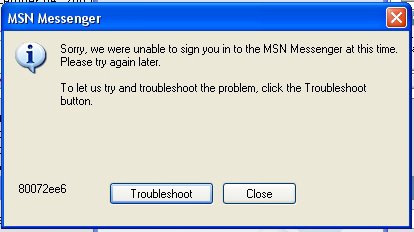
Having problem signing into Messenger
Then the Fix is below
If you ever get this problem do the following, as it is down to the Msxml3.dll not being registered to the PC fully.
To register the Msxml3.dll file:
1. Click "Start", click "Run", type the following command, %windir%\system32\regsvr32 %windir%\system32\msxml3.dll and then press ENTER:
After this command is completed successfully, you receive the following message: "dllRegisterserver in succeeded." ;
2. Click "OK."
3. Close msn messenger
4. Sign in to MSN Messenger again.
by peter
Xoftspy ?? new spyware program from Blog
http://www.blogexplosion.com/show_page.php?SiteID=8039
by peter
There's an excellent security awareness video that was produced on behalf of the Dutch Government for their highly successful National Security Awareness day - it's good IMHO as the content is highly visual, colourful and thought provoking. If you want to get your family, friends and business colleagues to take security seriously then this is an excellent resource.
The video can be downloaded from here - it's 12Mb and runs for just over five minutes.
For more security awareness material I recommend browsing to the GetSafeOnline websiteThanks & acknowledgement to Steve Lamb
by peter
Microsoft is tightening up the way its Internet Explorer browser handles HTTPS for version 7, which is used to secure online transactions, in an attempt to give people more protection online.
In a posting on the Microsoft Internet Explorer blog, IE program manager Eric Lawrence said that IE 7 would support the Transport Layer Security (TLS) protocol by default.
Existing versions of IE automatically use the SSL 2.0 protocol, which is weaker than TLS, to encrypt user data, although it is possible to manually switch to TLS.
Microsoft's decision to ditch support for SSL 2.0 means that any site that still requires this protocol should upgrade, but Lawrence claimed there are "only a handful" of such sites.
Lawrence also explained how IE 7 will behave differently from earlier versions when it encounters potential security problems.
"Whenever IE6 encountered a problem with a HTTPS-delivered Web page, the user was informed via a modal dialog box and was asked to make a security decision. IE 7 follows the XPSP2 'secure by default' paradigm by defaulting to the secure behavior," said Lawrence.
IE 7 will not give users the option of seeing both secure and insecure items within an HTTPS page. With IE6, this option appears when the browser encounters an HTTPS page that includes some HTTP content. But in IE 7, only the secure content will be rendered by default, forcing the user to choose to access the rest via the information bar.
"This is an important change because very few users (or web developers) fully understand the security risks of rendering HTTP-delivered content within a HTTPS page," Lawrence claimed.
by peter
If you have Windows or MSN Messengers ( it works on both )
So many IT people have told me about this new feature, I just had to try it out for myself, and now I have,
I've just got to share it with you!
You can add Encarta to your MSN Messenger buddy list and ask it questions.
The answers are totally fascinating. But first... here's how to get this going..
1. Open MSN Messenger and sign in.
2. Add Encarta as a contact: encarta@conversagent.com .
3. Double click Encarta from your Contact List.
4. Ask a question! You get an instant message when you add the contact:
Welcome, Pete! My name is Encarta Instant Answers. I am a smart computer who can bring you the Encarta info you want right in your IM window!Here are some questions you can ask me:* What is the size of Italy?* Where was Nelson Mandela born?* What is a cello?
Type your question and I'll look it up for you! So I did...
Pete says:Who is Santa?
Encarta? Instant Answers says:Santa Claus, legendary bringer of gifts at Christmas. He is generally depicted as a fat, jolly man with a white beard, dressed in a red suit trimmed.... etc
Go on - give it a go. - it's kept me amused & if you request it to join an IM you can use it.
by peter
A. If you're installing Windows 2003 R2 on an existing Windows 2003 server with SP1 installed, you require only the second R2 CD-ROM.
Insert the second CD and the r2auto.exe will display the Windows 2003
R2 Continue Setup screen.
If you're installing R2 on a domain controller (DC), you must first upgrade the schema to the R2 version (this is a minor change and mostly related to the new Dfs replication engine). To update the schema, run the Adprep utility, which you'll find in the Cmpnents\r2\adprep folder on the second CD-ROM. Before running this command, ensure all DCs are running Windows 2003 or Windows 2000 with SP2 (or later). Here's a sample execution of the Adprep /forestprep command:
D:\CMPNENTS\R2\ADPREP>adprep /forestprep
ADPREP WARNING:
Before running adprep, all Windows 2000 domain controllers in the forest should be upgraded to Windows 2000 Service Pack 1 (SP1) with QFE 265089, or to Windows 2000 SP2 (or later).
QFE 265089 (included in Windows 2000 SP2 and later) is required to prevent poten tial domain controller corruption.
User Action]
If ALL your existing Windows 2000 domain controllers meet this requirement, type C and then press ENTER to continue. Otherwise, type any other key and press ENT ER to quit.
C
Opened Connection to SAVDALDC01
SSPI Bind succeeded
Current Schema Version is 30
Upgrading schema to version 31
Connecting to "SAVDALDC01"
Logging in as current user using SSPI
Importing directory from file "C:\WINDOWS\system32\sch31.ldf"
Loading entries.................................................
...................................................... .........
139 entries modified successfully.
The command has completed successfully
Adprep successfully updated the forest-wide information.
After running Adprep, install R2 by performing these steps:
1. Click the "Continue Windows Server 2003 R2 Setup" link, as the figure at http://list.windowsitpro.com/t?ctl=1C510:43C5FCshows.
2. At the "Welcome to the Windows Server 2003 R2 Setup Wizard"
screen, click Next.
3. You'll be prompted to enter an R2 CD key (this is different from your existing Windows 2003 keys) if the underlying OS wasn't installed from R2 media (e.g., a regular Windows 2003 SP1 installation). Enter the R2 key and click Next.
Note: The license key entered for R2 must match the underlying OS type, which means if you installed Windows 2003 using a volume-license version key, then you can't use a retail or Microsoft Developer Network
(MSDN) R2 key.
4. You'll see the setup summary screen which confirms the actions to be performed (e.g., Copy files). Click Next.
5. After the installation is complete, you'll see a confirmation dialog box. Click Finish.
by peter
A. The Windows 2003 R2 installation doesn't install the new features (with the exception of Microsoft Management Console--MMC--3.0).
Instead, the R2 installation process updates the Add/Remove Windows Components Control Panel applet with all the new features and, to a lesser extent, updates the Manage/Configure Your Server Wizard with the new SharePoint role (and updated file and print server roles). Perform the following steps to install the new Quota Management feature:
1. Start the Add or Remove Programs Control Panel applet (Start, Settings, Control Panel, Add or Remove Programs).
2. Click the "Add/Remove Windows Components" button.
3. You'll see several new Windows Components options, including:
- Active Directory Services, which contains the Active Directory Application Mode (ADAM), Active Directory Federation Services (ADFS) and Identity Management for UNIX
- Distributed File System, including the DFS Management snap-in to manage the R2 DFS implementation, the DFS diagnostic and configuration tools, and the actual DFS replication service
- Management and Monitoring Tools, including File Server Resource Management, Hardware Management, Print Management Component and Storage Manager for SANs
- Microsoft .NET Framework 2.0
- Other Network File and Print Services, including Common Log File System (CLFS), Microsoft Services for NFS, and Print Services for Macintosh
- Subsystem for UNIX-based Applications
- Universal Description, Discovery, and Integration (UDDI) Services
- Windows SharePoint Services
For now, just enable the new Quota Management component, which you'll do by selecting "Management and Monitoring Tools" and clicking "Details."
4. Select "File Server Resource Manager" as the figure at http://list.windowsitpro.com/t?ctl=1C507:43C5FCshows and click OK.
5. Click Next on the Windows Components screen, which will initiate the file copying and configuration of selected components.
6. After the process is complete, click Finish.
If you installed the File Server Resource Manager (FSRM), you'll be prompted to reboot the computer. This is because the FSRM places drivers at the file system level, which can be activated only at computer startup. Click Yes to restart.
by peter
Ad hoc fix for WMF here http://www.hexblog.com/
Use the Checker first.......... there's no beggaring about with this thing chaps & chapets.......
Click save to desktop................ then run it........... if it say's your vulnerable
Download the hotfix & save to desktop then run the thing.
Restart to computer needed.
by peter

The February 2006 issue of MSDN Magazine is now available online at http://msdn.microsoft.com/msdnmag/issues/06/02.
And for those of you on the go, a downloadable CHM file of the entire issue is available at http://msdn.microsoft.com/msdnmag/htmlhelp.aspx.
Enjoy,
by peter

The January/February TechNet Magazine is now available online...
The complete content from the January ? February 2006 issue of TechNet Magazine is now available online at http://www.technetmagazine.com/
Details and other good content are available at the TechNet Magazine Blog. (including links to download CHM files of the magazine)
See blog post: http://blogs.technet.com/tnmag/archive/2006/01/03/416824.aspx
by peter

saw this on Barnaby?s blog and didn?t realize they were doing this now. For the IT Pro who needs to update many machines with security updates, but isn?t using WSUS or simply enforcing/allowing automatic updates, Microsoft are now making the monthly security updates available as a download-able .ISO file. I think that?s pretty cool.
For example, the download to the January updates is available here.
?What?s an .ISO file??
An ISO file is essentially a disk image. You can take that image and quickly burn it to a CD using CD Burner software. (Any worthwhile CD burning software includes this capability. I use Roxio, but there are others too.)
by peter
The updated Threats and Countermeasures guide provides you with a reference to all security settings that provide countermeasures for specific threats against current versions of the Microsoft Windows operating systems. This guide is intended primarily for consultants, security specialists, systems architects, and IT professionals who are responsible for the planning stages of application or infrastructure development and the deployment of computers that run Windows XP with SP2 or Windows Server 2003 with SP1 in enterprise environments. This guide is not intended for home users.
by peter
I get at least one phone call a week from a friend, relative or - cheekily - a met-once acquaintance. It usually happens on Sunday morning and it goes like this. Them: "I think I've got a virus - my computer's gone all weird." Me: "Did you have anti-virus software and a firewall?" Them: "What?"
These people are not just ruining their life (and my weekends), they're patient zero in a worldwide security pandemic. Let's face it; my "friends" are a security risk.
Ignorance is Not Bliss
Of course, you are different, fellow blogger. You are doing something about it. After all, here you are, reading this blog. I bet you have a firewall and virus protection already! don't you?
So the problem is not you and me, but our less well-informed friends and families. In the bright days of the internet, let's say 1999, technophiles were keen to show people wonders. "Look, you can do your banking online, buy books, send email to distant friends. It's great." Now the backlash.
There are 35 million people in the UK with Internet access but 34 million of them don't know a firewall from a chocolate biscuit. It's as if the whole of the country suddenly discovered cars and started calling driving instructors to ask for advice about how not to crash.
The problem is that they are making the roads unsafe for everyone else and instead of helping them to get better, increasingly exasperated technophiles just sort it all out for them. We enable our friends' incompetence.
In the real world, of course, driving instructors charge money and take the weekend off. You can't drive a car without passing a test and you have to learn the Highway Code.
In this spirit I have drawn up a ?Highway Code for Internet Beginners.' In future, if anyone asks me for help, I'll send them this list. If they do everything on it and still have a problem, then I'll consider helping. I urge you to do the same.
They've freeloaded long enough on our geek goodwill. From now on, it's tough love. We're all nerds now. My mother included.
The Highway Code for Internet Beginners
1. Get anti-virus software. Understand how it works. Keep it up to date. I use e-trust from Computer Associates myself.
2. Get a firewall. In Windows XP use the built-in Internet Connection Firewall.
3. Keep Windows up-to-date. Do the same thing with Microsoft Office.
4. Get an anti-spam filter. Outlook 2003 has its own filter.
5. Make weekly backups of your work. I like to transfer it to an external HDD and record it to a CD and post it to my family for safe-keeping.
6. Don't open email attachments or download files from the internet unless you are 100% confident that they are above-board. Avoid opening emails that look suspicious.
7. Be paranoid. Don't give away your personal details, especially financial information and passwords, unless you are convinced it is safe to do so. Don't be suckered by too-good-to-be-true promises, whether they are for potency pills, dictator's loot or work from home schemes.
8. Don't forward hoax virus warnings, chain emails or stupid petitions. Check their bona fides first online. This isn't a security issue but it will stop you looking like a bozo.
9. Educate yourself about security. Learn how to use your computer properly
.
10. Try my patented fix-anything diagnostic technique: 1) Restart or reboot, 2) check everything is plugged in and switched on, 3) read the manual and online help 4) check the manufacturer's support website, 5) call their technical support line, 6) think. Works EVERY time for me.
by peter
How to extract a file from an ISO image
There's a free tool that enables you to view the contents of an ISO image and extract individual files. The tool is named "Virtual CD-ROM Control Panel for Windows XP" - it's not supported though so please bear that in mind.
Browse here to download the utility together with a brief readme file.
Thank you to Steve Clayton (a Microsoft employee) for sharing this useful information.Also
In this blogcast Duncan McAlynn, Microsoft SMS MVP, presents a great utility from Microsoft that allows you to virtually mount ISO imageshttp://www.blogcastrepository.com/WINXP/Contrib/DMcAlynn/VirtualCDDA.htm
by peter
Is the Sleep button on your Windows XP machine in an inconvenient location for regular use? If so, here are five simple steps that show you how to create your own Sleep button.Many computers or keyboards have a Sleep button, which when pressed puts the computer into either Stand By or Hibernate mode depending on how Windows XP's Power Options are configured. However, the Sleep button might not be in convenient location for regular use (e.g., if the Sleep button is on the front of a mid tower case that is under your desk).You could activate Stand By or Hibernate mode from the Shut Down Windows dialog box. An alternative to this method is to create your own Sleep button by creating a shortcut on your desktop.
Here's how:
1. Right click on the desktop.
2. Select New Shortcut.
3. Type rundll32.exe powrprof.dll,SetSuspendState in the text box.
4. Click Next.
5. Type Sleep in the text box and click Finish.
Now when you click the Sleep icon, Windows XP will put the computer into either Stand By or Hibernate mode depending on how the When I Press The Sleep Button On My Computer setting is configured on the Advanced tab of the Power Options Properties dialog box.
by peter
Microsoft's NEW Interactive Webcast Calendar
This is awesome!I have always thought that TechNet and MSDN webcast offerings were a great source of information, but I have been frustrated at how hard it is to find a specific topic, event or presenter. Now you can!
This interactive calendar will quickly help you find live webcasts that fit your schedule as well as on-demand webcasts to view at your convenience. You can choose your time zone and filter this list by intended audience, webcast series, product or topic, and presenter.Dean Andrews and the webcast team did a great job with this--thanks!
Check it out http://www.microsoft.com/events/webcasts/calendar/monthview.aspx
by peter
2006 Football Germany World Cup - All Outlook Appointments for all Fixtures/Games/Matches
Fancy having all the fixtures for the Football World Cup in Germany in your Outlook Calendar ? then go here. Just drag and drop them from the zip file into your Outlook Calendar and Voila -
England are playing Sweden on my birthday. To be honest, I don?t have a great track record when it comes to England results on my birthday, but you never know. There?s always a first time .. .. ..
Oh yeah, if you?re an egg chaser then the 6 Nations Rugby fixtures are up there too.
If you are a football fan and you?ve qualified for the World Cup then I?d be interested to know who you?re supporting and how well you think you?re going to do.
I?ll start ? England ? disappointing exit in the quarter finals.
by peter
Microsoft may take the most heat on security vulnerabilities, but other software vendors need to catch up when it comes to dealing with flaws found in their products, IT execs and analysts say. Read the Computerworld article here
http://www.computerworld.com/securitytopics/security/holes/story/0,10801,107938p2,00.html
by peter
MUSIC MIX in Messenger!
How To Use It:
Open a conversation window
Hit ?activities?
Select the second one down: Music Mix
When the play list opens, add tracks to it and jam away?together!Details:
Remember ? you?re sharing a play list. If you fastforward, skip, or stop a song, your buddy will hear the same thing you do.
Songs are not actually transferred to your buddy, only a compressed version is temporarily cached on their computer while you mix.
Playlist file formats are wma, mp3, & wav
Music Mix holds up to 25 songs at a time, each a max of 20MB in size. You must delete songs to add more
Album art info is shown at the top of the activity window only in the US, but obscure songs can sometimes show the wrong album art.
the Search button only shows up for songs added by your buddy, clicking it will take you to an MSN Music search for your songRequirements:
Currently only available in the US, France, Germany, Japan, and the UK.
Requires WMP 10, which is available for Windows XP and up.
Now available on Windows Live Beta & MSN Messenger
by peter
You can migrate your files and settings from one computer to another using the Files and Settings Transfer Wizard in Windows XP. Did you know that you can also use the same utility to back up files? Using the Wizard, along with an external hard drive connected via a USB or Firewire connection, you can. In addition to an external hard drive, you can even back up to a network drive.
Here's how:
1. Launch the Files And Settings Transfer Wizard, select the Old Computer option on the Which Computer Is This? screen, and click Next.
2. Choose the Other option on the Select A Transfer Method screen.
Click the Browse button, specify the backup destination?an external hard drive or a network drive?and click Next.
3. On the What Do You Want To Transfer screen, select the appropriate Files And Settings option, and click Next.
Follow the instructions in the wizard to create the compressed backup file.
To restore the files, simply run the Files And Settings Transfer Wizard as though you were transferring the files to a new computer.
For more information of the Files And Settings Transfer Wizard, see the following articles in the Microsoft Knowledge Base:
Using Files And Settings Transfer Wizard in Windows XP
Using the Files And Settings Transfer Wizard By Using the Windows XP CD-ROM
Using the Files And Settings Transfer Wizard with a Wizard Disk in Windows XP
by peter
Recently, a rather high profile software company has been taken to task about its patching strategy. One of the comments that was made by the customers of this company was basically: "We don't have to worry, all our servers are behind a firewall". I've got to be honest and wonder why these people that their firewall somehow protects their systems? A firewall is the outside of what is known as "M&M Security" - Hard and Crunchy outside, Soft and Chewy inside. The basic problem with M&M security is that once a bad guy (or worm, or virus, or malware of any form) gets behind the crunchy outside, the game is over. George Santayana once said "Those who cannot remember the past are condemned to repeat it.". And trusting in a firewall is an almost perfect example of this. It turns out that there's a real-world example of a firewall that almost perfectly mirrors today's use of firewalls. It's actually quite uncanny in its accuracy. Immediately after WW1, the French, seeing the potential for a threat from Germany, built a series of fortifications known as the "Maginot Line". These were state-of-the art fortifications designed to protect against most if not all the threats known at the time.
From all accounts, the Maginot Line was a huge success. Everywhere the German army engaged the French on the Maginot line, the line did an excellent job of protecting France. But it still failed. Why? Because instead of attacking the Maginot Line head-on, the Germans instead chose to cut through where the Maginot line was weak - the Saar gap (normally an impenetrable swamp, but which was unusually dry that year) and the Low Countries (Belgium and the Netherlands, which weren't considered threats), thus bypassing the protection.
The parallels of the Maginot line and Firewalls are truly eerie. For instance, take the paragraph above, and replace the words "Maginot Line" with "firewall", "French" with "the servers", "German Army" with "Hackers", Saar gap with unforeseen cracks and "Low Countries" with "employee's laptops" and see how it works:
From all accounts, the Firewall was a huge success. Everywhere the Hackers engaged the servers on the line, the firewall did an excellent job of protecting the servers. But it still failed. Why? Because instead of attacking the Firewall head-on, the hackers instead chose to cut through where the firewall was weak - they utilized previously unforeseen cracks (because the company hadn't realized that their WEP protected network was crackable) and the employee's laptops, where the firewall was weak (because the employee's laptops weren't considered threats), thus bypassing the protection.
You should never assume that some single external entity is going to protect your critical assets. If you've got a huge armored front door, I can guarantee that the thieves won't come through the armored front door. Instead, they're going to pick up a rock and throw it through the glass window immediately next to the door and go through it.
I'm not dinging firewalls. They are an important part of your defensive arsenal, and can provide a critical front line of defense. But they're not a substitute for defense in depth. And let's be honest: Not everyone configures their firewall correctly.
If you assume that your firewall protects you from threats, then you're going to be really upset when the bad guys come in through an unprotected venue and steal all your assets.
Thanks to Stephen Toulouse and Michael Howard for their feedback.
by apotheon
Actually, I'd say the Saar Gap was Internet Explorer. When you first start out with a fully-patched IE, it's not as bad a security risk as it can be — fairly impenetrable to traditional infantry, but potentially passable by other, far more costly means than a mere march across open country. As you fail to patch it for a long time, though, it eventually hits a "dry season" where some combination of discovered vulnerabilities meets up with an army/cracker that wants to get in, and it's suddenly more like a welcome mat and open door in the middle of your firewall/fortification.
by pleclaire
Very well said. Do you have any resources that you would recommend in order to refill the before mentioned swamp?
by peter
Security Alert, February 8, 2006
A new Windows metafile vulnerability was discovered in Microsoft Internet Explorer (IE). The vulnerability is caused by incorrect processing of image headers and could be exploited by remote intruders executing arbitrary code in the context of the currently logged-on user. The problem affects Windows 2000 with Service Pack 4 (SP4) and Windows Me.
Systems that have IE 6.0 SP1 installed aren't affected.
Microsoft issued an advisory (at the URL below) that recommends installing IE 6.0 SP1.
http://list.windowsitpro.com/t?ctl=204B1:3943B9
by peter
by peter
On 14 February 2006 Microsoft is planning to release:
Security Updates
?
One Microsoft Security Bulletin affecting Microsoft Windows Media Player. The highest Maximum Severity rating for this is Critical. These updates will not require a restart. These updates will be detectable using the Microsoft Baseline Security Analyzer and the Enterprise Scanning Tool.
?
Four Microsoft Security Bulletins affecting Microsoft Windows. The highest Maximum Severity rating for these is Critical. Some of these updates will require a restart. These updates will be detectable using the Microsoft Baseline Security Analyzer.
?
One Microsoft Security Bulletin affecting Microsoft Windows and Microsoft Office. The highest Maximum Severity rating for these is Important. These updates will require a restart. These updates will be detectable using the Microsoft Baseline Security Analyzer.
?
One Microsoft Security Bulletin affecting Microsoft Office. The highest Maximum Severity rating for this is Important. These updates may require a restart. These updates will be detectable using the Microsoft Baseline Security Analyzer.
Microsoft Windows Malicious Software Removal Tool
?
Microsoft will release an updated version of the Microsoft Windows Malicious Software Removal Tool on Windows Update, Microsoft Update, Windows Server Update Services and the Download Center.
Note that this tool will NOT be distributed using Software Update Services (SUS).
Non-security High Priority updates on MU, WU, WSUS and SUS
?
Microsoft will not release any NON-SECURITY High-Priority Updates for Windows on Windows Update (WU) and Software Update Services (SUS).
?
Microsoft will release one NON-SECURITY High-Priority Updates on Microsoft Update (MU) and Windows Server Update Services (WSUS).
Although they do not anticipate any changes, the number of bulletins, products affected, restart information and severities are subject to change until released.
by peter
Windows Defender (Beta 2) is a free program that helps protect your home computer against pop-ups, slow performance, and security threats caused by spyware and other unwanted software.
It features Real-Time Protection, a monitoring system that recommends actions against spyware when it's detected, and a new streamlined interface that minimizes interruptions and helps you stay productive.Get more information at:http://www.microsoft.com/athome/security/spyware/software/default.mspx
by peter
There is a series of podcasts that are running in the Globe and Mail from now until March 3rd.
These podcasts address some great topics dealing with Productivity in the Canadian market? but are a good guide to business in any country.
Listen each week for IDC?s Perspectives on Productivity and look for the printed supplement in the Monday Report on Business section of the Globe and Mail.
The series is available to both read and download at www.globeandmail.com/productivity.Additionally, I will be posting links to the mp3 and wma versions each week. Remember, podcast doesn?t mean iPod, these podcasts can be listened to on your PC, Windows Mobile device, or virtually and mp3 player.
Enjoy,
by peter
March TechNet Webcasts are here- check out the schedule
They?ve got over 50 new TechNet webcasts coming up in March. Check out the March TechNet webcast schedule.
And if you haven?t seen the new interactive webcast calendars, this is a great way to keep on top of what?s coming each week:
NEW: Interactive TechNet Webcast CalendarUpcoming TechNet webcasts in a dynamic, interactive format.
NEW: Interactive Security Webcast Calendar
Upcoming Security webcasts in a dynamic, interactive format.
by peter
An interesting and different look at security & civilization through history.
Can?t wait for Par Deux
posted Tuesday, February 28, 2006 2:35 PM by sandeepm
The human society we live in today is the result of over 4000 years of cultural evolution. Security has always been a priority for all societies and while the focus of security may have changed, the emphasis has not. Every society has been built upon a core set of security foundations that allows the government to keep its citizens safe, maintain law and order, and protect from external threats. Historically this has been achieved by building settlements in areas that can be easily defended from attacks and close proximity to natural resources and trading partners. At this point the settlement was a potential opportunity for attack, but with little or nothing to offer the would-be attacker they remained relatively safe. However as the settlement grew in size and importance they moved from being an opportunity to becoming a target. The first level of defence to be erected was the outer wall to keep people out. But in order to allow people to travel out and allow commerce they had to start opening doors in their otherwise impenetrable wall. And while a trader can look like a trader, sound like a trader, and even smell like a trader, without the soldiers at the door checking their cargo they could never be sure. Sound familiar? It should do. In the IT world we call this wall a firewall and the people going in and out are packets. And just like the real world unless you deeply inspect the traffic or people coming through you have no real idea of the validity of the traffic. A similar approach is used in modern airport. The fact you have a ticket and passport does not imply you are a trusted and valid traveller. Unfortunately the IT world has been slow to keep up and our firewalls have frequently failed to keep out malicious traffic and hackers. The concept of masquerading malicious traffic as valid data and passing it through the firewall is often called a Trojan - again a familiar term. First conceived 3000 years ago and named after the Trojan horse. Something that was perceived to be ?good traffic?, secretly containing dangerous ?traffic?, and taken knowingly through the ?firewall?. The threat and countermeasure have been known about for three centuries, yet after 30 years of using a similar network we still became victims to the same threat. Looking back through history there are a number of facts that become apparent:
IT threats mirror themselves on real world threats
Threats come from the inside as well as outside
Attackers don?t play by the rules
Attack classes can be classified by real world categoriesTrojans, viruses, and spyware all take their name from real world threats and all too frequently the IT world fails to stay up to date and understand the types of threats that are evolving. While we have all had anti-virus deployed in our environments, did we consider spyware and the threat it poses before two years ago? The real world threat of spies also have been know for thousands of years, yet it has taken over 30 years in the IT world to wake up to the threat of spyware.
Security in the physical world costs relatively less than its IT counterpart, is more effective, and gives us less cause for concern ? can we take what we have learnt from the physical world, and develop the same type of security models in the IT world to deliver greater security, at a lower cost? Over the next few blog postings I will highlight physical security models, how they apply to the IT world, and how you can leverage these models to define your own internal security policies - stay tuned.
http://blogs.technet.com/sandeep/default.aspx
by peter
http://www.microsoft.com/technet/security/advisory/912945.mspxMicrosoft has releasing a non-security update for Internet Explorer on February 28, 2006.
For more information about this update, see Microsoft Knowledge Base Article 912945. This update is separate from the security update released on February 14, 2006 as part of Microsoft Security Bulletin MS06-004.
Microsoft Knowledge Base Article 912945 and the accompanying non-security update targets the following software:
?
Internet Explorer for Microsoft Windows XP Service Pack 2
?
Internet Explorer for Microsoft Windows Server 2003 Service Pack 1My thanks to Stepto http://blogs.technet.com/msrc/default.aspx at the Microsoft Security Response Center
by peter
I have been asked by colleagues & clients to put this here
Microsoft?s premier AntiSpyware software Windows Defender has a free new major upgrade! Together with Microsoft?s Windows OneCare you can maintain your computer?s health.
Download Here ==> Windows Defender (Beta 2) is a free program that helps you stay productive by protecting your computer against pop-ups, slow performance and security threats caused by spyware and other potentially unwanted software.
NEW! ==> Now available for Windows 64 Bit Version!
Support Resources
AntiMalware Blog
FAQ
Newsgroups
by peter
Today I held a security seminar for young executives, regarding surfing the net safely and different types of browsers and the best security settings for them. Some Internet Explorer users amongst them were asking why they still get pop-ups even though they have turned on the Pop-up Blocker.
Barring user error, there are three possible reasons that we discussed below.
Note:
These settings can be accessed from Tools->Pop-up Blocker->Pop-up Blocker Settings.
Reason: They clicked (or otherwise initiated a user action) on the page and your Pop-up Blocker Filter Level is set to Medium.
Solution: To set the Filter Level to High; make use of the Allow List and the override key (CTRL) to allow desired pop-ups.
Reason: You have spyware or other malware installed, either with or without your knowledge.
Solution: Acquire and use reputable anti-spyware software. Microsoft has a Beta version of Windows Defender available for download. A few minutes spent researching on the web should lead you to several other popular packages as well. Keep the computer up-to-date with regard to the latest security patches by visiting Microsoft Update on a regular basis and enabling automatic downloads of security patches.
Reason: The web site is making use of a Pop-up Blocker unaware Active X control that provides a mechanism for opening a new Internet Explorer window.
Solution: Use Tools->Manage Add-ons to disable suspect controls. When you visit a web site and get unwanted pop-ups, open Manage Add-ons and see what controls are currently loaded by Internet Explorer. Through a process of elimination, you should be able to disable controls that are being used to open Pop-ups. This may cause legitimate sites to stop working correctly and you will need to re-enable the control when you want to use it. (A balloon tip and blocked-control icon will appear on the status bar in Internet Explorer when a control is blocked. You can click the icon to quickly access Manage Add-ons and re-enable the control.)
Furthermore, do not install Active X controls from sites you do not trust 100%.
by peter
There is a superb handy hint from Allister Frost on the Useful Technology Blog regarding if you need or want the recipient of your email to send their response to more than one email address?
by peter
Keith Combs has blogged that the Windows Vista Guide ( only 59.1MB ) is now available to download as a Word .doc
by peter
If you have a problem downloading? try again later as microsoft have been trying to get more servers connected due to the demand. That has been phenominal
by peter
Tonight I attended the inaugral meeting of the UK Birmingham chapter of IASA ( International Association Software Architects) held at Wragge UK in Birmingham city centre.
My thanks to Wragge UK for their hospitality and the use of one of their conference rooms.
A special mention must go to Matt Deacon ( Microsoft Development Architect ) who instigated the initial response with Neil Weller Technical Architect, Timewave Technologies Ltd for opening a Birmingham chapter and made the journey up from London ( although this may change from Birmingham chapter to "Midland" chapter following a certain amount of discussion).
Also thanks must go to Dr Richard Grimes, who gave an indepth and thought provoking talk on Security within Windows32 / COM+ & .NET .
A thoroughly enjoyable evening guy's..... see you at the next one.
by peter
If you are testing Vista Beat 2 !! well then, it's more than likely that you have realised that there isn't that many Anti Virus solutions currently available..for it.
Well, check out here from CA and you can get their AV for free.
"FREE eTrust? EZ Antivirus for Windows VistaTM Beta Users"
My thanks to BRETTJO for this info
by peter
Microsoft & SAP are on target to deliver Duet formerly project Mendocino, the joint project application in June. The companies also announced that there will be additional applications scheduled for the second half of 2006.
Watch Demo here of Duet
The official blurb say's
"Duet software, formerly known as Project Mendocino, is the first joint product for use with Microsoft Office and SAP. Created by industry leaders Microsoft and SAP, Duet is designed to revolutionize the way information workers access enterprise applications. With Duet software, you will benefit from time and cost savings, increases in process compliance, improvements in decision making, and decreases in redundancy and data errors".
Sort by Trending
