Discussion Locked
Unofficial Microsoft Office Stuff
0 helpful
326 replies
Closed to new repliesThis discussion is closed. It stays readable, but it takes no new replies.
blog root

After Hours
by dklippert
EXCEL
Lotus 1-2-3?
Excel!
You could tell when Lotus was being taught by the instructor's chants of the multiple keystrokes. "Slash, F, Down arrow, Return, Slash, . . ."
"Another feature that illustrates 1-2-3's human-engineering design is its jargon-free prompts, explanatory messages, and fail-safe mechanisms. Suppose I want to delete a spreadsheet file. When I type "/F", I get a menu of
by dklippert
WINDOWS
Service Definitions
A primer
"What are services? By definition, it's a program that runs invisibly in the background. But can't the same thing be said for a number of programs that run in the background such as anti-virus programs? Yes, but the real difference is that services load and start running whether or not anyone logs into the computer, unlike a program that is launched from the
by dklippert
POWERPOINT
Slide for the day
Don't forget Friday's Special
Let's say you have a presentation that you are going to deliver to different people all week long.
You have Specials to demonstrate on Wednesday and Friday.
Rather than having to re-shuffle your deck and try to remember which slide should be up on which day, look at this free add-on from PresentationPoint.com.
"PlanPoint is a free
by dklippert
ACCESS
Keyboard Navigation
Change directions
You can change how your direction arrow and Enter keys behave in Access.
By default, when you press Enter the focus moves to the next field and the contents of the field are selected. When you press the direction arrow keys, the focus moves to the next field in the appropriate direction.
If you would like, you can set up the arrow keys to move from
by dklippert
WINDOWS
Path to Control Panel
Browser direction
Instead of leaving the IE browser, to open Control Panel, just type in the address bar
(without quotes).
"control panel\"
followed by whatever feature in the Control Panel you want.
For example,
"control panel\display"
takes you to the display settings.
Also:
How to Open Control Panel Folders from the Command Prompt
[Updated entry from
by dklippert
FRONTPAGE
Keyword Sniffer
Analyze your site
Here is a tool to quickly explore a website for keywords, links, and meta tags.
A Complete Meta Data Analysis System
The Terms They're Searching On
No coding required.
It's free. "The PowerSnoop.com Power Meta Analyzer system is designed this Meta Tag analysis tool to help webmasters analyze their web pages. This script analyzes not only the Meta Tags
by dklippert
EXCEL Sort Worksheets Order tabs Worksheets can be dragged and dropped into any order required. They can be set up in numeric or alpha order, but doing it by hand is a bother. Chip Pearson has written some macros that will do the job for you: Sorting Worksheets In Alphabetical Order Sorting In Custom Order Grouping Sheets By Color Here's the code to sort by tab color: Sub
by dklippert
Make your own
Give your kid an award for not setting the house on fire in the last 24 hours.
Make a formal presentation to your dog for scaring away imaginary burglars.
The desktop publishing power of your computer can create official (looking) honors.
Here's how to create your own template:
OfficeArticles.com:
Create a Certificate Template in Microsoft Word
Here's a collection of free templates:
Southworth.com
Free Award And Certificate Templates
EducationWorld.com:
Award Certificates
BrainyBetty.com
Certificate Templates
(These are PowerPoint templates)
Office.microsoft.com:
Certificates
(86 Certificates, labels, etc. Word, PowerPoint, and Publisher)
See all Topics
by dklippert
OUTLOOK Calendar on the Web Exchange not required Outlook has made it possible to share your calendar on the Internet as a web page. Click Calendar. On the File menu, click Save as Web Page. Under Duration, set the Start date and End date. Under Options, set the options you want. (Show appointment details, use a background graphic) Under Save as, type the calendar name, and then specify the Web
by dklippert
ACCESS An Access Primer No cost lessons This site provides quite complete on line manual about the care and feeding of MS Access. What makes this tutorial special are the sample database files that can be used to demonstrate the various features. "Microsoft Access is a development environment used to create computer databases for the Microsoft Windows family of operating systems. This site
by dklippert
POWERPOINT Copy/Move From one presentation to another Most of you would know that you can insert slides from another presentation by using the Slides from files menu option in the Insert menu. This is another (harder) way to do the same. Open the presentations you want to copy/move slides to and from. Click Slide Sorter on the View menu. On the Window menu, click Arrange All to display both
by dklippert
Good orderly direction
An array is defined as "An orderly arrangement". It can be thought of as a collection of data packaged in a container. The individual items in the container can be selected by referring to their location; first, second, and so on.
"Have you ever sat in front of your monitor pulling your hair out trying to identify duplicate entries in a list? If so, you should learn about Microsoft Excel's array formulas. In fact, you can use array formulas to perform calculations that are otherwise impossible in Excel, and you can enhance the power of some of the program's existing functions."
Excel's Array Formulas
By Helen Bradley
Chip Pearson:
Introduction To Array Formulas
"Array Formulas are formulas that work with arrays, instead of individual numbers, as arguments to the functions that make up the formula"
PacBell.net/beban/:
The file "Array Functions" contains 27 Function Procedures and 2 Sub Procedures for manipulating arrays (and worksheet ranges).
Excel Tools
Mumnet.tripod.com:
( Mathematical Ulterior Motives)
Ignorance - an excellent starting point for learning
Bob Ulmas:
Using Array Formulas in Excel
Daily Dose of Excel:
Anatomy of an Array Formula
Support.Microsoft.com:
Sample Visual Basic macros for working with arrays
Limitations for working with arrays in Excel
When to use a SUM(IF()) array formula
[Updated entry from 1/11/2004]
See all Topics
by dklippert
More than everything you wanted to know about wood and wood things
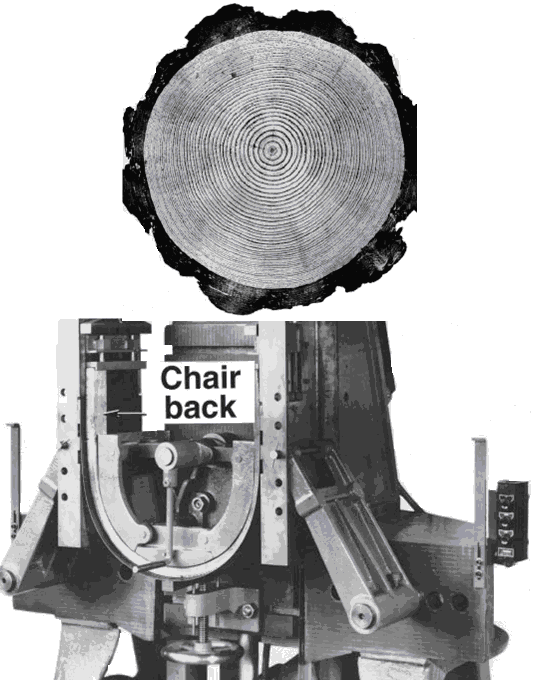
"Efficient use of our nation's timber resource is a vital concern. Because a major use of wood in the United States is in construction, particularly housing construction, good practice in this endeavor can have a profound impact on the resource.
This handbook is intended as an aid to more efficient use of wood as a construction material. It provides engineers, architects, and others with a source of information on the physical and mechanical properties of wood and how these properties are affected by variations in the wood itself.
Continuing research and evaluation techniques hold promise for wider and more efficient utilization of wood and for more advanced industrial, structural, and decorative uses."
Chapter 1 -- Characteristics and Availability of Commercially Important Wood
Chapter 2 -- Structure of Wood
Chapter 3 -- Physical Properties and Moisture Relations of Wood
Chapter 4 -- Mechanical Properties of Wood
Chapter 5 -- Commercial Lumber
Chapter 6 -- Lumber Stress Grades and Design Properties
Chapter 7 -- Fastenings
"Nails in use resist withdrawal loads, lateral loads, or a combination of the two. Both withdrawal and lateral resistance are affected by the wood, the nail, and the condition of use. In general, however, any variation in these factors has a more pronounced effect on withdrawal resistance than on lateral resistance. The serviceability of joints with nails laterally loaded does not depend greatly on withdrawal resistance unless large joint distortion is tolerable."
Chapter 8 -- Structural Analysis Equations
Chapter 9 -- Adhesive Bonding of Wood Materials
Chapter 10 -- Wood-Based Composites and Panel Products
Chapter 11 -- Glued Structural Members
Chapter 12 -- Drying and Control of Moisture Content and Dimensional Changes
Chapter 13 -- Biodeterioration of Wood
Chapter 14 -- Wood Preservation
Chapter 15 -- Finishing of Wood
Chapter 16 -- Use of Wood In Building and Bridges
Chapter 17 -- Fire Safety
Chapter 18 -- Round Timbers and Ties
Chapter 19 -- Specialty Treatments
U.S. Department of Agriculture, Forest Service, Forest Products Laboratory
See all Topics
by dklippert
WINDOWS Files and Settings Transfer Wizard Let MS do the heavy lifting Computers will only put up with physical and programmatic abuse for so long. Also manufactures keep coming up with another latest and best. What ever the rational, when the time come to move from one machine to another, take a look at these tutorials on the use of the Transfer wizard that comes with Windows XP.
by dklippert
FRONTPAGE Googol's of Deskbars The competition grows Remember back less than two years ago when deskbars for search engines appeared? These add-ins could search the Internet or your local machine faster than before. Google was one of the first. Now there are competitors. Here are some reviews and comparisons: GoebelGroup.com: Desktop Search Tools Matrix Pandia.com: Desktop search tools
by dklippert
EXCEL Information Functions Who, What, Where If you need to know if automatic calculation is on or off or the number of worksheets that are active, Excel can display the INFO. System Information: Current directory =INFO("directory") Available bytes of memory =INFO("memavail") Memory in use =INFO("memused") Total bytes of memory =INFO("totmem") Number of active
by dklippert
From one presentation to another
Most of you would know that you can insert slides from another presentation by using the Slides from files menu option in the Insert menu.
This is another (harder) way to do the same.
Open the presentations you want to copy/move slides to and from.
Click Slide Sorter on the View menu. On the Window menu, click Arrange All to display both presentations.
Click the slide you want to move, and drag it to the other presentation. When you drag and drop slides between presentations or from PowerPoint to other apps, Windows moves the slides instead of copying them. To keep the slides in the original presentation as well, press Ctrl while dragging and dropping.
To select multiple consecutive slides, click on the first one, then click on the last one while pressing the Shift key on the keyboard, and all slides between the first and the last will appear highlighted.
Note: To select more than one noncontiguous slide, press Ctrl while you click.
Also:
BellaOnLine.com:
Borrowing an Existing Slide from Another Presentation
Colgate University:
Inserting Slides from Another PowerPoint Presentation
[Updated entry from 1/8/2004]
See all Topics
by dklippert
Good orderly direction
An array is defined as "An orderly arrangement". It can be thought of as a collection of data packaged in a container. The individual items in the container can be selected by referring to their location; first, second, and so on.
"Have you ever sat in front of your monitor pulling your hair out trying to identify duplicate entries in a list? If so, you should learn about Microsoft Excel's array formulas. In fact, you can use array formulas to perform calculations that are otherwise impossible in Excel, and you can enhance the power of some of the program's existing functions."
Excel's Array Formulas
By Helen Bradley
Chip Pearson:
Introduction To Array Formulas
"Array Formulas are formulas that work with arrays, instead of individual numbers, as arguments to the functions that make up the formula"
PacBell.net/beban/:
The file "Array Functions" contains 27 Function Procedures and 2 Sub Procedures for manipulating arrays (and worksheet ranges).
Excel Tools
Mumnet.tripod.com:
( Mathematical Ulterior Motives)
Ignorance - an excellent starting point for learning
Bob Ulmas:
Using Array Formulas in Excel
Daily Dose of Excel:
Anatomy of an Array Formula
Support.Microsoft.com:
Sample Visual Basic macros for working with arrays
Limitations for working with arrays in Excel
When to use a SUM(IF()) array formula
[Updated entry from 1/11/2004]
See all Topics
by dklippert
More than everything you wanted to know about wood and wood things
"Efficient use of our nation's timber resource is a vital concern. Because a major use of wood in the United States is in construction, particularly housing construction, good practice in this endeavor can have a profound impact on the resource.
This handbook is intended as an aid to more efficient use of wood as a construction material. It provides engineers, architects, and others with a source of information on the physical and mechanical properties of wood and how these properties are affected by variations in the wood itself.
Continuing research and evaluation techniques hold promise for wider and more efficient utilization of wood and for more advanced industrial, structural, and decorative uses."
Chapter 1 -- Characteristics and Availability of Commercially Important Wood
Chapter 2 -- Structure of Wood
Chapter 3 -- Physical Properties and Moisture Relations of Wood
Chapter 4 -- Mechanical Properties of Wood
Chapter 5 -- Commercial Lumber
Chapter 6 -- Lumber Stress Grades and Design Properties
Chapter 7 -- Fastenings
"Nails in use resist withdrawal loads, lateral loads, or a combination of the two. Both withdrawal and lateral resistance are affected by the wood, the nail, and the condition of use. In general, however, any variation in these factors has a more pronounced effect on withdrawal resistance than on lateral resistance. The serviceability of joints with nails laterally loaded does not depend greatly on withdrawal resistance unless large joint distortion is tolerable."
Chapter 8 -- Structural Analysis Equations
Chapter 9 -- Adhesive Bonding of Wood Materials
Chapter 10 -- Wood-Based Composites and Panel Products
Chapter 11 -- Glued Structural Members
Chapter 12 -- Drying and Control of Moisture Content and Dimensional Changes
Chapter 13 -- Biodeterioration of Wood
Chapter 14 -- Wood Preservation
Chapter 15 -- Finishing of Wood
Chapter 16 -- Use of Wood In Building and Bridges
Chapter 17 -- Fire Safety
Chapter 18 -- Round Timbers and Ties
Chapter 19 -- Specialty Treatments
U.S. Department of Agriculture, Forest Service, Forest Products Laboratory
See all
Topics
by dklippert
Let MS do the heavy lifting
Computers will only put up with physical and programmatic abuse for so long.
Also manufactures keep coming up with another latest and best.
What ever the rational, when the time come to move from one machine to another, take a look at these tutorials on the use of the Transfer wizard that comes with Windows XP.

Microsoft.com:
Using the Files and Settings Transfer Wizard
By Sharon Crawford
Step-by-Step Guide to Migrating Files and Settings
AumHa.org:
(Windows Support Center)
Files and Settings Transfer Wizard
(F.A.S.T. for Short)
by Gary Woodruff
MC MCSE.com:
Using the Files and Settings Transfer Wizard
by Jason Zandri
See all Topics
by dklippert
The competition grows
Remember back less than two years ago when deskbars for search engines appeared? These add-ins could search the Internet or your local machine faster than before. Google was one of the first. Now there are competitors.
Here are some reviews and comparisons:
GoebelGroup.com:
Desktop Search Tools Matrix
Pandia.com:
Desktop search tools
University of Wisconsin E-Business Consortium:
Benchmark Study of Desktop Search Tools (PDF)
("There?s More to Search than Google & Yahoo!
An Evaluation of 12 Leading Desktop Search Tools")
(UWEBC Decision Tools)
Google.com
Google Desktop Beta
SearchEngineWatch.com:
Google Enhances Desktop Search
OReillyNet.com:
Google Your Desktop
Copernic.com:
Copernic Desktop Search
MSN.com
MSN Search Toolbar
Yahoo.com:
Yahoo! Desktop Search
Ask.com:
Ask Jeeves Desktop Search
Blinkx.com
blinkx v3.0 BETA
Googol:
"A googol is the large number 10100, that is, the digit 1 followed by one hundred zeroes. The term was coined in 1938 by nine-year-old Milton Sirotta, nephew of American mathematician Edward Kasner."
See all Topics
by dklippert
Who, What, Where
If you need to know if automatic calculation is on or off or the number of worksheets that are active, Excel can display the INFO.
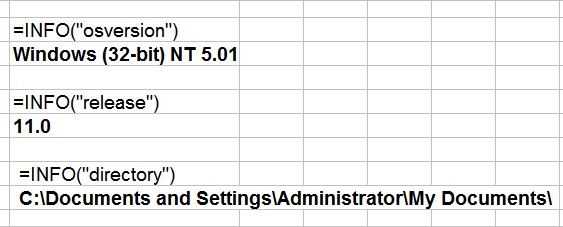
System Information:
Current directory
=INFO("directory")
Available bytes of memory
=INFO("memavail")
Memory in use
=INFO("memused")
Total bytes of memory
=INFO("totmem")
Number of active worksheets
=INFO("numfile")
Cell currently in the top left of the window
=INFO("origin")
Operating system
=INFO("osversion")
Recalculation mode
=INFO("recalc")
Excel version
=INFO("release")
Name of system. (PC or Mac)
=INFO("system")
More:
Excel-VBA.com:
Excel Spreadsheet Information Functions
See all Topics
by dklippert
Ask your peers
Here is a forum populated by Access users and developers around the world.
Just a few of the recent inquiries:
See all Topics
by dklippert
Ask your peers
Here is a forum populated by Access users and developers around the world.
Just a few of the recent inquiries:
See all Topics
by dklippert
Design suggestions
I haven't done any remodeling of this blog in awhile, but when I do I'll be looking at Jennifer Apple's site:
"Once you choose a blogging service and set up an account, you will be provided with a standard blog template. But this template will suffer from a cookie-cutter design, and if you don't personalize it your blog may become lost. To be noticed your blog needs to make a splash - as there are more than ten million blogs out there. So what we'll concentrate on here is working with some design elements that can help you add more zing to your blog."
Tips For Blog Templates & Blog Design In Photoshop
Here are a few of the link categories:
See all Topics
by dklippert
What information are you giving away?
Word documents contain a lot of Metadata. Information about the Author, and, sometimes, a history of edits.
Here is a freeware program that dynamically analyses your work.
"TRACE! analyzes Microsoft Office documents and provides an "Always-On" document security risk rating to alert you to the presence of potentially costly violations of regulations as well as inside-out breaches of information security.
- Dynamic tracking of nearly 100 content security, privacy and compliance violations
- Always-on alerts with risk level warnings on problems in new and existing documents
- On demand or batch assessment of documents in folders, email and on websites
- Automatically updates as legislation and regulations change.
- Generating a report with TRACE! can be done in any of the following situations:
- On an active document that you may be working on
- By scanning a single document, multiple documents or a folder
- By scanning email
- By scanning a Website"
Also see:
Personal Information
See all Topics
by dklippert
By Ron Carter
ASIN 7243 5 90832 2 3
Blue Note 2003

About the Artist
Ron Carter on bass, Russell Malone on guitar, Mulgrew Miller on piano
"Ron Carter is among the most original, prolific, and influential bassists in jazz. With more than 2,500 albums to his credit, he has recorded with many of music's greats: Tommy Flanagan, Gil Evans, Lena Horne, Bill Evans, B.B. King, the Kronos Quartet, Dexter Gordon, Wes Montgomery, and Bobby Timmons. He later toured Europe with Cannonball Adderley.
From 1963 to 1968, he was a member of the classic and acclaimed Miles Davis Quintet. He was named Outstanding Bassist of the Decade by the Detroit News, Jazz Bassist of the Year by Downbeat magazine, and Most Valuable Player by the National Academy of Recording Arts and Sciences.
In 1993 Ron Carter earned a Grammy award for Best Jazz Instrumental Group, the Miles Davis Tribute Band and another Grammy in 1998 for Call 'Sheet Blues', an instrumental composition from the film 'Round Midnight."
Recording Description
"Tasteful" jazz
Contents
1. The Golden Striker
2. On And On
3. N.Y. Slick
4. Concierto De Aranjuez (Adagio Theme)
5. Cedar Tree
6. A Quick Sketch
7. Parade
8. A Theme In 3/4
9. Autumn Leaves
See (and hear):
RonCarter.net
(If you want some jazz to fill in the spaces while you work, you can have continuous sounds from this site)
[updated entry from 1/1/2004]
See all Topics
by dklippert
Don't look like spam
A discussion:
"Transactional email can be a website's customer service ambassador, but messages must first survive a ruthless selection process in the user's in-box. Differentiating your message from spam is thus the first duty of email design.
Email is one of a website's most powerful tools for strengthening customer service and increasing users' confidence and trust in the site. Confirmation messages and other automated transactional email can complete the user experience: they reach out to customers in ways that are otherwise impossible for websites, which must sit still and wait for users to approach."
From
Dr. Jakob Nielsen's Alertbox
Automated Email From Websites to Customers
[
updated entry from 1/2/2004
]
See all
Topics
by dklippert
Hidden files
If you don't use a third party "zipper", like WinZip, when you attempt to locate a zipped file to attach to an email message, the file appears to have vanished. You are forced to open Windows Explorer, find the file and then drag it into the Outlook message box
Cause: Windows has a system component that treats zip files like ordinary file folders and Outlook sees these files as folders. In most cases, it only happens when you don't have third party compression programs installed, so you may see the behavior on one system but not another.
Solution: Disable Compressed folders. If you use a third party program you can leave compressed folders disabled.
To disable the feature at the Start menu, Run command, type:
regsvr32 /u zipfldr.dll
To restore the functionality, return to Start Menu, Run command and type:
regsvr32 zipfldr.dll
Slipstick.com:
Outlook doesn't display zip files in the Insert file dialog
WindowsNetworking.com:
Disable Windows XP's built-in zip support
TweakXP.com:
Disable Search from looking in zip (compressed) files
PCAuthority.com:
Tech Support - Windows Search
See all Topics
by dklippert
Installation warnings
A favorite trick of spyware programs is to make changes to the Registry. They attempt to do this in the background without your knowledge. WinPatrol is like having a guard dog on duty to warn when intruders are skulking about.
Scotia, New York, August 9th, 2005
"BillP Studios announced today that results of recent tests show WinPatrol PLUS with R.I.D. will detect 100% of the top spyware threats on a Microsoft Windows-based PC. Recent results by independent testers confirmed WinPatrol's "Real-time Infiltration Detection" methodology is effective in alerting users to newly installed software."

"WinPatrol takes snapshot of your critical system resources and alerts you to any changes that may occur without your knowledge. You'll be removing dangerous new programs while others download new reference files.
WinPatrol isn't the only software we recommend for complete safety but with Scotty on Patrol you'll find yourself informed on what's going on inside your computer. WinPatrol puts you back in control of your computer so you'll know what programs are and should be running at all times."
See all
Topics
by dklippert
Highlight entries
Conditional formatting can be set up by selecting the whole range, or for the first cell in the range and then copy down that conditional format. I find it is usually just as easy to select the whole range to start with. The formula will adjust itself.
In this example, cell B2 has a heading of Product Numbers.
Select cell B3 (or the entire targeted range) and from the menu.
Select Format > Conditional Formatting.
The Conditional Formatting dialog opens with the initial dropdown saying
"
Cell Value Is
".
Click the arrow next to this, and choose
"
Formula Is
".
After selecting "
Formula Is
", the dialog box changes appearance.
Instead of boxes for "
Between x and y
", there is now a single formula box.
You can type in any formula as long as that formula will evaluate to TRUE or FALSE.
The formula to type in the box is
=COUNTIF(B:B,B3)>1
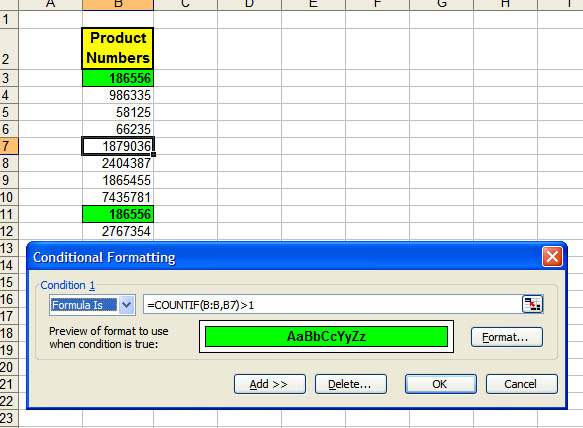
This says, "look through the entire range of column B.
Count how many cells in that range are the same value as what is in B3."
(In the graphic, B7 is the Active cell.)
That same comparison will be made in every cell that contains the conditional formatting.
(If your data is in column E and you are setting the first conditional formatting up in E5, the formula would be =COUNTIF(E:E,E5)>1.)
Anytime a duplicate appears in the range, it will receive the special formatting.
In this example, any time a duplicate number appears anywhere in column B, even if it is not itself formatted, the selected range will reflect the duplicate.
=COUNT(B:B,B3)>2 would count entries that appear more than two times.
=COUNT(B:B,B3)=2 would count entries that appear twice.
If you want only a part of the column in the formula, it is easier to use absolute addresses, such as =COUNT($B$3:$B$200,B3)>1
Adapted from
MrExcel.com
Also see:
Chip Pearson's
discussion of duplicates:
Duplicate And Unique Items In Lists
and:
Contextures.com:
Conditional Formatting
(See Hide Duplicate Values)
[
Updated entry from 1/3/2004
]
See all
Topics
by dklippert
Empty entries
"An example might be fax numbers in a customer database. If you store a Null, it means you don't know whether the customer has a fax number.
If you store a zero-length string, you know the customer has no fax number.
Access gives you the flexibility to deal with both types of 'empty' values."
From John L. Viescas at Viescas.com
Also:
AccessSolutions.co.uk:
Defining Null Values
and:
Make Null Zero
See all Topics
by dklippert
Is this your neighbor?
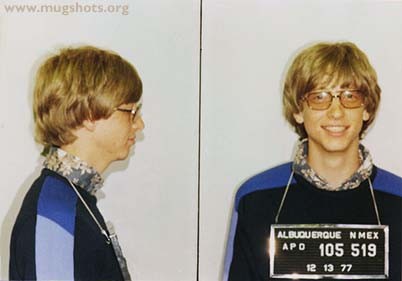
"Three things you can count on in life: death, taxes, and screwing up. Don't feel badly, though. Everyone does it, including your favorites from the worlds of business, television, music, and film. And most likely, no one is looking up your photograph on the web to see how badly you messed up this time! You won't believe whom you'll find with one of those attractive letter boards with the name of the local lockup underneath his or her illustrious chin."
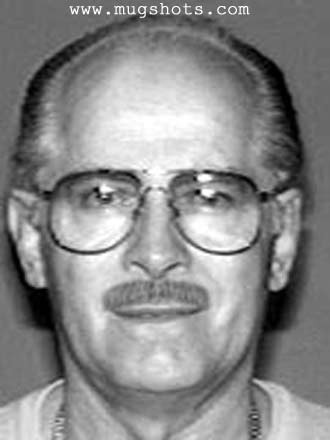
JAMES J. BULGER
Date of Birth: September 3, 1929
Hair: White/Silver
Place of Birth: Boston, Massachusetts
Eyes: Blue
Height: 5'7" to 5'9"
Complexion: Light
Weight: 150 to 160 poundsBulger is an avid reader with an interest in history. He is known to frequent libraries and historic sites. Bulger is currently on the heart medication Atenolol (50 mg) and maintains his physical fitness by walking on beaches and in parks with his female companion, Catherine Elizabeth Greig.
Bulger and Greig love animals and may frequent animal shelters. Bulger has been known to alter his appearance through the use of disguises. He has traveled extensively throughout the United States, Europe, Canada, and Mexico.
Caution James J. Bulger is being sought for his role in numerous murders committed from the early 1970s through the mid-1980s in connection with his leadership of an organized crime group that allegedly controlled extortion, drug deals, and other illegal activities in the Boston, Massachusetts, area.
He has a violent temper and is known to carry a knife at all times. Considered armed and extremely dangerous if you have any information concerning this person, please contact your local FBI office or the nearest U.S. Embassy or consulate.
Reward The FBI is offering a $1,000,000 reward for information leading directly to the arrest of James J. Bulger.
Also ( in a different category):
Your worst day:
And then there's:
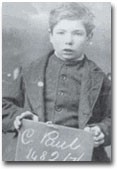
Charles Paul
" 14 days in an adult gaol and five years in a reformatory for allegedly stealing six pairs of his father's drawers."
Here's more information than you ever wanted to know:
State of Texas:
Death Row
See all
Topics
by dklippert
Help from an expert
You'll use at least one of these tips in your next delivery.
Here are two of the suggestions:
12. Create an automatic agenda slide:Use the Summary Slide feature to create a list of your slideshow's slides. Select the slides to include in the Slide Sorter view, then click Summary Slide on the Outlining toolbar. Change the title of the new slide to Agenda and move it to the beginning of the presentation. From this slide, you can hyperlink each of the other slides' names to their corresponding slides, then use this Agenda slide to navigate to topics the audience wants to discuss.
34. Create a slide list:
Display the Outline pane. (In PowerPoint 2002, display the Outline tab of the Outline pane.) Press ALT+SHIFT+1 to collapse the entire outline to show only slide titles. (This shortcut toggles between collapsing and expanding the outline.) Choose FILE > PRINT. From the
Print What
drop-down list, choose Outline View. Click OK.
Presentations.com:
44 tips and tricks to help turbocharge your PowerPoint presentations
By Ellen Finkelstein
See all
Topics
by dklippert
Avoid the warning
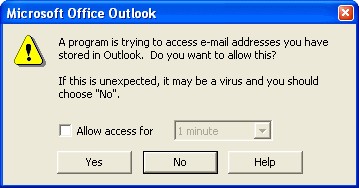
"A program is trying to automatically send e-mail on your behalf. Do you want to allow this?"
or:
This is the result of a security update in Outlook 2000 +.
Here's how to get out of the problem:
. . ."a tiny program that sits in the taskbar and clicks the Yes button on behalf of you, when Outlook's Security Guard opens prompt dialog saying that a program is trying to send an email with Outlook or access its address book. You can suspend/resume it by double-clicking its taskbar icon. Developers can automate its behavior by sending special messages."
Information About the Outlook E-mail Security Update
Also see:
Automation Security from Slipstick.com
Administrative Options for the Outlook E-mail Security Update
[Updated entry from 1/5/2004]
See all Topics
by dklippert
Word!
I used to ask "How many have ever used WordPerfect?" Over the years it has gone from about 50% to blank stares.
WordPerfect (WP) couldn't bring itself to accept the existence of Windows, and Microsoft ran past, taking over the market.
Word is Object-Oriented, WordPerfect is Stream-Formatted.
"What does this mean? Well, this basically means that when you make a change to a WordPerfect document, the changes take effect 'From THAT Point Forward'. You generally don't need to select an Object (e.g., a word, sentence, or a paragraph) in order to effect a change. You can simply select a color, a font, a paragraph style, etc, and the whole document will be affected (as stated, from that point forward). Stream Formatted is, as you can imagine, like a stream of formatting that flows throughout the document.
Word, on the other hand, is object-oriented. Every letter, word, sentence, and paragraph is an object. To help people grasp the concept of object-oriented programming, Microsoft uses a simple analogy: oranges. You can imagine that an orange has several attributes that can be changed: it has a color, a texture, etc. It can be changed by being painted or peeled. Therefore, once you understand that you need to select an object when you want to manipulate your Word document, you begin to understand how to work in Word."
WP is still around. Mostly used in the legal profession by those who still bemoan the loss of powdered wigs.
Here are some references:
The history of WordPerfect:
Almost Perfect
(a book by W. E. Peterson)
Wikipedia:
WordPerfect
See all
Topics
by dklippert
MSDN Portal
While you can code HTML for a web page using Notepad, FrontPage can help to quickly develop a more sophisticated site.
"Web sites are more sophisticated than ever before, and they require a sophisticated application that can keep pace with your Web development. FrontPage is a Web site development and management application that can help you produce professional Web sites that are dynamic and interactive."
Getting Started with FrontPage
"Whether you're interested in Web development or in extending FrontPage, you'll find information here that helps you capitalize on the power of technologies like XML, XSLT, ASP, ASP.NET, and Microsoft SharePoint Products and Technologies."
Here are some suggested blogs:
Kathleen Anderson's Blog (MVP)
See all
Topics
by dklippert
Order tabs
Worksheets can be dragged and dropped into any order required. They can be set up in numeric or alpha order, but doing it by hand is a bother.
Chip Pearson has written some macros that will do the job for you:
Here's the code to sort by tab color:
Sub GroupSheetsByColor()Dim Ndx As LongDim Ndx2 As Long For Ndx = 1 To Worksheets.Count - 1 For Ndx2 = Ndx To Worksheets.Count If Worksheets(Ndx2).Tab.ColorIndex = _ Worksheets(Ndx).Tab.ColorIndex Then Worksheets(Ndx2).Move after:=Worksheets(Ndx) End If Next Ndx2 Next NdxEnd Sub
Sorting Worksheets In A Workbook
(The colorindex variable chooses one of the 56 colors in Excel's basic palette.
Here are all the colors and numbers as compiled by F. David McRitchie:
Excel Colors )
Here is another take on sorting from Carla Jolley:
Using VBA to Sort Workbooks
See all Topics
by dklippert
Make your own
Give your kid an award for not setting the house on fire in the last 24 hours.
Make a formal presentation to your dog for scaring away imaginary burglars.
The desktop publishing power of your computer can create official (looking) honors.
Here's how to create your own template:
OfficeArticles.com:
Create a Certificate Template in Microsoft Word
Here's a collection of free templates:
Southworth.com
Free Award And Certificate Templates
EducationWorld.com:
Award Certificates
BrainyBetty.com
Certificate Templates
(These are PowerPoint templates)
Office.microsoft.com:
Certificates
(86 Certificates, labels, etc. Word, PowerPoint, and Publisher)
See all
Topics
by dklippert
Exchange not required
Outlook has made it possible to share your calendar on the Internet as a web page.
Add an Outlook calendar to a Web page
Here's a step by step pictorial:
Stanford Linear Accelerator Center:
Publishing an Outlook Calendar to the Web
Also:
Sliptick.com:
Publishing Outlook Calendars on the Internet or an Intranet
See all Topics
by dklippert
No cost lessons
This site provides quite complete on line manual about the care and feeding of MS Access.
What makes this tutorial special are the sample database files that can be used to demonstrate the various features.
"Microsoft Access is a development environment used to create computer databases for the Microsoft Windows family of operating systems. This site provides lessons, examples, and links on how to use and explore MS Access. We also separately provide some guidance on VBA, the programming language that ships with Microsoft Access."
See all
Topics
by dklippert
WORD
Start Menu List
List programs
Here is an interesting macro, with instructions on how to install it and a template that can be downloaded.
I recommend using the template to avoid the problems that can occur when pasting code.
A Macro to List All Programs in the Windows Start Menu
by Greg Chapman, MVP
"TechTrax is a free, monthly Ezine (online magazine) published the beginning of each
by dklippert
OUTLOOK
Dynamic Distribution Lists
Group the contacts
If you want to send an email to a list, but omit a few of its members, Click on the plus sign next to the distribution name. Click OK to expand the list and remove members who you do not want to receive the email.
Rather than creating and updating a distribution list as a list of names, you could use Categories.
To add or remove names from
by dklippert
FRONTPAGE
Googols of Deskbars
The competition grows
Remember back less than two years ago when deskbars for search engines appeared? These add-ins could search the Internet or your local machine faster than before. Google was one of the first. Now there are competitors.
Here are some reviews and comparisons:
GoebelGroup.com:
Desktop Search Tools Matrix
Pandia.com:
Desktop search tools
by dklippert
ADDENDUM
Bathroom Appliances
One man's toilet is . . .
Bill Gates mansion bathroom tour
(a story to be read and enjoyed but not believed)
Terry Love:
Consumer toilet reports
Gizmodo.com:
Toilets
"We've all been there. Nature calls and the only answer is a toilet with more levers, switches, and buttons than Wily E. Coyote's latest invention. What to do? If you're Bob Cromwell, the answer is
by dklippert
POWERPOINT Web Page on a Slide All in one place You can put a hyperlink on a slide. During the presentation, you can click on the link, invoke the browser and show the web site. Rather than that, how about placing the web page itself on the slide? Not a screen shot, but the actual, fully functional page. When you're through with the demonstration, one click takes you to the next slide. "No
by dklippert
POWERPOINT
Web Page on a Slide All in one place
You can put a hyperlink on a slide. During the presentation, you can click on the link, invoke the browser and show the web site.
Rather than that, how about placing the web page itself on the slide?
Not a screen shot, but the actual, fully functional page. When you're through with the demonstration, one click takes you to the next slide.
"No
by dklippert
Ready, Set
Here's more information on the Windows Start menu:
"The list of programs on the Start menu is divided into two parts: the programs displayed above the separator line (also known as the pinned items list) and the programs displayed below the separator line (also known as the most frequently used programs list).
The programs on the pinned items list remain there and are always available for you to click to start them. You can add programs to the pinned items list."
Most Frequently Used programs (MFU) list is empty
Glencoe Norton online:
Customizing the Start Menu in Windows XP
Also:
Start Menu List
See all Topics
by dklippert
MUSIC
Fitness to Practice
Paracetamoxyfrusebendroneomycin
Adam Kay 10.30 outside the UK). Raising money for Macmillan Cancer Relief
See all Topics
by dklippert
EXCEL
Startup Woes
When kickstart is inappropriate
It happens to me less often than in the past, but when Excel does not want to open correctly, here are some resources to solve the problem.
"There are several reasons why you may experience problems when you start Microsoft Excel. This article discusses how to troubleshoot the cause of the startup problem, and possible remedies to correct the
by dklippert
WORD
Merge Formatting
$ lost
The data in Access or Excel has been formatted. You have leading zeros, percents, currency is formatted and so on.
Word 2002+, however loses the formatting when a mail merge is attempted.
Here's a fix.
Word 2002 has three potential data access methods, the "old fashioned" ODBC or DDE and the newer OLE DB.
ODBC and OLE DB can, quickly, extract data from a source
by dklippert
ACCESS
Text Box Highlights
Change background
It can be difficult to tell which text box on a form you're currently working with.
One solution is to highlight the current position, with a different background.
Access 2000+ allows you to do this with conditional formatting, but you can also get a similar result using code. To do so, create a new Module and add the following code:
Function
by dklippert
OUTLOOK Mail your Word Send your thoughts You can write an email message in Word, but there is no need to copy and paste it into Outlook. Select Mail Recipient. Word will open your default email program and place the message, or document in the composition window or include it as an attachment. Ed Bott writes about this and a way to overcome some attachment limitations: Allow Outlook to send
by dklippert
ADDENDUM
Pack Light
Traveler's friend
The Universal Packing List
By Mats Henricson
"In January 1988 I left Sweden for warmer climates - Africa. I was there for 5 months. A trip like that is impossible without proper planning. For months I compiled a list of things I might need, as well as things I had to do before I hit the road. When I came back from Africa I realized I could use the list for
by dklippert
POWERPOINT Slide on a Web Page Make it an Internet show A little bit ago we talked about putting a live web page directly on a slide: Web Page on a Slide. This hint is about converting your PowerPoint show into a web presentation. Here's a slide show on the web showing how it's done: EllenFinkelstein.com: Publishing a Presentation to the Web Also: Indezine.com: PowerPoint 2002-2003 Web
by dklippert
WINDOWS Burn CD's The how and howevers It has become less complicated to create your own CDs for data backup or music. "When I first started authoring CDs, the CD recorder itself cost $35,000 (for the cheap model), and blank CDs were a mere $50 apiece. I never would have guessed that someday they'd both cost a fraction of what they did then. In part, this is what has fueled the explosive growth
by dklippert
FRONTPAGE Look at Yourself Information on line Here is a site that will test your connection speed, tell you your latitude and longitude, IP address and more. They provide a one stop location to validate email addresses, locate the host server for a domain, plus trace, ping etc. You can also find out what information your browser is broadcasting to the world. Internetfrog.com See all
by dklippert
Send your thoughts
You can write an email message in Word, but there is no need to copy and paste it into Outlook.
Select File>Send To>Mail Recipient. Word will open your default email program and place the message, or document in the composition window or include it as an attachment.
Ed Bott writes about this and a way to overcome some attachment limitations:
Allow Outlook to send and receive URLs
In the future there will be no need to select Word as your email editor. It will be the only editor Outlook 12 uses.
Here's the report from:
Channel 9
Office 12 will, probably, use the more direct appellation "Email":


For other Office 12 screenshots, see:
Bink.Nu
See all
Topics
by dklippert
Make it an Internet show
A little bit ago we talked about putting a live web page directly on a slide:
Web Page on a Slide
.
This hint is about converting your PowerPoint show into a web presentation.
Here's a slide show on the web showing how it's done:
EllenFinkelstein.com:
Publishing a Presentation to the Web
Also:
Indezine.com:
PowerPoint 2002-2003 Web Options
RDPSlides.com has this article:
PowerPoint on the Web
Here's how to use the Publishing Wizard:
Using the Web Publishing Wizard to upload your files to the web
Office.Microsoft.com:
Show slide animations during a Web presentation
See all
Topics
by dklippert
The how and howevers
It has become less complicated to create your own CDs for data backup or music.
"When I first started authoring CDs, the CD recorder itself cost $35,000 (for the cheap model), and blank CDs were a mere $50 apiece. I never would have guessed that someday they'd both cost a fraction of what they did then. In part, this is what has fueled the explosive growth of the CD burning industry.
But now, Windows XP makes this technology a mainstream activity. Built-in support for CD burning makes the task easier than ever before-as easy as copying to a floppy disk."
CD Burning Becomes Routine in Windows XP
Also:
Windows XP CD Burning Secrets
By Ed Bott
Burning CDs in Windows XP
By Alex Nichol AumHa.org
CD-Recordable FAQ
Simple answers to simple questions
Also:
CDBurnerXP Pro
CDBurnerXP Pro is a free CD/DVD burning solution.
With this software you can burn CD-R, CD-RW DVD+R/RW DVD-R/RW discs.
See all Topics
by dklippert
Information on line
Here is a site that will test your connection speed, tell you your latitude and longitude, IP address and more.
They provide a one stop location to validate email addresses, locate the host server for a domain, plus trace, ping etc.
You can also find out what information your browser is broadcasting to the world.
See all
Topics
by dklippert
EXCEL
Time without Limits
No Delimiters
Excel is most happy when you enter dates and times with the correct separators.
1/1/2004 is a good date. So is 1-1-2004.
If you just entered 112004 in a cell formatted as a date you'll get:
Wednesday, August 27, 2206
the 112,004th day since January 1, 1900.
Chip Pearson has come up with VBA code, using the Worksheet_Change event procedure, that will
by dklippert
Show who's in charge
"Bend Word is written around Macintosh Word 2001: but it's highly recommended for anyone who wants to really unleash the power of Word: this is (huge) article is "Word 101" for people who really want Word to work for them instead of the other way around.
For the most part it's structured like a dictionary with self-contained articles, so even though it's almost 200 pages long, it isn't difficult to find information - just as with a dictionary! It's intended to be used on-screen rather than to be printed out, because the articles have clickable hyperlinks for instant access to related topics."
Article contributed by
Clive Huggan
(April 2005 edition)

[
updated entry from 1/28/2004
]
See all
Topics
by dklippert
OUTLOOK
Match Template to Account
Set your identity
If you have multiple email accounts you can use a different template for each account.
After creating the template, assigning it to an account and saving it, you can assign the template to a button.
Click the button and the selected template will appear using the assigned account to send the message.
Slipstick provides screenshots and
by dklippert
ACCESS
Defeat Personalized Menus
A fast way in
Personalized menus display just your recently used menu items for a few seconds before the entire menu is displayed.
If you like this feature and have left it enabled, you can display a full menu by double-clicking the menu name when you open it.
To turn this off, go to Customize Options and put a check by Always show full menus.
See all
by dklippert
ADDENDUM
Where on the World
Stats on a map
Various statistical findings superimposed on a world globe."This project started some eight years ago.
An attempt to do justice to the term 'political' and 'geo-political' globe.
Trying to tell the lie (of abstraction and visualization) that tells the truth.
By now there are more than 200 different globes."
3 Hour US Air Force
by dklippert
POWERPOINT
Gettysburg Address
Did Lincoln read Edward Tufte?
At one time or another many of you have see the PowerPoint version of Lincoln's 1863 presentation. (They called them speeches back then.)
Here's Peter Norvig's background rational for its creation and what followed after its release:
"Why I did it
"Doesn't he realize this presentation is a waste of time? Why doesn't he just tell
by dklippert
WINDOWS
Accessibility for All
Overcome the barriers
Microsoft has made a point of supporting the use of computers by as many people as possible.
You may not feel that you need this information now, but the time will come when you yourself are struck with even a temporary Carpel Tunnel problem. Or you pod mate in the cubical is having problems seeing the screen.
Here are some links that may
by dklippert
FRONTPAGE
Pictures Toolbar
Control your graphics
You may have used this toolbar in other applications; you may want to get to know it even better.
These tutorials looks at the toolbar which includes several easy-to-use features to tweak, enhance and position graphic images after they are inserted into a FrontPage web page.
OutFront.net:
The FrontPage Pictures Toolbar part I
The FrontPage
by dklippert
EXCEL Pivot Tables and Pivot Chart Links PivotTables allow you to create multidimensional data views by dragging and dropping column headings to move data around. J. Carlton Collins, CPA, president of ASA Research, LLC, is an accounting systems and spreadsheet expert. He will walk you through both the basic and complex issues involved. Microsoft Excel Pivot Tables Jon Peltier, has over 23
by dklippert
EXCEL
Pivot Tables
and Pivot Chart Links
PivotTables allow you to create multidimensional data views by dragging and dropping column headings to move data around.
J. Carlton Collins, CPA, president of ASA Research, LLC, is an accounting systems and spreadsheet expert.
He will walk you through both the basic and complex issues involved.
Microsoft Excel Pivot Tables
Jon Peltier, has over 23
by dklippert
WORD Background Printing Yes, you can! Remember back in the old days of Word before 2003? We would demonstrate how a background color or theme could be applied to a document. Then say something like, "But you can only see it on the screen." That changed with 2003. Go to Options. Go to the Print tab and on the Include with document section, put a check next to "Background colors and images"
by dklippert
WORD Background Printing Yes, you can! Remember back in the old days of Word before 2003? We would demonstrate how a background color or theme could be applied to a document. Then say something like, "But you can only see it on the screen." That changed with 2003. Go to Options. Go to the Print tab and on the Include with document section, put a check next to "Background colors and images"
by dklippert
OUTLOOK Fraudulent Email But it said my bank sent it! Phishing or counterfeit email is rife. Here is some information from PayPal, a company that is the subject of many scams: "A fraudulent (spoof) email pretends to be from a well-known company, such as PayPal or eBay, in an attempt to get personal information from you. People who send spoof emails hope to use your information - such as credit
by dklippert
ACCESS Alphabetize by One Field or the Other If one is missing, use the other Let's say you have a database that has the company name and a contacts name. In some cases the CompanyName field is empty. If that happens, you want to continue the alpha sort using the contact's LastName. To do this, you need to create an extra query field to provide the sort, using the NZ() function to replace the
by dklippert
WORD
Background Printing
Yes, you can!
Remember back in the old days of Word before 2003?
We would demonstrate how a background color or theme could be applied to a document. Then say something like, "But you can only see it on the screen."
That changed with 2003.
Go to Options.
Go to the Print tab and on the Include with document section,
put a check next to "Background colors and images"
by dklippert
OUTLOOK
Fraudulent Email
But it said my bank sent it!
Phishing or counterfeit email is rife. Here is some information from PayPal, a company that is the subject of many scams:
"A fraudulent (spoof) email pretends to be from a well-known company, such as PayPal or eBay, in an attempt to get personal information from you. People who send spoof emails hope to use your information - such as credit
by dklippert
ACCESS
Alphabetize by One Field or the Other
If one is missing, use the other
Let's say you have a database that has the company name and a contacts name.
In some cases the CompanyName field is empty. If that happens, you want to continue the alpha sort using the contact's LastName.
To do this, you need to create an extra query field to provide the sort, using the NZ() function to replace the
by dklippert
ADDENDUM
Crossword Puzzles
May I have a word with you?
Even if you're used to doing crosswords with a pen or a typewriter, you're sure to find something new at this site.
It has, of course, a selection of word sources.
Language dictionaries from Abenaki to Zulu with Mapudungun in between.
"So you like word games, do you? Well, you have come to the right place. We have the richest assortment
by dklippert
POWERPOINT
Safety Shows
Don't be sorry
The University of Vermont at Burlington has an area entitled "Safety Information Resources on the Internet collection."
As part of that collection, they offer 256 PowerPoint presentations on safety.
Topics range from "Basic Electrical Safety" and "Healthy Living: Exercise, Diet, and Stress" to "You Know You're A Safety Nut When...."
Keep this site in
by dklippert
WINDOWS
Who Needs a Mouse?
Finger tricks
Rather not use a mouse?
MouseKeys is designed for people who have difficulty using a mouse. MouseKeys allows you to use the numeric keypad to control the mouse pointer.
Click Start, click Control Panel, and then click Accessibility Options.
On the Mouse tab, under MouseKeys, select the Use MouseKeys check box.
To turn off MouseKeys, clear the Use
by dklippert
FRONTPAGE
Disable the Image Toolbar
Drop the bar
"When the user visits a web site and mouses over an image that meets particular requirements, the My Pictures hovering toolbar will appear after one half second, and will disappear immediately after the user moves the cursor off the image. The hovering toolbar has three to four buttons depending upon the browser client and user operating
by dklippert
EXCEL
Format Numbers
It's your choice
Here is an almost forgotten sample spreadsheet. It was constructed, for Microsoft, back in 1997 by Lori B. Turner, and is still relevant.
The sheets are protected. In order to see the cell formatting, you need to go to Protection to Unprotect Sheet . . . There is no password required
Formatting sample Workbook
Also: OzGrid:
Custom Formats
If you need to
by dklippert
WINDOWS Log on Screen Capture Snapped in the act When describing how to Sign on to Windows, it's nice to be able to show what the screen looks like. Print Screen won't work, because the cache has not been set up until after the process. Here's how it's done: Press Ctrl+Alt+Del to open the Windows Task Manager Click on the Processes tab and highlight Explorer.exe Click "End Task" in the
by dklippert
WORD
Clip Art Gallery
Sprinkle carefully
Judicious use of Clip art can spice up a document. Here's an article about how to customize existing pictures including:
Display clip-related toolbars
Customizing your clip art
Cropping
Sizing
Adding text wrapping
Blurring
Rotating and flipping
Adding a drop shadow
Edit clip art in Word Also:Clip art gallery
750+ Halloween clips
Clip Art demo
5 new
by dklippert
OUTLOOK Shipping Status Track UPS and FedEx With eBay and Amazon, packages are flying across the country 24 hours a day. This free Outlook add-in combines with Outlook's calendar to follow the path of an order. "Parcel Tracker is an add-in for Microsoft Outlook that automatically synchronizes an appointment item with a shipping service enabling you to track your package delivery / status
by dklippert
Snapped in the act
When describing how to Sign on to Windows, it's nice to be able to show what the screen looks like.
Print Screen won't work, because the cache has not been set up until after the process.
Here's how it's done:
If everything worked, your taskbar and desktop should have disappeared.
Don't worry, it's temporary.
Your taskbar and desktop should now re-appear.

Computing.net:
Screenshot of Windows XP login
(By Ender )
This works with Windows XP and Windows server 2003. Earlier versions did not have Logonui.exe.
I'm still looking for a way to get the classic Log on screen.

See all Topics
by dklippert
Sprinkle carefully
Judicious use of Clip art can spice up a document. Here's an article about how to customize existing pictures including:
Also:

5 new things about the Clip Art and Media site
Mary Sauer's Design Gallery Help
Microsoft Clip Art & Media Help
See all Topics
by dklippert
OUTLOOK
Shipping Status
Track UPS and FedEx
With eBay and Amazon, packages are flying across the country 24 hours a day, locating a shipment can be important. This free Outlook add-in combines with Outlook's calendar to follow the path of an order.
"Parcel Tracker is an add-in for Microsoft Outlook that automatically synchronizes an appointment item with a shipping service enabling you to
by dklippert
ADDENDUM
Il Circo Dei Rocchetti Rotolanti
The Rolling Reels Circus
Giuseppe (Pino) Civitarese is an oceanographer from Trieste.
He has a small but fascinating collection of paper automata.
"Automata, from the Greek automatos, "acting of one?s own will, self-moving" is more often used to describe non-electronic moving machines, however, especially those that have been made to resemble human
by dklippert
Start at the end
Here's a lively paper on the ins and outs of giving a presentation and communicating ideas.
"In the newspaper business they teach you to put the least important stuff at the end, so if your story was cut for length the reader wouldn't miss much. But in a presentation, it helps to start with the end, because that's when the results should start coming in.
There are two ways to start from the end.
The first is asking yourself what results you want from the presentation. Is it sales? Understanding? Recruits? Strokes? Whatever you're looking for, that's where you need to start, because without a clear outcome in mind, there's no way your presentation will come out clear.
The second is to state your conclusion. Larry Gottlieb calls this the 'conclusion first' approach. First impressions last longest. If you don't say the one thing you need to say right up front, it may never get heard.
Starting with your conclusion also tells the audience you won't waste their time with preliminaries."
It's The Story, Stupid
By Doc Searls
Also see:
Beyond Bullet Points
By Cliff Atkinson
[ updated entry from 1/16/2004 ]
See all Topics
by dklippert
Start at the end
Here's a lively paper on the ins and outs of giving a presentation and communicating ideas.
"In the newspaper business they teach you to put the least important stuff at the end, so if your story was cut for length the reader wouldn't miss much. But in a presentation, it helps to start with the end, because that's when the results should start coming in.
There are two ways to start from the end.
The first is asking yourself what results you want from the presentation. Is it sales? Understanding? Recruits? Strokes? Whatever you're looking for, that's where you need to start, because without a clear outcome in mind, there's no way your presentation will come out clear.
The second is to state your conclusion. Larry Gottlieb calls this the 'conclusion first' approach. First impressions last longest. If you don't say the one thing you need to say right up front, it may never get heard.
Starting with your conclusion also tells the audience you won't waste their time with preliminaries."
By Doc Searls
Also see:
Beyond Bullet Points
By Cliff Atkinson
[
updated entry from 1/16/2004
]
See all
Topics
by dc guy
The old general rule for nonfiction writing is still a good one:
1. Tell them what you're going to tell them.
2. Tell them.
3. Tell them what you've told them.
by dklippert
ACCESS Source of Tables Identify a linked Access table's source When a database contains linked tables, you may need to find the location of the source file. One way is to: Open the table in Design view Clicking Yes when Access informs you that some properties can not be modified. Right-click on the window's title bar Select Properties from the shortcut menu. The location will appear in
by dklippert
ACCESS
Source of Tables
Identify a linked Access table's source
When a database contains linked tables, you may need to find the location of the source file.
One way is to:
Open the table in Design view
Clicking Yes when Access informs you that some properties can not be modified.
Right-click on the window's title bar
Select Properties from the shortcut menu.
The location will appear in
by dklippert
FRONTPAGE
Privacy and the Internet
What happens on your computer, stays . . .
Here are some protection suggestions:
"Links to numerous pages on the Web where home users can find software and information relevant to Windows PC privacy and security.
It also contains a rudimentary "checklist" of basic steps that home PC users can take to enhance their privacy and security while using the
by dklippert
EXCEL
Mac vs. PC
Spreadsheet vagaries
"Microsoft Excel 2004 for Mac and Microsoft Office Excel 2003 are similar in many ways. For example, the programs share a common file format and share most of the same features. However, there are some important differences that you should consider when you work with both Excel 2004 for Mac and Excel 2003."
Description of some of the differences between
by dc guy
by dklippert
WORD
Forms in Word
With and without code
Data entry forms can be designed and presented using VBA code. Another simpler way to do it is to construct a form directly in the Word document.
"Have you ever been asked to fill out a form in a word processor, only to discover that when you attempted to enter information, the lines on the form moved all over the page? Not to mention that the form was
by dklippert
What those little graphics mean
There's not much room in an Outlook icon to communicate information.
Robert Sparnaaij, MVP-Outlook, has put together a legend of these tiny pictures with their meanings.
Such as:
What Do The Icons Mean?
For more information see his web site:
How to Outlook
See all Topics
Sort by Trending