I had this happen with a Dell 1600SC server running SBS 2003 and unfortunately the boot partition ran so low on space to the point it would no longer boot. At which point I used a Partition Wizard bootable ISO image to make CD to boot with and extend the boot partition so SBS 2003 could boot properly. This worked, but everytime SBS 2003 would try to boot it would get to the loading windows screen, there would be a blue flash and the server would spontaneously reboot again. Next I tried booting, but before loading windows I hit F8 and selected the option to go into "Safe Mode" but this didn't work either. I also tried booting into "Last known Good Configuration" which failed as well. As a last ditch effort I tried "Disable automatic restart on system failure". At that point I could finally see that the error was an issue mounting the boot volume so I tried to use my SBS 2003 install CD's to enter the recovery console. Then I started having the same issue where the console wouldn't load and the server give me another stop error. I also tried several other types of bootable (linux / Windows PE) consoles but finally got a stop error that helped. This time it made reference to a "page file" issue which I knew right away was a RAM problem. So I got a copy of Memtest86 Server (bootable ISO image) and proceeded to test the RAM sticks one at a time (to see if I could isolate the bad ones). At first I thought all 4 sticks were bad but I soon realized you need to go into the bois to change your USB controller support first so I use F2>Bios>Integrated Devices>USB Controller>set to mouse without bios support>Save & exit. After that the RAM tested fine. Then I downloaded Dell's diagnostic tool and had it test all the hardware on the machine from a bootable CD. At this point everything tested fine except the SCSI hard drives which were showing errors (all had green lights though). So I rebooted and went into the Perc 4 controller (ctrl-m) and then ran the "Check Data Consistency" utility. It took around 5 hours to scan the full logical drive (6 physical hard drives) but it fixed all the parity issues. I then proceeded to boot again and see if it would start SBS 2003 and I was finally able to get it to a gray screen where the OS ran "chkdsk" and was able to repair itself. After that, SBS 2003 booted normally. It took me 3 painful days to figure this out and I hope this helps other avoid the issue I went through.
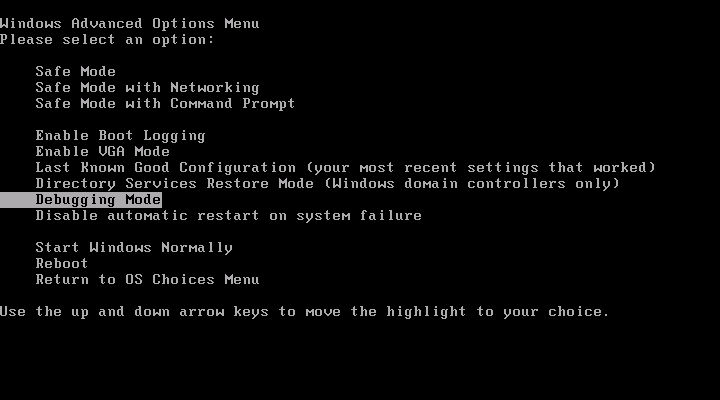
Here's the Server 2003 boot menu (F8 while booting):
http://www.nynaeve.net/images/bootmenu.png