


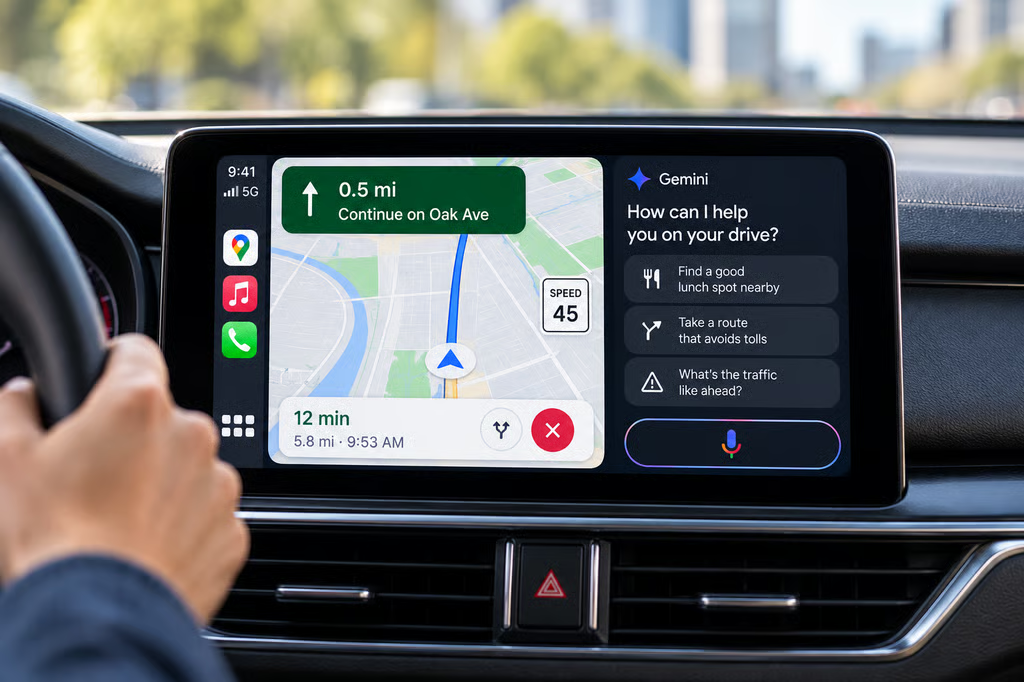
Google is bringing Gemini’s conversational navigation features to Apple CarPlay, allowing iPhone users to ask more complex questions while driving. The rollout began Oct. 21 for US drivers, with availability expanding globally.
The update lets drivers make hands-free, multi-step requests about destinations, routes, and traffic conditions through Google Maps. However, Google’s newer Personal Intelligence features, which connect Gemini to Gmail, Calendar, and other personal information, have not been announced for CarPlay.
According to The Verge’s report, drivers can activate Gemini by tapping its icon inside Google Maps on their vehicle’s infotainment display.
What Gemini can do in Google Maps on CarPlay
The integration lets drivers ask follow-up questions and combine several navigation requests in one conversation.
For example, a driver can ask Gemini to recommend nearby restaurants, choose a destination, and request directions that avoid toll roads.
The assistant can also help drivers report traffic disruptions and find places to stop along their route.
Unlike conventional navigation commands, Gemini can interpret requests that build on earlier questions without requiring users to start a separate search each time.
The feature works through Google Maps on the CarPlay display, rather than requiring drivers to switch to the Gemini app on their iPhones.
Google has already been expanding Maps beyond traditional navigation. Its Ask Maps features can help users plan trips, compare destinations, and prepare certain transactions, although those capabilities should not be assumed to work through CarPlay.
Google also previously named CarPlay as a destination for Immersive Navigation, a separate Maps upgrade that introduces detailed 3D visuals, improved route guidance, and more information about upcoming turns.
The company’s March 12 announcement identified CarPlay among the platforms expected to receive Immersive Navigation.
That commitment is separate from the newly reported conversational Gemini rollout. The arrival of Gemini does not establish that every Immersive Navigation feature is available on every CarPlay system.
Google has not provided a complete compatibility list covering countries, vehicles, or Google Maps app versions.
Personal Intelligence remains unconfirmed for CarPlay
The CarPlay launch does not include a confirmed rollout of Google’s newer Personal Intelligence capabilities.
Google introduced those features for Android Auto on Oct. 20, allowing eligible users to connect Gemini to information from Gmail, Calendar, Photos, Maps, YouTube, and Search.
With permission, Gemini can use that information to answer personalized questions, such as finding flight details in an email or retrieving information associated with a calendar event.
According to Google’s announcement, users must opt in to Personal Intelligence. An existing setting in the Gemini app can also carry over when a compatible Android phone connects to a vehicle.
The Android Auto rollout has account and regional restrictions. Personal Intelligence is not available to Google Workspace business, enterprise, or education accounts.
Google has not confirmed whether those integrations will eventually reach CarPlay.
That distinction is relevant for organizations managing employee vehicles or allowing staff to use personal phones for work-related travel.
Conversational navigation can help drivers find destinations without requiring access to company email or calendar information. Personal Intelligence would introduce additional data-access considerations if Google later extends it to CarPlay.
The expansion follows Google’s broader transition from Assistant to Gemini, which is changing how users interact with voice assistants across supported devices.
How to use Gemini with Apple CarPlay
The rollout began in the US on Oct. 21, with international availability expanding.
To check for the feature, drivers can open Google Maps on their CarPlay display and look for the Gemini icon.
Once available, tapping the icon starts a conversational interaction with the navigation assistant.
Drivers can try asking for nearby destinations, requesting a route that avoids toll roads, or reporting a traffic issue.
Because Google has not published a complete compatibility list, the absence of the icon does not establish whether a particular vehicle or iPhone will receive the feature later.
For organizations managing CarPlay deployments, three capabilities should remain distinct:
- Conversational Gemini navigation: Rolling out through Google Maps on CarPlay, beginning with US drivers.
- Immersive Navigation: Previously announced for CarPlay, with availability subject to Google’s rollout.
- Personal Intelligence: Announced for Android Auto and cars with Google built-in, but not confirmed for CarPlay.
Google’s expansion gives iPhone users access to conversational navigation through their existing CarPlay setup without switching to Android Auto.
For now, the confirmed upgrade is hands-free assistance with routes, destinations, and traffic. Access to personal Google account information through CarPlay remains unconfirmed.
Also read: Using navigation and other apps together can increase phone temperatures, and our guide explains how to prevent overheating while using CarPlay or Android Auto.