

Retail tech has come a long way since the invention of cash registers. One point-of-sale system can now manage inventory, track sales, and accept payments — all on the go with one POS terminal. Affordable mobile terminals also allow businesses to adapt to the constantly evolving in-person payment methods such as buy now, pay later (BNPL) and QR codes.
To bring you insights into this popular payment technology, I leveraged my seven years of experience reviewing POS systems and payment systems, my degree in financial management, and certificate payments technology.
What is a POS terminal?
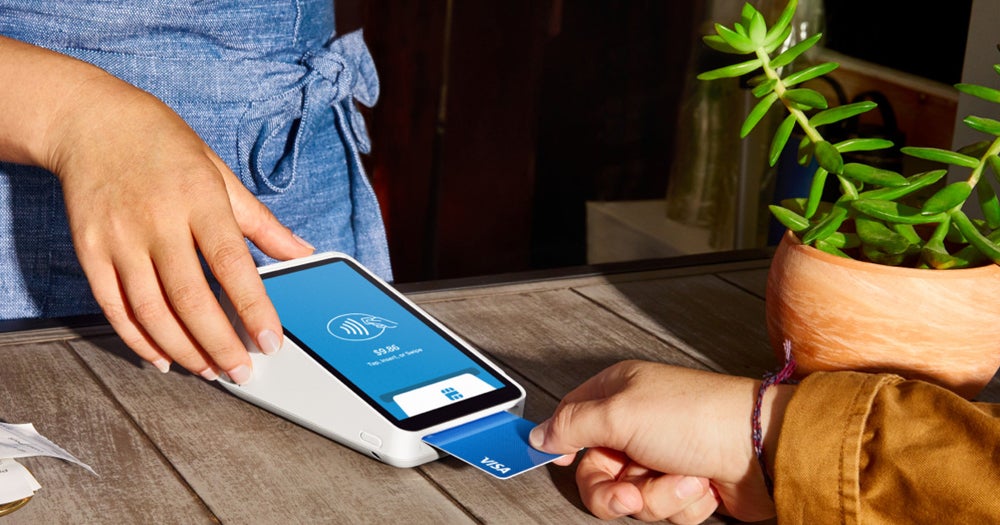
A point-of-sale, or POS terminal, is a compact business hardware that comes with built-in POS software and a card reader to accept cash, card, and other forms of non-cash transactions like gift cards. Terminals also typically have, or are connected to, cloud-based POS software to update business information such as inventory levels and sales in real-time.
History of cash registers and POS systems
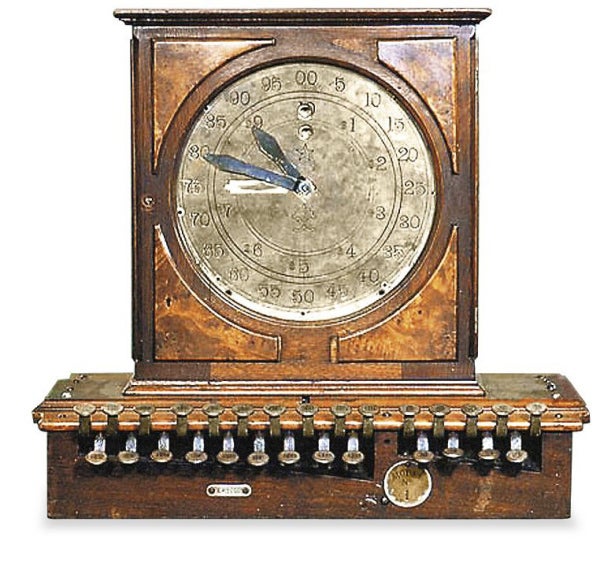
Before the POS terminal, there was the cash register. Invented by James Ritty, a saloon owner from Ohio, in 1879, the cash register was designed to accurately record transactions to help users with their bookkeeping.
The National Cash Register (NCR) eventually purchased the invention in 1884. During this time, electric motors, cash drawers, and paper rolls for receipts were added to the cash register.
Did you know? Tech monopolies are not just a 21st-century problem. In 1921, the U.S. Government filed suits against NCR under the Sherman Antitrust Act. At the time, NCR controlled 95% of the cash register market.
IBM introduced the first restaurant computer-based POS system in 1973, which came with an electronic cash register (ECR) and a client-server on the back end. But it wasn’t until 1979 that Visa and Mastercard released the magstripe technology for accepting credit card payments at the point of sale.
When the internet became available, Europay, Visa, and Mastercard also developed EMV chips on credit cards in 1993, significantly improving credit card processing. Soon after, pioneers like PayPal, Verifone, and Ingenico developed mobile card readers, allowing businesses to accept payments anywhere.
Eventually, PayPal transitioned away from its basic mobile card readers and, along with other competitors like Square, introduced POS terminals that offer better security and more advanced payment capabilities. As POS technology advanced, leading payment processors launched what are now called “Smart Terminals” that combined advanced POS features.
How can POS terminals improve business operations?
The advent of the internet enabled POS systems and terminals to evolve into a more efficient business solution. Nowadays, terminals offer quicker and more secure payment processing, customer engagement tools, better inventory control, and additional payment channels.
Read more: Best POS systems for small business
How do POS terminals work?
The role of the POS terminal in the POS ecosystem is to compute the total cost of the transaction, accept payment, and keep a record of the transaction.
During checkout
At checkout, customers bring products to the POS terminal for purchase. The seller scans the product barcode with a barcode scanner, which generates a corresponding SKU number within the POS system’s inventory catalog. The product information, including the list price, is then displayed, and the user enters the quantity to get the total cost.
When collecting payment
Once the total price is displayed, the customer presents their preferred payment method.
- If cash or other non-card payments: The seller enters the tender amount to prompt the cash drawer.
- If card: the seller will either swipe, insert, or tap the card in the area where the card reader is located in the POS terminal.
- If mobile and other digital payment: the customer will present proof of payment on their mobile device for the user to record the confirmation code
In the back end, a payment authorization request is initiated at this point. The transaction and payment data is encrypted and transmitted by the merchant’s payment processor, then sent to the relevant financial institutions for verification. If the customer’s bank confirms that funds are available, the transaction will be authorized, and payment approval will be displayed on the POS terminal. Otherwise, a declined payment notice will be displayed, and the customer will be asked to provide a different payment source.
Logging the transaction
Finally, a receipt for the completed transaction will be generated and provided to the customer. A copy of the receipt is kept by the user. For card transactions, a transaction receipt is generated in triplicate, and one is given to the customer. At the back end, the POS system also records the sale and adjusts the available inventory in real-time.
Read more: POS deployment checklist
What are the key features to look for in a POS terminal?
The POS terminal is a combination of software and hardware components.
Hardware setup
Hardware is an essential feature of a POS terminal. For it to complete its task, the POS terminal should have, at minimum:
- A computer-operated device that runs the POS software.
- A card reader for accepting card payments (swipe, tap, or dip).
- A thermal printer to generate receipts, or other means of delivering receipts.
You may also want to consider:
- A barcode scanner to scan barcodes that pulls up product information.
- A cash drawer (for countertop terminals) for storing cash and other non-card payments if you plan to accept cash.
Payment gateway
The payment gateway is a software component embedded in the POS system. This is the checkout window on the system display where the user enters the customer’s payment information. The payment gateway will display the available payment methods depending on your payment processing settings. It is also the payment gateway’s role to encrypt the transaction data before sending it to the payment processor for authentication.
Payment processor
The payment processor connects to the card network and other financial institutions that authorize the transfer of funds from the customer’s source to the merchant. Payment processors are integrated into the POS terminal and offer tools for processing cards, ACH, digital checks, contactless payments, and more.
Inventory management
Inventory management is a primary feature of a POS system and key to an efficient POS terminal. The system immediately updates inventory levels with every transaction completed, returned, or refunded from the POS terminal. Constant inventory monitoring helps prevent stockouts.
Transaction reporting
One of the primary functions of a simple cash register is to keep sales records. With a modern POS system, every transaction completed in a POS terminal not only records the sale but also generates customer profiles and updates available inventory. It can categorize transactions in multiple ways, such as by employee, checkout counter, customer, product, and more.
Loyalty and rewards
While not a key component, a loyalty and rewards program integrated into the POS system can significantly improve customer relationships. With this feature, a merchant can further analyze customer purchasing habits and create tailored campaigns that customers will want to participate in. This helps businesses to build a solid customer base and keep them engaged.
Top POS terminals in 2024
With all the POS systems and terminals on the market today, choosing the best option for your business can be challenging. Below, I give you our top POS terminal recommendations for popular business types:
Square Terminal
The Square Terminal is Square’s all-in-one mobile POS terminal. It comes with built-in POS software that can work as a stand-alone or as a second screen to the Square Register and a built-in card reader for swipe, EMV chip, and NFC contactless transactions. What’s great about Square is that it offers industry-specific POS software that can be installed into the Square Terminal at no extra cost. Though not optimized for long hours of handheld payment processing, the Square Terminal is compact enough for accepting payments table-side and for easy setup in farmers markets and popup stores.
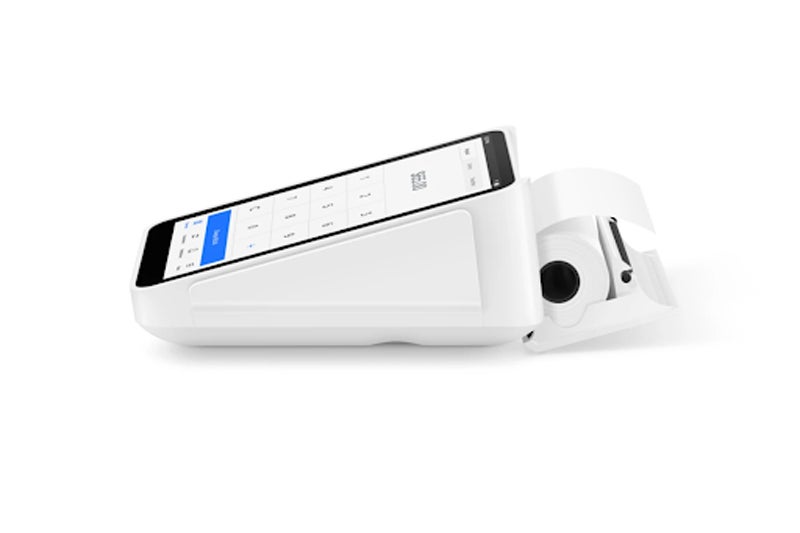
Specifications:
- Price: $299 or $27/mo for 12 months
- Warranty: One-year limited warranty, 30-day free return
- Payments accepted: Chip cards (EMV), NFC cards, Apple Pay, Google Pay, Samsung Pay, Afterpay, Cash App Pay (QR code), Magnetic-stripe cards with free magstripe reader plug-in
- Offline payment available
- Connectivity: Wifi, Ethernet
- In the box:
- Square Terminal hardware
- Power adapter
- Power adapter cable
- Receipt paper roll
- Accessories:
- Hub for Square Terminal
- Additional paper rolls
- Hardware: White, made of metal and molded plastic, weighs 417g, 5.6in L x 3.4in W x 2.5in H
- After-sale support: 24/7
Clover Flex
The Clover Flex is a sleek and portable POS terminal designed for handheld transactions. It is equipped with a 6-inch color touchscreen and built-in camera, receipt, and barcode scanner. The Clover Flex also has an embedded magnetic stripe, EMV chip, and NFC contactless reader to process payments. Merchants can purchase this with or without POS software, but you’ll need the software if you intend to use the Flex as an extension of a countertop POS system. The Clover system is unique because it’s compatible with a number of payment processors.
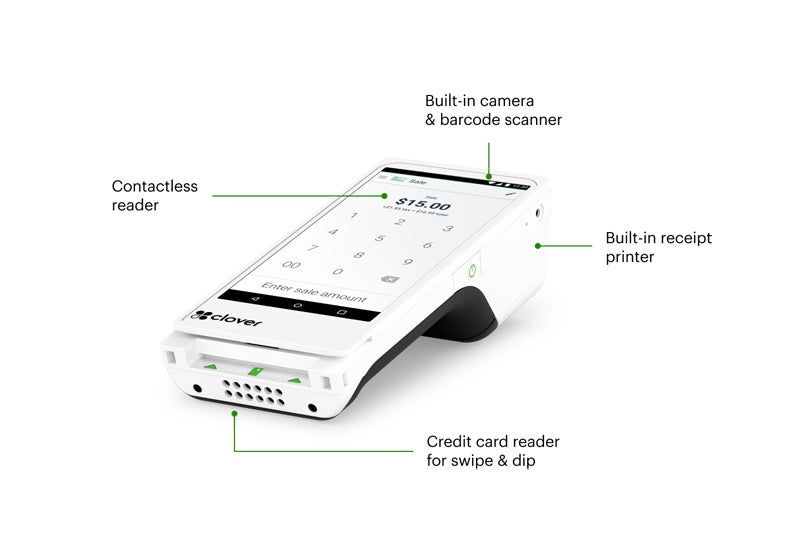
Specifications:
- Price: $599 or $35/month
- Warranty: One-year limited warranty
- Payments: Accepts chip, swipe, and contactless payments like Apple Pay®, Google Pay™, and Samsung Pay®
- Display: 6″ LCD color touch screen
- Camera/Scanner: 1D/2D barcode scanner/camera
- Receipt printer: Built-in thermal dot receipt printer
- Security: Clover Security end-to-end encryption
- Connectivity: Wi-Fi and LTE connectivity
- Battery life: 8 hours for standard SMB
- After-sale support: 24/7
- Purchase options:
- Flex Pocket (without built-in receipt printer)
- Clover POS software (retail or restaurant) at $14.95 or $49.95 per month
- In the box:
- Clover Flex hardware
- Charging cradle
- Power cord
- Power brick (battery)
- Optional PIN entry aid
- One roll of receipt paper
- Quick start guide
Toast Go2 handheld POS
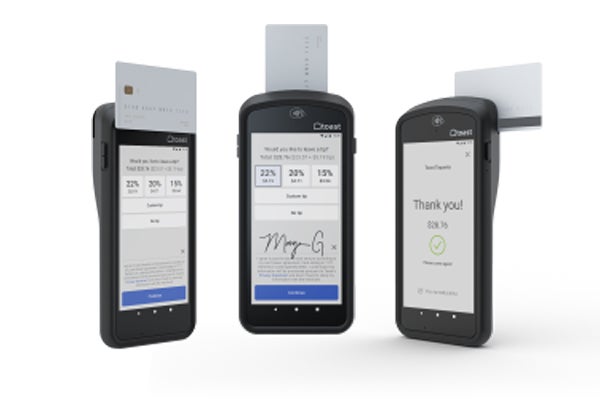
Toast’s handheld device is a stand-alone POS and payment terminal with built-in POS software, a card reader, and receipt printer. The hardware is industry-grade, with IP54 protection against dust and water damage, and built to withstand drops up to 4 feet. Ideal for busy sit-down restaurants, the Toast Go2 comes with table seating and reservation management tools, plus custom tipping, bill splitting, and signature capture features.
Specifications:
- Price: Startup kit $0 or $494.10 + $50/mo
- Warranty: One-year limited warranty
- Payments: Accepts NFC, EMV, and traditional MSR credit cards, Apple Pay, Google Pay, and other contactless payments
- Durability: Restaurant-grade. Dropproof up to 4 feet, IP54 rated for dust and water resistance
- Display: 6.4-inch touchscreen
- Dimensions: 7.87” L x 0.79” W x 3.74″ H
- Product Weight: 1.13 lbs
- Battery life: Up to 24 hours
PayPal Terminal
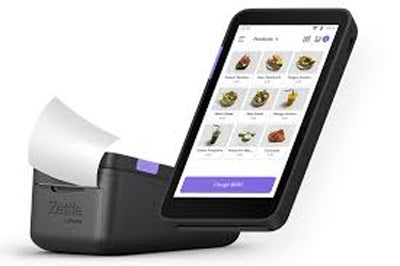
The PayPal Terminal is a stand-alone POS hardware designed similarly to Square Terminal. However, hardware tools like barcode scanners, thermal printers, and charging docks are optional. The PayPal Terminal comes with a built-in card reader capable of tap, EMV chip, and contactless payments and PayPal’s POS software. The starter kit also includes a preloaded SIM card for continued internet access and uninterrupted payment processing. The PayPal Terminal is ideal for selling in farmers’ markets, trade shows, and popup stores that cater to tourists who pay with international credit cards.
Specifications:
- Price:
- Basic PayPal Terminal: $199
- With barcode scanner: $239
- Accessories:
- Printer and magnetic charging dock: Plus $70 (with basic Terminal) or Plus $60 (with Terminal and barcode scanner)
- Warranty: One-year limited warranty, 30-day return
- Payments: Chip, tap, PIN, and NFC payments
- Battery life:
- Standby – Up to 48 hours
- Operational – Up to 12 hours
- With Zettle Printer & Dock – constant
- Dimensions: 5.4in L x 3in W x 0.6 in H
- Weight: 210 grams
- Connectivity: WiFi, 3G/4G
- Dark gray, made of metal and molded plastic
Helcim Smart Terminal
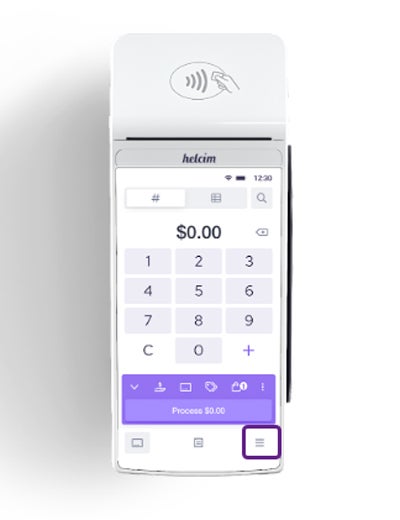
The Helcim Smart Terminal comes with stand-alone POS software, a colored touch screen display, and a built-in receipt printer. It connects to the internet via WiFi and accepts card and digital wallet payments via tap, chip, and PIN. It can also accept payments for Helcim invoices via manual card entry. The device lacks a camera or barcode scanner, so it’s better suited for professional services and restaurants than retail. But what makes Helcim Smart Terminal stand out is its pre-approved and built-in surcharging feature, which you can toggle on and off for every transaction.
Specifications:
- Price: $329 or $30 for 12 months
- Accessories: Charging dock $50
- Payments: Accepts chip, tap, PIN, and contactless payments like Apple Pay®, Google Pay™
- Warranty: One-year limited warranty, 14-day return
- Connectivity: WiFi
- Dimensions: 7.87in L x 3.07in W x 2.20in H
- Weight: 1.1 lbs
- In the box:
- Helcim Smart Terminal
- Charging Cable (USB-C to USB-A)
- Additional USB-C Cable
- Receipt paper rolls x2
How do you choose the right POS terminal for your business?
The right POS terminal for your business depends on your needs and the combination of hardware, payment processing, and software that will best suit you.
Unlike 10 or 15 years ago, when businesses had to decide whether they wanted an on-premise or cloud-based POS, today, most POS systems exclusively offer cloud setups. However, consider the following factors when choosing a POS terminal for your business:
Available payment methods
The best POS terminal should support all major credit cards and digital payments. It should also be able to accept any other payment methods you want to support, including gift cards, keyed-in payments, and buy now, pay later (BNPL) installment options. The right payment processor will also provide you options to use cost optimization programs such as surcharging and convenience fees to minimize your processing costs.
Read more: Best merchant services
Fees
Speaking of processing costs, payment processing fees are arguably the most significant factor when choosing a POS terminal. Hardware costs for payment processing vary from free to hundreds of dollars, depending on your business needs. However, recurring costs for accepting payments will affect your revenue the most. Choose a provider that will give you the most savings based on your sales volume. Make sure that you only pay for payment processing features that you currently need.
Security
Regardless of your business size or industry, transaction security should be a major consideration as you handle sensitive customer information. To minimize security risks, work only with level 1 Payment Card Industry (PCI) accredited payment processors. This ensures that your provider offers the latest security features, such as end-to-end encryption, user authentication, machine learning fraud detection, and chargeback management tools.
Read more: Guide to POS security
Available integrations
Your POS terminal should have access to key functionalities such as inventory, client relationship management (CRM), loyalty and rewards, and reporting. You should also look for other third-party integrations for tools you may need, such as accounting and local delivery. Being able to integrate all these features into one platform helps in creating an efficient business management solution.
Connectivity
A reliable POS terminal stays connected and works efficiently with minimal downtime or failed transaction requests. For this, you need to choose a payment terminal hardware with multiple connectivity options such as Bluetooth, WiFI, and LAN, as well as temporary offline payment processing during a power outage. Also, consider the terminal’s power source and battery life against your typical business day and transaction volume.
Industry-specific features
Industry-specific features also play a role in payment terminals. In fact, the early restaurant POS terminals already had a kitchen ordering integration. Currency conversion is also one of the early features allowing merchants to accept international payments.
Look for any industry-specific tools your business needs before choosing a POS terminal. For example, basic and custom tipping is available from some payment processors. While restaurants prefer local delivery functionality, a retailer might need a shipping feature instead.