


We may earn from vendors via affiliate links or sponsorships. This might affect product placement on our site, but not the content of our reviews. See our Terms of Use for details.
Key takeaways
- The QuickBooks vs Xero comparison favors QuickBooks Online for US small businesses that need advanced accounting features, customizable financial reports, and extensive third-party integrations.
- Xero is a better fit for businesses that prioritize unlimited users, team collaboration, and straightforward bookkeeping workflows.
- When deciding between QuickBooks vs Xero, choose based on your business’ accounting needs, reporting requirements, budget, and preferred integrations.
- QuickBooks Online vs Xero at a glance
- QuickBooks vs Xero pricing
- Invoicing and accounts receivable
- Expense tracking and accounts payable
- Banking and reconciliation
- Inventory and project accounting
- Financial reporting
- Automation and AI features
- Integrations and scalability
- Ease of use and customer support
- QuickBooks Online vs Xero alternatives
- Final verdict: Should you choose QuickBooks Online or Xero?
- FAQs
QuickBooks Online vs Xero at a glance
 QuickBooks |  Xero |
|
|---|---|---|
| My rating (out of 5) | ||
| Best for | ||
| Monthly starting fee | ||
| Users | ||
| Invoicing | ||
| Expense and bill management | ||
| Bank reconciliation | ||
| Inventory management | ||
| Project accounting | ||
| Financial reporting | ||
| Payroll | ||
| Multicurrency | ||
| AI capabilities | ||
| Free trial | ||
| Limitations |
QuickBooks Online dashboard
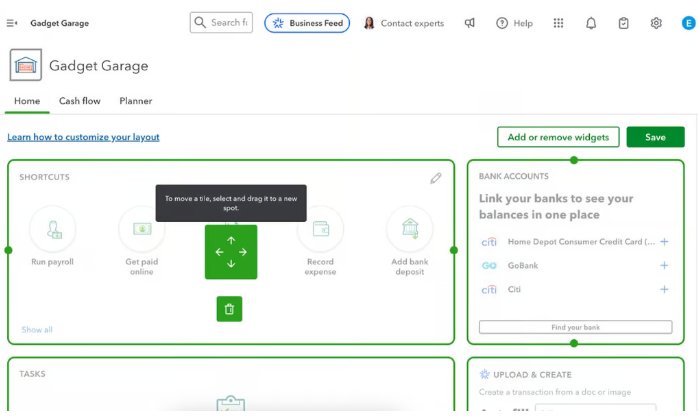
For a closer look at QuickBooks Online’s features, pricing, and limitations, read our full QuickBooks Online review.
Xero dashboard
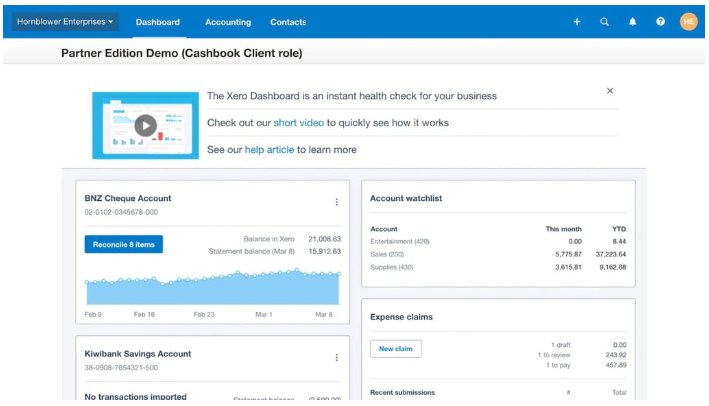
For a more detailed look at Xero’s features, pricing, and limitations, read our full Xero review.
QuickBooks vs Xero pricing
Winner: Xero. Xero offers lower subscription prices across comparable plan levels, starting at $27 per month compared with QuickBooks Online’s $38. It also includes unlimited users on all plans, while QuickBooks limits user access based on the subscription tier. However, QuickBooks may offer better value for US businesses that need more invoicing flexibility at the entry level.
QuickBooks Online | Xero |
|
|---|---|---|
| Entry-level | ||
| Mid-tier | ||
| Higher-tier | ||
| Advanced |
Prices reflect regular US monthly subscription rates, excluding promotional discounts, taxes, and add-ons. These are plan-level comparisons, not exact feature equivalents.
How much would your business actually pay?
Xero Early costs less than QuickBooks Simple Start, but its limit of 20 invoices and five bills makes it less practical for businesses with frequent transactions.
Here’s how much three hypothetical businesses would spend based on their accounting needs.
QuickBooks | Xero |
|
|---|---|---|
| Freelancer sending 10 invoices monthly | ||
| Service business sending 50 invoices monthly and managing bills | ||
| Growing business needing project tracking and multicurrency | ||
| Annual cost for the service business |
These examples assume the listed plans meet each business’s requirements and exclude payroll, payment processing, third-party apps, and other optional charges.
For a service business, Xero Growing could save $312 annually compared with QuickBooks Essentials. However, businesses should also consider their accountant’s preferred software, the availability of US-specific integrations, and whether they need features available only in higher-tier plans.
Invoicing and accounts receivable
Winner: QuickBooks Online. QuickBooks Online has an edge in invoicing with its integrated QuickBooks Payments service and additional receivables management features on eligible plans. Xero offers comparable essentials, including recurring invoices, payment reminders, and online payment collection, but its entry-level plan limits the number of invoices businesses can send.
QuickBooks Online | Xero |
|
|---|---|---|
| Customizable invoices | ||
| Recurring invoices | ||
| Automatic payment reminders | ||
| Online payments | ||
| Progress invoicing | Yes, on Plus and Advanced | No equivalent native estimate-based progress invoicing workflow |
| Invoice limits | ||
| Accounts receivable tracking |
For contractors and service businesses that bill clients in stages, QuickBooks Online’s progress invoicing is particularly useful. Available on Plus and Advanced, it lets you create multiple invoices from a single estimate while tracking amounts already billed and outstanding.
Xero handles recurring invoices, automated reminders, and online payments through providers such as Stripe and GoCardless. However, its Early plan limits businesses to 20 invoices monthly, making Growing a more practical option for businesses with frequent billing
Expense tracking and accounts payable
Winner: QuickBooks Online. Businesses managing multiple suppliers may benefit from QuickBooks Online’s integrated bill payment options and advanced approval workflows. Xero handles routine expense tracking, bill capture, and vendor payments well, but QuickBooks provides more configurable controls for businesses with complex accounts payable processes.
QuickBooks Online | Xero |
|
|---|---|---|
| Expense tracking | ||
| Receipt and bill capture | ||
| Recurring bills | ||
| Bill approval workflows | ||
| Online bill payments | ||
| Employee expense claims | ||
| 1099 management | ||
| Accounts payable aging |
A business processing 50 supplier invoices monthly can use either platform to record bills, monitor due dates, and track outstanding payments. QuickBooks Online may be more suitable when multiple employees handle bill entry, approvals, and payment authorization under defined workflows.
Banking and reconciliation
Winner: QuickBooks Online. QuickBooks Online provides a structured bank statement reconciliation process, discrepancy reports, and tools for identifying and correcting reconciliation errors. Xero offers a streamlined interface and cash coding for bulk transaction processing, but QuickBooks has an advantage when reviewing historical transactions and troubleshooting discrepancies.
QuickBooks Online | Xero |
|
|---|---|---|
| Automatic bank feeds | ||
| Transaction matching | Automatic matching and suggested matches | Automatic matching and suggested matches |
| Bank rules | including auto-add options | with automated categorization |
| Bulk transaction processing | ||
| Bank statement reconciliation | ||
| Reconciliation discrepancy reports | ||
| AI-powered reconciliation |
Reconciling bank accounts involves more than categorizing imported transactions. QuickBooks Online provides a structured process for matching transactions against bank statements, with reconciliation reports and discrepancy tools that help bookkeepers investigate differences or review historical records.
For businesses processing large volumes of repetitive transactions, Xero’s cash coding feature can speed up categorization and reconciliation. Its streamlined interface is useful for everyday bookkeeping, although QuickBooks Online offers more dedicated tools for investigating reconciliation discrepancies.
Inventory and project accounting
Winner: QuickBooks Online. QuickBooks Online offers more comprehensive inventory and project accounting tools, including FIFO inventory costing, low-stock alerts, and project profitability tracking on eligible plans. Xero provides basic inventory management and project tracking, although businesses with complex inventory requirements may need third-party integrations.
QuickBooks Online | Xero |
|
|---|---|---|
| Inventory tracking | ||
| Inventory valuation | ||
| Cost of goods sold (COGS) | ||
| Low-stock alerts | ||
| Purchase orders | on eligible plans | |
| Project tracking | ||
| Project profitability | ||
| Advanced inventory |
QuickBooks Online Plus and Advanced offer inventory tracking, automatic COGS calculations, low-stock alerts, and project profitability reports. Xero provides basic inventory tracking across all plans, while project tracking is available on Established. Both platforms may require third-party integrations for advanced inventory needs, such as manufacturing and warehouse management.
Financial reporting
Winner: QuickBooks Online. Financial reporting is one of QuickBooks Online’s strongest advantages, particularly for businesses needing customizable reports, budgeting tools, and detailed financial analysis. Xero covers essential financial statements and offers report customization, but QuickBooks provides more advanced management reporting capabilities on higher-tier plans.
QuickBooks Online | Xero |
|
|---|---|---|
| Core financial statements | ||
| Customizable reports | ||
| Budgeting | ||
| Budget vs. actual reports | ||
| Class and location tracking | ||
| Project profitability reports | ||
| Advanced reporting | ||
| Report scheduling |
QuickBooks Online offers extensive reporting options, including customizable financial statements, budget comparisons, and class and location tracking. Xero also provides customizable reports, budgeting, and tracking categories, but QuickBooks Online has an advantage for businesses needing more detailed financial analysis and management reporting.
Automation and AI features
Winner: QuickBooks Online. QuickBooks Online offers a broader range of AI-assisted accounting capabilities through Intuit AI agents, including transaction categorization, reconciliation, payment collection, and financial insights. Xero’s Just Ask Xero (JAX) focuses more on automating everyday bookkeeping tasks, particularly bank reconciliation and transaction processing.
QuickBooks Online | Xero |
|
|---|---|---|
| AI assistant | ||
| Automated transaction categorization | ||
| AI-powered bank reconciliation | ||
| Receipt and document processing | ||
| Automated invoice reminders | ||
| AI financial insights | ||
| AI-assisted payment collection | ||
| AI-assisted project management |
QuickBooks Online uses specialized AI agents for accounting, payments, financial analysis, and project management. Its Accounting AI helps categorize transactions and identify anomalies, while Finance AI provides forecasts and financial insights for Advanced users.
Xero’s JAX focuses on automating routine bookkeeping, particularly bank reconciliation and document processing. It can automatically reconcile high-confidence transactions and flag exceptions for review, although availability varies by plan and feature rollout.
Integrations and scalability
Winner: QuickBooks Online. QuickBooks Online is better suited for US businesses needing integrated payroll, payment processing, and advanced financial management tools as they grow. Xero offers a larger app marketplace and unlimited users across all plans, making it attractive to businesses that prioritize team collaboration and flexible integrations.
QuickBooks Online | Xero |
|
|---|---|---|
| Third-party integrations | ||
| Payroll integration | ||
| Ecommerce integrations | ||
| CRM integrations | ||
| User scalability | ||
| Advanced business management |
As a business grows, its accounting software may need to connect with ecommerce platforms, payroll services, inventory systems, and CRM applications. QuickBooks Online supports these integrations and offers additional financial management capabilities through its Advanced plan, although the number of users remains limited by subscription tier.
Businesses that need multiple employees or external accountants working in the same system may find Xero more flexible. It supports over 1,000 third-party apps and includes unlimited users across all plans, along with US payroll integration powered by Gusto.
Ease of use and customer support
Winner: QuickBooks Online. Both platforms have user-friendly interfaces and provide resources to help businesses manage their books. However, QuickBooks Online has an advantage for US businesses because of its extensive ProAdvisor network, onboarding resources, and broader live support options, while Xero relies more heavily on online support and callback assistance.
QuickBooks Online | Xero |
|
|---|---|---|
| User interface | ||
| Ease of setup | ||
| Learning curve | ||
| Customer support | ||
| Support availability | ||
| Accountant network | ||
| Training resources |
QuickBooks Online provides guided setup, training resources, and access to a large network of US-based ProAdvisors. Xero offers a simpler interface for everyday bookkeeping, but its support model relies primarily on online requests and callbacks rather than a direct inbound phone support line.
QuickBooks Online vs Xero alternatives
Businesses comparing QuickBooks Online and Xero may also want to consider other accounting software that better suits their budget or accounting requirements. Zoho Books, FreshBooks, and Wave offer alternatives for businesses that prioritize automation, service-based invoicing, or affordable bookkeeping.
| Affordable accounting with customizable workflows and inventory management |  | Offers invoicing, bank reconciliation, automation, and inventory management, with advanced features available on higher-tier plans. | |
| Client invoicing, time tracking, and project-based billing |  | Combines invoicing, expense tracking, time tracking, and project profitability tools for freelancers and service-based businesses. | |
| Free accounting and invoicing for a small business | Provides free basic accounting, unlimited invoicing, and expense tracking, with paid upgrades for bank feeds and automation. |
Zoho Books is worth considering if you need more affordable accounting software with room to expand into inventory management and automation. FreshBooks is particularly useful for consultants and service businesses that bill clients for time and projects, while Wave is a practical option for freelancers and very small businesses with straightforward bookkeeping needs.
Final verdict: Should you choose QuickBooks Online or Xero?
QuickBooks Online is the stronger choice for US businesses that need detailed financial reporting, advanced accounting features, and integrated financial management tools. Xero offers better value for businesses that prioritize lower subscription costs, unlimited users, and straightforward bookkeeping. Your decision should ultimately depend on the accounting workflows your business needs and how much you’re willing to spend.
Choose QuickBooks Online if…
- Your business needs detailed financial reporting, customizable reports, and advanced budgeting tools.
- You manage inventory, track project profitability, or require more complex accounting workflows.
- You want integrated US payroll, bill payments, and access to a large network of QuickBooks ProAdvisors.
- You prioritize structured bank reconciliation, discrepancy reporting, and tools for troubleshooting accounting errors.
Choose Xero if…
- Your business needs unlimited users without upgrading to a more expensive subscription.
- You prefer a straightforward interface for managing invoices, expenses, and bank transactions.
- You process repetitive bank transactions and want to streamline reconciliation using cash coding and automation.
- You want lower subscription costs while maintaining essential accounting functionality for your business.
FAQs
Is Xero better than QuickBooks Online?
Xero is better for businesses that prioritize affordable pricing, unlimited users, and streamlined bookkeeping. However, QuickBooks Online is generally a stronger choice for US businesses that need advanced financial reporting, inventory management, and integrated accounting tools.
Is QuickBooks Online or Xero easier to use?
Xero has a relatively straightforward interface, making it easier to navigate for basic bookkeeping tasks. QuickBooks Online has a steeper learning curve because of its broader features, but it offers extensive training resources and access to QuickBooks ProAdvisors.
Can I switch from QuickBooks Online to Xero?
Yes, you can migrate from QuickBooks Online to Xero using supported conversion tools or third-party migration services. Before switching, review your chart of accounts, outstanding invoices, unpaid bills, and opening balances to ensure your financial records transfer accurately.
Does Xero support US accounting and tax requirements?
Yes, Xero supports US accounting workflows, including sales tax tracking, 1099 reporting, and payroll integration through Gusto. However, QuickBooks Online offers a more extensive ecosystem of US-focused accounting, tax, and payroll services.
Which is better for small businesses: QuickBooks Online or Xero?
QuickBooks Online is generally better for US small businesses that need comprehensive accounting features, detailed financial reports, and room for more complex workflows. Xero is a good alternative for businesses with simpler accounting needs, multiple users, and a preference for lower subscription costs.