Discussion Locked

No sound in my PC

0 helpful
3 replies
Closed to new repliesThis discussion is closed. It stays readable, but it takes no new replies.

Hi,

It was working well, but after installing new window Xp, there is no sound

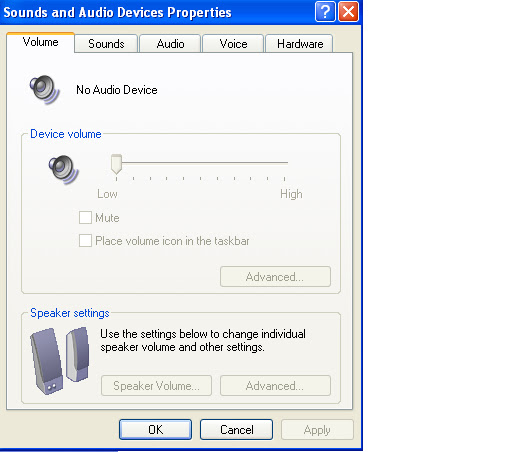
Please take view at these images, so that can easily get the problem

Audio video property not working

https://lh3.googleusercontent.com/-1sEYd1NMZtM/TkMv8-4MweI/AAAAAAAACCs/CET1nYrudhw/error2.jpg
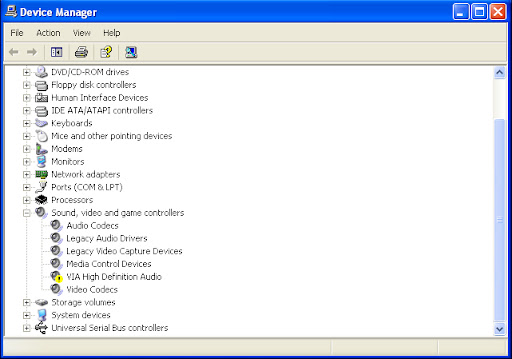
VIA error on devise manger

https://lh5.googleusercontent.com/-U0pCdF4tdc8/TkMv_EsdCLI/AAAAAAAACCw/It4wQRBrSOA/Error1.jpg
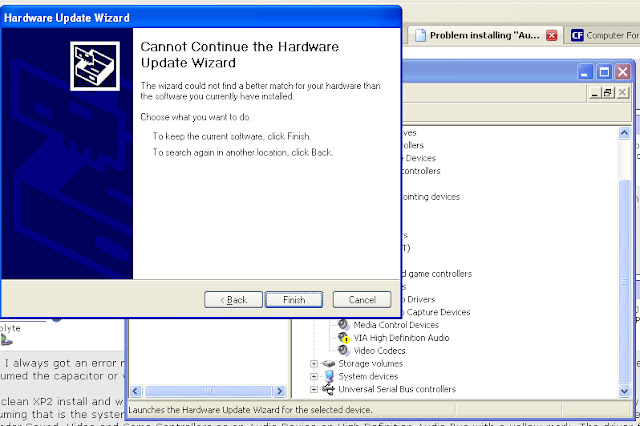
When I tried to update the drover, there were showing this error

https://lh6.googleusercontent.com/-iQM8Mozm9nI/TkMwBpf8_GI/AAAAAAAACC0/jrp8526qanA/s640/error3.jpg
But some it shows "a file is already found with same name etc"

Please guide me how I can play the songs and other things

3 replies

by purpleskys

all your windows updates? also try going to the manufacturers website and downloading the driver manually, sometimes that works better.

by sunilgupta91

Could you please share the link from i can get right driver because i have tried many download but no one works.

please share direct link

by hal 9000

Which most new M???Boards use you need to install it before connecting to the Windows Update Servers for XP.

Reattech as some describe do not pay the Microsoft Tax by getting their Drivers Digitally Signed so you need to install all Reattech Audio Drivers before WGA gets loaded onto your computer.

As for a link to the download as we do not know what your hardware actually is you can go to the Makers Web Site for the driver or try the Unknown Device Identifier available free here

http://www.fileheap.com/software-unknown-device-identifier-download-34861.html

And then Googling your required Driver if this isn't a Off the Shelf System like Dell, HP or so on but a custom build White Box Computer.

The other thing to try is open the Sound & Audio Device Properties as in your first picture and left click on the Sound Tab and make sure that the correct Audio Device is listed there. Sometimes this doesn't get loaded properly and while the Audio is working Windows doesn't know what to use as the wrong Audio Device is listed.

Col

This discussion is closed to new replies.