Five Apps: Free project management alternatives - TechRepublic

Five Apps: Free project management alternatives

  • 702_planning.png

    Five free Microsoft Project alternatives

    Poor planning is the root of most project failures and\r\ninterestingly, the smaller the project, the less scrutiny the plan gets! If\r\nyou’re managing projects, execution will benefit from tight tracking. Unfortunately,\r\nproprietary software is usually expensive or ransomed via subscription fees.

    \r\n\r\nIf you’re supporting a\r\nsmall organization with an even smaller budget, consider one of these free\r\nsoftware management solutions. At the end, you’ll find a short list of feature comparisons\r\n(Table A). All five are desktop\r\napplications for Windows, although some are compatible with Mac OS and Linux.\r\nBe sure to read all licensing agreements to make sure you meet all\r\nrequirements.

    \r\n\r\n

    Credit: Images by Susan Harkins for TechRepublic

  • a702FigA.JPG

    ProjectLibre 1

    Five Apps

    \r\n\r\n

    1: ProjectLibre

    \r\n\r\n

    ProjectLibre\r\n(previously known as OpenProj) is open source project management\r\nsoftware that openly bills itself as a replacement\r\nfor MS Project. (Cheeky!) It’s compatible with MS Project 2003, 2007, and 2010,\r\nand Linux, MacOS, and Windows, so it covers almost everybody. It also supports\r\nseveral languages.

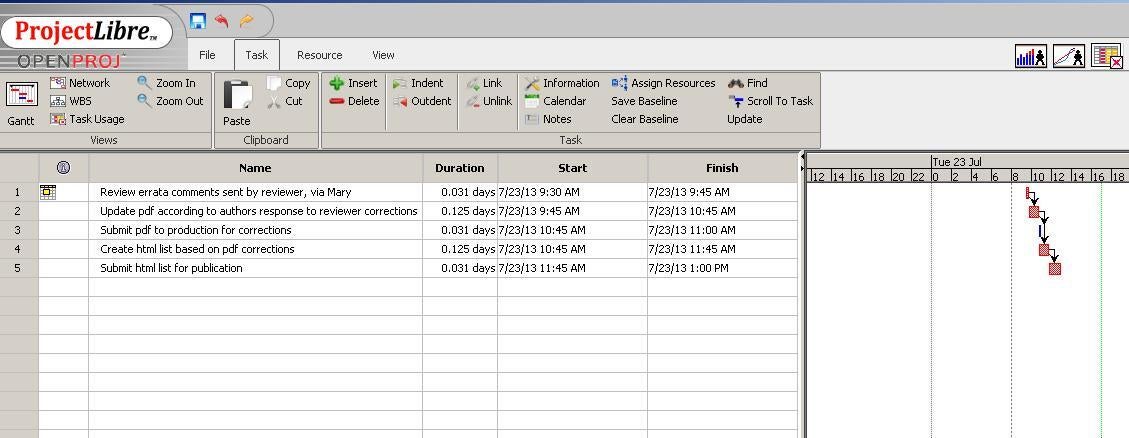
    \r\n\r\nFigure A shows its similarities to MS Project. Creating\r\ndependencies and resources is easy and intuitive (mostly). Whether you’re input\r\nor interface oriented, you’ll find projects easy to set up and maintain. Gantt\r\nview calculates and displays your project’s path visually by default. Durations\r\nand task dependencies work as expected and for the most part, finding the options\r\nyou use most will be easy.

    Credit: Images by Susan Harkins for TechRepublic

  • b702FigB.JPG

    ProjectLibre 2

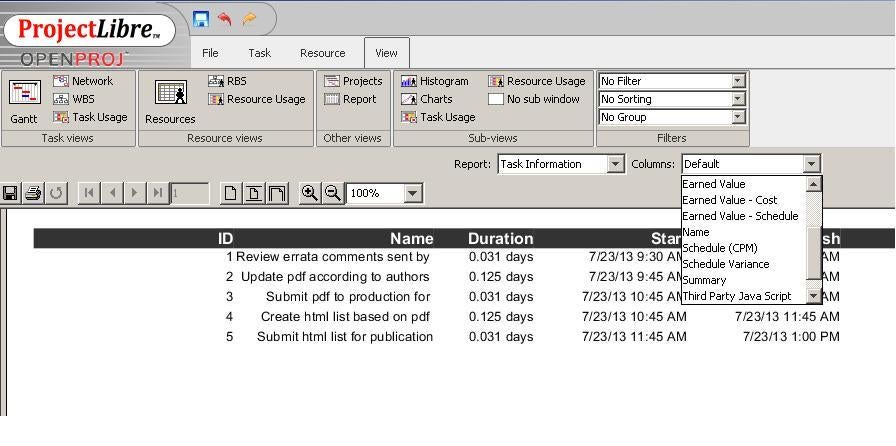
    You can easily print or preview this window and you can\r\nprint to a PDF file, but you’ll probably rely more on Reports view, shown in Figure B. The defaults are reasonable\r\nand easily customized. The result is low-frills reporting that you can use to\r\ndocument your project or share with others.

    \r\n\r\nThis program lives up to\r\nits hype. Its only negative is its lack of user documentation, but it does have\r\nan active online community.

    Credit: Images by Susan Harkins for TechRepublic

  • c702FigC.JPG

    GanttProject 1

    2: GanttProject

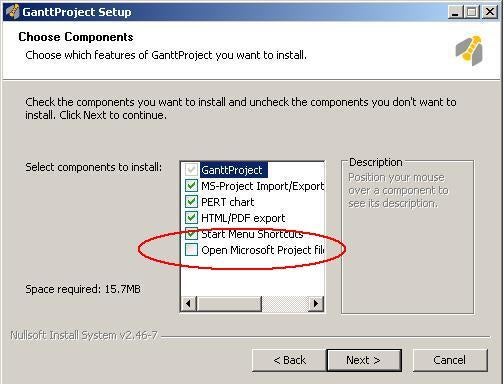
    \r\n\r\nGanttProject’s claim to fame is\r\nsimplicity and if you specify during\r\ninstallation, as shown in Figure C, it\r\nwill open MS Project files. It’s free and supports versions for Windows, Mac OS\r\nX, and Linux.

    Credit: Images by Susan Harkins for TechRepublic

  • d702FigD.JPG

    GanttProject 2

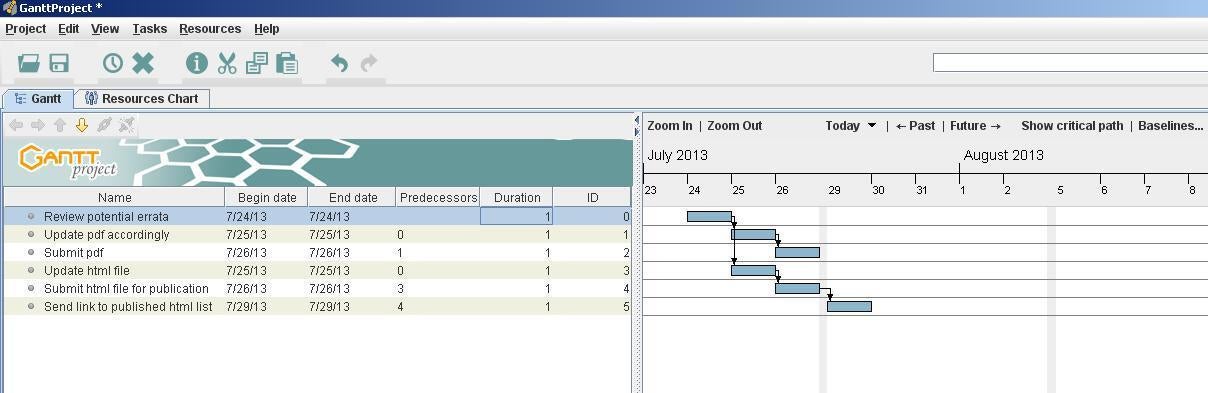
    Customizing\r\nGantt view, shown in Figure D isn’t\r\nas easy as it could be, but it’s easy enough. Dependencies are easy to create\r\nand display, similar to MS Project and ProjectLibre. Its reporting options are\r\nimpressive, but it doesn’t support costing features.

    Credit: Images by Susan Harkins for TechRepublic

  • e702FigE.JPG

    ToDoList 1

    3: ToDoList

    \r\n\r\nFor simplified and flexible\r\ntask management, ToDoList\r\ncan’t be beat. It’s not a full-blown project management application, but it’s\r\nperfect for keeping smaller projects on task.

    Credit: Images by Susan Harkins for TechRepublic

  • f702FigF.JPG

    ToDoList 2

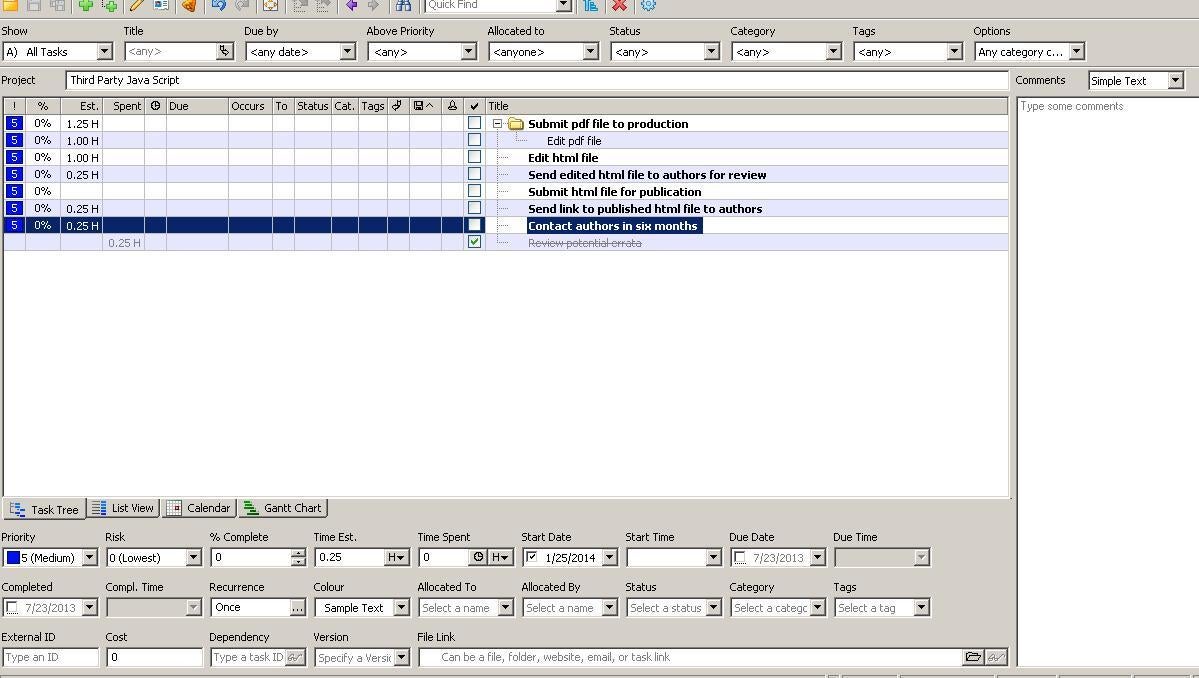
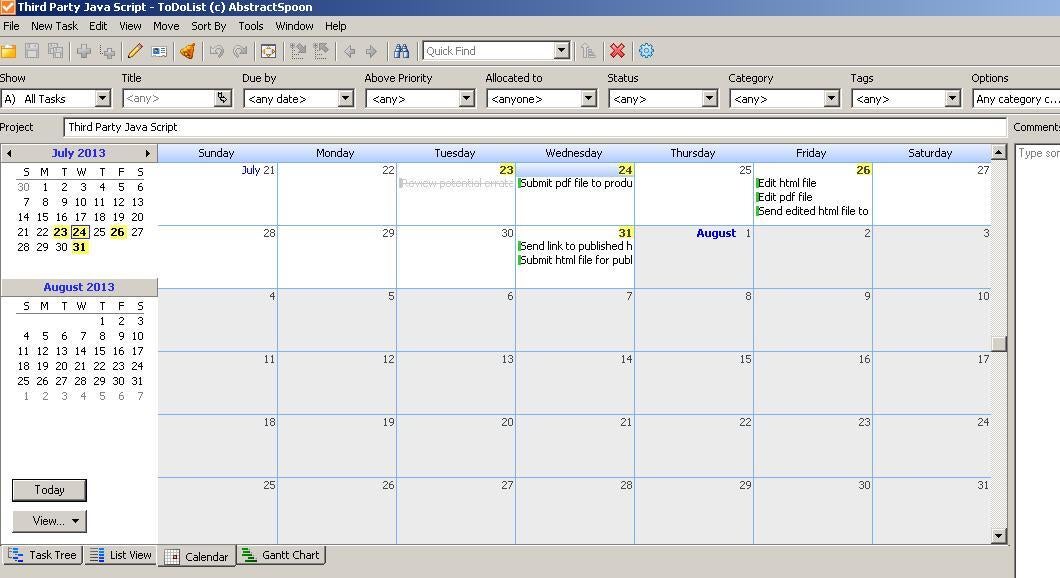
    Figure E shows the main window\r\nwhere you’ll enter tasks. You can add and delete options, to suit your working\r\nneeds. Calendar view, shown in Figure F\r\noffers a day-by-day accounting. Using XML style sheets, you can customize reports.\r\nOnline documentation isn’t comprehensive, but it’s a reasonable start.

    Credit: Images by Susan Harkins for TechRepublic

  • g702FigG.JPG

    2-plan Project Management Software 1

    4: 2-plan Project Management Software

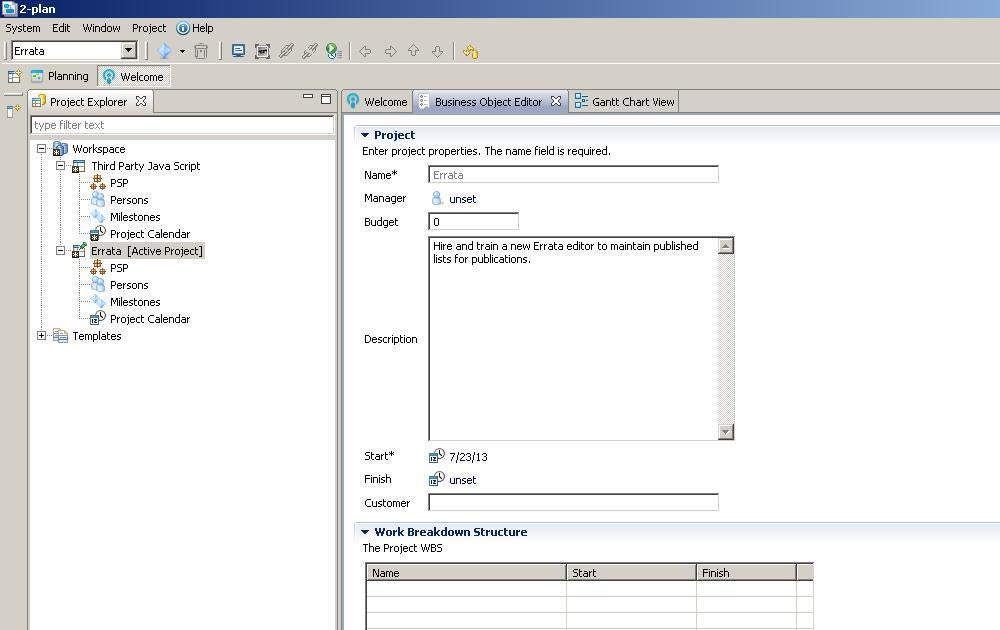
    \r\n\r\nEverything that ToDoList\r\nisn’t, 2-plan Project Management Software is.\r\nIt’s the enterprise version you might need if your organization is larger and\r\nyou juggle several projects at once. Figure\r\nG shows two projects with 2-plan’s high-end perspective. It comes with a\r\nserious learning curve.

    Credit: Images by Susan Harkins for TechRepublic

  • h702FigH.JPG

    2-plan Project Management Software 2

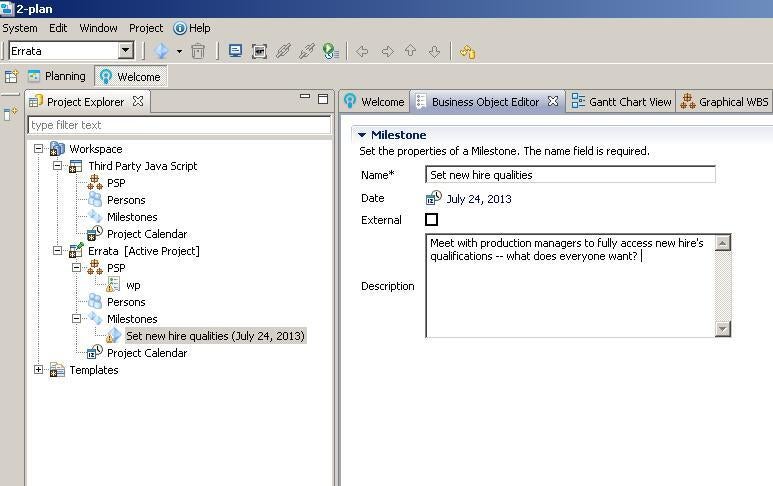
    Consider 2-plan for enterprise-level project management. Figure H shows the addition of a new\r\nmilestone.

    \r\n\r\nYou can download a desktop\r\nversion for Windows, Mac OS X, and Linux. Windows systems also need a Java\r\nRuntime Environment. 2-plan supports English and German versions. If team\r\nmembers need mobile access, consider 2-plan Team, which you can use to access\r\nprojects via a mobile phone.

    Credit: Images by Susan Harkins for TechRepublic

  • i702FigI.JPG

    Open Workbench 1

    5: Open Workbench

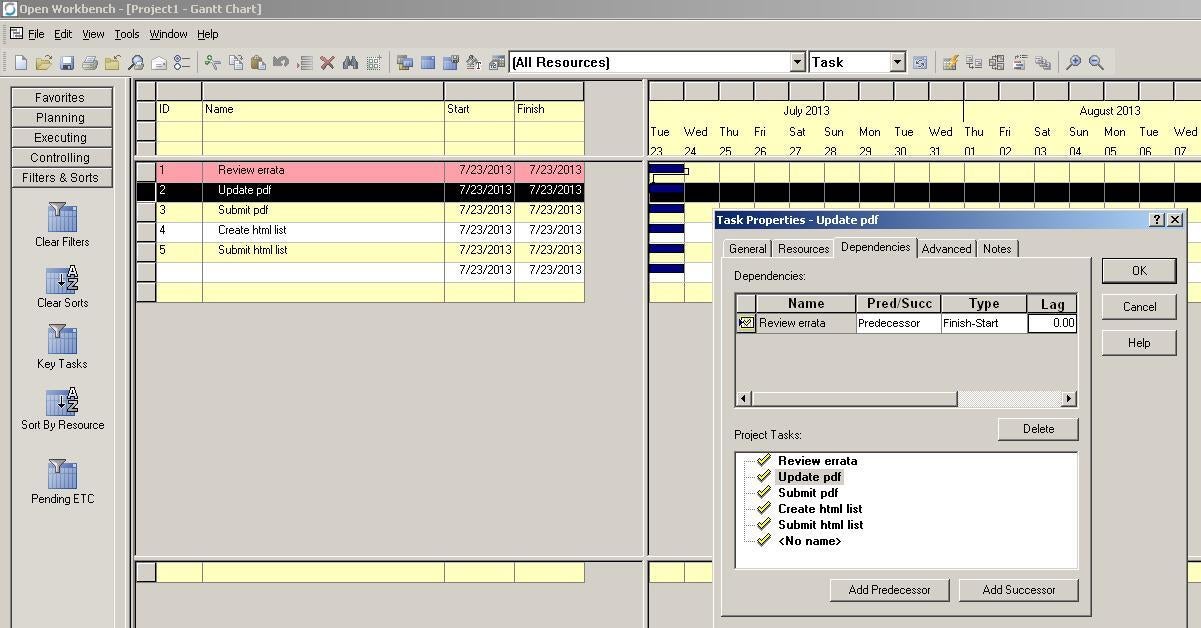
    \r\n\r\nOpen Workbench isn’t\r\nas intuitive right out of the box as other offerings in this list and it’s\r\nstrictly a Windows app. You can create milestones, and assign tasks, resources,\r\nand dependencies. You can also track and compare budgetary allowances. It all\r\nworks, but the learning curve is steeper than the others. The interface isn’t friendly\r\nor as intuitive as most of us have come to expect. For instance, adding a\r\ndependency takes a bit of discovery, as you can see in Figure I.

    Credit: Images by Susan Harkins for TechRepublic

  • j702FigJ.JPG

    Open Workbench 2

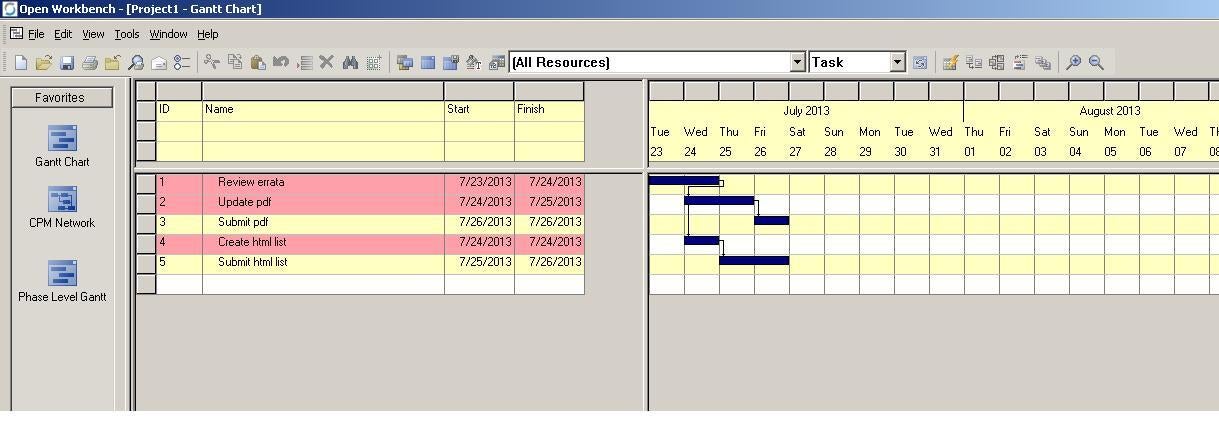
    Fortunately, the interface is interactive, so you can avoid\r\nmost of the menu hunting and right-clicking. You’ll probably spend most of your\r\ntime in Gantt Chart view, shown in Figure\r\nJ.

    \r\n\r\nAnother difference (or\r\nadvantage depending on your perspective) is its emphasis on resources rather\r\nthan duration. This behavior might be just what you need. Once you’re familiar\r\nwith the interface, you’ll find a robust set of tools. Because of the learning\r\ncurve, it’s best suited for larger projects, but it does offer a lot, for free.


    Table A: Feature comparison (opinion) with 1 being the lowest and 3 being\r\nthe highest rating.

    \r\n\r\n

    \r\n\r\n\r\n\r\n\r\n\r\n\r\n\r\n\r\n\r\n\r\n\r\n\r\n\r\n\r\n\r\n\r\n\r\n\r\n\r\n\r\n\r\n\r\n\r\n\r\n\r\n\r\n\r\n\r\n\r\n\r\n\r\n\r\n\r\n\r\n\r\n\r\n\r\n\r\n\r\n\r\n\r\n\r\n\r\n\r\n\r\n\r\n\r\n\r\n\r\n\r\n\r\n\r\n\r\n\r\n\r\n\r\n\r\n\r\n\r\n\r\n\r\n\r\n\r\n\r\n\r\n\r\n\r\n\r\n\r\n\r\n\r\n\r\n

    \r\n \r\n \r\n

    ProjectLibre

    \r\n

    \r\n

    GanttProject

    \r\n

    \r\n

    ToDoList

    \r\n

    \r\n

    2-plan

    \r\n

    \r\n

    Open Workbench

    \r\n

    \r\n

    Tasks

    \r\n

    \r\n

    3

    \r\n

    \r\n

    2

    \r\n

    \r\n

    2

    \r\n

    \r\n

    2

    \r\n

    \r\n

    3

    \r\n

    \r\n

    Scheduling

    \r\n

    \r\n

    3

    \r\n

    \r\n

    3

    \r\n

    \r\n

    2

    \r\n

    \r\n

    2

    \r\n

    \r\n

    3

    \r\n

    \r\n

    Resources

    \r\n

    \r\n

    3

    \r\n

    \r\n

    3

    \r\n

    \r\n

    NA

    \r\n

    \r\n

    2

    \r\n

    \r\n

    2

    \r\n

    \r\n

    Reports

    \r\n

    \r\n

    2

    \r\n

    \r\n

    2

    \r\n

    \r\n

    2

    \r\n

    \r\n

    2

    \r\n

    \r\n

    2

    \r\n

    \r\n

    Costs

    \r\n

    \r\n

    2

    \r\n

    \r\n

    NA

    \r\n

    \r\n

    1

    \r\n

    \r\n

    2

    \r\n

    \r\n

    3

    \r\n

    \r\n

    RBS

    \r\n

    \r\n

    Yes

    \r\n

    \r\n

    Yes

    \r\n

    \r\n

    NA

    \r\n

    \r\n

    Yes

    \r\n

    \r\n

    Yes

    \r\n

    \r\n

    WBS

    \r\n

    \r\n

    Yes

    \r\n

    \r\n

    Yes

    \r\n

    \r\n

    Plug-in

    \r\n

    \r\n

    Yes

    \r\n

    \r\n

    Yes

    \r\n

    \r\n

    MS Project\r\n compatibility

    \r\n

    \r\n

    Yes

    \r\n

    \r\n

    Yes

    \r\n

    \r\n

    No

    \r\n

    \r\n

    Yes

    \r\n

    \r\n

    Yes

    \r\n

    \r\n\r\n

    Credit: Images by Susan Harkins for TechRepublic

    \r\n

1 of 11
Susan Harkins

Susan Sales Harkins is an IT consultant, specializing in desktop solutions. Previously, she was editor in chief for The Cobb Group, the world's largest publisher of technical journals.