How do I... Transfer logins from one SQL Server 2005 instance to another SQL Server 2005 instance? - TechRepublic

How do I… Transfer logins from one SQL Server 2005 instance to another SQL Server 2005 instance?

  • By Steven Warren

    This gallery is also available as a TechRepublic blog post and download.

    In my last How do I…, I discussed how to restore a SQL Server to a new server. After the article published, I had some questions on the best way to move SQL Server logins from one SQL Server 2005 instance to another SQL Server 2005 instance.

    I want to preface that you can move logins from one SQL Server to another SQL Server in many different ways. In my experience, I have found that this is the easiest way to move logins from one SQL Server to another SQL Server while keep existing passwords.

    We will begin by downloading a script called Sp_Help_RevLogin.

    Note: If you are transferring logins from SQL Server 2000 to SQL Server 2005, download this script.

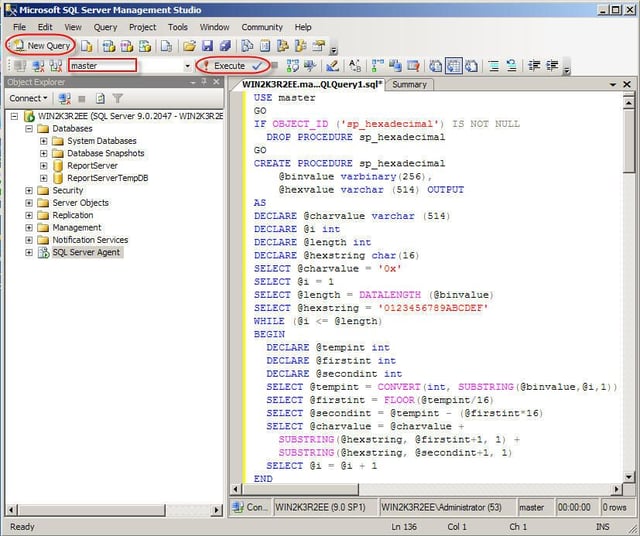
    Next, navigate to Start | All Programs | Microsoft SQL Server 2005 | SQL Server Management Studio. Simply highlight and copy the script from the link provided and paste into SQL Server Management Studio as shown.

    Note: When you first open SQL Server Management Studio, you must click New Query, and select the Master database prior to pasting the script and clicking Execute.

  • Move SQL Server logins

    We still have the final task of resolving permissions. When you move a database from one server to another server that is running SQL Server, a mismatch happens between the SIDs (security identifier numbers). The sp_change_users_login can fix the issue.

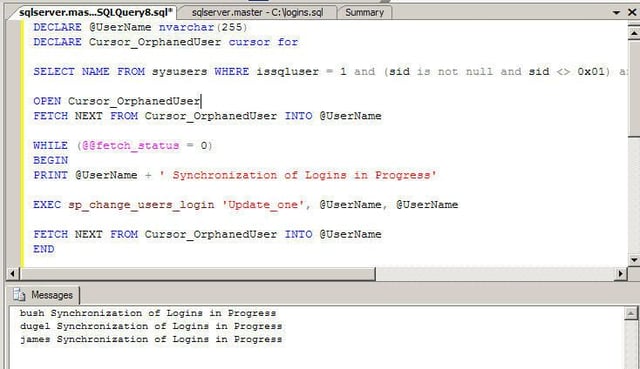
    Open SQL Server Management studio and run the script as shown. The accompanying image displays how Listing B will look in SQL Server Management Studio.

    Listing B
    DECLARE @UserName nvarchar(255)
    DECLARE Cursor_OrphanedUser cursor for
    SELECT NAME FROM sysusers WHERE issqluser = 1 and (sid is not null and sid <> 0x01) and suser_sname(sid) is NOT null ORDER BY name
    OPEN Cursor_OrphanedUser
    FETCH NEXT FROM Cursor_OrphanedUser INTO @UserName
    WHILE (@@fetch_status = 0)
    BEGIN
    PRINT @UserName ‘ Synchronization of Logins in Progress’
    EXEC sp_change_users_login ‘Update_one’, @UserName, @UserName
    FETCH NEXT FROM Cursor_OrphanedUser INTO @UserName
    END
    CLOSE Cursor_OrphanedUser
    DEALLOCATE Cursor_OrphanedUser
    Go

    Run this script on each database for which you have to synchronize logins. Once you have finished running this script on each database, you have successfully moved SQL Server logins from one server to another.

1 of 2
Steven S. Warren

Steven S. Warren is a popular author residing in Winter Haven, Florida with his wife and 2 children. As a columnist on such well-known IT web sites as Techrepublic.com, CNET, and ZDNET, Steven has published numerous articles. Additionally, Steven holds the following certifications: MCDBA, MCSE, MCSA, CCA, CIW-SA, CIW-MA, Network+, and I-Net+. You can visit his web site at http:\\\\www.stevenscottwarren.com. \ \ He is also a Microsoft Most Valuable Professional and has book on VMware Workstation 5 forthcoming.