


If you are using MS Outlook (any version), you will notice that there is no way to rename the mail profile from Control Panel (see Figures A and B).
Figure A
Figure B
I knew that most of these settings are stored in the registry, so I ran a search for every instance of Profile. I did find where the change was and confirmed my suspicion that this setting can be modified using the registry.
Note: As always, edit the registry at your own risk. Make sure you have a reliable backup of the registry; some erroneous edits could render your system unbootable.
The only way to rename your Mail Profile is through direct editing of the registry.
Figure C
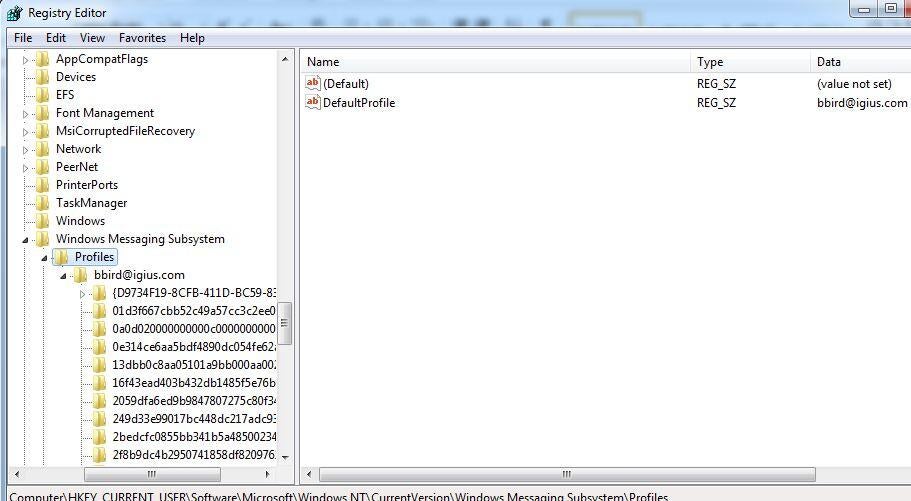
1. Launch Regedit and browse to
HKEY_CURRENT_USER\Software\Microsoft\Windows NT\CurrentVersion\Windows Messaging Subsystem\Profiles\ (Figure C).
2. Now, edit the DefaultProfile key by right-clicking and selecting Modify.
3. Rename the key to how you would like it to appear.
4. Next, right-click the profile you just renamed. It will be located at HKEY_CURRENT_USER\Software\Microsoft\Windows NT\CurrentVersion\Windows Messaging Subsystem\Profiles\bbird@igius.com.
5. Right-click the profile and click Rename and rename it to the same as above.
6. Close the Registry editor and then re-open the Mail Applet in Control Panel to find that the Mail Profile has been successfully renamed, as shown in Figure D.