
\n\tThe Raspberry Pi $35 Linux computer sold out within hours of going on sale in February – with demand for the device reportedly hitting 700 orders per minute.
\n
\n\tThe upshot is a lot of people who wanted the credit card-sized Raspberry Pi have been left empty-handed – with anyone ordering the device today unlike to receive one until about July.
\n
\n\tFortunately, the Raspbery Pi is not the only pocket-sized device in town. There are a variety of alternatives worth considering if you want to get your geek on with a relatively low-cost, portable computer.
\n
\n\tPandaBoard ES
\n
\n\tLike the Pi but with a bit more grunt under the hood and a higher price tag, the $180 PandaBoard ES is suited to both PC user and developer.
\n
\n\tThe diminutive board is based on an open-source hardware design, and can run several flavours of Linux, such as Ubuntu and the Android OS. Support for a range of add-on boards allows the device to drive motors, run sensors and power LEDs, or anything else an electronics or robotics enthusiast might want to do.
\n
\n\tAmong other things, PandaBoards have been used as media centres streaming 1080p, as control units for robots, as a wearable computer, to run a gesture-control interface, and as a general-purpose Android dev tool.
\n
\n\tHobbyists and new users will benefit from the active online community collaborating on PandaBoard projects and sharing tips on its use through wikis, mailings, videos and chat channels.
\n
\n\tPhoto: teamstickergiant via Flickr under licence.
\n
\n\tSpecs
\n
\n\tBoard: Core Logic OMAP4460 system on a chip.
\n
\n\tProcessor: 1.2 GHz dual-core ARM Cortex-A9 processor.
\n
\n\tGraphics: Full HD 1080p multi-standard video encode-decode.Imagination Technologies’ POWERVR SGX540 graphics core supporting APIs including OpenGL ES v2.0, OpenGL ES v1.1, OpenVG v1.1 and EGL v1.3.
\n
\n\tVideo/Audio: HDMI v1.3, DVI-D Connector, LCD expansion header, DSI support. 3.5mm audio in and out, HDMI audio out, stereo audio input support.
\n
\n\tMemory: 1GB DDR2 RAM.
\n
\n\tStorage: Full-size SD-MMC card cage with support for high-speed and high-capacity SD cards.
\n
\n\tConnectivity: 10/100 Ethernet, wireless connectivity 802.11 b/g/n, Bluetooth v2.1 + EDR based on WiLink 6.0.Three USB 2.0 ports – one on the go, two host.
\n
\n\tExpansion: General-purpose expansion header – I2C, GPMC, USB, MMC, DSS, ETM – camera expansion header, LCD signal expansion using a single set of resistor banks.
\n
\n\tDebug: JTAG, UART/RS-232.
\n
\n\tOther: Two configurable status LEDs, one GPIO button, sys-boot switch to boot from number of sources.
\n
\n\tDimensions: 4.5 inches high, four inches wide.
\n
\n\tWeight: 2.88oz.
\n\tCotton Candy
\n
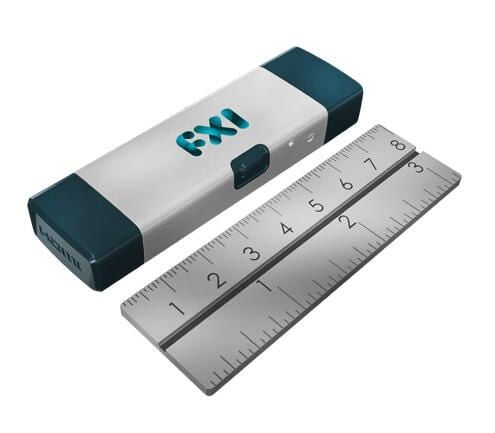
\n\tIf you thought the Raspberry Pi was tiny, then check out the Cotton Candy, a computer that fits onto a USB stick. Billed as the smallest computer in the world, the Cotton Candy is designed to be a computer you can carry in your pocket.
\n
\n\tThe $199 Linux-powered machine is simple and only needs a USB port for power and a HDMI-compatible display to operate.
\n
\n\tIt can be plugged into any computer or device with a USB port, hooked to a display and paired with a mouse and keyboard and it’s ready to go. Cotton Candy’s manufacturers describe it as providing a secure way for people to access cloud services and apps on the move.
\n
\n\tPhoto: Cotton Candy
\n\n
\n\tSpecs
\n
\n\tProcessor: Arm Cortex-A9 1.2GHz.
\n
\n\tGraphics: Quad-core ARM Mali 400MP. 480p/720p/1080p decode of MPEG4-SP/H.263/H.264 AVC/MPEG-2/VC1. OpenGL ES v2.0.
\n
\n\tVideo/Audio: HDMI 1.3a with audio for connection to devices that do not support USB mass storage.
\n
\n\tMemory: 1GB DRAM.
\n
\n\tStorage: Up to 64GB local microSD storage.
\n
\n\tConnectivity: Wi-fi 802.11 b/g/n, Bluetooth 2.1 + EDR.USB 2.0 male form factor for power and connection to devices that support USB mass storage.
\n
\n\tSupported OS: Android Gingerbread, Ice Cream Sandwich and Ubuntu.
\n\tBeagleBoard-xM
\n
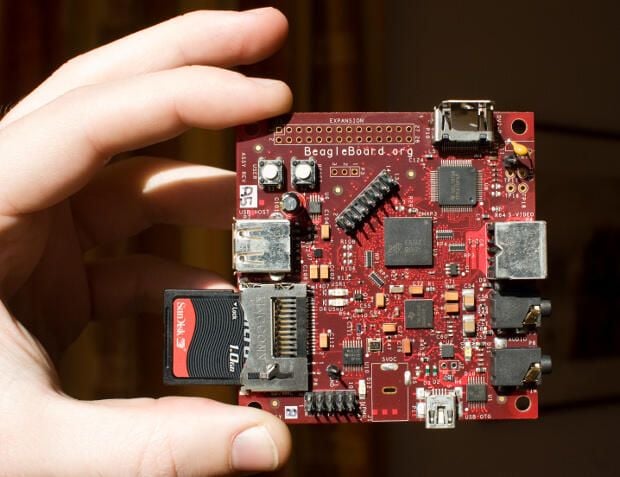
\n\tStriking a nice balance between price and power, the $149 Beagleboard-xM is the platform of choice for many home-brew electronics and robotics projects. Powered by USB, the BeagleBoard-xM is open-source hardware designed to offer laptop-grade performance and expandability packed into a device just over three inches across.
\n
\n\tThe board – which supports a range of operating systems including Linux, Risc OS and Windows CE – is suited for use as a low-cost PC or a development platform, with 512MB allowing for software multitasking and compilation of large bundles of code.
\n
\n\tBeagleBoard can support equipment ranging from sensors to electric motors, making it well suited to controlling electronics and robotics. The devices are being used as a processing unit in projectsto develop an autonomous ground vehicle, unmanned aerial vehicles and even a robot postman.
\n
\n\tPhoto: koenkooivia Flickr under licence
\n\n
\n\tSpecs
\n
\n\tBoard: OMAP3530 system on a chip.
\n
\n\tProcessor: 1GHz Arm Cortex-A8.
\n
\n\tGraphics: OpenGL ES 2.0 capable 2D-3D graphics accelerator capable of rendering 10 million polygons per second. HD video capable TMS320C64x+ DSP for signal processing at up to 430MHz.
\n
\n\tMemory: 512MB
\n
\n\tVideo/Audio: DVI-D, S-Video out.Stereo audio in and out for a microphone, headphones or speakers.
\n
\n\tConnectivity: USB peripherals, MMC+/SD/SDIO interface for memory or wireless connectivity.
\n
\n\tPower: USB.
\n\tCuBox
\n
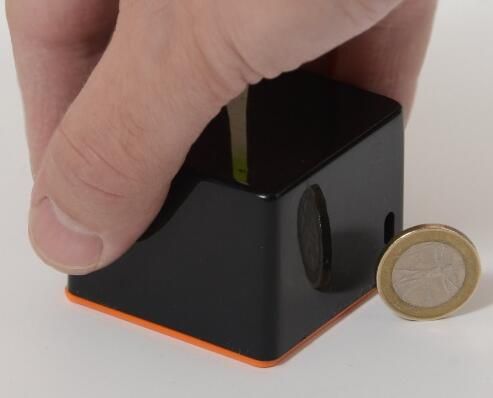
\n\tWith 1080p video playback and infrared remote-control compatibility, the tiny CuBox is crying out for a place in the living room. Unsurprisingly, the typical use for the $135 box is as a media centre or set-top box.
\n
\n\tBut the CuBox, which supports various Linux distributions including Ubuntu and Debian, has more tricks up its sleeve \u2013 able to function as a thin-client device, software development platform or as part of network-attached storage setup.
\n
\n\tThe CuBox is no bigger than two inches in any direction and draws no more than three watts of power from its 5V power supply.
\n
\n\tPhoto: CuBox
\n\n
\n\tSpecs
\n
\n\tBoard: Marvell Armada 510 system on a chip.
\n
\n\tProcessor: 800 MHz ARMv7 core
\n
\n\tVideo/Audio: HDMI and SPDIF optical audio.
\n
\n\tMemory: 1GB 800MHz DDR3
\n
\n\tStorage: Micro SD default 2GB.
\n
\n\tConnectivity: 10/100/1000 Ethernet. Two high-speed USB host ports. E-SATA, microUSB device port for development uses.
\n
\n\tOther: Infrared receiver.
\n\tGumstix Overo
\n
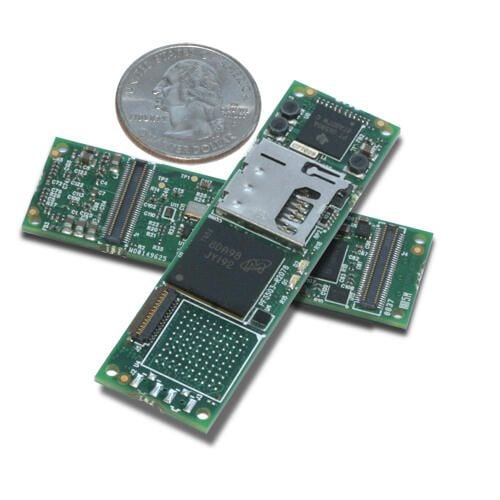
\n\tThe Overo boards are the chameleons of computing \u2013 just as happy controlling a smartphone-sized touchscreen as they are tracking locations via GPS.
\n
\n\tThe Overo are boards that provide the guts of a computer \u2013 such as the CPU and memory \u2013 and are then mounted on different expansion boards to change their abilities, allowing them to connect to and control different hardware.
\n
\n\tHowever, don’t expect them to do everything a computer can out of the box, as they need to be mounted on expansion boards to add abilities such as hooking up to a display or connecting to Ethernet.
\n
\n\tThe small size and customisable nature of the hardware has led to Gumstix’s use in a wide range of applications \u2013 such as helping control mini-satellites and humanoid robots, as well as being clustered into a supercomputer to track botnets online. Ongoing projects are using Gumstixs to develop real-time computer-vision processing in a wearable system and an e-reader with a flexible display.
\n
\n\tA strong developer communityprovides wikis and how-tos to bring new users up to speed. Gumstix Overo boards range in feature and price – from the $115 Overo Sand to the $229 Overo FE COM \u2013 with expansion boards ranging from $27 to $129.
\n
\n\tPhoto:JustinC474
\n
\n\tSpecs
\n\n
\n\tGumstix Overo Earth: $149.
\n
\n\tBoard: Texas Instruments OMAP 3503.
\n
\n\tProcessor: 600MHz ARM Cortex-A8
\n
\n\tMemory: 512MB RAM
\n
\n\tStorage: 512MB Flash
\n
\n\tExpandability: One 140-pin Gumstix Overo series or custom expansion board. One 27-pin camera board.
\n
\n\tConnections: Two 70-pin connectors with 140 signals for I2C, six PWM lines, six A/D and one-wire. UART, SPI, extra MMC lines. Headset, microphone. Backup battery. High-Speed USB host and USB one to go. One 27-pin connector with signals for camera board.
\n
\n\tPower: Powered via expansion board – Overo series or custom – connected to dual 70-pin connectors.
\n
\n\tSize: 17mm x 58mm x 4.2mm.
\n
\n\tWeight: 4.3g.

Nick Heath is a computer science student and was formerly a journalist at TechRepublic and ZDNet.


