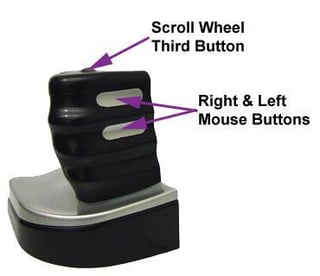
Who says a mouse has to lie flat on a desk? You might not see these as often as your garden-variety mouse, but a few oddball peripherals are giving real relief to frequent computer users.\r\n\r\n
With an eye to battling the growing number of repetitive stress injuries (RSI), Active Release Techniques has released a mouse that eases the strain on users’ hands. The company says its Zero Tension Mouse helps prevent RSI by allowing muscles in the hand, arm and neck to relax.
\r\n\r\n
The mouse’s scroll wheel and button sit atop the device, not unlike the fire button on a gaming joystick. Two buttons, equivalent to the left and right buttons on a regular mouse, are positioned on the side.
\r\n\r\n
For more pictures of mice with design flair, and other innovations in input devices, check out Logitech’s updated mice with customizable buttons and scroll wheels.
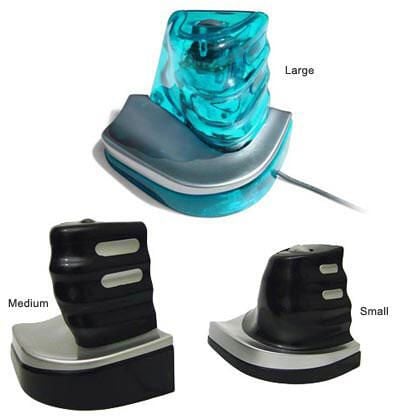
The Zero Tension Mouse comes in three sizes for a more precise fit with a user’s hand. Depending on the size, the device is roughly 4 inches high by 3 inches wide by 5 inches deep.\r\n\r\n
The Zero Tension Mouse is compatible with both Mac OS and Windows.

To use the mouse, users rest the full weight of the hand on the base of the device and wrap their fingers around the handle in a “thumbs-up” position. This doesn’t require the arm to twist and is more akin to the natural positioning of the arm and hand when they are at rest.
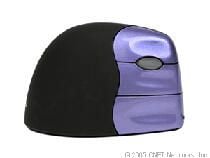
The Evoluent VerticalMouse 2 uses a different take on vertical concept and looks more like a regular mouse perched on its side. CNET’s reviewers took the mouse for a whirl early last year. This is what they had to say about it.\r\n\r\n
The good: Ergonomic design reduces forearm twisting; five-button design for programmable commands.
\r\n\r\n
The bad: Doesn’t register when computer wakes up from sleep mode; faulty scrollwheel; design causes hand to drag.
\r\n\r\n
The bottom line: Although the VerticalMouse 2 eliminates forearm twist–one of many causes of repetitive stress injuries–its awkward feel coupled with design and operational flaws keep us from recommending this mouse.
\r\n\r\n
Read CNET’s full review
\r\nWatch video review
\r\nCheck prices
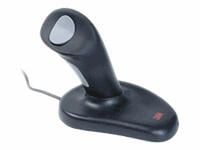
An older model of ergonomic peripherals is the 3M Ergonomic Mouse EM500GPS, which is based on the same concept as the Zero Tension Mouse and takes a page from gaming joysticks.\r\n\r\n
The 3M Ergonomic Mouse is an optical, cabled mouse that connects to any available USB port.
\r\n\r\n
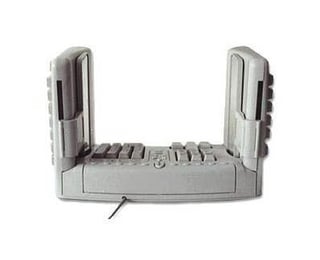
Mice aren’t the only peripherals getting in on the vertical action. This SafeType keyboard, while not exactly commonplace, has become a familiar desktop accessory to many cubicle dwellers over the years.\r\n\r\n
The vertical side walls of the keyboard may take some getting used to, but are intended to allow users’ wrists to rest in a more relaxed position.
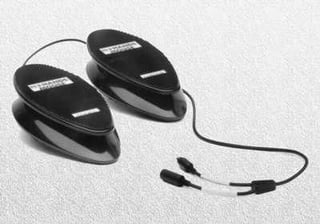
If you’re ready to buck the entire desktop-mouse establishment, the No Hands Mouse may be for you. With two pedals that sit on the floor, it allows users to scroll with one foot and click with the other.
Bill Detwiler is the Editor for Technical Content and Ecosystem at Celonis. He is the former Editor in Chief of TechRepublic and previous host of TechRepublic's Dynamic Developer podcast and Cracking Open, CNET and TechRepublic's popular online show. Previously, Bill was an IT manager in the social research and energy industries. He has bachelor's and master's degrees from the University of Louisville, where he has also lectured on computer crime and crime prevention.


