By George Ou
The Enterprise and Ultimate editions of Windows Vista offer BitLocker, a new data protection feature that does volume-level encryption on your hard disk drive. BitLocker complements, and in some cases replaces, Windows EFS (Encrypting File System).
In this gallery, I’ll walk through the steps for enabling BitLocker, which operates only on the Boot partition, typically the drive labeled C:.
This gallery is also available as an article and PDF download.
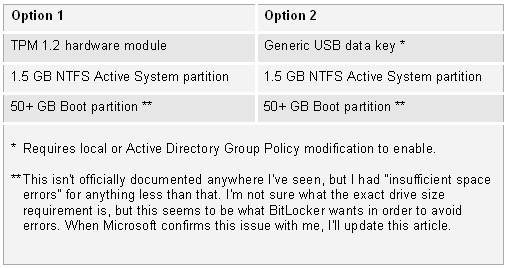
Before we start, we must meet the minimum requirements for BitLocker encryption. Here are the two basic options for running BitLocker.
The 1.5 GB Active System partition is where the unencrypted bare essential bootstrap files for the Vista operating system are located. The 50 GB Boot partition is where Windows is installed and where your page files and temporary files should be located, since EFS can’t protect these things but BitLocker can.
The best way to set this up is to create a 1.5 GB partition along with a 50 GB partition when you first install Vista. If you’re kicking yourself now because you’ve already installed Vista, don’t worry: A simple utility called the BitLocker Drive Preparation Tool can automatically redo the partitions for you. If you’ve already made the 1.5 GB partition, you’ll still need the preparation tool to transfer the necessary files from your Windows partition to the 1.5 GB partition.
To get the BitLocker Drive Preparation Tool, you can go to Windows Update and look under Vista Ultimate Extras. There, you simply check BitLocker Drive Preparation Tool to download and install.
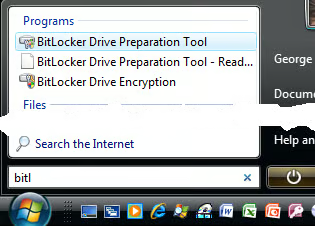
To launch the tool, hit the Start button and type bitl. You’ll see it pop up as the first program, as shown here.
Now, we must launch the Group Policy Editor. For individual home PCs or PCs not joined to an Active Directory, this is the local Group Policy Editor. Active Directory administrators can set this at the AD level and apply it to an Organizational Unit or an entire AD at the global level.
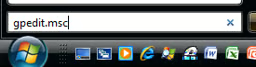
To launch the GP Editor locally, just hit Start and type gpedit.msc, as shown here.
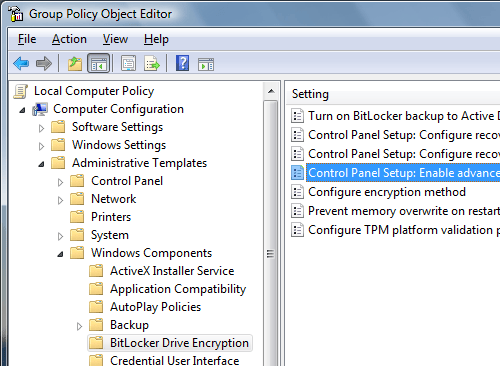
Next, we have to expand our GP Editor out to the BitLocker Drive Encryption folder, as shown here, and double-click on Control Panel Setup: Enable Advanced Startup Options.
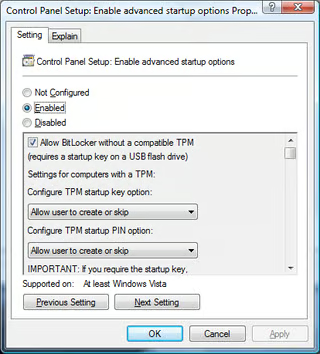
Set this control to Enabled and select Allow BitLocker Without A Compatible TPM, as shown here.
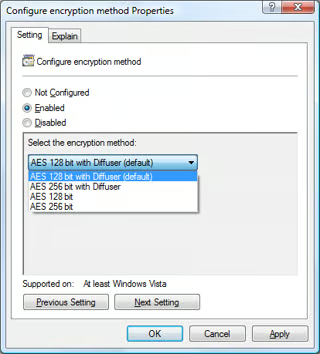
Once you enable Allow BitLocker Without A Compatible TPM, click Apply and OK. Then, click on Configure Encryption Method and you’ll see the window shown here.
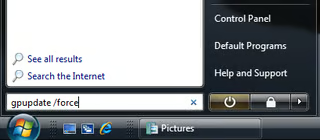
Once you make the changes you want, hit Apply and OK and close out of the GP Editor. You can avoid a reboot if you force your machine to update its group policy with the command gpupdate /force, as shown here.
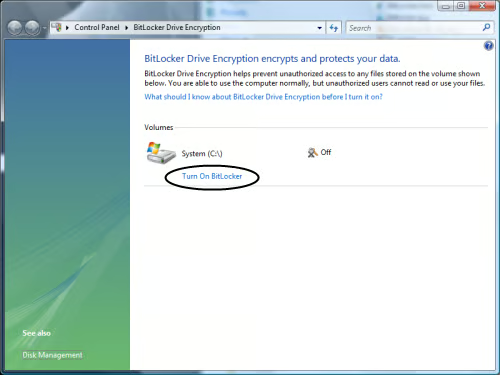
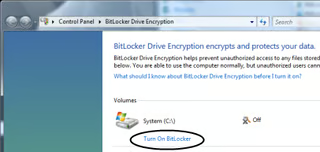
Now you’re ready to launch the BitLocker Drive Encryption tool. Just press the Start button on your keyboard or desktop, type bitl, and arrow down twice to select BitLocker Drive Encryption. You should then see the screen shown here.
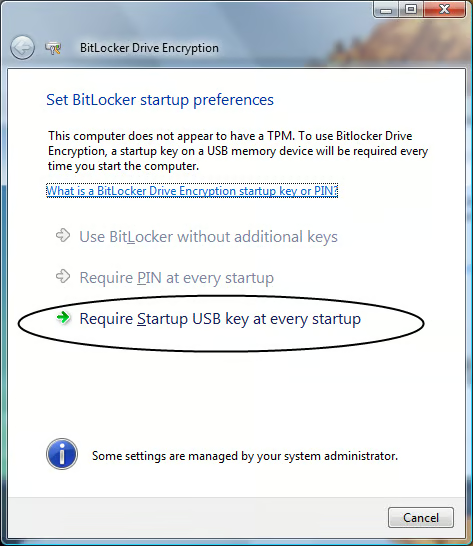
When you click on Turn On BitLocker, you’ll see the screen shown here.
Before you continue, insert a USB data key of any size. This will essentially be the “ignition” key for your PC from this point on. Once BitLocker is enabled, you won’t be able to start your PC without this key (or some other key with a replica of the hidden information on this key). You might want to keep this USB key on your key chain instead of in the bag with your laptop in case your bag is stolen.
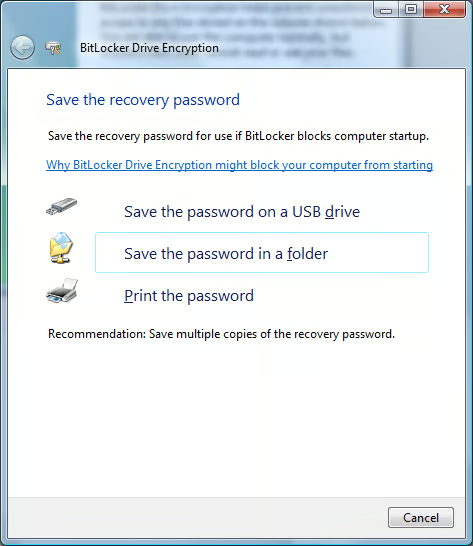
The next step is to back up your password for emergency recovery using the options shown here.
You can save the backup to the same USB drive and copy it elsewhere later. If you try to save the password in a folder, you have to use a folder on a volume other than the boot volume that BitLocker encrypts. And it can’t be on the root of the volume, it must go into a folder. Enterprises can back up BitLocker passwords through Active Directory. Remember that the password isn’t the actual BitLocker key itself, but something that can derive the key.
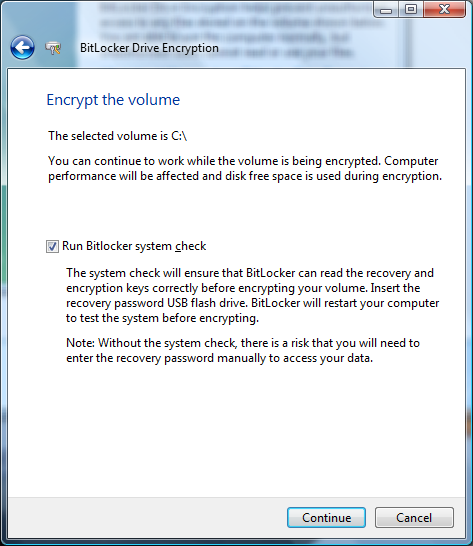
Once you finish the backup, you can encrypt the drive using these options. Simply hit Continue, and BitLocker will check your system and start encrypting your boot drive. It might take an hour or two, depending on the size of your drive and speed of your system. Then, it will reboot and prompt you for the USB key, if it isn’t already inserted. Once you reboot, you’re finished; you’ve got BitLocker running.

Jody Gilbert has been writing and editing technical articles for the past 25 years. She was part of the team that launched TechRepublic.


