
\n\tThere are many new features of Microsoft Windows 8 that will be great for tablets and touch devices, but will be annoying as all get out for desktop users. This is a major complaint among many of the Windows 8 naysayers. However, many of these little annoyances can be avoided with a simple configuration tweak. If you use Internet Explorer on a desktop system, this should be one of the first adjustments you make in Windows 8.
\n
\n
\n\tBy default, when you click on a web link in the Windows 8 Metro UI, Internet Explorer will open that web page in the Metro UI version of IE. This opens the browser page in full screen with now navigation buttons, address bars, etc. similar to what you see here.
\n
\n\tThis slideshow is also available as a post in the TechRepublic Microsoft Windows Blog. \n\n
\n
\n\tImages by Mark Kaelin for TechRepublic

\n\tIn some cases this may be fine with you, but for many desktop users this is not what we want. To configure Internet Explorer to open all web links in the desktop version, you have to make a change in Internet Properties.
\n
\n\tImages by Mark Kaelin for TechRepublic
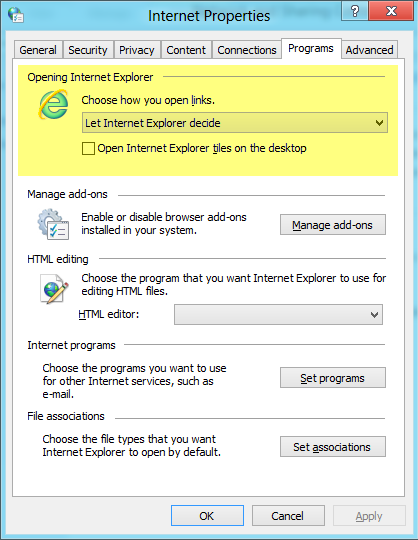
\n\tOnce you get to the Internet Properties screen, click the Programs tab.
\n
\n\tImages by Mark Kaelin for TechRepublic
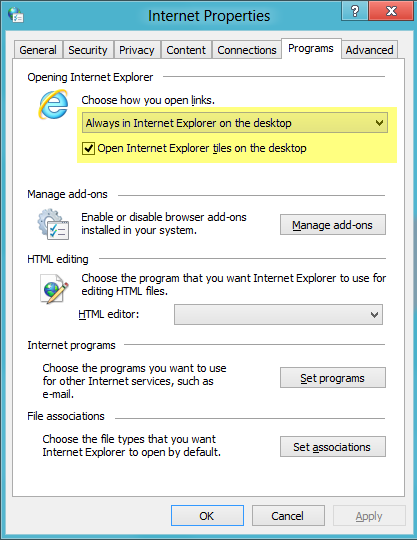
\n\tThe first section on the Program tab deals with Internet Explorer. Click the drop down menu and change the entry to read “Always in Internet Explorer on the desktop.”
\n
\n\tNote, you can also specify that you want Metro UI tiles to open in IE on the desktop by clicking the check box. When you are finished, click Apply and then OK.
\n
\n\tPresumably, if Firefox, Chrome, Opera, and other browsers will operate in a similar fashion when (if) they release Windows 8/Metro versions of those web browsers.
\n
\n\tImages by Mark Kaelin for TechRepublic
\n
\n

Mark W. Kaelin has been writing and editing stories about the information technology industry, software, hardware, gaming, finance, accounting, and technology geekdom for more than 30 years.


