\n\tThis gallery is also available as a post in the Windows and Office Blog.
\n
\n\tIn Part I of this series, I began examining some of the new features in Windows 8’s File Explorer. As I did, I primarily focused on the Ribbon’s three Core tabs titled Home, Share, and View. As I mentioned, the Ribbon also provides you with a set of contextual tabs, which appear based on the location or type of object that you have selected in File Explorer, and then provide you with groups of appropriate commands. Along with the all of the commands on the core tabs, this system of contextual tabs is designed to expose close to 200 different file management commands in File Explorer without having them buried in numerous nested menus, popups, dialog boxes, or right-click context menus.
\n
\n\tIn this edition of the Windows Desktop Report, I will continue my in-depth look at Windows 8’s File Explorer by exploring the contextual tabs on the new Ribbon.
\n
\n
\n
\n\tAs I mentioned, the Ribbon system with its tabs is designed to expose close to 200 different file management commands in File Explorer. One of the ways that the Ribbon system accomplishes this feat is by using contextual tabs, which only appear when you select a specific location, such as Computer or Network, or select a specific object, such as an image file or drive. When one of these objects is selected, the appropriate contextual tab will then display commands related to that object.
\n
\n\tFor example, when you select an image file, you’ll see a tab that contains commands such as Rotate and Set as background. When you select drive, you’ll see a tab that contains command such as Optimize and Format.
\n
\n\tIn this way, contextual tabs essentially display the commands that you need only when you need them. Let’s take a closer look.
\n
\n
\n\tLet’s begin with Computer. When you select Computer in File Explorer’s Navigation pane, the File menu and two tabs titled Computer and View will appear in the Ribbon. The File menu and the View tab contain the same commands as I showed you last week; however, the Computer tab contains a set of commands for the tasks that you typically perform in Computer. For instance, when you select a drive letter, a contextual tab titled Disk Tools Drive appears.
\n
\n
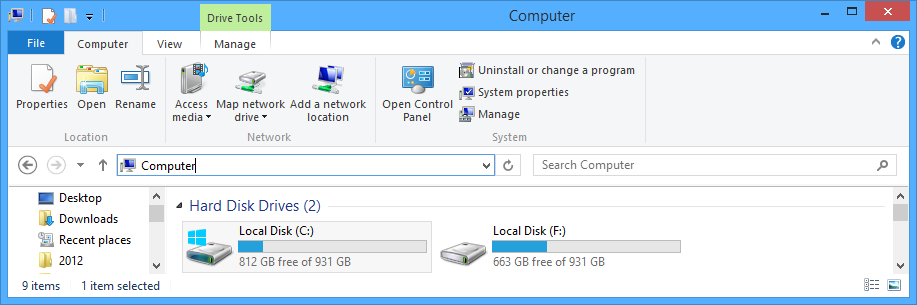
\n\tAs you can see in Figure A, the Computer tab contains three groups: Location, Network, and System. The Location group contains three commands:
\n
\n\t
\n\t
\n
\n
\n\tCredit: Images by Greg Shultz for TechRepublic
\n\tThe Network group contains Access Media, which allows you to connect to the media shares on other computers on your network, the Map network drive, which allows you to assign drive letters to a network share, and the Add a network location command, which launches the Add Network Location wizard that you can use to connect to a cloud site, an FTP site, or a network location.
\n
\n\tThe System group allows you to easily tap into the Control Panel, launch the Uninstall Program tool, or access a System screen just like the one you access in Windows 7 by right clicking on Computer and selecting Properties. The Manage command conveniently launches the Computer Management console, where you can access such things a Task Scheduler, Event Viewer, and Device Manager.
\n
\n
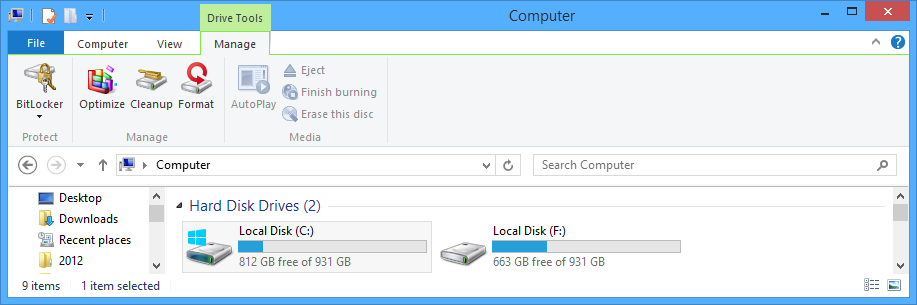
\n\tSelecting the Manage tab, as shown in Figure B, provides you with access to a set of commands you commonly need to use when working with drives. You’ll notice that this contextual tab is highlighted with an additional green tab titled Drive Tools to make it stand out. This tab contains three groups: Protect, Manage, and Media.
\n
\n\tAs you can see, the commands in Media group in my screen shot are inactive, but they become active when you select the appropriate type of drive, such as a USB thumb drive or a DVD-R disc.
\n
\n\tCredit: Images by Greg Shultz for TechRepublic
\n\tThe Manage group contains the Format, Cleanup, and Optimize commands, which work exactly as you would expect – but instead of being spread out on a context menu and a couple of tabs on the Properties dialog box, they are now readily available on the Ribbon. The Protect group contains the Bitlocker command, which will allow you to enable and manage Bitlocker.
\n
\n
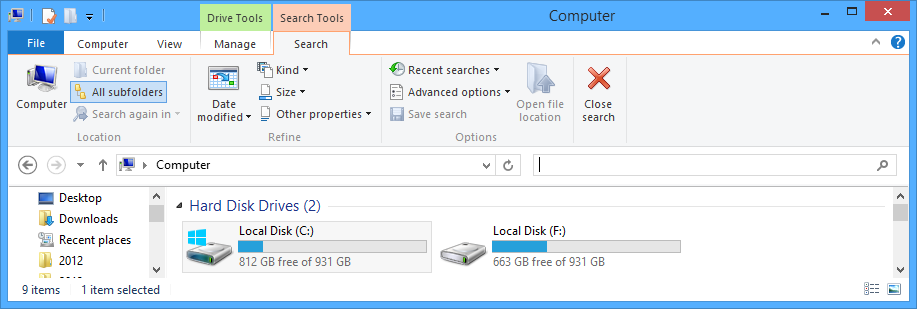
\n\tWhen you select the Search box in any File Explorer window, you’ll see the Search Tools contextual tab, as shown in Figure C. In the Location group, you can see that there are several commands that allow you to specify where you want to search, such as All subfolders. The commands in the Refine group allow you to narrow your search by such attributes as Date or Size. In the Options group you’ll find several commands that will allow you to perform various search related operations, such as access Recent searches or configure Advanced search options. Once you’re finished searching you can click Close a search to disable the Search tab and clear the results.
\n
\n\tCredit: Images by Greg Shultz for TechRepublic
\n
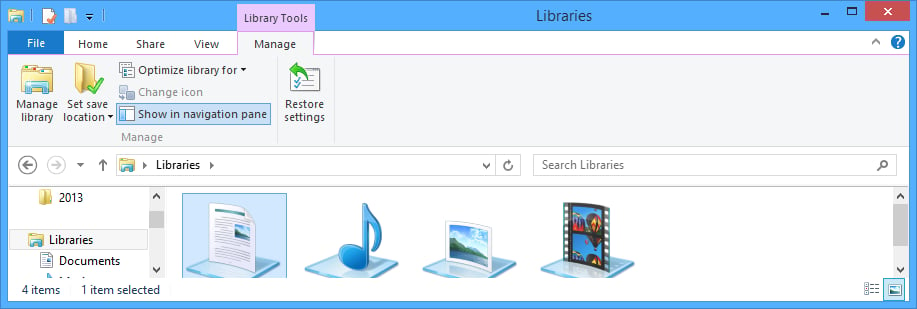
\n\tWhen you select Libraries in File Explorer’s Navigation pane, you’ll see the File menu, the core tabs, and the Manage contextual tab, which is highlighted as Library Tools, as shown in Figure D.
\n
\n\tFrom this tab, which only has one group titled Manage you can perform a host of library related tasks, such as use the Manage Library command to add and remove libraries, specify the type of file that the library will be optimized for, as well as decide whether a library is to appear in the Navigation pane. If you have made changes and then decide you don’t want them anymore, you can use the Restore settings command to revert to the default settings.
\n
\n\tCredit: Images by Greg Shultz for TechRepublic
\n
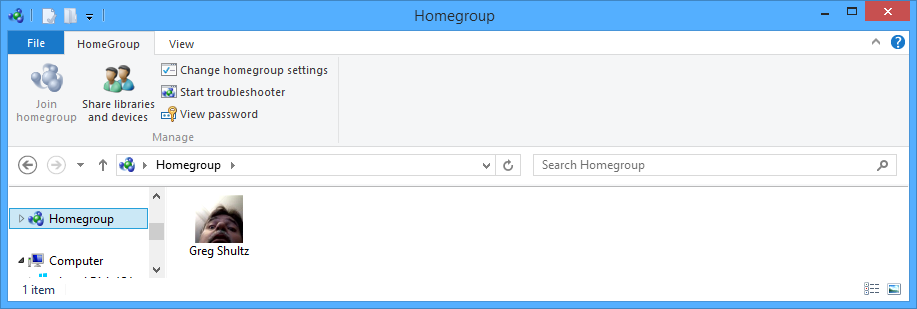
\n\tWhen you select Homegroup in File Explorer’s Navigation pane, the File menu and two tabs titled HomeGroup and View will appear in the Ribbon, as shown in Figure E. The File menu and the View tab contain the same commands as I showed you last week. The commands on the HomeGroup tab allow you to share libraries and devices with the Homegroup as well as change Homegroup settings. You can also view the Homegroup password or launch the Homegroup troubleshooter.
\n
\n\t(You’ll notice that the name of the tab uses an uppercase G in group. As you can see on this tab, you’ll find this feature spelled as Homegroup, homegroup, and HomeGroup throughout the Windows 8 and documentation. I am not sure why there isn’t a standard naming convention here, but the same inconsistencies exist in Windows 7.)
\n
\n\tCredit: Images by Greg Shultz for TechRepublic
\n
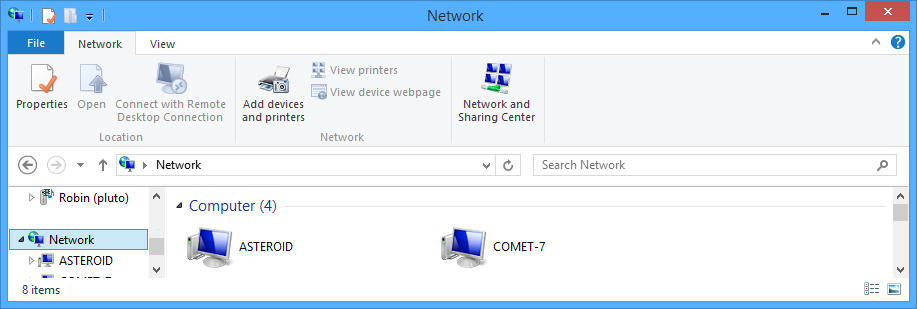
\n\tWhen you select Network in File Explorer’s Navigation pane, the File menu and two tabs titled Network and View will appear in the Ribbon, as shown in Figure F. In the Location group of the Network tab, you’ll find the Properties command, which will launch the Network and Sharing Center, the Open command, which when a computer is selected will access that computer and display its shares, and the Connect with Remote Desktop Connection command is available when you select a computer in the network. The Add devices and printers command launches the Add a device wizard, the View printers command allows you to see any printers being shared by the selected computer. And. when you select a device such as a router, the View device webpage command in the Network group is enable and allows you to quickly change configuration settings. You can also easily access the Network and Sharing Center by clicking its button on the Network tab.
\n
\n\tCredit: Images by Greg Shultz for TechRepublic
\n
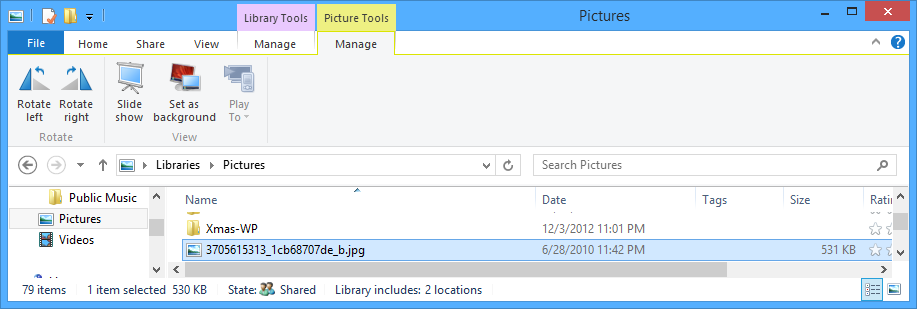
\n\tWhen you select certain file types in File Explorer, you’ll see contextual tabs that contain commands related to the file type. For example, when you select an image file, you’ll see a Picture Tools Manage tab that contains the Rotate and View groups, as shown in Figure G.
\n
\n\tCredit: Images by Greg Shultz for TechRepublic
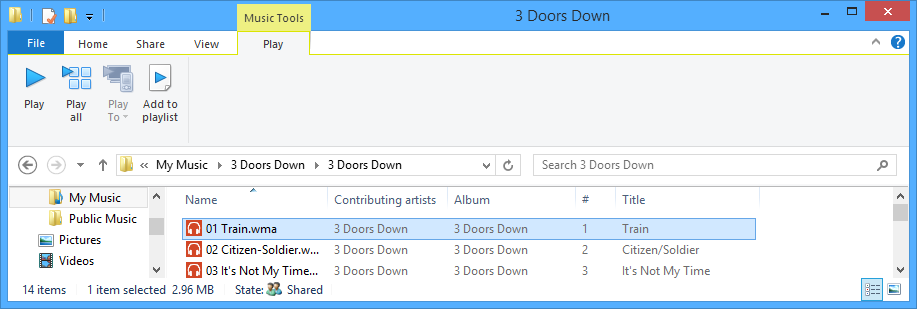
\n\tWhen you select a video or music file, you see the Video Tools Play tab or the Music Tools Play tab, as shown in Figure H.
\n
\n
\n\tWhat do you think about Windows 8’s File Explorer? Are you ready to embrace the Ribbon or are you going to complain about it? It’s your choice! As always, if you have comments or information to share about this topic, please take a moment to drop by the TechRepublic Community Forums and let us hear from you.
\n
\n
\n\t
\n\t
\n
\n
\n\tCredit: Images by Greg Shultz for TechRepublic

My first computer was a Kaypro 16 \"luggable\" running MS-DOS 2.11 which I obtained while studying computer science in 1986. After two years, I discovered that I had a knack for writing documentation and shifted my focus over to technical writing.


