By choosing “Full Scale Launcher” from the main menu, you can enter the full application. This is a more advanced screen with many more options and details available.
For a full review of Paragon Partition Manager 10 Professional, check out the TechRepublic Product Spotlight Blog.
Image created by Justin James for TechRepublic.
The backup wizard allows you to choose exactly what you want to copy, with varying degrees of granularity.
For a full review of Paragon Partition Manager 10 Professional, check out the TechRepublic Product Spotlight Blog.
Image created by Justin James for TechRepublic.
Paragon Partition Manager 10 Professional can use a “virtual mode” where operations are not actually performed immediately. This is the default, and it is a great way to catch mistakes before they are made.
For a full review of Paragon Partition Manager 10 Professional, check out the TechRepublic Product Spotlight Blog.
Image created by Justin James for TechRepublic.
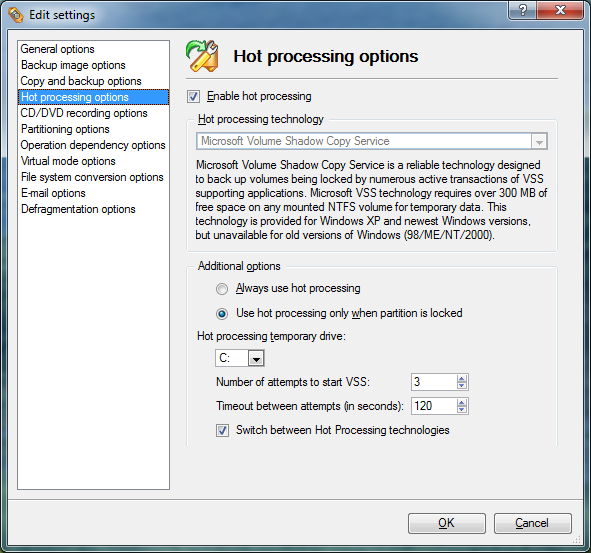
The application can also use Windows’ Volume Shadow Copy (VSS) to take “snapshots” of data. This is a critical feature if you have certain applications running in the background while operations are being performed.
For a full review of Paragon Partition Manager 10 Professional, check out the TechRepublic Product Spotlight Blog.
Image created by Justin James for TechRepublic.
This is another example of the UI, this time for a partition resize operation. As you can see, it provides you with all of the information you need to make the right decision, while being clear and easy to understand at the same time.
For a full review of Paragon Partition Manager 10 Professional, check out the TechRepublic Product Spotlight Blog.
Image created by Justin James for TechRepublic.

I am an all purpose IT person. If there's a generic job title in IT, I've probably had it, most likely more than once. Programmer, systems administrator, DBA, PC tech/repair, Help Desk, webmaster, web designer, web developer, applications developer, network engineering. Somehow I have managed to get my thumb stuck in each one of those pies!


