Users in Exchange-based organizations enjoy comprehensive built-in mobility via ActiveSync; however, even as users clamor for smartphones, IT needs to make sure that these services are used in ways that are consistent with organizational policies. Although some users believe that these policies can be constraining, the situation would be much worse if the mobile device were to create a major security incident.
There are a variety of third party solutions to manage, monitor, and control mobile devices, but many organizations loathe spending a lot of money on these kinds of services and are most concerned with being able to simply control how devices interact with their systems. Exchange 2010 includes a number of administrative controls to help IT departments provide these mobility services while enabling automated methods by which user’s devices are required to adhere to policy.
This TechRepublic gallery is also available as a Smartphones blog post.
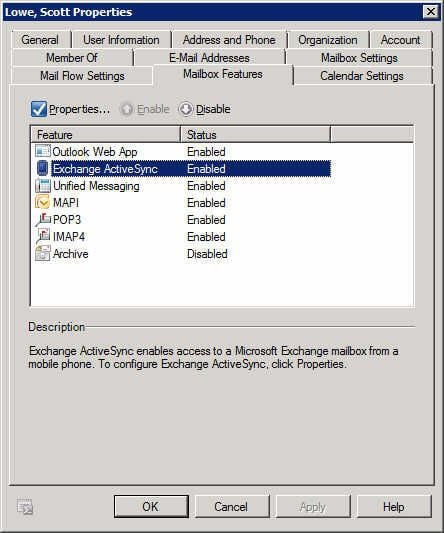
First and foremost, you get to decide whether ActiveSync is even available on a user by user basis. You can opt to disable ActiveSync for all users and then enable it only for those users who need it. In this figure, you see an Exchange Management Console screenshot that shows you my Exchange profile with ActiveSync enabled.
All screenshots by Scott Lowe for TechRepublic.
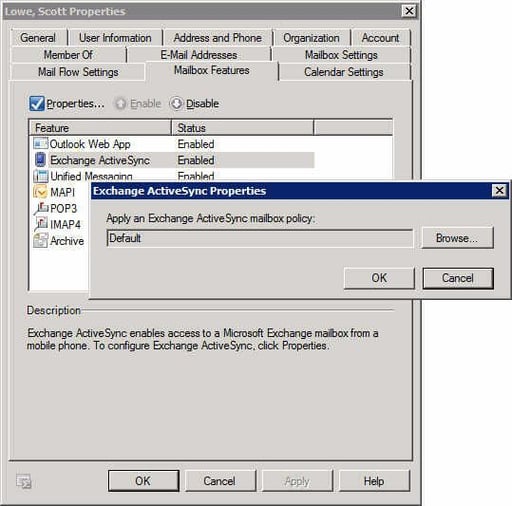
Exchange 2010 includes a default ActiveSync policy, but you can create others if you like. Each individual mailbox needs to be associated with an ActiveSync policy. To change the policy, choose ActiveSync and click Properties. On the Properties page, choose the policy that should apply to this user’s devices.
All screenshots by Scott Lowe for TechRepublic.
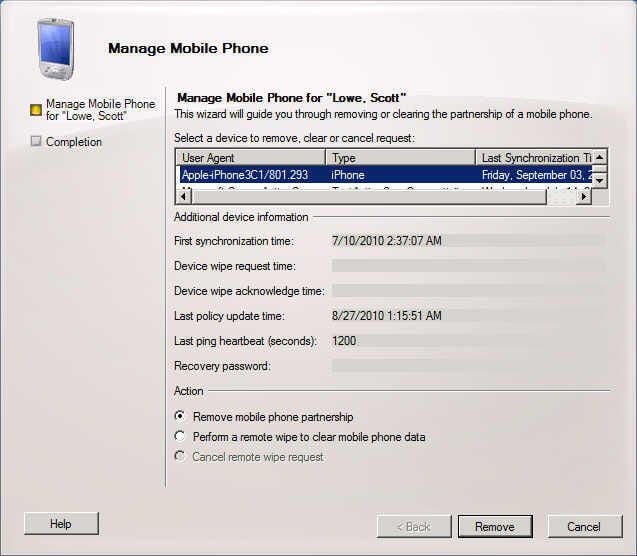
If a user happens to lose his or her smartphone, you can take direct action by administratively disassociating that user’s phone from the Exchange server or initiating a remote wipe of that user’s attached device. To do so, from the Exchange Management Console, right-click the user’s name and choose Manage Mobile Phone. You will see a screen like this one.
All screenshots by Scott Lowe for TechRepublic.
ActiveSync policies
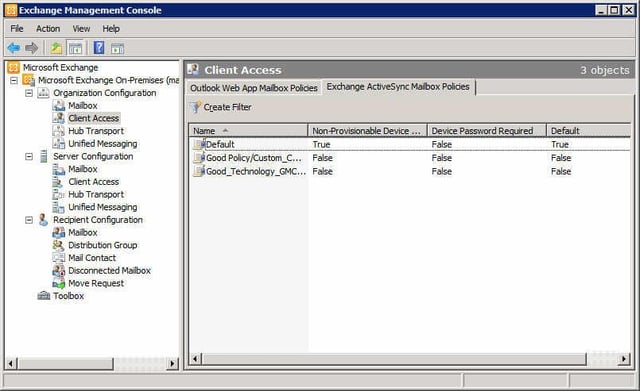
You can be even more granular through the use of ActiveSync policies. In Exchange 2010, you can create any number of ActiveSync policies and associate different policies with different users.
ActiveSync policies are managed in the Exchange Management Console by navigating to the Organization Configuration | Clint Access node. From there, choose the Exchange ActiveSync Policies tab, right-click a policy you’d like to modify and, from the shortcut menu, choose Properties. I’ll introduce you to each of the primary ActiveSync policy areas. Note: Some ActiveSync policies can only be used if your users have an Exchange Enterprise Client Access License.
All screenshots by Scott Lowe for TechRepublic.
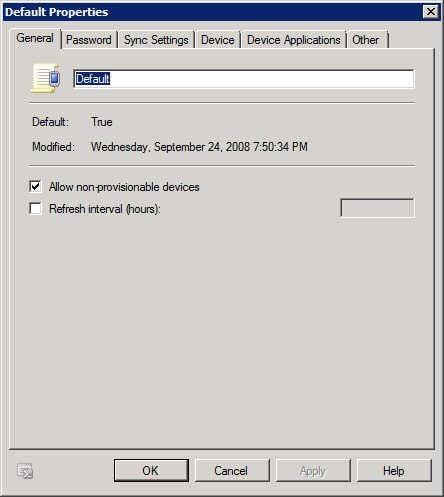
The General tab is a place for general information about the policy, such as the policy name and how often the policy is refreshed. If you make regular changes to policies, you can specify a short refresh time, which ensures that devices will receive a new policy within that time period.
All screenshots by Scott Lowe for TechRepublic.
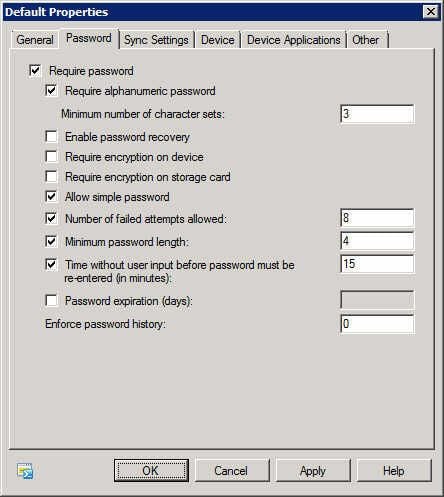
By requiring the use of a password, you protect a user’s mobile device from casual snooping or from being immediately cracked in the event that it is lost or stolen. Via the ActiveSync Password tab, you can configure how long the password must be, how many failed attempts are allowed, password complexity, password expiration, and more. On this page, you can also indicate that only users with devices that support encryption can use ActiveSync.
All screenshots by Scott Lowe for TechRepublic.
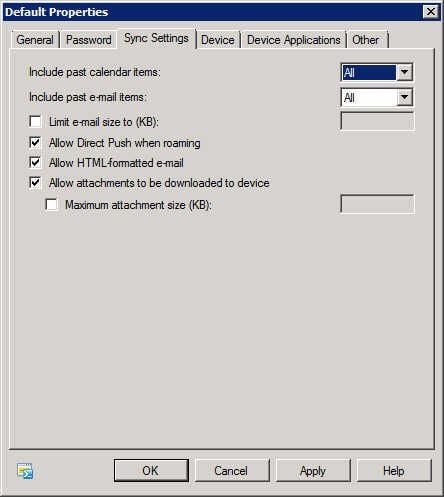
The Sync Settings tab is the place for deciding how much information should be sent down to the device. You get to decide whether past calendar appointments are synchronized, and you can decide the maximum email size that will be pushed. You can also choose to disable the ability of roaming users to use ActiveSync/Direct Push. Depending on your organization’s data plans, this could save the company money.
All screenshots by Scott Lowe for TechRepublic.
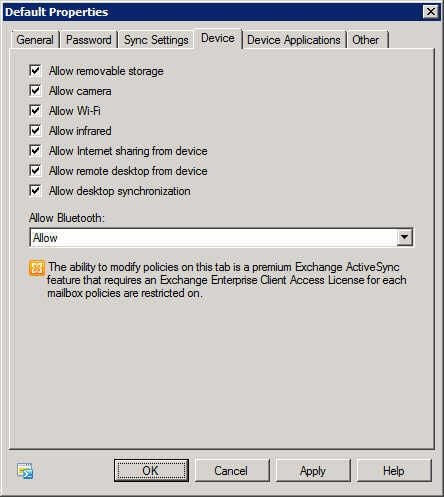
Some device features, such as cameras, Wi-Fi, and the other connectivity options, can present a security hazard to organizations in which sensitive information must be closely controlled. On the Device tab, you can choose to disable specific device features such as cameras and Bluetooth in order to combat the security issue.
All screenshots by Scott Lowe for TechRepublic.
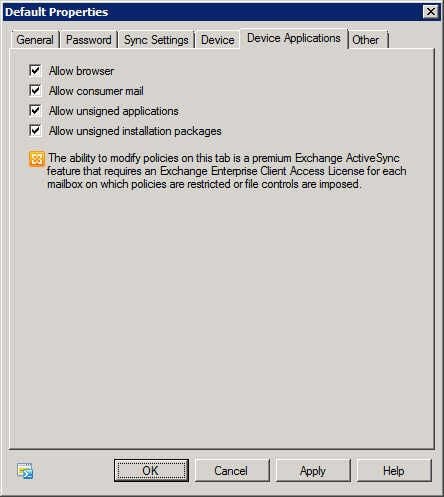
How a device is used can be as important as the kind of data you allow it to access. Do you want users accessing the web using their phone’s browser? Should they be allowed to check their personal mail account using the phone? In this figure, you can see that these items and more can be configured on the Device Applications tab.
All screenshots by Scott Lowe for TechRepublic.
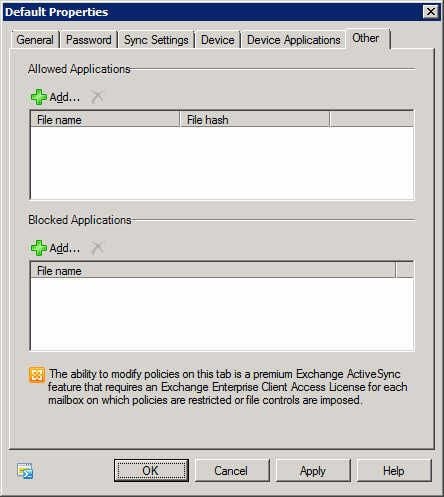
On the Other tab, Microsoft has put everything else; in this case, that boils down to being able to decide which applications can be used on mobile devices.
Summary
While not necessarily as full-featured as comprehensive third-party solutions, Exchange’s built-in ActiveSync provides you with a baseline set of security controls that might be enough to protect your company from the pitfalls sometimes associated with mobility.
All screenshots by Scott Lowe for TechRepublic.


