


One of the key features of networking is the bundling of data into packets. The packets then travel around the building or around the world and are unbundled by another node on the network. Administrators and engineers who are troubleshooting and analyzing networks sometimes need to break out a protocol analyzer to open up these packets and take a closer look at their contents to see what’s happening on the network.
Today, we’ll examine the anatomy of the three most common types of TCP/IP packets that travel across most wires (or glass, if you have fiber-optic cable). We’ll also discuss some common packet errors and their typical causes.
Understanding networks using the OSI reference model
The following two articles can help you gain a stronger grasp of networking terms and concepts by using the OSI reference model as a guide:
“There’s no need to fear the OSI model”
“Use the OSI reference model to aid in topology decisions”
User Datagram Protocol (UDP)
The Transport Layer of your network (OSI Layer 4) will typically utilize two major protocols to move information:
- UDP (User Datagram Protocol), which is documented in RFC 768
- TCP (Transmission Control Protocol), which is documented in RFC 793
With network protocols such as UDP and TCP/IP, the packets range from 64 to 1,500 characters, or bytes.
UDP is a connectionless protocol that contains no reliability, flow-control, or error-recovery functions. Because of its simplicity, UDP headers contain fewer bytes and consume less network overhead than TCP. UDP is useful in situations where the reliability mechanisms of TCP are not necessary, such as in cases where a higher-layer protocol might provide error and flow control. UDP provides users with TCP-like services. Unlike TCP, UDP packets can be discarded before reaching their targets. UDP is useful when TCP would be too complex, too slow, or just unnecessary.
UDP is the transport protocol for several well-known application-layer protocols, including Network File System (NFS—UDP ports 1021/1022), Simple Network Management Protocol (SNMP—UDPports 161/162), Domain Name System (DNS—UDP port 53), and Trivial File Transfer Protocol (TFTP—UDP port 69).
Figure A shows the UDP packet format.
| Figure A |
 |
| UDP packet |
The UDP packet format contains four fields:
- Source Port and Destination Port fields (16 bits each) identify the end points of the connection.
- Length field (16 bits) specifies the length of the header and data.
- Checksum field (16 bits) allows packet integrity checking (optional).
UDP packets
UDP takes the message received from the layers above it on the OSI model and formats that message into UDP packets. The sending application sends the packets to a peer application on the receiving host. UDP requires no notification of receipt and does not use the three-way handshake (SYN-ACK-ACK—which we’ll discuss in more detail a bit later). Again,UDP is a much simpler protocol than TCP and is useful in situations where the reliability mechanisms of TCP are not necessary.
Transmission Control Protocol (TCP)
TCP is a connection-oriented Layer 4 protocol that provides full-duplex, acknowledged, and flow-controlled service to upper-layer protocols. It moves data in a continuous, unstructured byte stream. Sequence numbers identify bytes within that stream. TCP can also support numerous simultaneous upper-layer conversations.
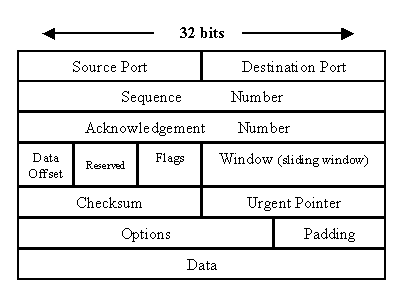
Figure B shows the packet format.
| Figure B |
 |
| TCP packet |
The TCP packet format consists of these fields:
- Source Port and Destination Port fields (16 bits each) identify the end points of the connection.
- Sequence Number field (32 bits) specifies the number assigned to the first byte of data in the current message. Under certain circumstances, it can also be used to identify an initial sequence number to be used in the upcoming transmission.
- Acknowledgement Number field (32 bits) contains the value of the next sequence number that the sender of the segment is expecting to receive, if the ACK control bit is set. Note that the sequence number refers to the stream flowing in the same direction as the segment, while the acknowledgement number refers to the stream flowing in the opposite direction from the segment.
- Data Offset (a.k.a. Header Length) field (variable length) tells how many 32-bit words are contained in the TCP header. This information is needed because the Options field has variable length, so the header length is variable too.
- Reserved field (6 bits) must be zero. This is for future use.
- Flags field (6 bits) contains the various flags:
URG—Indicates that some urgent data has been placed.
ACK—Indicates that acknowledgement number is valid.
PSH—Indicates that data should be passed to the application as soon as possible.
RST—Resets the connection.
SYN—Synchronizes sequence numbers to initiate a connection.
FIN—Means that the sender of the flag has finished sending data. - Window field (16 bits) specifies the size of the sender’s receive window (that is, buffer space available for incoming data).
- Checksum field (16 bits) indicates whether the header was damaged in transit.
- Urgent pointer field (16 bits) points to the first urgent data byte in the packet.
- Options field (variable length) specifies various TCP options.
- Data field (variable length) contains upper-layer information.
TCP makes up for IP’s deficiencies by providing reliable, stream-oriented connections. The protocol suite gets its name because most TCP/IP protocols are based on TCP, which is in turn based on IP. TCP and IP are the twin pillars of TCP/IP. TCP adds a great deal of functionality to the IP service.
TCP packets
TCP almost always operates in full-duplex mode (two independent byte streams traveling in opposite directions). Only during the start and end of a connection will data be transferred in one direction and not the other. TCP uses segments to determine whether the receiving host is ready to receive the data.
When the sending TCP host wants to establish connections, it sends a segment called a SYN to the peer TCP protocol running on the receiving host. The receiving TCP returns a segment called an ACK to acknowledge the successful receipt of the segment. The sending TCP sends another ACK segment and then proceeds to send the data. This exchange of control information is referred to as a three-way handshake.
TCP packets are very complex and incorporate several mechanisms to ensure connection state, reliability, and flow control of data packets:
- Streams: TCP data is organized as a stream of bytes, much like a file.
- Reliable delivery: Sequence numbers are used to coordinate which data has been transmitted and received. TCP will arrange for retransmission if it determines that data has been lost.
- Network adaptation: TCP will dynamically learn the delay characteristics of a network and adjust its operation to maximize throughput without overloading the network.
- Flow control: TCP manages data buffers and coordinates traffic so its buffers will never overflow. Fast senders will be stopped periodically to keep up with slower receivers.
- Round-trip time estimation: TCP continuously monitors the exchange of data packets, develops an estimate of how long it should take to receive an acknowledgement, and automatically retransmits if this time is exceeded.
Internet protocol (IP)
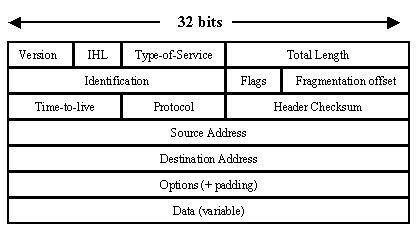
IP is the Layer 3 protocol that provides fragmentation and reassembly of datagrams and error reporting. Along with TCP, IP represents the core of the Internet protocol suite. Figure C shows the IP packet format.
| Figure C |
 |
| IP packet |
The IP packet format consists of these fields:
- Version field (4 bits) indicates the version of IP currently used.
- IP Header Length (IHL) field (4 bits) indicates how many 32-bit words are in the IP header.
- Type-of-service field (8 bits) specifies how a particular upper-layer protocol would like the current datagram to be handled. Datagrams can be assigned various levels of importance through this field.
- Total Length field (16 bits) specifies the length of the entire IP packet, including data and header, in bytes.
- Identification field (16 bits) contains an integer that identifies the current datagram. This field is used to help reconstruct datagram fragments.
- Flags field (4 bits; one is not used) controls whether routers are allowed to fragment a packet and indicates the parts of a packet to the receiver.
- Time-to-live field (8 bits) maintains a counter that gradually decrements to zero, at which point the datagram is discarded. This keeps packets from looping endlessly.
- Protocol field (8 bits) indicates which upper-layer protocol receives incoming packets after IP processing is complete.
- Header Checksum field (16 bits) helps ensure IP header integrity.
- Source Address field (32 bits) specifies the sending node.
- Destination Address field (32 bits) specifies the receiving node.
- Options field (32 bits) allows IP to support various options, such as security.
- Data field (32 bits) contains upper-layer information.
IP packets (datagrams)
IP attaches an IP header to the segment or packet’s header in addition to the information added by TCP or UDP. Information in the IP header includes the IP addresses of the sending and receiving hosts, datagram length, and datagram sequence order. This is provided in case the datagram exceeds the allowable byte size for network packets and must be fragmented.
Different packets, same problem
Tracking down network performance problems can be time-consuming and extremely complicated. All of these packets can run into a variety of problems when they are converted to frames and transmitted across your network. Let’s look at some of the most common reasons for nondelivery of your information.
Out-of-window (late) collisions
Out-of -window collisions occur when a station receives a collision signal while still transmitting but more than 51.2 microseconds (the maximum Ethernet propagation delay) after transmission began.
Cause: There are two conditions that cause this type of error to occur. Either the network segment’s physical length exceeds IEEE 802.3 specifications (100 meters) or a node on the net is transmitting without first listening for carrier sense (and beginning its illegal transmission more than 51.2 microseconds after the first station began transmitting).
Giants
Giants are packets that are longer than the maximum Ethernet size of 1,518 bytes (excluding preamble).
Cause: Giant packets usually occur when you have a jabbering node on your network, indicating a bad network card. That is a node that is continuously transmitting or transmitting improperly for short bursts, probably due to a bad transmitter on the NIC. Giants can also be caused by packets that are corrupted as they are transmitted, either by the addition of garbage signals or by the corruption of the bits that indicate frame size.
Misalignment
Misaligned packets are those that contain any unit of bits that’s less than a byte.
Cause: Misaligned packets can result from a MAC layer packet formation problem or from some transmission medium (cabling) problem that is corrupting or losing data. They can also result from packets passing through more that two cascaded multiport transceivers (a network design that does not meet the Ethernet spec). Alignment packet errors typically also have CRC errors.
CRC
Cyclic redundancy check (CRC) errors occur when the packets are somehow damaged in transit. When each packet is transmitted, the MAC layer of the transmitting device computes a frame check sequence (FCS) value based on the contents of the packet. The receiving station performs the same calculation. If the FCS values differ, the packet is assumed to have been corrupted and is counted as a CRC error.
Cause: CRC errors can result from a MAC layer hardware problem’s causing an inaccurate computation of the FCS value or from another transmission problem that has garbled the original data.
Runts
A runt packet is one that is smaller that the minimum Ethernet frame size of 64 bytes (excluding preamble). This minimum size is tied to the maximum propagation time of an Ethernet network segment (51.2 microseconds), and it takes approximately 51.2 microseconds to transmit 64 bytes of data. Therefore, every node on the segment should be aware that another node is transmitting before the transmission is complete, providing for more accurate collision detection.
Cause: Runts can sometimes result from collisions, so they may be the natural byproduct of a busy Ethernet segment. However, they can also indicate a problem with hardware (packet formation), transmission (corrupted data), or network design (more than four cascaded repeaters).
The final word
If your network suffers from performance problems and you’ve hit a brick wall trying to find a solution, try opening up a protocol analyzer, also known as a packet sniffer, and start examining the traffic on your network. With the insights you’ve gained here, you should be able to formulate some ideas about what the problem could be.
How often do you use a packet sniffer?
Do you have tips for analyzing packets? We look forward to getting your input and hearing about your experiences regarding this topic. Join the discussion below or send the editor an e-mail.