


In my experience working with government agencies, I’ve seen how concerns around sensitive public records can make the shift to cloud-based tools feel risky. But the spreadsheets and filing systems most teams default to offer far less structure and security than purpose-built government project management software. Below are my top project management platforms that meet the security standards and operational requirements in the public sector.
| Smartsheet Gov | Best purpose-built platform for federal agencies | |
| Wrike | Best for enterprise governance and access control | |
| Microsoft Planner | Best for Microsoft 365 environments | |
| monday | Best for workflow standardization | |
| ClickUp | Best for AI-assisted government operations |
| Why you can trust TechRepublic |
I've spent the past four years testing nearly 20 project management platforms, and some of them have become part of my workflow. Writing dozens of PM software guides for businesses of all sizes taught me what individuals and teams need from these tools beyond the marketing pitch. I also build custom scoring rubrics for each review to ensure fairness and that selected platforms get evaluated on the same criteria. Marianne Sison Marianne SisonSenior Staff Writer for Project Management |

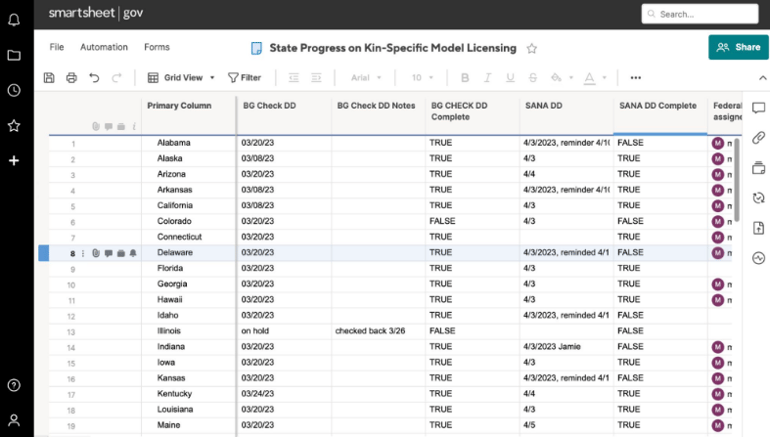
Why I chose Smartsheet Gov
A FedRAMP-certified platform, Smartsheet Gov is the best project management tool for meeting the strict security and compliance requirements of the U.S. federal government. Unlike tools like monday.com or ClickUp that primarily run on standard commercial cloud infrastructure, Smartsheet offers a government-focused deployment with enhanced access controls, audit logging, and admin governance settings.
The Defense Information Systems Agency Impact Level 4 (DISA IL-4) authorization confirms the platform meets U.S. Department of Defense security requirements, making it one of the few project management tools Department of Defense (DoD) mission owners can use for sensitive operational work.
Many U.S. cabinet agencies use Smartsheet Gov for policy management, resource and asset management, national security, and operational risk management. Federal agencies can procure the platform through the General Services Administration (GSA) Advantage, which removes the contracting barriers that typically slow software adoption in government settings.
| ✅Dedicated project management environment for federal agencies | ❌Advanced automation logic limited to simple conditions |
| ✅FedRAMP Moderate and DISA IL-4 authorized | ❌No version history for tracking automation changes |
| ✅ Over 100 security event types tracked in audit logs | ❌Native integrations fewer than competing enterprise platforms |
Smartsheet pricing
- Smartsheet Gov – Contact sales for custom pricing
- Standard version
-
- Pro: $9/user/month — Includes rich formulas, Gantt/board/calendar views, unlimited sheets and reports
- Business: $19/user/month — Adds timeline view, workload tracking, unlimited automations
- Enterprise: Custom pricing — Adds scenario planning, AI formulas and charts, project portfolios
- Advanced Work Management: Custom pricing — Adds Control Center for portfolio scaling, Dynamic View for granular sharing, Data Shuttle sync
Standout features
- Capture over 100 types of security and user activity events through real-time event reporting for a comprehensive audit trail.
- Control how data is downloaded, exported, and shared outside the organization through data egress policies.
- Run the platform on a FedRAMP Moderate and DISA IL-4 authorized environment for federal agencies.
- Automate approval routing and centralize vendor data management across the full contract lifecycle from RFP to renewal.

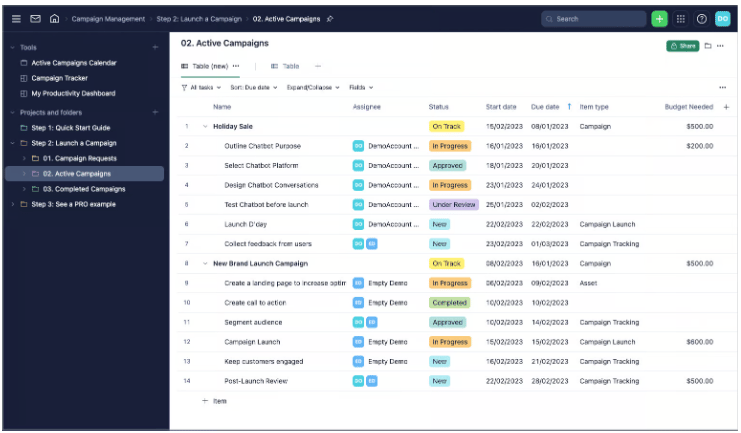
Why I chose Wrike
For public agencies with stricter data governance, Wrike’s permission controls are the most configurable I’ve seen in this category.
Admins can create custom user types, access roles, and user groups that reflect the org structure, with on-demand audit reports tracking activity per user. Approval chains route to internal and external stakeholders through secure links, which cover the multi-party sign-off requirements common in government procurement and infrastructure workflows.
Wrike Lock gives organizations control over their own encryption keys, allowing them to manage who can access their data. It also holds SOC 2 Type II and ISO 27001 certifications, which are standard requirements for software procurement in regulated industries. Those same credentials are part of why I included Wrike in my roundup of the best legal project management software.
Budgeting tools compare planned costs against actual spending with support for currency and hourly rate settings, while workload charts highlight overbooked resources and make it easier to reassign tasks.
| ✅SOC 2 Type II, ISO 27001, and ISO 27018 certified | ❌Advanced security features locked behind Enterprise tier |
| ✅Granular role-based access control per task and folder | ❌New users need two to four weeks to navigate comfortably |
| ✅ Blueprints standardize repeatable workflows | ❌Pricing model is too complex for small agencies |
Wrike pricing
- Free: Unlimited users — Includes task management, folder hierarchy, board/table view, custom views
- Team: $10/user/month — Adds Gantt charts, dashboards, basic AI features
- Business: $25/user/month — Adds resource management, AI agents, forms, workflow automation
- Pinnacle: Custom pricing — Adds budgeting, advanced security
- Apex: Custom pricing — Adds bi-directional integrations, Wrike Sync, enterprise-scale automations with Wrike Integrate
Standout features
- Generate on-demand audit reports to track each user’s activity across the entire account, including who modified specific items.
- Restrict access to sensitive information through locked spaces visible only to authorized members.
- Route approval requests through a configurable chain of approvals with secure links for internal and external sign-off.
- Monitor planned costs against actual costs per project through budgeting tools with custom currency and hourly rate settings.

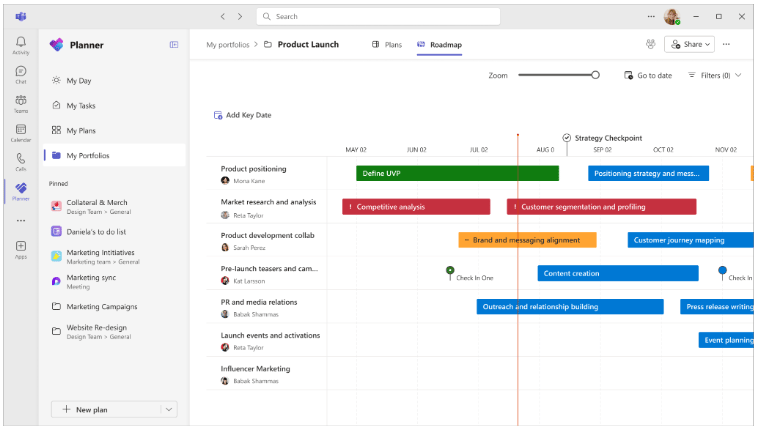
Why I chose Microsoft Planner
For government agencies already on Microsoft 365, Planner is the easiest to adopt since it doesn’t require additional procurement or separate onboarding. Planner is available within the Microsoft 365 Government Community Cloud, and includes multi-factor authentication, single sign-on through Active Directory, and encryption of data in transit and at rest.
The platform lives within the Microsoft ecosystem, allowing you to access task assignments from Teams, embed boards into SharePoint pages, and sync due dates with Microsoft To Do. Approval workflows run through Power Automate, which connects to the Microsoft 365 stack without third-party connectors.
The GCC environment meets FedRAMP High Impact accreditation requirements and supports criminal justice and federal tax data, with customer information stored in U.S.-based data centers and access limited to screened Microsoft personnel. GCC High supports FedRAMP High, ITAR, DFARS, and DISA SRG L4 compliance, while the DoD environment is designed for Impact Level 5 requirements to support defense agencies with stricter security and regulatory standards.
| ✅Minimal onboarding for agencies using Microsoft 365 | ❌No native audit trail for task-level change history |
| ✅SharePoint and OneDrive integration for document management | ❌Portfolio management limited compared to dedicated PM tools |
| ✅ Office 365 GCC High is FedRAMP High authorized | ❌Advanced features require Project Plan 3 or 5 licenses |
Pricing
- Free (Included in Microsoft 365): — Includes core task management features, board and list views, “My Day” and “My Tasks” personalized views, and Microsoft Teams integration.
- Planner Plan 1: $10/user/month — Adds task dependencies, project templates, custom reporting, timeline view, and agile features like backlogs and sprints.
- Planner and Project Plan 3: $30/user/month — Adds Microsoft 365 Copilot (preview), advanced dependencies, resource request capabilities, task history, and visual roadmaps.
- Planner and Project Plan 5: $55/user/month — Adds advanced portfolio management and enterprise resource management and allocation.
Standout features
- Control plan and task access through Microsoft 365 Groups for org-wide permission boundaries.
- Automate approval routing, notifications, and task triggers across Microsoft and non-Microsoft services through Power Automate.
- Track differences between planned and actual schedules with baseline reporting for start dates, effort, and task duration.
- View employee tasks and workload in People view, with the ability to reassign tasks from the same screen.

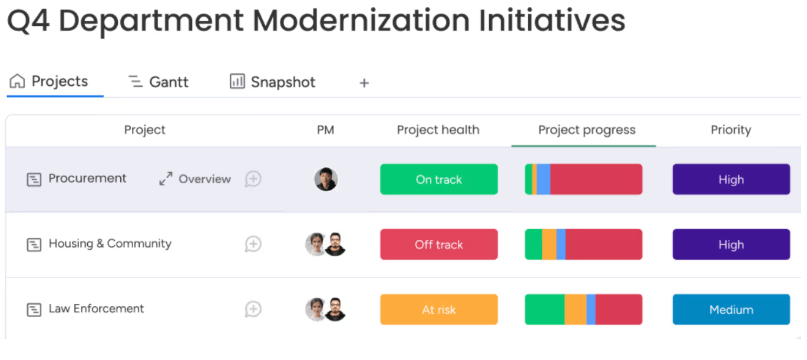
Why I chose monday Work Management
Government agencies with multiple departments often struggle to standardize processes when teams manage different versions of the same workflows. monday work management addresses this with managed templates, which allow administrators to create a master template from a board or workspace and automatically sync updates across every connected board created from it. These templates can include automations and integrations, so changes apply instantly across hundreds of active projects.
I also like how monday supports request routing and portal workflows for internal service requests. The All Projects Dashboard combines data from connected projects into a centralized view with pre-built widgets that update automatically as projects are added or removed. On the Enterprise plan, additional admin and security controls extend permission management, governance policies, and workflow standardization across the entire account.
| ✅Five-layer permission architecture on the Enterprise plan | ❌Seat-bucket pricing becomes expensive as teams scale |
| ✅Highly customizable boards and workflow columns | ❌Steep learning curve for non-technical staff |
| ✅Item-level access controls for sensitive data | ❌Advanced permissions locked behind Enterprise tier |
monday pricing
- Free: Up to 2 users — Includes 3 boards, task tracking, basic column types
- Basic: $9/user/month — Adds unlimited boards and items, unlimited viewers, dashboard, file storage
- Standard: $12/user/month — Adds timeline and Gantt views, calendar view, basic automation, integrations
- Pro: $19/user/month — Adds time tracking, private boards for task control, advanced automation limits, formula columns
- Enterprise: Custom pricing — Adds advanced permissions, enterprise-scale task dashboards, audit logs, higher automation and integration limits
Standout features
- Route service requests to the right department through intake forms with conditional logic.
- Roll out project templates across all departments for consistent data collection and reporting.
- Connect data from multiple projects into pre-built or custom dashboards for real-time visibility.
- Manage access and permissions at a granular level through IP restrictions, 2FA, and SSO.
- View resource capacity across multiple projects to identify allocation issues.

Why I chose ClickUp
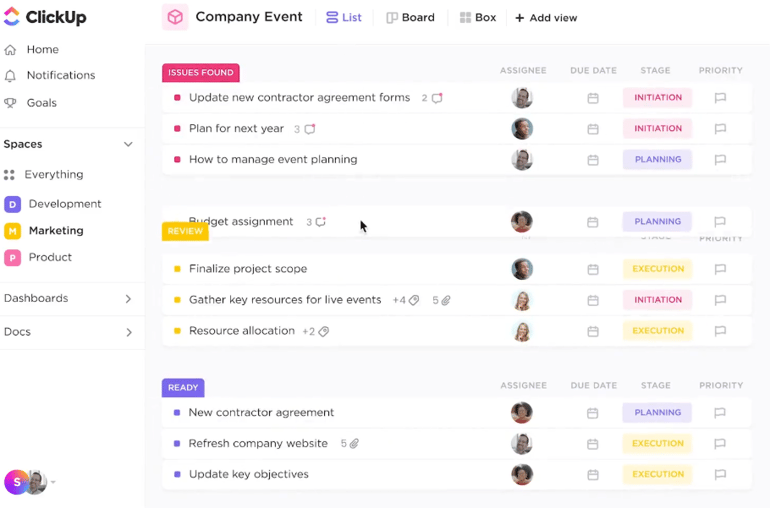
Among the platforms in this roundup, ClickUp has the deepest AI integration that goes beyond content generation. ClickUp records task updates, comments, document changes, and AI activity to support auditability and accountability needs often expected in government offices. Super Agents also include permission controls, audit logs, rollback options, and ownership tracking for every AI-driven action, which matters when agencies need to track automated decisions.
Enterprise Search retrieves information from tasks, docs, chats, and meetings across the workspace. If data privacy is a concern, ClickUp states that third-party AI providers cannot store or train on workspace data, which addresses the data sovereignty issues I frequently hear in the public sector.
For teams cautious about AI autonomy, administrators can limit agent permissions and require human approval before performing critical actions. ClickUp AI additionally holds ISO 42001 certification for responsible and secure AI management, a certification ClickUp publicly advertises for its AI features.
| ✅Centralized document storage links to tasks | ❌Steep setup curve for enforcing naming and workflow standards |
| ✅Automatic audit trail for task and document changes | ❌No native payroll or invoicing integrations |
| ✅ Time tracking with customizable timesheet reporting | ❌Onboarding large agencies takes three or more weeks |
ClickUp pricing
- Free Forever: — Includes unlimited tasks, multiple task views (list, board), basic task statuses, task comments, mentions
- Unlimited: $7/user/month — Adds Gantt charts, time tracking, custom fields, resource management
- Business: $12/user/month — Adds sprint points, advanced automation, workload management, time tracking, task dependencies
- Enterprise: Custom pricing — Adds advanced permissions, custom roles, enterprise-scale task management controls
Standout features
- Record every task update, comment, and document edits automatically for regulatory audits.
- View the status, actions taken, and location of every automation run in a single audit log.
- Track permit and license applications through custom workflows with automated status updates and deadline reminders.
- Track document version history and assign ownership to manage reviews and approvals.
My methodology
I used a scoring rubric alongside my expert judgment to evaluate how well each platform supports government workflows, compliance standards, and long-term scalability across departments or agencies.
General Features (25%): Government projects run on documentation, approvals, and audit trails, so I weighted these features the highest in this rubric. I looked for task management with role-based permissions, approval workflows, portfolio views, and reporting tools that generate records suitable for public accountability requirements.
Pricing (20%): Pricing in the public sector is more complicated than a monthly per-seat cost, since government agencies often operate under procurement frameworks, annual budget cycles, and contract requirements. I factored in whether vendors offer government pricing, volume licensing, or FedRAMP-authorized plans, and how costs scale as departments and user counts grow.
Niche Features (20%): Public sector teams often need advanced capabilities, such as granular audit logs, document version control, compliance reporting, and workflow standardization across departments. I evaluated whether these features are built into the platform or require additional configuration, third-party integrations, or higher-tier upgrades to access.
Expert Score (15%): This category reflects my own assessment of how well each platform performs in government operations, including high-volume documentation, multi-stakeholder coordination, and long procurement cycles. I considered how each tool supports governance workflows without requiring significant customization.
Ease of Use (10%): I assessed how quickly a non-technical government employee could navigate core workflows, submit approvals, and generate reports without relying on administrator support.
Support (10%): Government teams need reliable support with response time commitments. I looked at whether vendors offer dedicated account management, SLA-backed support tiers, and onboarding resources suited to organizations with formal IT procurement and change management processes.
How to choose the government project management software
I’ve worked with project management platforms that looked impressive in demos but struggled to meet the operational and compliance demands common in the public sector. They often deal with strict approval chains, public accountability requirements, and long procurement cycles, so the right PM software must support that level of structure, transparency, and security.
1. Compliance and regulatory support
Look for software that supports compliance frameworks relevant to your agency, such as FedRAMP authorization, and confirms whether audit logs are automatically generated and retained. Also, check whether the vendor can provide documentation of their compliance certifications before you commit to a trial.
2. Security and data controls
Ask the vendor directly where your data is hosted and whether it qualifies for your agency’s data residency requirements. For this one, I always check for role-based access controls, data encryption at rest and in transit, and whether the vendor stores data on government-approved infrastructure.
3. Budget tracking and financial reporting
Test whether the tool can produce reports that map to your agency’s budget codes and fiscal reporting periods. If it requires heavy customization to get there, factor that cost into your evaluation. The software should support budget forecasting, expenditure tracking, and the ability to generate financial reports in formats your agency already uses.
4. Approval workflows and procurement processes
A project management software for local government needs to support configurable approval workflows that reflect their sign-off process. Run a test scenario using your agency’s approval chain before signing a contract. Software that looks flexible in a demo often reveals limitations when applied to government workflows.
5. Reporting and stakeholder updates
Check whether reporting templates are customizable and whether reports can be scheduled for automatic delivery. It should generate reports that are accurate, easy to export, and formatted for non-technical audiences.
FAQs
What is government project management software?
Government project management software is a tool built to help public sector teams plan, track, and deliver projects within compliance and accountability requirements. Unlike general project management tools, it typically supports audit trails, multi-agency collaboration, and reporting formats required by government procurement and standards.
What features should government project management software have?
Look for role-based access controls, compliance tracking, audit logs, and reporting tools that meet public sector requirements. Budget tracking and document management are also important since most government projects require volumes of file records for accountability and reporting purposes.
Is government project management software different from regular project management tools?
Yes. General project management tools prioritize speed and flexibility, while government project management software is built around compliance, documentation, and accountability. If your team handles public funds or reports to auditors and governance committees, a tool designed for the public sector will save you significant time on reporting and audit preparation.