


Payroll involves calculating employee wages, withholding taxes, paying employees on time, and filing required tax forms with federal, state, and local agencies. Whether you’re setting up payroll for the first time or looking to improve your process, this guide walks through the key steps, from obtaining tax IDs and choosing a pay schedule to calculating paychecks and staying compliant with payroll regulations.
What’s the easiest way to do payroll?
The easiest way to do payroll is to use payroll software that automatically calculates wages, withholds taxes, and files payroll forms for you. While you can calculate payroll manually using spreadsheets and IRS tax tables, doing so is time-consuming and increases the risk of calculation errors, missed deadlines, or compliance penalties.
Modern payroll platforms, such as Gusto, automate key steps like tax withholdings, direct deposit, benefits deductions, and payroll tax filings. This significantly reduces administrative work and helps small businesses stay compliant with federal, state, and local regulations.
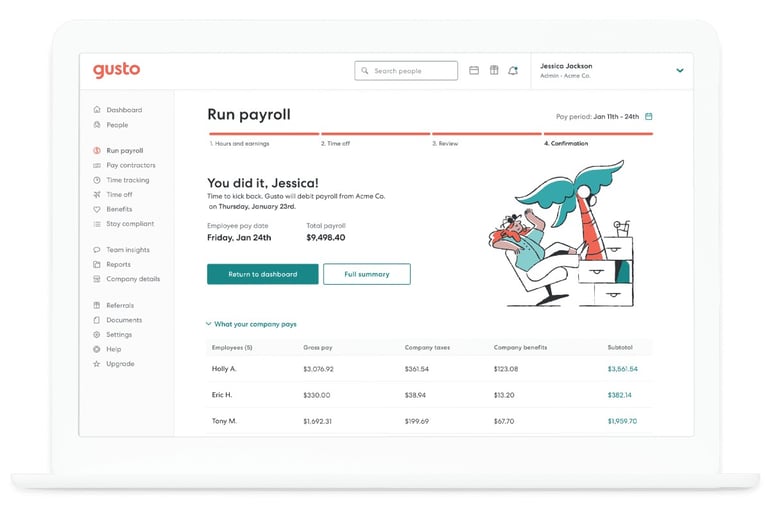
Even if you are a very small business that isn’t looking to spend a lot of money on payroll, using a payroll software can save you both time and money in the long run. If you haven’t already, try out some payroll software to decide which platform is right for your needs.
Want to learn more? Check out our deep dive into how payroll software works.
How to set up payroll
1. Get an Employer Identification Number
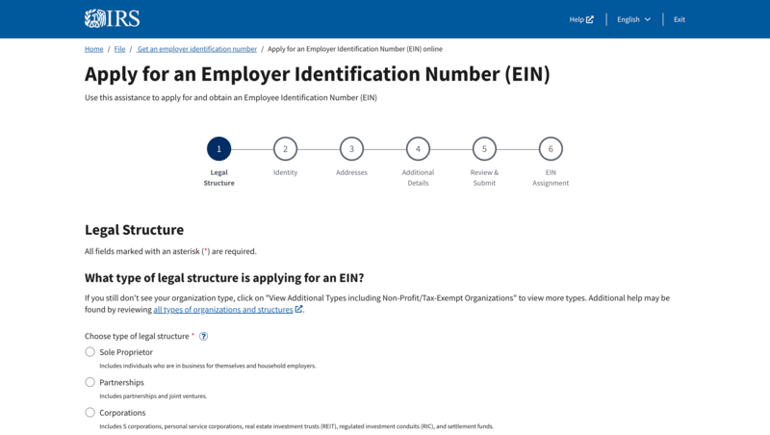
An Employer Identification Number (EIN) is a federal tax ID issued by the IRS to identify your business for payroll tax filing and reporting. You cannot legally file employment tax forms, such as Form 941 (Employer’s Quarterly Federal Tax Return), without an EIN.
If your business operates in the United States or U.S. territories, you can apply for an EIN for free through the IRS website using the online EIN Assistant. In most cases, once your application is validated, your EIN is issued immediately, allowing you to register for payroll tax accounts and begin setting up payroll.
You may need your EIN before opening a business bank account or setting up payroll software, as most financial institutions require it for account verification and ACH processing.
2. Register for state payroll tax accounts
In addition to your federal EIN, most businesses must register for state payroll tax accounts before running payroll. This typically includes a state income tax withholding account (if your state has income tax) and a state unemployment insurance (SUTA) account.
Without these accounts, you cannot legally withhold state income taxes or pay required unemployment taxes on behalf of your employees.
Registration requirements vary by state. Visit your state’s Department of Revenue and Department of Labor websites to determine which accounts you must open and how to apply.
Some states also require new hire reporting and additional local payroll tax registrations. For example:
- California requires employers to report newly hired or rehired employees to the California New Employee Registry within 20 days of hire.
- Texas requires new hire reporting to the Texas Employer New Hire Reporting Operations Center within 20 days.
- New York City employers must register for and withhold New York City local income tax, in addition to New York State income tax.
- Pennsylvania requires employers to withhold and remit local earned income tax (EIT) based on the employee’s work location and residence municipality.
If you hire employees in a different state from where your business is registered, you generally must register for payroll tax accounts in that employee’s work state even if you do not have a physical office there.
If you’re unsure which accounts apply to your business, consult a licensed accountant or payroll professional to ensure you meet all state and local payroll compliance requirements before issuing your first paycheck.
Besides the federal EIN, you might also need a state business ID, depending on your state’s business registration requirements. Your state government’s website will specify if you need to register for a business ID. You might also want to consult a local accountant or attorney about local requirements for state withholding and unemployment insurance accounts.
3. Classify your employees
Before you run payroll, you must determine whether each person you pay is an employee or an independent contractor. This classification directly affects how you calculate wages, withhold taxes, and file payroll forms.
- Employees require federal and state income tax withholding, Social Security and Medicare taxes (FICA), unemployment taxes (FUTA and SUTA), and year-end Form W-2 reporting.
- Independent contractors are typically responsible for paying their own income and self-employment taxes and receive Form 1099-NEC instead of a W-2.
The IRS uses a common-law test that evaluates behavioral control, financial control, and the nature of the working relationship to determine proper classification.
In addition, many states use stricter standards than the IRS. For example, California and several other states use the ABC test. The ABC test presumes a worker is an employee unless all three criteria are met.
Misclassifying employees as contractors can result in back taxes, penalties, and interest. If you’re unsure how to classify a worker, you can review IRS guidance or file Form SS-8 (Determination of Worker Status) to request an official determination.
Getting worker classification right at the start helps you avoid compliance issues and ensures payroll taxes are calculated correctly.
Looking for software options? Check out The Best Payroll Apps
4. Gather employee documents
After classifying your workers, collect all required payroll and tax documentation before issuing the first paycheck. Missing or incomplete forms can delay payroll processing and create compliance risks.
For employees, gather the following:
- Full legal name and current address (for tax reporting and Form W-2)
- Social Security number (SSN) for tax withholding and reporting
- Date of birth (required for certain benefits and insurance records)
- Employment start date (used for tax reporting and new hire reporting)
- Pay rate and compensation details (hourly rate or salary, overtime eligibility, bonuses)
- Form W-4 to determine federal income tax withholding
- Form I-9 to verify employment eligibility (required by U.S. Citizenship and Immigration Services)
5. Obtain workers’ compensation insurance
Most states require employers to carry workers’ compensation insurance as soon as they hire their first employee. This coverage pays for medical expenses and lost wages if an employee is injured or becomes ill due to work-related activities.
Requirements vary by state. For example:
- California requires nearly all employers to carry workers’ compensation insurance, even if they have just one employee.
- Texas, however, does not require most private employers to carry workers’ compensation insurance (making it a “non-subscriber” state), though employers who opt out assume greater liability risk in workplace injury lawsuits.
Check your state’s Department of Labor or workers’ compensation board website to confirm whether coverage is required for your business and how to obtain a policy. If you’re unsure about your obligations, consult an insurance professional or payroll provider before issuing your first paycheck.
Even if you classify someone as a contractor, a state agency could reclassify them as an employee and trigger retroactive workers’ comp liability.
6. Make a decision about benefits
Before running your first payroll, determine whether you will offer employee benefits and how those benefits will be deducted from paychecks. Many benefits require pre-tax payroll deductions, which directly affect how you calculate taxable wages.
Common payroll-related benefits include:
- Health insurance premiums (often pre-tax under Section 125 cafeteria plans)
- Dental and vision insurance
- Retirement contributions, such as a 401(k) plan
- Health Savings Accounts (HSAs) or Flexible Spending Accounts (FSAs)
- Employer-paid benefits, such as life insurance or disability coverage
Pre-tax deductions reduce an employee’s taxable income for federal income tax and sometimes for Social Security and Medicare, while post-tax deductions are withheld after taxes are calculated. Setting up these deductions correctly before your first payroll run helps prevent tax miscalculations and reporting errors.
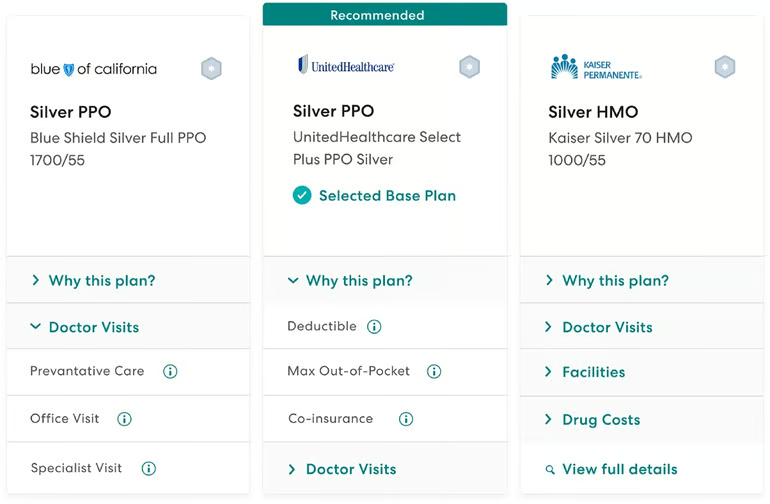
Many payroll platforms include built-in benefits administration tools. Once employees select their plans, deduction amounts automatically sync with payroll, ensuring contributions are calculated and withheld correctly each pay period.
Check out The Best Payroll Software for Enterprises
7. Select a pay schedule
Before running payroll, decide how often you will pay employees. Your pay schedule affects cash flow, administrative workload, overtime calculations, and compliance requirements.
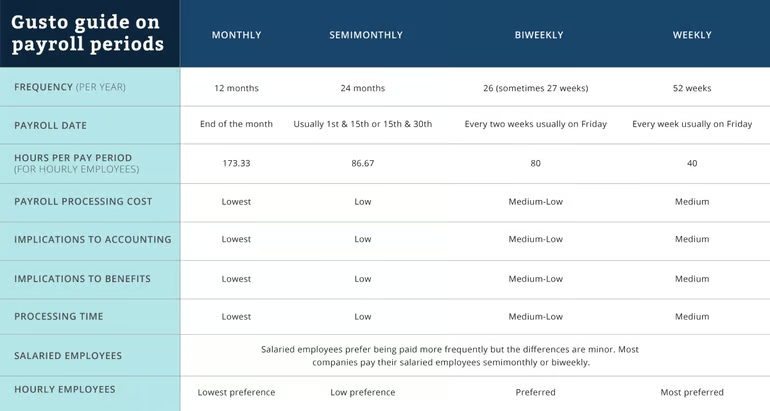
The four most common payroll schedules are:
- Weekly: Employees are paid once per week (52 pay periods per year). Common in industries with hourly workers, such as construction, manufacturing, and hospitality.
- Biweekly: Employees are paid every two weeks (26 pay periods per year). Popular across many industries due to consistency and ease of overtime tracking.
- Semimonthly: Employees are paid twice per month, typically on fixed dates such as the 1st and 15th (24 pay periods per year). Common for salaried employees.
- Monthly: Employees are paid once per month (12 pay periods per year). Less common in the U.S. and often limited to executive or highly compensated roles.
Remember that the pay schedule also affects cash flow. More frequent payroll means wages and payroll taxes leave your account more often, which can tighten short-term liquidity. Choose a schedule that aligns with your revenue cycle so you can consistently fund payroll and tax deposits on time.
Before finalizing your pay schedule, review state wage payment laws. Some states require employers to pay employees at least semiweekly or biweekly, depending on industry and worker classification. Failing to comply with minimum pay frequency laws can result in wage claims or penalties.
Choose a schedule that aligns with your state requirements, workforce structure, and payroll processing capacity.
8. Create a payroll policy and employee handbook
After selecting your pay schedule, document your payroll practices in an employee handbook or standalone payroll policy. This ensures employees understand when they will be paid, how wages are calculated, and what deductions will appear on their paycheck.
Your payroll policy should clearly outline:
- Pay frequency and pay dates
- Overtime eligibility and calculation method
- Holiday pay and paid time off (PTO) accrual rules
- Bonus or commission payment structure
- Benefits deductions (pre-tax and post-tax)
- Direct deposit procedures
- Final paycheck procedures upon termination
Clear documentation reduces misunderstandings, supports wage-and-hour compliance, and provides protection in the event of a dispute or wage claim. Provide the handbook to every employee and obtain a signed acknowledgment confirming receipt. Keep this acknowledgment on file as part of your payroll and HR records.
However, handing out policies isn’t enough. Ensure your policy actually matches how payroll is actually processed. If your handbook states that overtime is calculated weekly, but managers apply a different method in practice, the inconsistency can create wage-and-hour liability.
More payroll coverage
- A Complete Guide to Payroll Software
- The Best International Payroll Services
- The Best Payroll Software
- Choosing a payroll service: A guide for business leaders
- Verito vs. Rightworks: Which IT Provider Is Best for Your Firm?
9. Open and fund a dedicated payroll bank account
Before issuing paychecks, ensure you have an active business bank account for payroll. Employees must be paid from a registered business account — not a personal account — to maintain proper financial and tax records.
Many employers choose to use a separate payroll bank account to isolate wage payments and payroll tax liabilities from general operating funds. This helps:
- Prevent accidental spending of payroll tax withholdings
- Simplify reconciliation and accounting
- Improve internal controls and audit readiness
Because payroll taxes must be remitted on strict deposit schedules, maintaining a dedicated account can help ensure funds are available when federal and state payments are due.
If you plan to offer direct deposit, confirm that your bank supports ACH transfers and that your payroll software can securely connect to the account. Also verify funding timelines, transaction limits, and cutoff times so your payroll and tax deposits are processed without delays.
10. Decide who will manage payroll
Before running payroll, designate who will be responsible for processing, reviewing, and approving payroll each pay period. Payroll involves sensitive employee data, tax withholdings, and cash flow management, so clear accountability is essential.
Even if you outsource payroll to an accountant or payroll provider, someone within your company should:
- Review payroll reports before funds are released
- Confirm wage calculations and deductions
- Approve tax payments and filings
- Maintain secure access to payroll systems
Whenever possible, separate payroll entry from payroll approval to reduce fraud risk. For example, one person may process payroll while another reviews and authorizes the final release of funds. Dual approval controls are especially important for direct deposit and tax payments.
In small businesses, this responsibility often falls to the founder, owner, or office manager. In larger organizations, payroll duties may be divided between HR, finance, and accounting teams to create separation of duties and reduce fraud risk.
Clearly defining payroll roles helps prevent errors, strengthens internal controls, and ensures compliance with federal and state wage and tax laws.
Check this list of The Best Payroll Software for Your Small Business
11. Choose software and review the software setup guide
Once you’ve determined your pay schedule and worker classifications, select a payroll system that aligns with your compliance needs, workforce structure, and budget.
When evaluating payroll software, consider:
- Pricing model: Is it a flat monthly fee or per payroll run? Weekly payroll can increase costs under per-run pricing.
- Tax filing services: Does the provider calculate, file, and remit federal, state, and local payroll taxes on your behalf?
- Multi-state support: Essential if you employ remote workers across state lines.
- Contractor payments: Look for built-in 1099-NEC reporting if you rely on independent contractors.
- Benefits administration: Integration with health insurance, retirement plans, and pre-tax deductions.
- Direct deposit and ACH processing timelines.
- Integrations: Accounting software, time tracking systems, and HR platforms.
After selecting a platform, carefully follow the provider’s setup guide. During setup, you’ll typically enter your EIN and state tax account numbers, add employees and pay rates, connect your bank account, and configure tax filing settings.
Review all tax settings and deduction rules before running your first payroll to ensure withholdings and filing schedules are configured correctly.
If your business relies mostly on contractors, there are also more contractor-focused payroll plans and tools.
12. Upload everything into the payroll software
After choosing your payroll software, complete the guided setup process by entering all required business and employee information. This typically includes:
- Employer Identification Number
- State payroll tax account numbers
- Business bank account details for payroll and tax payments
- Employee pay rates, classifications, and start dates
- Federal and state tax withholding settings (from Forms W-4 and W-9)
- Benefits deductions and contribution rules
- Pay schedule configuration
If you’re transitioning from another payroll provider, ask your new platform about data migration tools. Many systems allow you to import historical payroll data, year-to-date earnings, and prior tax filings to ensure accurate reporting and Form W-2 or 1099-NEC preparation at year-end.
Before running your first payroll, carefully review all tax rates, deduction settings, and employee classifications. Running a test payroll (if available) can help confirm that gross-to-net calculations and tax withholdings are configured correctly.
Some providers also offer onboarding support or implementation specialists to assist with setup and compliance verification.
How to run payroll each pay period
Once your system is set up, payroll becomes a repeatable process that you’ll complete every pay cycle. Whether you run payroll weekly, biweekly, or semimonthly, the core steps remain largely the same.
Generally, here’s what typically happens during each payroll run:
1. Collect and approve time worked
For hourly employees, gather approved timesheets from your time tracking system. Confirm regular hours, overtime, and any shift differentials. For salaried employees, verify any unpaid leave or compensation changes that affect pay.
2. Review variable pay and adjustments
Account for bonuses, commissions, reimbursements, retroactive pay changes, or wage garnishments. Supplemental wages (such as bonuses) may be taxed differently depending on how they’re processed.
3. Confirm deductions and benefits
Review pre-tax and post-tax deductions, including health insurance premiums, retirement contributions, HSAs, FSAs, and any court-ordered garnishments. Ensure new enrollments or benefit changes are reflected correctly.
4. Review gross-to-net calculations
Before approving payroll, review the payroll register. Confirm gross wages, tax withholdings (federal, state, Social Security, Medicare), employer tax liabilities, and net pay amounts. This step helps catch errors before funds are released.
5. Approve and fund payroll
Once reviewed, approve the payroll run and ensure sufficient funds are available in your payroll bank account. Most direct deposit transactions must be submitted one to four banking days before payday, depending on your provider’s ACH cutoff times.
6. Confirm tax liabilities and reports
After payroll processes, review generated tax reports and upcoming deposit obligations. Payroll software typically calculates what you owe for federal and state taxes and schedules filings automatically if enabled.
Even if you have automated payroll software, always review reports before final approval. Doing this each pay period can prevent costly corrections, amended tax filings, or employee paycheck issues later.
Ready to compare providers? Explore our guide to the best payroll software to find a solution that fits your business.
Frequently asked questions (FAQs)
What is the difference between gross pay and net pay?
Gross pay is an employee’s total earnings before taxes and deductions. Net pay is the amount the employee receives after taxes, benefits, garnishments, and other deductions have been withheld.
How long should payroll records be kept?
The IRS generally recommends retaining employment tax records for at least four years after the tax becomes due or is paid, whichever is later. State recordkeeping requirements may be longer.
What happens if a payroll mistake is discovered after employees are paid?
Payroll errors should be corrected as soon as possible. Depending on the issue, employers may need to issue additional wages, recover overpayments, update payroll records, or file amended tax forms.
Can I pay employees with Venmo, Cash App, PayPal, or other payment apps?
Possibly, but employers must still comply with wage payment laws, maintain payroll records, withhold taxes correctly, and provide required pay statements. State laws may restrict acceptable payment methods, so businesses should verify compliance before using payment apps for payroll.