


Chances are, your data center depends upon a MySQL database server or two. If that is the case, you’ll want to make sure your databases are set up with an eye to security.
Must-read security coverage
- UK Police Convicts Pair in £5.5 Billion Bitcoin Launder Case
- Blackpoint Cyber vs. Arctic Wolf: Which MDR Solution is Right for You?
- How GitHub Is Securing the Software Supply Chain
- 8 Best Enterprise Password Managers
Thankfully, MySQL offers a handy command that goes a very long way to improve the security of your MySQL installation. This single command will:
- update the password plugin;
- set a password for the root account (if one already exists, you can opt to keep it or change it);
- remove root accounts that are accessible from outside the local host;
- remove anonymous-user accounts; and
- remove the test database and privileges that permit anyone to access databases with names that start with test_.
Although the above tasks aren’t overly complicated, they are easily overlooked and, if you have a lot of databases, can be time-consuming.
Let’s harden the MySQL server install.
SEE: Information security incident reporting policy (Tech Pro Research)
Running the command
The command to begin the hardening process is:
sudo mysql_secure_installation
Upon running this command, you will be prompted for the MySQL admin password. Once you successfully enter the password, the process will begin. Then you will be required to okay or dismiss the following (Figure A).
- Update the password plugin (Press Y for yes and hit the Enter key on your keyboard)
- Select the level of password validation policy you want to enable (0 = low, 1 = medium, 2 = strong). Important note: Later in this article I offer cautionary details about this policy level.
- Change the root password (to dismiss this option, type N, so the tool does not change the admin password for MySQL)
- Remove anonymous users (Press Y to remove)
- Disallow remote root login (Press Y to disable)
- Remove test database (Press Y to remove)
Figure A
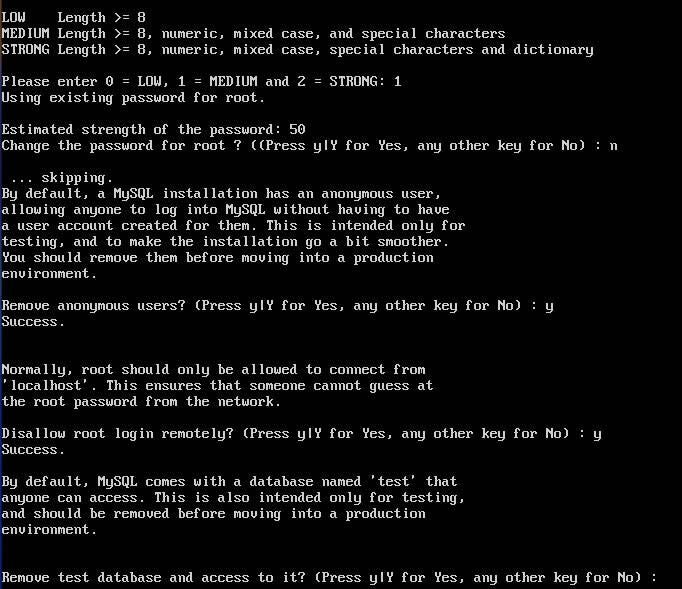
After the questions are answered, you’ll be prompted to reload the privilege tables by typing Y. That’s it–your MySQL database server installation is more secure. You can log in to the MySQL shell using the command mysql -u root -p and then issue the command SHOW DATABASES; to see that the test database has been removed.
SEE: Report: Almost half of enterprises have no one in charge of database security (TechRepublic)
An important note about the password validation policy
Use caution when selecting the level of password validation policy, as this could cause problems with any user already created, such as a database user for a running service like WordPress. If this causes problems, you’ll have to change the database user password for the service/user having problems. To do this, issue the following command (USER is the username and NEWPASSWORD is the new password to be used):
mysqladmin -u USER -p password NEWPASSWORD
You will be prompted for the current user password. Upon successful authentication, the password will be changed.
In order to test remote access for the root user, you will have had to set up the MySQL server to accept remote connections; we’ll cover the remote connection to MySQL at a later date.
Enjoy more secure MySQL databases
Congratulations! Your MySQL installation is more secure. As long as your host platform is solid and you keep your operating system and its various servers up to date regularly, you should be able to rest easier that your data is safer from attack.