



For a Buddhist, Karma is the sum of a person’s actions in this and previous states of existence, which is viewed as deciding the fate of their future existences. With Todoist, Karma isn’t quite that profound. Instead, Todoist Karma has to do with the number of tasks you want to achieve on a daily or weekly basis. Every time you complete a task, it adds to your Karma score.
SEE: Hiring kit: Project manager (TechRepublic Premium)
You start by setting goals. Once you’ve set your goals, you can use advanced features to gain even more Karma points and then visualize your work in color-coded graphs and work your way through the eight Karma levels, which are:
- Beginner: 0–499 points
- Novice: 500–2,499 points
- Intermediate: 2,500–4,999 points
- Professional: 5,000–7,499 points
- Expert: 7,500–9,999 points
- Master: 10,000–19,999 points
- Grandmaster: 20,000–49,999 points
- Enlightened: 50,000+ points
Although bragging rights are a bit antithetical to actual Karma, we all know how project team members like to brag, so keeping track of these points can certainly be a badge of honor. Or, maybe it just feels good to know you’re getting all that work done for a project. Either way, keeping track of your goals and Todoist Karma should be considered a positive step toward being a productive member of a team.
How do you set your goals and enable Karma points? Let me show you.
What you’ll need to enable Karma points and set goals
The only things you’ll need for this are a valid Todoist account and a web browser. You can use either the free or paid Todoist plan, as these features are available for both.
Let’s start building our karma.
How to enable Karma points and set productivity goals
The first thing to do is log in to your Todoist account from within your web browser. After logging in, look up near the top right of the window for the Productivity icon, which should be a circle with 0/5 to the right. Click that icon to reveal the Productivity pop-up (Figure A).
Figure A
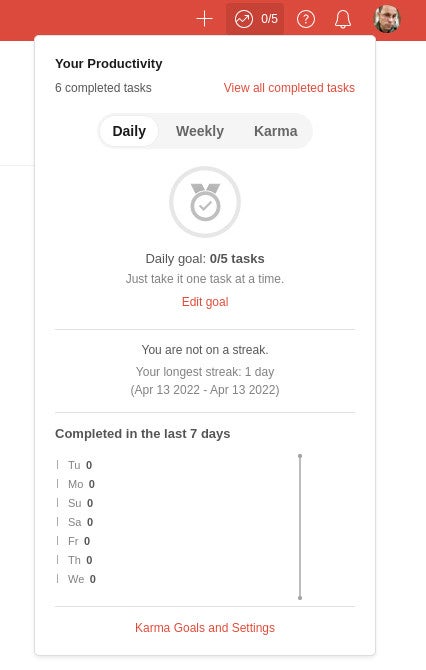
From the bottom of that pop-up, click Karma Goals and Settings.
A new pop-up will appear (Figure B), where you can start configuring your goals and enable Karma.
Figure B
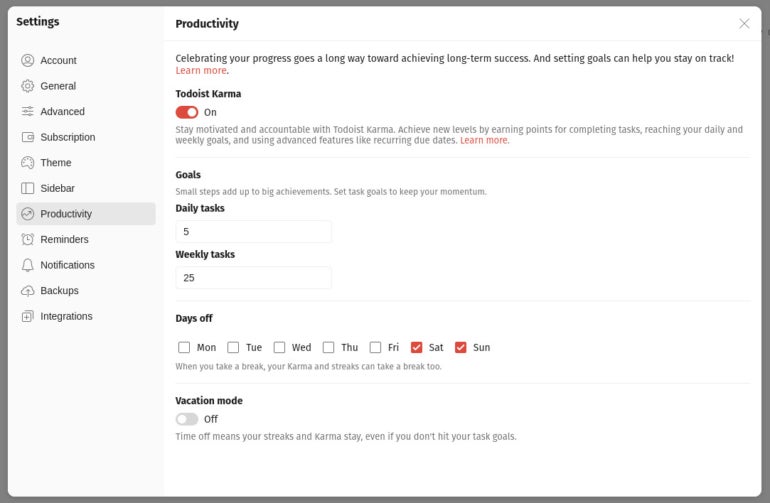
Make sure to click the ON/OFF slider for Todoist Karma first. Next, you’ll want to configure how many daily and weekly tasks you want to complete. The default is 5 daily and 25 weekly. You’ll also want to set your days off. You can also enable Vacation Mode, which means time off won’t count against your Karma and Goals count.
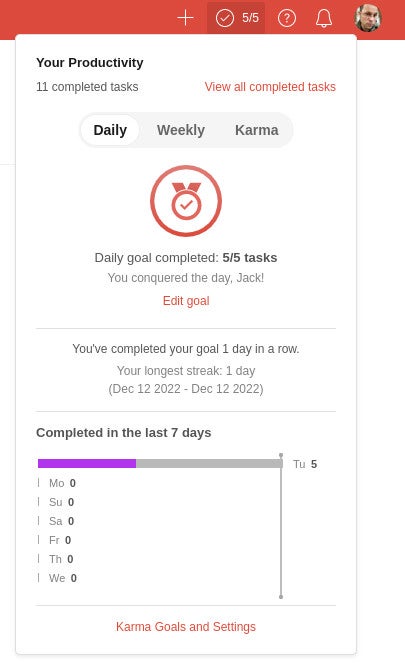
After enabling Karma and configuring your goals, you can close the Settings window. As you complete a task in Todoist, you’ll see your productivity count climb. When you reach your goal, you’ll receive a pop-up notification congratulating you. If you click the Productivity icon, the pop-up will also show you’ve reached your daily goal (Figure C).
Figure C
Karmic goodness
It’s always good to have goals and keeping track of your success with those goals can be a good motivator for productivity. That and knowing you’ve accomplished everything you’ve set out to do that day can help ease tension and give you a sense of relief when you see it presented before you. Congratulate yourself on a job well done and enjoy the bonus of the karma you collect in the doing.
Subscribe to TechRepublic’s How To Make Tech Work on YouTube for all of the latest tech advice for business pros from Jack Wallen.