


The best marketing project management software helps you stay on top of campaigns, monitor progress, and collaborate across teams from one place. Starting at only $5 per month, a good project management solution brings together essential tools like task management, automations, proofing, and timelines in an easy-to-use interface. Regardless of your project strategy, it supports workflows for campaigns, client deliverables, events, and asset management, while saving your team time and helping you hit goals faster.
Below are the best project management software for marketing and what each is best suited for.
- monday.com: Best for visual workflows
- ClickUp: Best for marketing collaboration
- Wrike: Best for enterprise-scale marketing efforts
- Jira: Best for agile teams running test-and-learn campaigns
- Smartsheet: Best for spreadsheet-style marketing resource planning
- Teamwork.com: Best for client-facing marketing projects
- Notion: Best for marketing knowledge hubs
- Asana: Best for lightweight marketing workflows
- Basecamp: Best for campaign communication
- Trello: Best for beginner marketing teams
- What is project management software for marketing?
- Top marketing project management software comparison
- monday.com: Best for visual workflows
- ClickUp: Best for marketing collaboration
- Wrike: Best for enterprise-scale marketing efforts
- Jira: Best for agile teams running test-and-learn campaigns
- Smartsheet: Best for spreadsheet-style marketing resource planning
- Teamwork.com: Best for multiple client-facing marketing projects
- Notion: Best for building flexible marketing knowledge hubs
- Asana: Best for lightweight marketing workflows
- Basecamp: Best for unifying campaign communication
- Trello: Best marketing teams new to project management
- Key features of marketing project management software
- Benefits of marketing project management tools
- Choosing the right marketing project management tool
- Methodology
- FAQs
What is project management software for marketing?
Project management software for marketing is a full-featured platform dedicated to individuals and teams that plan, execute, and oversee campaigns and daily workflows. It offers a centralized workspace where teams can manage tasks, assign resources, set deadlines, and monitor progress from planning to delivery.
These platforms often include tools for creative approvals, campaign tracking, and performance reporting, which are all essential for maintaining visibility across multi-channel efforts. Many also support automation, integrations, and real-time collaboration to keep fast-paced marketing teams aligned and productive.
Top marketing project management software comparison
 Visit monday.com |
|
||
 Visit ClickUp |
|
||
 Visit Wrike |
|
||
 Visit Jira |
|
||
 Visit Smartsheet |
|
||
 Visit Teamwork.com |
|
||
 Visit Notion |
|
||
 Visit Asana |
|
||
 Visit Basecamp |
|
||
 Visit Trello |
|
monday.com: Best for visual workflows

Why I picked monday.com
If you’re managing a visually driven marketing team, monday.com is the software for you. Its intuitive, color-coded interface simplifies complex marketing campaigns, allowing teams to quickly identify project statuses and critical deadlines at a glance. I particularly like the conditional coloring feature because it lets you highlight essential tasks, such as pending approvals for creative assets or identifying campaign milestones.
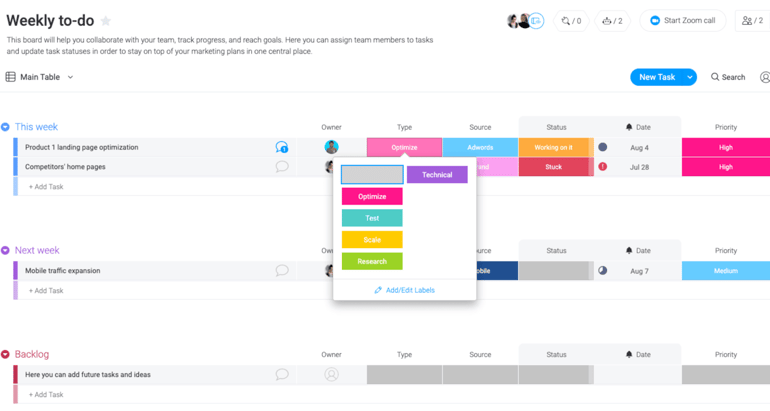
Beyond task prioritization, monday.com excels with customizable visual elements. You can personalize boards by assigning distinct colors to represent various marketing objectives, such as campaign channels, target audience segments, or performance metrics. For example, your social media team can visually track engagement rates and content effectiveness by assigning different colors to various performance levels, instantly highlighting posts that need improvement or those outperforming expectations.
Pros and cons
| Pros | Cons |
|---|---|
| ✓ Highly customizable views make it easier to adapt workflows to your team’s style | ✗ Key features like time tracking are locked behind higher-tier plans |
| ✓ Up to 200 project templates help accelerate campaign setup and onboarding | ✗ Search filters are limited, which can slow down navigation in large projects |
| ✓ Color-coded labels give you at-a-glance visibility | ✗ All paid plans require a minimum of three users, which can be restrictive |
monday.com pricing
All plans are billed on a per-user basis.
- Free: $0 (forever free for up to 2 users)
- Basic: $12/month (billed monthly) or $9/month (billed annually)
- Standard: $14/month (billed monthly) or $12/month (billed annually)
- Pro: $24/month (billed monthly) or $19/month (billed annually)
- Enterprise: Custom pricing
Standout features
- A user-friendly drag-and-drop interface lets you build and manage marketing projects visually.
- Marketing teams can jumpstart campaigns with a wide range of custom-built templates.
- Custom automation features simplify repetitive tasks and help streamline marketing workflows.
- Built-in data visualization tools, including multiple chart types, offer clear insight into performance and progress.
- Teams can collaborate efficiently through real-time messaging, file sharing, and shared document editing.
For more information, check out this full monday.com review.
ClickUp: Best for marketing collaboration

Why I chose ClickUp
If your team needs a centralized platform for managing campaigns, ClickUp is your go-to project management software. It offers more than 15 project views, including timeline, list, and Kanban boards, and allows you to adopt your preferred view without changing the overall campaign structure. For example, your SEO team can use the timeline view to map out long-term content sprints while your design team sticks to the board view for visual asset production.
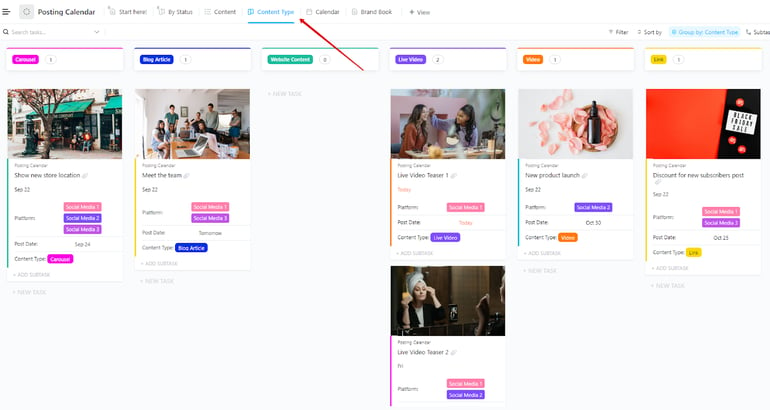
ClickUp bundles collaboration tools that keep brainstorming and coordination under one roof. Built-in Docs, whiteboards, and threaded comments enable teams to sketch out campaign strategies, review drafts, and assign follow-ups. You can use custom dashboards to track product launch assets, coordinate with sales, and visualize content gaps, all from the same workspace.
Pros and cons
| Pros | Cons |
|---|---|
| ✓ Offline mode lets you create tasks even without internet | ✗ Platform performance may slow down when handling high-volume projects |
| ✓ Customization options are extensive, giving teams full control over their workspace layout | ✗ Feature-rich nature can be overwhelming for teams just getting started |
| ✓ Timeline view makes mapping out long-term sprints easy | ✗ AI-powered tools require a monthly fee |
ClickUp pricing
All plans are billed on a per-user basis.
- Free Forever: $0 (forever free for unlimited users)
- Unlimited: $10/month (billed monthly) or $7/month (billed annually)
- Business: $19/month (billed monthly) or $12/month (billed annually)
- Enterprise: Custom pricing
Standout features
- Users can switch between list, board, timeline, and calendar views without changing the overall structure, making it easy to match the workspace to each team’s preferred style.
- Custom fields let teams track campaign-specific details and tailor task data to their needs.
- Marketing workflows become more efficient with customizable automations that cut down on repetitive tasks.
- Goal tracking and milestone tools help teams monitor progress and stay aligned with objectives.
For more information, check out this full ClickUp review.
Wrike: Best for enterprise-scale marketing efforts

Why I chose Wrike
If you’re juggling multi-channel campaigns across departments, Wrike is a solid pick. Wrike stands out as one of the most robust platforms I’ve worked with. It’s best for enterprise teams that need to stay aligned with design, product, and data stakeholders without slowing down progress. With features like cross-tagging, you can assign tasks to multiple departments while maintaining high visibility. This works well for brand launches where messaging, creative, and reporting all have to sync in real time.
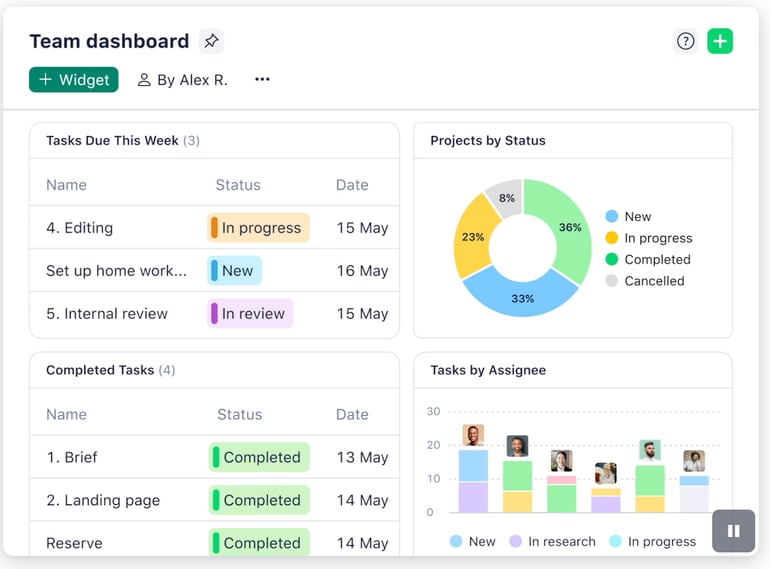
Wrike also helps streamline intake and approvals through dynamic request forms. You can standardize what information is collected and automatically route it to the right owner. With Wrike’s built-in AI writing tools, your team can draft campaign briefs, summarize meetings, or build early content drafts faster. It’s a time-saver for teams handling complex, high-volume work without sacrificing quality or collaboration.
Pros and cons
| Pros | Cons |
|---|---|
| ✓ Unlimited users can access the freemium version | ✗ Navigation to templates is more time-consuming than in other platforms |
| ✓ AI-powered features are available on all plans, adding automation without extra cost | ✗ Pre-built integrations require a monthly fee, which can increase your total cost |
| ✓ Advanced task management tools support complex campaign tracking | ✗ Some teams may find Wrike’s structured layout rigid for fast-moving projects |
Wrike pricing
All plans are billed on a per-user basis.
- Free: $0 (forever free for unlimited users)
- Team: $10/month (billed annually)
- Business: $25/month (billed annually)
- Enterprise: Custom pricing
- Pinnacle: Custom pricing
Standout features
- Quickly launch your projects using Agile or Waterfall templates, or toggle between Kanban boards and Gantt charts for flexible visual planning.
- Streamline the creative approval process with built-in proofing tools, approvals, and integrations with Adobe Creative Suite.
- Use AI-powered summaries to review feedback and approve campaign assets on the go.
- Wrike’s clean, intuitive layout organizes files, tasks, and campaign details into dedicated folders, keeping everything in one place.
For more information, check out this full Wrike review.
Jira: Best for agile teams running test-and-learn campaigns

Why I chose Jira
If your marketing team is often involved in experimentation and iteration, Jira is one of the strongest platforms out there. It brings the agile structure to campaign management by letting you break down initiatives into sprints, prioritize backlogs, and make adjustments based on feedback. Jira can be used to manage A/B testing at scale, where you can build workflows tied directly to performance data and real-time feedback loops. It also has a ticketing system that makes constant exchange of ideas, especially with developers, seamless.
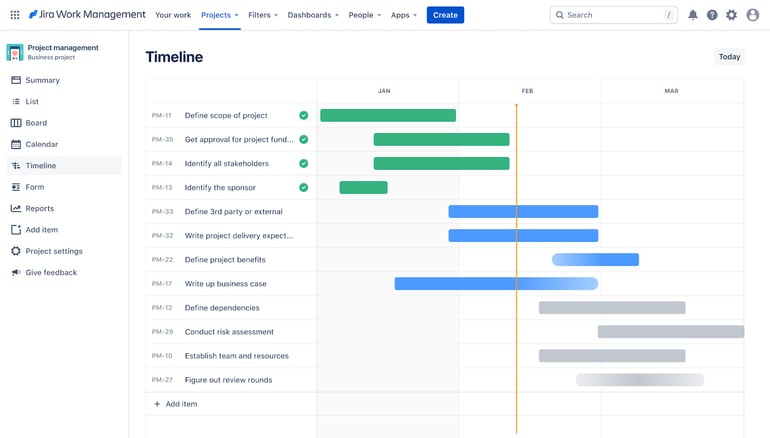
What sets Jira apart is how it bridges product and marketing timelines. You can sync deliverables through shared roadmaps and release dates to keep cross-functional efforts aligned. This is especially useful during phased product rollouts, where marketing needs to track market readiness alongside development milestones.
Pros and cons
| Pros | Cons |
|---|---|
| ✓ Rich analytics and reporting tools provide insight into campaign performance | ✗ User experience is geared toward developers, which can be a barrier for marketers |
| ✓ Offers robust agile tools that support sprint-based marketing workflows | ✗ Collaboration features are limited compared to creative-focused platforms |
| ✓ Integrates with up to 3,000 third-party apps, ideal for cross-platform visibility | ✗ Primary users are dev teams, so marketing use cases require extra effort to customize |
Jira pricing
All plans are billed on a per-user basis.
- Free: $0 (forever free for 10 users)
- Standard: $9/month or $875/year
- Premium: $17/month or $1,700/year
- Enterprise: Custom pricing
Standout features
- Jira’s agile framework makes it a strong fit for marketing teams using Scrum or Kanban boards.
- Teams can build custom workflows to manage campaign tasks, approvals, and project stages.
- Advanced reporting tools provide insight into progress and performance, helping teams stay on track.
- Its built-in ticketing system works for teams collaborating closely with developers.
For more information, check out this full Jira review.
Smartsheet: Best for spreadsheet-style marketing resource planning

Why I chose Smartsheet
If your marketing team is more familiar with Excel than Kanban boards, Smartsheet offers the perfect middle ground. Its familiar grid-based layout makes it easy to adopt, but it’s also packed with project management features you won’t find in a typical spreadsheet. This benefits marketing teams seeking to map out high-level campaign calendars, coordinate ad spend, and track asset approvals without building complex formulas.
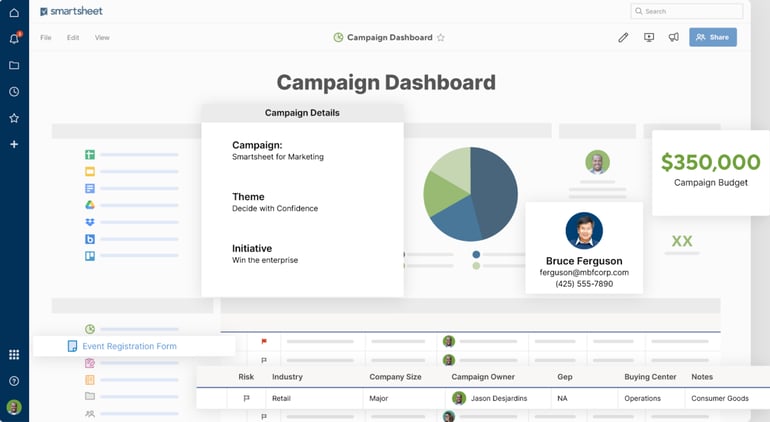
What I find useful is how Smartsheet handles resource management. You get clear visibility into team bandwidth across campaigns, and placeholders help you plan staffing needs for upcoming launches or time-sensitive projects. Smartsheet is effective for prepping seasonal campaigns and assigning tentative roles for design and content teams weeks in advance.
Pros and cons
| Pros | Cons |
|---|---|
| ✓ Built-in formulas and functions allow teams to manage complex data | ✗ No free plan is available, making it less accessible for teams on a budget |
| ✓ Supports multiple collaboration options like comments, shared sheets, and dashboards | ✗ Navigation can feel overwhelming to new users unfamiliar with spreadsheet-heavy tools |
| ✓ Enterprise-grade security controls protect sensitive campaign and budget data | ✗ File storage and asset management are not centralized, which can slow down collaboration |
Smartsheet pricing
All plans are billed on a per-user basis.
- Pro: $9/month (billed monthly) or $12/month (billed annually)
- Business: $19/month (billed monthly) or $24/month (billed annually)
- Enterprise: Custom pricing
- Advanced Work Management: Custom pricing
Standout features
- Handle complex calculations with advanced formulas and functions and automate updates with real-time data syncing.
- Improve decision-making with custom visualizations like burndown charts and time series graphs.
- Boost project execution by monitoring team workloads to spot availability gaps, track task progress, and prevent over-allocation of resources.
- Create and share mobile-friendly forms with conditional logic.
For more information, check out this full Smartsheet review.
Teamwork.com: Best for multiple client-facing marketing projects

Why I chose Teamwork.com
If you’re part of an agency juggling several marketing campaigns across different clients, Teamwork.com proves to be an excellent choice. Its centralized dashboard makes it easy to monitor everything, from budgets to task timelines, without jumping between platforms. The built-in time tracking lets you easily distinguish billable and non-billable hours in real time so you can avoid budget overruns and protect your margins.
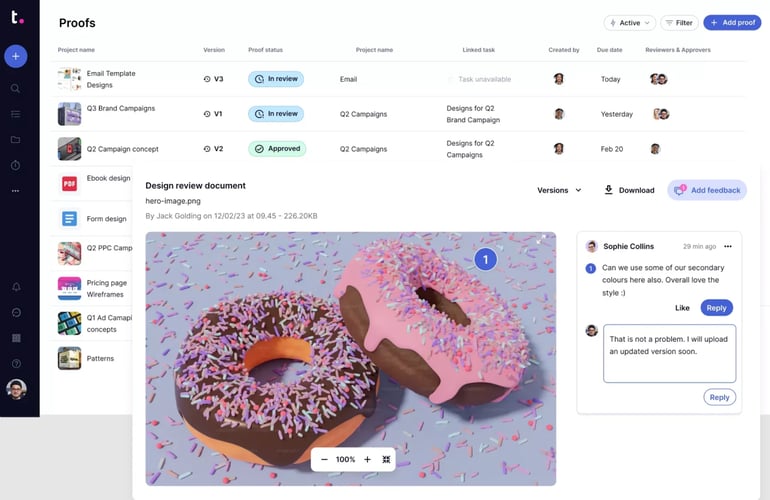
Teamwork.com also stands out for how it powers client collaboration. Clients can be looped into specific projects, track their own deliverables, and leave feedback on tasks without cluttering your team’s workflows. This promotes transparent review loops, which saves time on approvals and reduces back-and-forth emails.
Pros & cons
| Pros | Cons |
|---|---|
| ✓ Built-in AI tools are available even on the free plan | ✗ Interface includes extensive menu options, which can slow down navigation |
| ✓ Time-tracking features help monitor billable hours across campaigns and clients | ✗ Higher pricing compared to some competitors may be a barrier for small teams |
| ✓ Budget tracking tools let you manage costs and expenses in detail | ✗ Cloud storage caps are strict, limiting file handling unless you upgrade |
Teamwork.com pricing
All plans are billed on a per-user basis.
- Free: $0 (forever free for up to 5 users)
- Deliver: $13.99/month (billed monthly) or $10.99/month (billed annually)
- Grow: $25.99/month (billed monthly) or $19.99/month (billed annually)
- Scale: Custom pricing
- Enterprise: Custom pricing
Notion: Best for building flexible marketing knowledge hubs

Why I chose Notion
If your marketing team values customization, Notion has all the features you need. Its block-based structure gives you the freedom to build workspaces that fit your team’s exact needs. You’ll find it useful for creating campaign timelines, archiving creative briefs, or laying out long-term strategies.
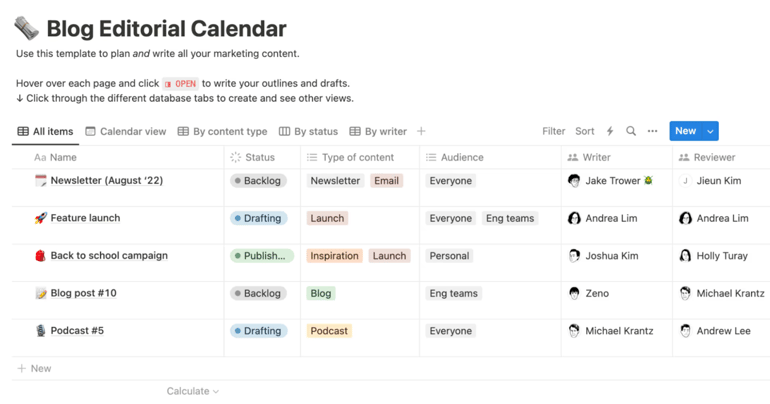
What sets Notion apart is how it supports internal knowledge sharing across marketing roles. You can house everything from audience personas to campaign retrospectives. While setting up a Notion workspace can take some initial effort, it quickly becomes a valuable hub for organizing creative assets, campaign plans, and team documentation.
Pros and cons
| Pros | Cons |
|---|---|
| ✓ Offers powerful tools to structure and organize high volumes of content and campaign data | ✗ Requires significant effort and time investment to build and optimize your workspace from scratch |
| ✓ Ideal for solo marketing freelancers who need a simple way to manage projects independently | ✗ Mobile app performance can lag, especially in data-heavy pages |
| ✓ Active user community provides a diverse library of templates to speed up setup | ✗ Lacks offline mode, which limits accessibility when working remotely |
Notion pricing
All plans are billed on a per-user basis.
- Free: $0 (forever free for up to 2 users)
- Plus: $12/month (billed monthly) or $10/month (billed annually)
- Business: $24/month (billed monthly) or $20/month (billed annually)
- Enterprise: Custom pricing
Standout features
- Chat with your preferred AI models within your workspace at no extra cost.
- Launch meetings straight from the menu bar to minimize context switching and maintain workflow focus.
- Use Notion AI to automatically categorize and label emails based on your priorities so you can access important messages instantly.
- Tailor your task and project layout with a custom design that fits your team’s unique work style.
For more information, check out this full Notion review.
Asana: Best for lightweight marketing workflows

Why I picked Asana
Asana is a go-to platform for marketing teams that value clarity and simplicity when managing campaigns. Its clean interface and flexible layout make it easy to break down high-level strategies into manageable, actionable tasks. You can organize creative briefs, campaign milestones, and stakeholder reviews in one workspace without overwhelming your team.
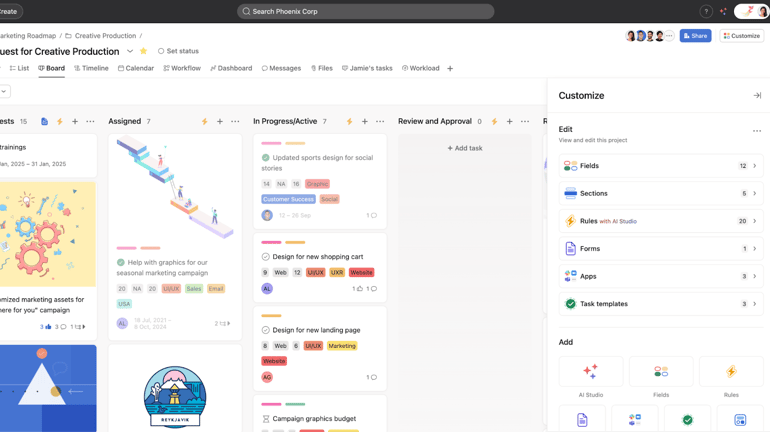
Another standout feature of Asana is its ability to manage recurring tasks and routine deliverables. Brand teams can benefit by managing content refresh cycles or weekly newsletter production with minimal setup.
Pros and cons
| Pros | Cons |
|---|---|
| ✓ Robust task management features keep projects on schedule | ✗ Not suited for projects with several dependencies |
| ✓ Custom dashboards and views to match different team needs | ✗ Limited resource management features may fall short for larger teams |
| ✓ User-friendly interface accessible for new users | ✗ Tasks can only be assigned to one user |
Asana pricing
All plans are billed on a per-user basis.
- Personal: $0 (forever free for up to 10 users)
- Starter: $13.49/month (billed monthly) or $10.99/month (billed annually)
- Advanced: $30.49/month (billed monthly) or $24.99/month (billed annually)
- Enterprise: Custom pricing
Standout features
- A clean, visual interface makes it easy for marketing teams to manage tasks and stay aligned across projects.
- Teams can build custom workflows and templates that match the unique requirements of each campaign.
- The timeline view helps map out deadlines and dependencies, offering a clear path from planning to launch.
- Reporting and analytics tools give teams visibility into performance and progress so they can focus on achieving campaign objectives.
For more information, check out this full Asana review.
Basecamp: Best for unifying campaign communication

Why I picked Basecamp
Basecamp is a strong choice for marketing teams that need one place to bring everything together, including teams, tasks, files, and communication. Its all-in-one structure makes it easy to organize ongoing campaign work while cutting down the use of third-party apps. It serves as a command center where you store feedback, schedules, and creative briefs under one roof.
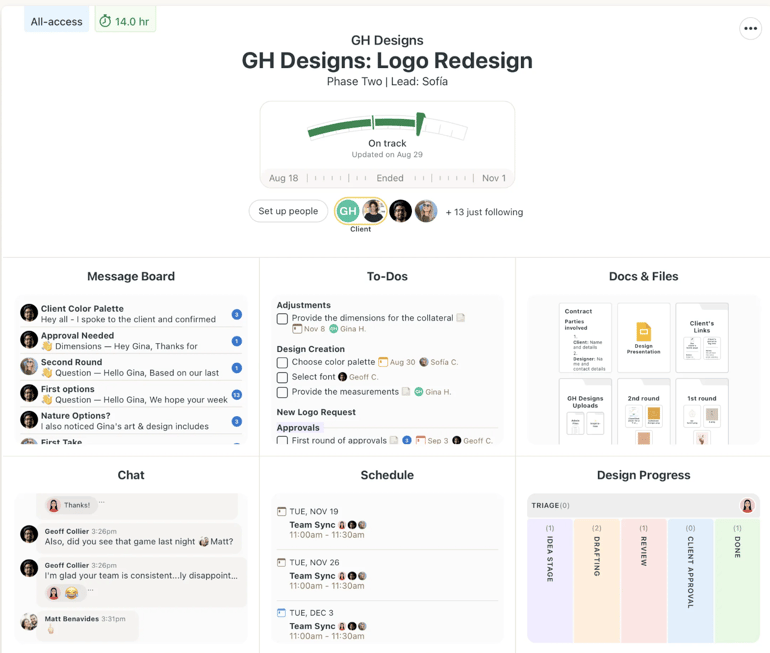
The platform shines when you need to maintain visibility across multiple stakeholders. Collaboration tools like built-in group chat, message boards, and simple task lists are useful for hosting daily standups, managing feedback loops, and coordinating cross-functional launches.
Pros & cons
| Pros | Cons |
|---|---|
| ✓ Granular user permissions give teams control over who has access | ✗ Doesn’t scale well for complex marketing projects |
| ✓ Powerful search and filtering make it easy to locate tasks, files, and updates | ✗ Lacks a built-in time-tracking tool |
| ✓ Offers up to 5 TB of storage for asset-heavy projects | ✗ No free plan is available, limiting accessibility for smaller teams |
Basecamp pricing
- Free: Only available to teachers and students
- Basic: $15/user/month
- Pro Unlimited: $349/month or $299/month (billed annually) for unlimited users
Standout features
- Built-in real-time chat for instant team communication within the Basecamp platform.
- Custom client access settings put you in charge of what external stakeholders can see and interact with.
- File management tools help marketing teams upload, collaborate on, and control access to documents in one place.
- Tasks can be broken down into smaller subtasks to make large projects more manageable.
For more information, check out this full Basecamp review.
Trello: Best marketing teams new to project management

Why I picked Trello
Trello is an ideal choice for marketing teams just getting started with project management tools. Its clean Kanban board layout makes it easy to visualize progress, assign tasks, and adjust priorities. Beginners can jump in right away and start building campaign workflows, thanks to Trello’s no-frills setup.
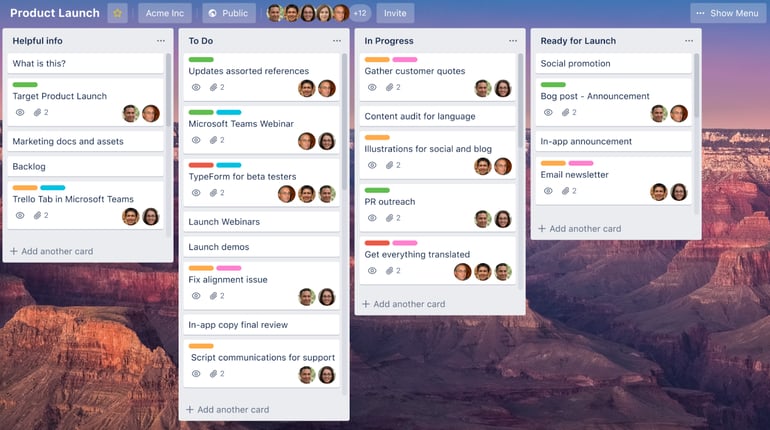
What makes Trello effective for beginners is how easily it adapts to marketing workflows. From content calendars to email campaign planning, teams can start with a simple board and build as they go. As your needs scale, you can turn to Power-Ups to add extra features gradually like time tracking, automated workflows, and voting.
Pros and cons
| Pros | Cons |
|---|---|
| ✓ Free plan is well-suited for solo marketers managing their own projects | ✗ No native time tracking functionality |
| ✓ Unlimited storage, cards, and activity logs included even on the free tier | ✗ Heavily reliant on Kanban boards, which may limit workflow flexibility |
| ✓ Power-Ups add flexibility by integrating additional features and third-party apps | ✗ Lacks task dependencies, which can make complex planning more difficult |
Trello pricing
All plans are billed on a per-user basis.
- Free: $0 (forever free for up to 10 users)
- Standard: $6/month (billed monthly) or $5/month (billed annually)
- Premium: $12.50/month (billed monthly) or $10/month (billed annually)
- Enterprise: Starts at $17.50/monthly (billed annually)
Standout features
- Kanban-style boards make it easy to collaborate and check project updates at a glance.
- Custom checklists let you create multiple subtasks within a card.
- Power-Ups enhance your Trello boards by adding advanced features and integrating your go-to apps directly into your workflow.
- The Trello Inbox captures ideas, reminders, and to-dos in one place.
For more information, check out this full Trello review.
Key features of marketing project management software
The right marketing project management software can make or break how your marketing team operates. These tools offer essential features designed to improve visibility, streamline collaboration, and keep campaigns moving forward. Here are key features you should consider if you’re looking to purchase a new project management platform.
- User-friendly interface: An intuitive, easy-to-navigate interface ensures your team can get up and running quickly. A smooth user experience leads to faster onboarding, better productivity, and stronger team-wide adoption.
- Collaboration tools: Built-in messaging, file sharing, and comment threads allow teams to communicate in real time. This is useful when coordinating with stakeholders, agencies, or departments outside of marketing.
- Task management: Tasking features let you assign responsibilities, set due dates, and organize work by priority or dependency. Project views like Kanban boards or Gantt charts make it easier to track progress at a glance.
- Workflow automation: Automation tools reduce manual work and minimize errors across manual campaign processes. Look for platforms that support custom triggers, automated task assignments, and real-time status updates.
- Time tracking and resource management: Integrated time tracking delivers valuable insights into where your team’s effort is going. Resource management tools, on the other hand, help you stay within budget and avoid overloading your team.
- Integration with existing tools: Your software should seamlessly connect with the platforms your marketing team already relies on such as CRM, email platforms, social media calendar, and analytics tools. This reduces tool fatigue and consolidates key data in one place.
- Customizability and scalability: As your campaigns evolve, your project management platform should grow with you. Custom dashboards, templates, and flexible reporting make it easier to adapt the system to your team’s workflows and scale across larger projects or teams.
Benefits of marketing project management tools
Marketing project management tools offer a wide range of benefits for both in-house teams and agencies. When choosing the right software, marketers should keep these key advantages in mind:
Streamlined collaboration
These tools make it easier for team members to collaborate by providing a shared space for communication, file sharing, and feedback. This supports a smoother workflow and encourages more creative input across the team.
Better time and resource management
With built-in scheduling and resource allocation features, project management tools help teams stay on track and within budget. You can assign tasks, set deadlines, and manage workloads more efficiently.
Centralized project information
Project management platforms keep all project-related data in one place, making it easy to access assets, timelines, and conversations. This minimizes miscommunication and ensures everyone stays aligned.
Real-time project visibility
Most tools offer dashboards and progress tracking, giving teams full visibility into where projects stand. This helps spot delays early and enables proactive adjustments to keep everything moving smoothly.
Smarter task prioritization
Marketing teams can use these tools to rank tasks by urgency, deadlines, or strategic importance. Prioritizing the right activities helps boost productivity and ensures that high-impact work is completed first.
Choosing the right marketing project management tool
Choosing the right project management software for marketing starts with understanding your team’s structure, workflows, and campaign types. Before committing, assess whether the platform can support your operational needs while staying flexible enough to adapt as your team grows.
Prioritize solutions that integrate well with your existing marketing stack like CRM systems, email platforms, and analytics tools to streamline implementation and centralize your data. Make sure core features such as task tracking, collaboration tools, reporting dashboards, and resource planning align with your day-to-day goals.
It’s also smart to compare pricing tiers, test usability, and read reviews from other marketing professionals to get a sense of real-world performance. Taking the time to evaluate these areas will help you find a solution that boosts productivity and delivers long-term value.
Methodology
I handpicked ten leading project management platforms that align with how marketing teams operate. I evaluated each tool based on its marketing-relevant features, ease of use, and pricing to determine how well it fits common marketing workflows. I also reviewed user feedback to uncover real-world strengths and limitations. With these insights, I identified the ideal use case for each tool to help you choose the right solution for your team’s needs.
FAQs
What is the best project management software for marketing?
The best marketing project management software depends on your team’s structure, workflow preferences, and campaign complexity. If you’re looking for an intuitive, visual platform that’s easy to adopt, monday.com is a standout. For teams managing larger cross-functional efforts, Wrike is another strong option, as it can handle complex campaign planning
Which is the best project management software?
The answer comes down to your business size, industry, and team preferences. For instance, if your team prioritizes ease of use and visual task tracking, Asana is a solid option. On the other hand, ClickUp offers more customization and feature depth, making it ideal for businesses that want an all-in-one workspace.
What is the best CRM for project management?
Choosing the best CRM for project management depends on whether your priority is pipeline visibility, task automation, or customer engagement tracking. HubSpot is a top choice if you’re looking for a platform that blends CRM and project management. Another excellent option is Zoho CRM, which offers built-in project management capabilities through Zoho Projects.