


Google has officially started rolling out the latest set of Android 16 features, marking a major change in how the operating system evolves. Instead of one big annual update, Google is shifting to more frequent releases.
The shift mirrors a broader plan revealed earlier in the year. According to the Android team, this model gives users access to features as soon as they’re ready and offers developers faster tools for innovation.
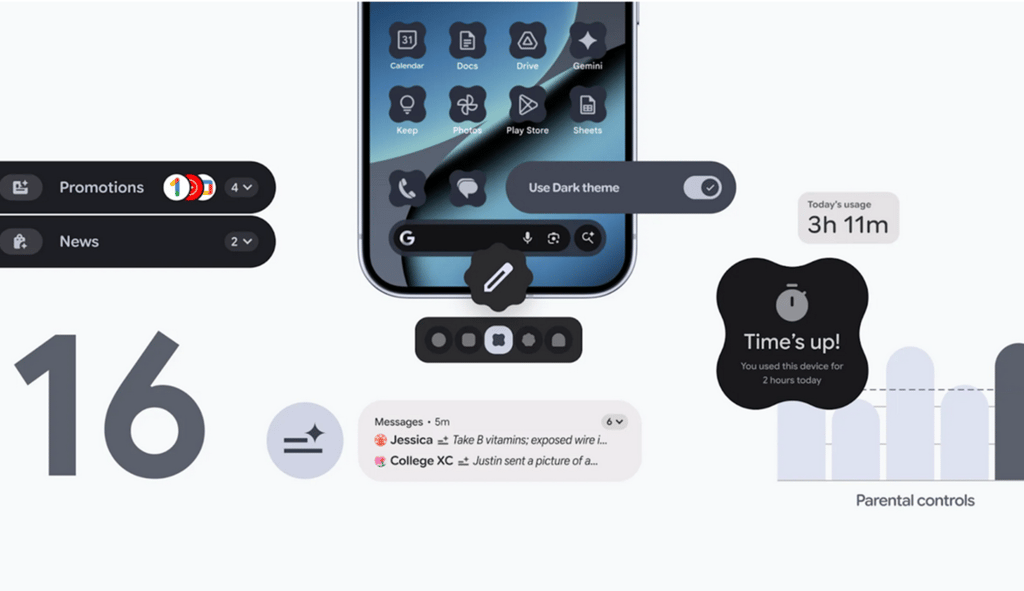
The latest update arriving now is Android 16 QPR2. It introduces new ways to manage notifications, personalize home screens, and handle family controls. Google says it’s all part of making devices “smarter, more personal and easier to manage.”
Cutting through notification overload
Notifications have long been a pain point for users, and Android 16 is trying to clean things up.
Google’s new AI-powered summaries collect long chats and turn them into quick highlights. “AI-powered notification summaries condense longer messages and group chats, giving you quick understanding and context at a glance,” said Mindy Brooks, Vice President of Product and UX for Android Platform.
Alongside the summaries, a new notification organizer automatically sorts low-priority alerts. It’s designed to keep the important things on top while pushing promos and noise out of the way.
A more personal and accessible Android
Customization, often one of Android’s strong suits, is expanding again. The update includes options to change icon shapes and apply themed icons across apps for a more unified look. It also deepens Android’s dark theme, something both the user-focused and developer-focused sides of Google emphasized.
VP of Product Management, Android Developer, Matthew McCullough wrote on the Android Developers blog that the update brings “an expanded option under dark theme,” explaining how it helps users seeking a more consistent visual experience or those with low vision or photosensitivity. Google’s system can now automatically darken many apps that don’t have their own dark mode, though developers are still encouraged to build native versions for polished results.
Parental controls built directly into Android
Android 16 takes a major step toward family safety by making device-level parental oversight easier. Brooks says the new built-in controls “can be used to set the amount of screen time that can be spent on a device each day… set downtime schedules… control app usage… [and] add more time by granting extra minutes.”
Parents can still link to Google Family Link, but now the basics are accessible directly from a child or teen’s device, protected with a PIN.
Developers get their own big upgrade
Several changes in this release focus on improving app performance and the Android development experience.
Android Runtime now includes a redesigned garbage collector. McCullough explains: “The Android Runtime (ART) now includes a Generational Concurrent Mark-Compact (CMC) Garbage Collector.” This update aims to reduce CPU usage and improve battery life.
Google is also giving developers new ways to check for compatibility with the more frequent updates, noting, “We have introduced new fields to the Build class as of Android 16, allowing your app to check for these new APIs using SDK_INT_FULL and VERSION_CODES_FULL.”
These improvements underline Google’s goal of moving Android forward more quickly, without breaking apps.
On the security front, tweaks continue behind the scenes, but one prominent upcoming feature for developers is support for device-locking behaviors and protections around SMS one-time passwords. McCullough notes that behavior changes in this release focus on security or accessibility, not disruptive compatibility shifts.
More Google coverage
- New Google Search AI Mode is ‘Total Reimagining,’ Says CEO Sundar Pichai
- In Major Ruling, Judge Finds Google ‘Willfully Acquired and Maintained Monopoly Power’ Over Digital Ad Market
- Google’s Big Bet on Nuclear Energy: ‘The Race to Power AI-Driven Data Centers is Accelerating’
- Computer History Museum Releases Original AlexNet Code: Why It Matters
Health, connectivity, and migration get a boost
Google is also expanding what Android can track and how easily users can switch devices. Health Connect now pulls step data straight from the phone’s sensors, and a new data transfer API promises smoother migrations between Android and iOS.
On the audio side, personal audio sharing via Bluetooth LE is now built directly into the system interface.
Available first on Pixel
Google says these updates are already “starting to roll out with Android 16 on eligible Pixel devices today,” with more devices expected to follow once manufacturers integrate the changes.
For developers, McCullough recommends using “the latest Canary build of Android Studio Otter” to fully support the new capabilities.
Meanwhile, Google Pixel work chat monitoring is under the spotlight in coverage of how new RCS archival tools give employers more visibility into staff messages.