


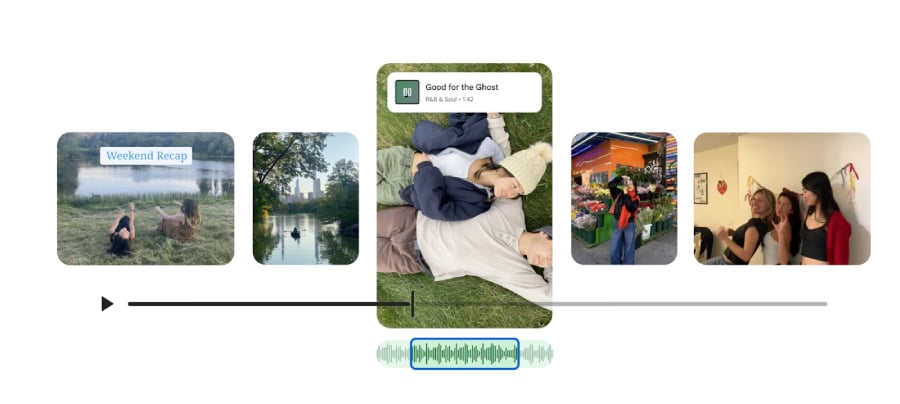
Google wants to make your next highlight reel a lot less stressful. The company has rolled out a new set of video editing tools inside Google Photos, giving users simple ways to create polished videos without jumping between apps.
The update introduces five key features that focus on speed, simplicity, and creativity, transforming the app from a simple gallery into a creation studio.
Templates now do the heavy lifting
One of the biggest additions is a new set of ready-made templates, now rolling out on Android. These templates come with preset music, text, and cuts that sync to the soundtrack.
In the Google announcement, Nick Staubach, group product manager for Google Photos, explained how simple the process is: “Just pick a template, select the photos and videos you want included and sit back while Photos automatically creates a shareable video that matches the beat.”
Users can find templates by selecting the Create tab and choosing “highlight video.” Google says more templates are coming.
A redesigned video editor for both Android and iOS
The video editor itself is getting a significant overhaul across both platforms. Google says it’s “faster and easier to use,” now including a universal timeline that supports multi-clip editing. An adaptive canvas also adjusts depending on where clips are positioned during editing.
The redesigned editor is also now the default video editor on Android, so basic tasks like trimming a single clip now use the new interface.
Soundtracks are now built into the editor
Google is also introducing a baked-in music library for highlight videos. Users can browse tracks and add a soundtrack on both Android and iOS. According to the blog, “a great video is even better with great music,” and the editor now helps users quickly find a matching vibe.
More Google coverage
- New Google Search AI Mode is ‘Total Reimagining,’ Says CEO Sundar Pichai
- In Major Ruling, Judge Finds Google ‘Willfully Acquired and Maintained Monopoly Power’ Over Digital Ad Market
- Google’s Big Bet on Nuclear Energy: ‘The Race to Power AI-Driven Data Centers is Accelerating’
- Computer History Museum Releases Original AlexNet Code: Why It Matters
Custom text overlays for personal touches
Android users are also getting new text-overlay tools. Google confirmed that users can now add stylish text overlays, complete with customizable fonts, colors, and backgrounds. This helps add context, captions, or creative elements directly in Google Photos without needing Instagram, TikTok, or another editing app.
Edit individual clips with more control
Beyond highlight reels, the new editor also enhances single-clip editing. Users can open any video, tap “Edit,” and apply music, text, filters, and other adjustments. This feature is automatically available as the default editor on Android.
According to Google, all five features are either already available or currently rolling out. Templates are currently limited to Android, but will expand over time.
Think your Google Pixel 9 Pro or Google Pixel 9 Pro Fold might be eligible? Read on to see how Google has kicked off extended free repairs — it could save you a pricey screen replacement.