


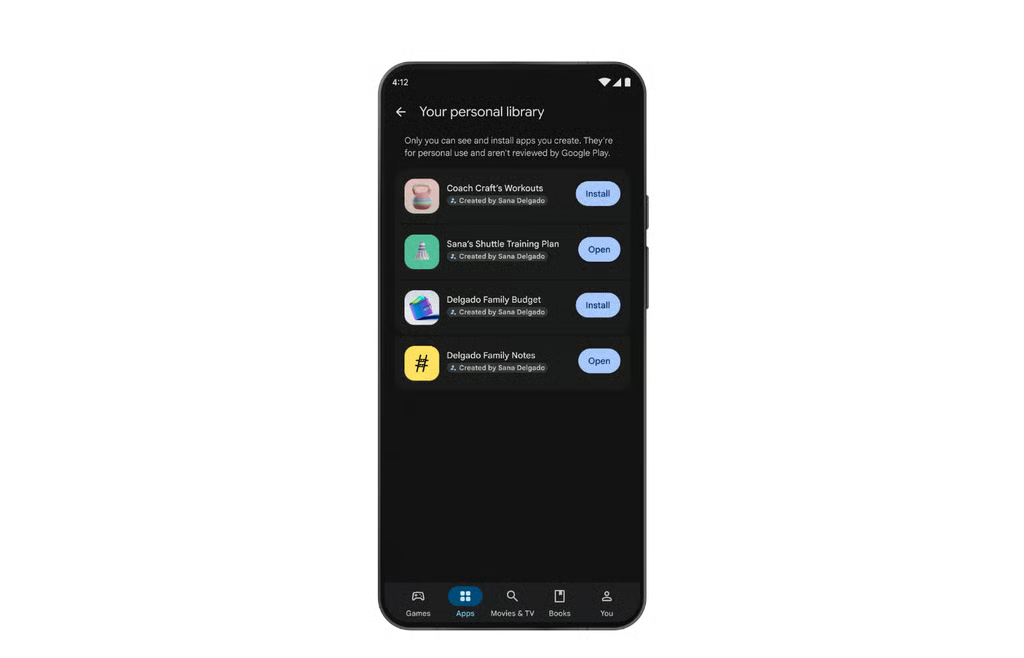
Google is making it easier to put an AI-built Android app on your own phone.
Announced Oct. 13, the update lets users launch personal apps created in Google AI Studio through Google Play using a standard Google account, without a developer account. It is rolling out to users 18 and older in select markets, including the US.
For users who want a simple tool tailored to their needs, the change removes a publishing hurdle. Creating Android apps in AI Studio was already possible; the new feature makes personal distribution through Google Play more accessible.
The system operates via Google AI Studio, the company’s web-based generative platform. Users describe an app concept in conversational English, and the AI generates the underlying software. The creator can tweak features or start over before installing the program onto their Android device.
Users do not need to register for a standard Google Play developer account, which carries a $25 one-time fee. Their personal apps remain private and separate from the public store catalog. USB debugging belongs to a separate installation method that connects an Android device directly to a computer.
Google plans to let users share personal creations with close friends and family in the coming months. If a project gains traction, Google offers a path to graduate it to a professional developer account, subjecting it to standard Trust & Safety reviews for global distribution.
Where personal apps could be useful
The immediate appeal is a tool built around one person’s requirements. A custom calculator or a tracker for recreational league expenses could serve a narrow purpose without becoming a publicly listed product.
Users can refine an app through follow-up prompts, but they should check whether each change produces the intended result. A useful starting point is a small task whose output is easy to verify, rather than a tool handling important records or decisions.
For employees experimenting with work-related tools, easier creation does not remove the need for software development practices such as testing and maintenance. Before entering company information, users should check their organization’s rules on AI services and internally developed apps, including AI guardrails for controlling data access and validating outputs.
What users should check before relying on an app
Before relying on a generated app, test it with sample information. For a calculator, compare its answers with known results. For a tracker, check whether entries remain available after closing and reopening the app.
Google’s Android app-building documentation lists technical limits: projects are client-side only, and features requiring a server-side runtime, including Firebase integration and Google Workspace APIs, are unavailable in that workflow. Users planning a connected business tool should check these limits before investing time in a prototype.
The announcement does not explain the full screening process for private apps. Users should therefore avoid treating availability through Google Play as proof that a generated app’s calculations, storage, or behavior have been independently validated.
The practical benefit is a simpler route from an idea to a personal tool. Whether that tool is dependable still comes down to testing its results and understanding its limits.
Want to learn more AI tips, tricks, and prompting techniques? TechRepublic readers get free 7-day access to The Neuron Academy, our practical learning platform designed to help professionals use AI more confidently at work. Browse all lessons →
Let us teach you How to Talk to AI for free! Try our six-minute course at The Neuron Academy and learn a few simple ways to write better prompts and get more useful results from AI, or browse our other AI course for free for seven days. Check out all the lessons here →