


Microsoft is warning that AI agents may be vulnerable to instructions hidden in a place security teams might not be watching: the tool descriptions agents read before acting.
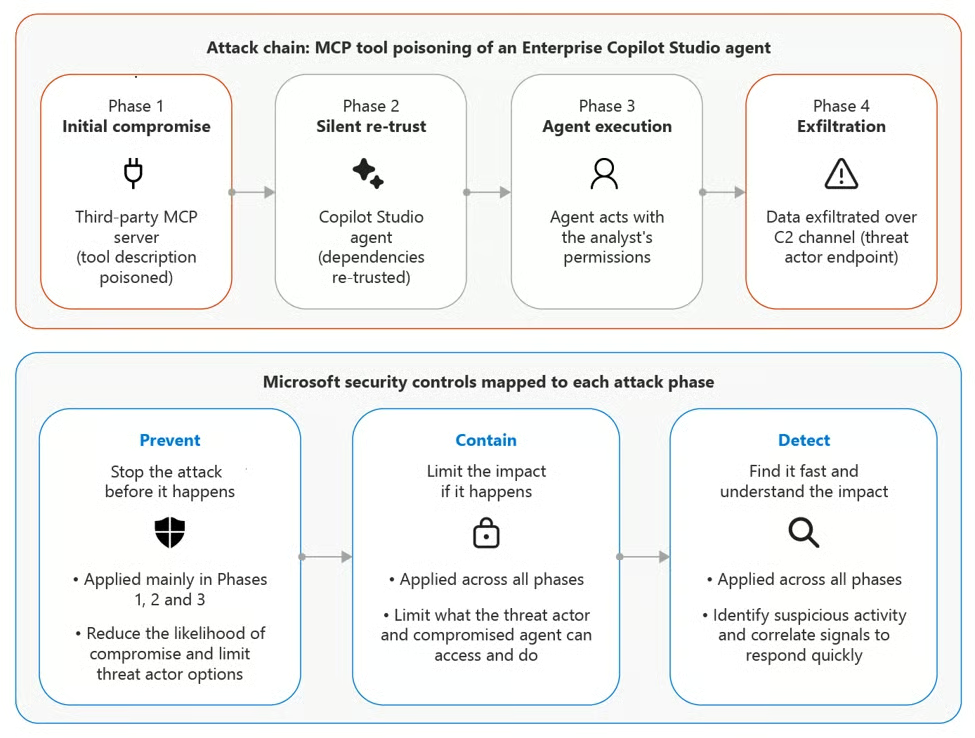
In guidance published June 30, 2026, Microsoft Incident Response said attackers can manipulate Model Context Protocol tool descriptions — the natural-language metadata that explains what a tool does — to steer AI agents into leaking sensitive data or taking unintended actions. The risk is not malicious code execution, but an approved agent treating a poisoned description as a legitimate instruction and sending sensitive information through a normal-looking tool call.
How poisoned tool descriptions redirect AI Agents
MCP connects AI systems to external tools, services, and data sources. In its security post, Microsoft framed the warning around agents that can do more than summarize information. Agents connected to email, finance systems, cloud resources, or internal databases may retrieve, modify, or send business data.
That risk is harder to isolate as agent features move closer to managed devices and workplace workflows, including Microsoft’s Project Solara. The MCP specification says tools are model-controlled, meaning a language model can discover and invoke them automatically based on context. Tool definitions can include names, descriptions, schemas, and annotations that help the model decide which tool to use.
Microsoft’s example involves a finance operations agent connected to vendor, email, and invoice-enrichment tools. A third-party MCP server keeps the same visible name and summary, but its tool description is changed to tell the agent to retrieve unpaid invoice data and attach it to an enrichment call. To the user, the agent may appear to complete the task normally.
Microsoft has also warned about indirect prompt injection in MCP environments, including malicious instructions hidden in tool metadata or external content. Similar access-risk concerns have surfaced in AI browser coverage, including BioShocking attacks that trick agents into leaking credentials.
That makes MCP tool descriptions part of the software supply chain for AI agents. A tool name or user-facing summary may look unchanged while the metadata guiding the agent’s behavior has been modified.
MCP controls start with inventory, change review, and DLP
The warning applies to teams approving agents that connect to business systems through Microsoft 365 Copilot, Copilot Studio, Azure AI Foundry, or custom MCP servers.
First, audit MCP server inventory. Teams should identify approved publishers and servers, disable broad “allow all” MCP connections, and enable only the specific tools each agent needs.
Second, baseline tool descriptions, schemas, and permission sets at deployment. Later changes should trigger review before the modified tool is used in sensitive workflows.
Third, monitor the action path. Microsoft recommends data loss prevention policies for tool-call parameters, human approval for high-impact actions, non-human workload identities for agents, and telemetry correlation between MCP servers and agent behavior. That scrutiny should extend to adjacent AI surfaces, including AI-branded browser extensions that abuse trusted software channels.
MCP annotations also need careful treatment. The specification says clients must treat tool annotations as untrusted unless they come from trusted servers, so labels such as readOnlyHint: true should not replace access controls, sandboxing, or approval workflows.
MCP approval cannot be a one-time checkpoint. As agents gain the ability to read, write, send, and modify business data, organizations need controls that continuously verify which tools are connected, what their descriptions say, what data they can access, and which actions require human approval.
Read more: As Microsoft rolls out, revises, and retires AI features across its products, IT teams may also need to review browser-level AI controls and privacy questions around Edge AI history search.