


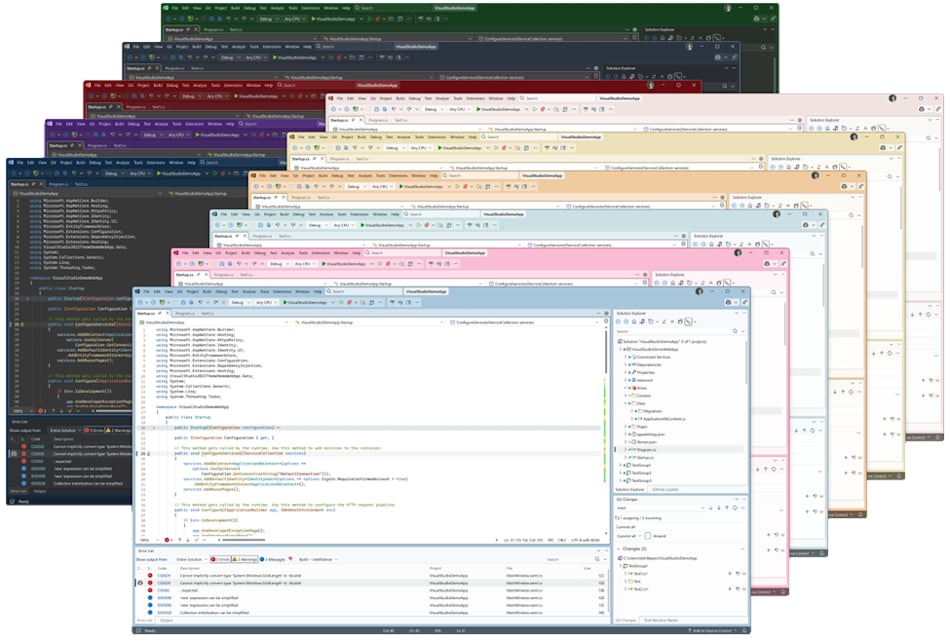
Microsoft has introduced Visual Studio 2026, a significant update to its flagship IDE that adds deeper AI integration, faster performance, and a modern design refresh.
According to Mads Kristensen, principal product manager at Microsoft, the update weaves AI “directly into the developer workflow,” adds features such as adaptive paste and the Profiler Agent, and streamlines coding with a lighter, more focused interface.
First major visual studio upgrade in five years
Kristensen described the release as the most ambitious step forward for the IDE in years. Visual Studio 2026 is the first major upgrade since the launch of Visual Studio 2022 in November 2021, marking a five-year gap between full version releases.
The new edition also introduces the Insiders Channel, replacing the long-standing Preview program as Microsoft’s way of giving developers early access to upcoming features. Kristensen emphasized that the goal of the release is to keep developers “in flow,” cutting friction in everyday work while ensuring the IDE evolves alongside modern coding practices.
Microsoft has not specified a release date yet, though The Register reported general availability could align with the November launch of .NET 10.
AI, performance, and design at the forefront
Visual Studio 2026 is designed to feel faster, smarter, and more intuitive across everyday development tasks. The update touches everything from performance and debugging to interface design, while expanding support for the latest frameworks and languages.
AI-powered development
Artificial intelligence takes a more central role in the update, with GitHub Copilot embedded throughout the IDE to provide contextual suggestions, explanations, and fixes as developers code.
New capabilities include adaptive paste, which adjusts inserted snippets to match project conventions, and a Profiler Agent that pinpoints performance bottlenecks and recommends improvements.
Copilot also extends into everyday actions, from right-click shortcuts and smarter search corrections to the ability to reference external URLs in chat. Developers can also connect their own language models from providers such as Anthropic, Google, or OpenAI for tailored AI support.
Performance improvements
Speed is another primary focus. Microsoft said the update delivers faster solution loading and tighter build loops that reduce downtime between coding and testing.
Debugging gains include inline post-return values for quicker visibility into logic issues. Razor Hot Reload is now faster and more reliable.
Memory use and overall performance for Razor and Blazor projects have been optimized to handle larger, more complex solutions.
Modern design and usability
Visual Studio 2026 introduces a refreshed Fluent UI design that brings crisper visuals, improved iconography, and a set of new themes to personalize the workspace.
A streamlined settings system built on JSON makes configuration clearer and easier to share. Extension management has also been simplified.
Microsoft said the changes make the IDE feel lighter and better suited for long coding sessions.
More Microsoft news
- Inside Microsoft’s Real-Time War Against Cybersecurity Threats
- Project Ire: Microsoft Tests AI That Autonomously Detects Malware
- Microsoft Targets ‘Critical AI Talent’ from Meta to Dominate Next AI Breakthroughs
- Windows 10 Support Ends Soon, Though Extended Security Updates Offers Are Available
Expanded developer tools
Several long-requested tools have been brought into broader use. Code coverage, once limited to Enterprise, is now available in the Community and Professional editions, helping more developers track test effectiveness.
Debugging has been expanded with a search inside text visualizer. GitHub integration now renders inline pull request comments with Markdown.
Copilot also plays a bigger role in code review, offering smarter suggestions on potential issues before changes are committed.
Platform and language support
Visual Studio 2026 introduces full support for .NET 10 and C# 14, enabling developers to immediately leverage the latest framework and language features.
The Razor editor has been overhauled for speed and reliability. C++ templates now default to C++20 with improved syntax highlighting for attributes.
At the same time, legacy components are being phased out, with Microsoft confirming the deprecation of C++AMP, ARM32 tooling, and the /await flag.
Everyone is stepping up their IDE game
Microsoft’s focus on weaving AI into Visual Studio mirrors a wider shift across the industry. Apple’s Xcode 26 Beta, for example, now supports models like GPT-5 and Claude while rolling out a redesigned tab system and workflow refinements.
Other players are also integrating AI deeper into their workflows. Anthropic’s Claude Code is introducing continuous security reviews that scan for vulnerabilities in real time, while OpenAI’s Codex is evolving into an agent that can generate code, write tests, fix bugs, and even propose pull requests.
These changes show how AI-first development is quickly becoming the new standard across coding platforms.
Microsoft’s embrace of AI isn’t limited to Visual Studio. The tech giant’s enterprise tools are also seeing a shake-up as Claude moves into the spotlight.