



Microsoft has released Windows 11 Insider Preview Build 26220.7859 (KB5077223) to users in the Beta Channel.
The update is based on Windows 11 version 25H2 and is being delivered as an enablement package. The build does not introduce flashy new features. Instead, it focuses largely on reliability improvements, with one noticeable addition for Microsoft 365 Family subscribers.
One of the most visible additions in this build is aimed at those already using Microsoft’s subscription services. Specifically, the company is testing a more direct path for users to change their current service level without leaving the operating system’s native interface.
According to Microsoft, “Microsoft 365 Family subscribers will find an option to upgrade to a different 365 plan on the Accounts page within the Settings app.”
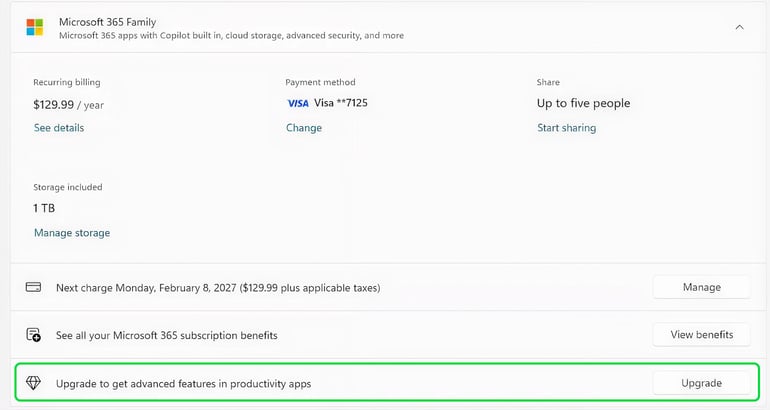
For those who prefer a cleaner look, Microsoft is also allowing users to remove this upgrade option by simply turning off the suggested content toggle in their settings.
Smoothing out the rough edges
Beyond the subscription nudge, the engineering team has been hard at work squashing several persistent bugs that have frustrated users in recent builds.
One of the primary fixes addresses an issue where system tray icons sometimes failed to appear correctly when the taskbar was set to autohide. The Windows Insider Blog noted that the update has “Improved reliability of showing app icons in the system tray when the taskbar was set to autohide.” This should come as a relief to anyone who has had to hover and hope for their icons to reappear.
File Explorer also received some much-needed attention in this release. Testers have previously reported a strange glitch where their active windows would suddenly reset their position, a bug that Microsoft claims to have finally wrangled.
The Windows blog reports that the team “Addressed an issue where all File Explorer open windows and tabs might unexpectedly jump to Desktop or Home.”
Furthermore, the update improves Nearby Sharing stability for moving large files and enhances the reliability of customizing hardware options, such as the mouse wheel, in the Bluetooth and Devices section.
More Microsoft news
- Inside Microsoft’s Real-Time War Against Cybersecurity Threats
- Project Ire: Microsoft Tests AI That Autonomously Detects Malware
- Microsoft Targets ‘Critical AI Talent’ from Meta to Dominate Next AI Breakthroughs
- Windows 10 Support Ends Soon, Though Extended Security Updates Offers Are Available
The slow and steady rollout
As is tradition with the Insider program, not everyone will see these changes the moment they hit the update button.
Microsoft is continuing to use its Controlled Feature Rollout technology to ensure things don’t break as they reach more PCs. This means the features are initially landing for a smaller group of testers before expanding to the wider Beta population. Users who want to jump to the front of the line can do so by heading to Windows Update and turning on the toggle to get the latest updates as soon as they are available.
Also read: Native Sysmon support is rolling into Windows 11 Insider builds for deeper security monitoring.