


QuickBooks Online and Sage Accounting are two of the most popular accounting software products available. If you own a small to midsized business and are looking for an easy-to-use accounting solution, we highly recommend QuickBooks Online. It’s straightforward, packed with helpful features, and it’s super easy to find accountants and bookkeepers who already know how to work with it.
On the other hand, if you’re running a larger business with more complicated finances, Sage might be a better fit. Sage 50 is a great choice if you need detailed reporting and strong inventory management as your business grows. And if you’re aiming even higher and need a full powerhouse accounting system, you’ll want to look at Sage Intacct. It’s more expensive and complex, but it gives you everything you need to set, track, and crush complex recordkeeping.
Sage vs QuickBooks Online: Comparison table
| Starting price | ||
| Free trial | ||
| User limits | ||
| Unlimited invoicing | ||
| Inventory management | ||
| Main payroll add-on | ||
| Third-party integrations | ||
| Platform type | ||
| Mobile app | ||
| Customer support | ||
| Learn more |
Sage vs QuickBooks Online: Pricing
Sage 50 Accounting
Sage 50 Accounting has three separate plans that support unique business needs:
- Sage Pro Accounting: $625 per year
- Sage Premium Accounting: $1,043 per year
- Sage Quantum Accounting: $1,780 per year
While the Sage Pro plan limits you to one user only, the Premium plan includes access for up to five users. The Quantum plan includes access for up to 40 users. However, each additional user increases the base cost of the plan. For instance, Premium Accounting costs $1,319 per year for two users and $1,652 for three users.
If you pay employees, you can bundle your Sage Accounting plan with a Sage Payroll plan that supports payroll for up to 30 payees per month. Automation for invoices, receipts, and bank activity costs an additional fee, as does enabling invoice-based payments through Stripe and PayPal.
Intuit QuickBooks Online
While QuickBooks Online is pricier than most of its small-business accounting software competitors, its starting price is much lower than Sage Accounting’s entry-level plan:
- QuickBooks Simple Start: $38 per month. Includes access for one user.
- QuickBooks Essentials: $75 per month. Includes access for three users.
- QuickBooks Plus: $115 per month. Includes access for five users.
- QuickBooks Advanced: $275 per month. Includes access for 25 users.
New customers are eligible for a 30-day free trial. Note that QuickBooks Online will automatically bill you for the next month of service at full price unless you cancel your plan before your trial expires.
Businesses can also choose to bundle QuickBooks Online with a QuickBooks Workforce plan, though no additional discount is available for customers who bundle both services. QuickBooks Workforce starts at $50 per month plus $6 per employee per month.
Sage Accounting vs QuickBooks Online: Features
Unlimited invoicing
Winner: Tie
Both QuickBooks Online and Sage 50 Accounting include unlimited customizable invoices. Both products offer useful automations, including automatic recurring invoices. Sage also offers batch invoicing.
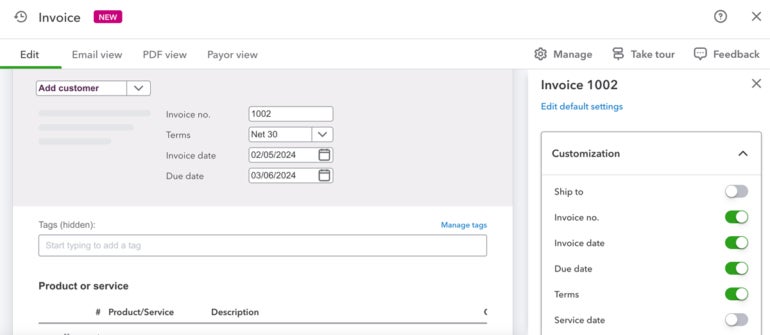
However, with Sage 50, invoice-based payments are only available at an additional fee. Sage 50 syncs with Stripe and PayPal so you can accept payments within the invoice using your preferred payment provider. In contrast, QuickBooks Online builds in the fee for invoice-based payment options without a separate charge.
Inventory management
Winner: Sage Accounting
Sage 50 gives you inventory tools with all three of its plans, while QuickBooks Online only includes inventory features with its two higher-tier plans. With Sage, you’ll get helpful basics like stock tracking, building product assemblies, and the option to pick between LIFO and FIFO inventory methods.
If you need even more detailed tracking, Sage’s two more expensive plans let you create serialized inventory items and run detailed inventory reports. On the other hand, QuickBooks Plus and Advanced plans offer basic inventory tracking but don’t go quite as deep as Sage when it comes to reporting and item tracking.
Advanced accounting features
Winner: Sage Accounting
Sage and QuickBooks share most of the same basic accounting features. For instance, both providers include expense management, invoicing, automatic bank reconciliation, and financial reporting with their cheapest plans.
QuickBooks has a lot to offer compared to most small-business accounting programs, but when you stack it up against Sage Accounting, there are areas where it isn’t as powerful. With Sage 50’s entry-level plan, you get features like inventory management, job costing, bill tracking, and basic cash flow reporting — things that QuickBooks’ cheapest plan doesn’t include.
If you spring for one of Sage’s higher-tier plans, you’ll also get advanced reporting, detailed budgeting tools, and industry-specific tools for businesses like construction and manufacturing. If your business grows and needs more firepower, you can move up to Sage Intacct. It’s one of the best accounting systems out there for midsized and large companies. While QuickBooks Desktop Enterprise can compete at that level, QuickBooks Online just doesn’t have the same level of advanced features.
Third-party integrations
Winner: QuickBooks Online
Sage Accounting has its fair share of third-party integrations, including built-in connections with Stripe, PayPal, Avalara, and Fortis. However, while Sage 50 syncs natively with dozens of third-party providers, QuickBooks Online currently integrates with more than 750 third-party business apps.
If you love Sage but need access to more third-party apps, consider upgrading to Sage Intacct, which syncs with over 350 external apps.
Mobile accounting app
Winner: QuickBooks Online
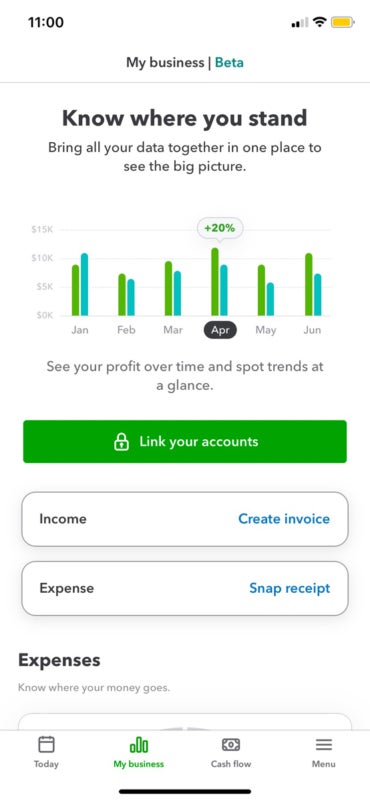
QuickBooks Online’s mobile accounting app includes on-the-go invoicing, receipt scanning, expense tracking and mileage tracking. It’s also well reviewed by both iOS users and Android users alike.
By contrast, Sage 50 doesn’t have a solid mobile accounting solution. Sage Intacct does include a relatively well-reviewed iOS app, but it doesn’t have an Android app listed on Google Play, and the iOS app has fewer than 50 reviews compared to QuickBooks’ 100,000-plus reviews.
Customer service
Winner: Sage Accounting
While QuickBooks offers a solid product, customer service reviews have delivered lackluster ratings. Customers struggle to reach a live agent and note long wait times while navigating QuickBooks’ phone tree.
In contrast, Sage prides itself on its solid customer service reputation. Each Sage product has its own in-depth resource center, which includes access to a large community hub, detailed knowledge base, live Q&As, phone-based customer service, online requests for service, and comprehensive courses, both live and pre-recorded.
More about Accounting
- What Is Accounting? Definition, Types, Importance and Examples
- Best Accounting Software and Services
- Verito vs. Rightworks: Which IT Provider Is Best for Your Firm?
- Top Free Accounting Software
- Accounting Glossary
Sage pros and cons
Sage is a powerful accounting solution that offers a lot for businesses that need more advanced financial tools, but it’s not without its trade-offs. We’ve broken down some of the key pros and cons to help you be fully informed before committing to Sage.
| ✅ Inventory management included with each plan | ❌ Fewer third-party integrations than competitors like Xero and QuickBooks |
| ✅ Access for up to 40 users | ❌ Payroll integration limited to Sage Payroll |
| ✅ Excellent customer service and customer educational tools | ❌ Potentially steep learning curve for first-time business owners |
| ✅ Multi-business management | ❌ Poorly reviewed mobile app |
QuickBooks Online pros and cons
QuickBooks Online, like any software, has its strengths and limitations. Here’s a quick look at the key pros and cons to help you see if QuickBooks Online is the right fit for your business.
| ✅ Free, one-on-one guided setup for all new users. | ❌ Higher starting price than competitors like Xero, FreshBooks, and Zoho Books. |
| ✅ Relatively low software learning curve for non-accountant business owners. | ❌ Comparatively limited payroll add-ons. |
| ✅ Convenient live bookkeeping add-on | ❌ Poor customer service reputation. |
Should your organization use Sage or QuickBooks Online?
Choose Sage if . . .
- You’re part of a growing or midsized business with complex finances.
- You want to manage multiple businesses on the same accounting platform.
- You need access to industry-specific software.
- You manage inventory and prefer accounting software that bundles bookkeeping and inventory tracking in the same package.
Choose QuickBooks Online if . . .
- You’re a solopreneur or freelancer who needs basic bookkeeping and accounting tools
- You haven’t used accounting software before and want accessible software with easy setup
- You want to take advantage of QuickBooks’ broad network of QuickBooks-certified accountants and live bookkeepers
- You rely on multiple apps to run your business and prefer accounting software that can easily integrate with each one
Methodology
When comparing Sage and QuickBooks Online, I focused on the things that matter most — features, cost, ease of use, growth potential, and utility. I didn’t just review technical specifications; I wanted to determine which platform would provide the best value and experience for owners of small to midsized businesses. Here are the main things I considered:
Pricing and value
I compared the base prices, free trial offerings, and the overall value provided at different subscription tiers to determine which platform offers the most features relative to its cost.
Feature depth and accessibility
Each product was evaluated based on the depth of its accounting features — including invoicing, inventory management, and payroll integration — and whether those features were accessible at lower or higher pricing levels.
Ease of use and learning curve
I assessed how easy each platform is for non-accountants and first-time software users, factoring in software setup, navigation, and availability of educational resources.
Scalability and growth potential
Consideration was given to how well each software scales with a growing business, including user limits, advanced features, and the ability to upgrade to more powerful solutions like Sage Intacct.
Third-party integrations and mobile access
I looked into the number and quality of app integrations and mobile app capabilities, since flexibility and on-the-go access are critical for modern businesses.
Customer service reputation
Customer service ratings, availability of support resources, and responsiveness were analyzed to determine which company offers better post-purchase user support.
Frequently asked questions (FAQs)
Which is better for small businesses, Sage or QuickBooks?
QuickBooks is generally considered more suitable for most small businesses. Sage is better for larger businesses that require more advanced features.
Can I switch from QuickBooks to Sage (or vice versa)?
Yes, switching between QuickBooks and Sage is possible. From QuickBooks to Sage you would use Sage’s Conversion Wizard, and from Sage to QuickBooks you would need to put your information into a compatible format (like a CSV file) prior to import.
What’s the easiest accounting software to learn?
QuickBooks Online is widely considered the easiest accounting software to learn, especially for small business owners and beginners.
Is Sage more expensive than QuickBooks?
Yes, Sage is generally more expensive than QuickBooks Online, especially when comparing starting prices. Sage 50’s entry-level plan starts at around $625 per year, while QuickBooks Online’s basic plan starts at $35 per month.