


Odoo is the best free inventory management software overall because its One App Free plan supports one Odoo application with unlimited users. Square is the better free option for retailers that want inventory connected directly to POS, payments, and online sales.
The best free inventory management software can track products, stock counts, locations, purchasing, and sales without requiring a full paid inventory system from day one. However, the limits vary widely. Some products restrict users or orders, while others reserve purchase orders, advanced reporting, integrations, or other inventory functions for paid plans.
I compared 14 inventory management platforms across 25 data points and selected seven that provide enough free functionality to support real business use rather than functioning primarily as short-term trials.
- Top picks for free inventory management software
- Why you can trust TechRepublic
- How I evaluated the best free inventory management software
- Best free inventory management software compared
- Free inventory management software by business type
- Odoo: Best free inventory management software overall
- Zoho Inventory: Best for ecommerce inventory and order management
- Square Inventory: Best free inventory software for retailers
- Loyverse Inventory: Best for mobile POS inventory
- SalesBinder: Best for small wholesalers and multi-location inventory
- InvenTree: Best open-source inventory software for manufacturing
- Backbar: Best free inventory software for bars and beverage businesses
- Free vs paid inventory management software
- When spreadsheets are still enough
- When free inventory software becomes risky
- How to choose the best free inventory management software
- Frequently asked questions
Top picks for free inventory management software
| Odoo | Overall free inventory management | $31.10/user/month |
| Zoho Inventory | Ecommerce inventory and order management | $39/month |
| Square Inventory | Retail inventory with POS and payments | $49/location/month |
| Loyverse Inventory | Mobile POS inventory | $25/store/month for Advanced Inventory |
| SalesBinder | Small wholesalers and multi-location inventory | $9/month |
| InvenTree | Open-source manufacturing inventory | Free to self-host |
| Backbar | Bars and beverage inventory | $79/location/month billed annually |
Why you can trust TechRepublic
Inventory software affects purchasing, fulfillment, cash flow, and customer experience, so I do not rank products by feature count alone.
I compare what is actually available on the free plan, which limits are most likely to matter in day-to-day work, what businesses need to pay for next, and whether the upgrade path still makes sense after the free tier is exhausted.
I also distinguish between a feature that exists somewhere in a vendor’s platform and one that is actually included in the free plan. That distinction matters with modular and tiered platforms because a feature shown on a product page may still require another application, subscription, or add-on.
Where possible, I use vendor pricing pages, documentation, help centers, free accounts, product walkthroughs, and current plan comparisons to verify limits and features before scoring each product.
How I evaluated the best free inventory management software
I started with 14 inventory management products offering a free plan, open-source software, or meaningful inventory functionality without a recurring software charge. I scored each product across 25 data points, with the greatest weight placed on what businesses can accomplish without paying.
The scoring categories were:
- Pricing and free plan value, 40%: I considered whether the product has a real free option, user and product limits, upgrade options, customization, and whether the free tier is large enough for actual business use.
- Free inventory features, 25%: I reviewed real-time tracking, low-stock or reorder alerts, multi-location inventory, mobile access, granular item tracking, reporting, purchasing, vendor management, and related functions.
- Ease of use, 15%: I looked at interface quality, customer support, integrations, setup requirements, documentation, and whether businesses need technical expertise to start using the platform.
- Scalability, 20%: I considered the depth of the overall product, developer customization, native add-ons, integrations, and whether businesses can expand the system as their inventory operation grows.
Best free inventory management software compared
| Odoo | 4.46 | One Odoo app | Unlimited | Multiple inventory locations | Stock control, routing, replenishment, warehouse management | Multiple Odoo apps or external API |
| Zoho Inventory | 4.44 | 50 orders/month | 1 | 1 | Composite items, dropshipment, backordering, POs | More orders, users, locations, or advanced inventory |
| Square Inventory | 4.32 | Basic inventory only | Multiple team members | Multiple locations | POS-linked stock tracking, online and invoice sales | Advanced inventory and purchasing |
| Loyverse Inventory | 4.10 | Advanced controls require add-on | Multiple | Multiple stores | Real-time stock, alerts, variants, composite items | POs, transfers, valuation, stock counts |
| SalesBinder | 4.08 | 100 active records | 1 | Unlimited | Inventory, CRM, POs, invoices, suppliers | More records or users |
| InvenTree | 4.05 | Self-hosting and technical setup | Depends on deployment | Multiple | Parts, stock, BOMs, suppliers, purchasing, builds | Managed hosting or lower-maintenance setup |
| Backbar | 3.97 | One business location | Unlimited | 1 | Mobile counts, purchasing, multiple storage areas, reports | Multiple locations or deeper costing/reporting |
What does “free inventory software” actually mean?
“Free” does not mean the same thing across these platforms.
Free-forever plans do not expire as long as you stay within their usage limits. Zoho Inventory, SalesBinder, Backbar Basic, and Odoo One App Free fit this model.
Free software with paid inventory upgrades provides core stock management at no monthly charge but charges for deeper functions. Loyverse, for example, includes essential inventory for free but charges $25 per store per month for Advanced Inventory, which adds purchase orders, stock transfers, inventory counts, production, valuation, and label printing.
Open-source software such as InvenTree can be free to use and self-host, but the business takes on more responsibility for installation, hosting, maintenance, and technical support.
Free POS software with inventory combines inventory with a larger commerce platform. Square Free costs $0 per location, while Square Plus costs $49 per location and adds advanced inventory and other paid business tools. Payment processing fees still apply when you accept payments.
The best free option is therefore not necessarily the product with the longest feature list. It is the one whose free limits match how your business buys, stores, tracks, and sells inventory.
Free inventory management software by business type
| Best free inventory software overall | Odoo | It offers the deepest inventory functionality with unlimited users if you can work within its one-app model. |
| Ecommerce inventory | Zoho Inventory | It combines inventory with online ordering, purchasing, dropshipment, and fulfillment workflows. |
| Retail inventory and POS | Square Inventory | It connects basic stock tracking directly with POS, payments, invoices, and online sales. |
| Mobile retail or cafe inventory | Loyverse Inventory | Its free POS and inventory tools work well from smartphones and tablets. |
| Wholesalers and distributors | SalesBinder | It combines stock management with customer, supplier, PO, and invoice records. |
| Manufacturing and parts inventory | InvenTree | Its open-source system supports parts, BOMs, builds, suppliers, and technical customization. |
| Bars and beverage businesses | Backbar | Its free plan is built specifically for beverage counts, purchasing, storage areas, and bar inventory. |
Odoo: Best free inventory management software overall

Our rating: 4.46 out of 5
Starting price: $0 for One App Free
Best fit: Choose Odoo if you need deeper warehouse controls, multiple locations, and unlimited users; skip it if you want fast setup, several Odoo apps for free, or external API access on the free plan.
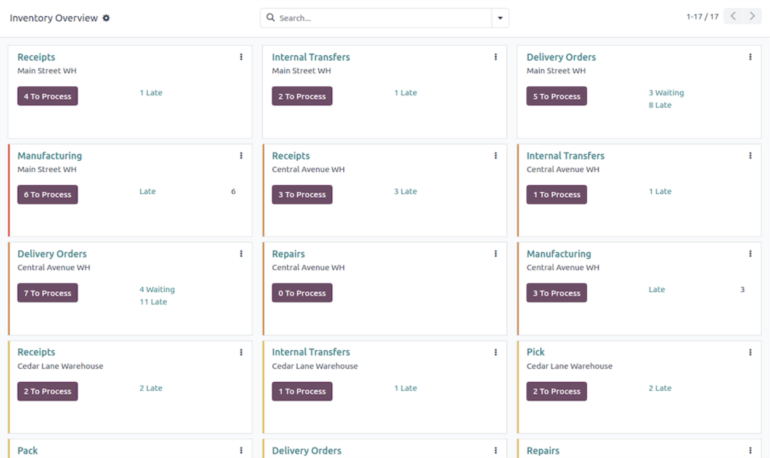
Odoo Inventory offers one of the strongest free inventory systems available. Its One App Free plan lets businesses choose one Odoo app and use it with unlimited users. Selecting Inventory gives teams access to a much deeper stock management system than the basic inventory functions bundled into most free POS platforms.
It is particularly useful for warehouses, distributors, wholesalers, and growing retailers that need to organize stock across locations, replenish inventory, transfer products, and manage more structured warehouse processes.
Why I chose Odoo
Odoo earned the highest score in my evaluation because its free plan combines strong inventory functionality with unlimited users.
Most competing free plans make you compromise on one of those areas. Zoho and SalesBinder restrict user access, while Square and Loyverse reserve several advanced inventory functions for paid tiers.
Odoo also gives businesses room to build more detailed inventory workflows than the simpler POS-first systems on this list.
The tradeoff is setup. Odoo provides more control, but that means more configuration and a steeper learning curve. Its One App Free model also means businesses need to pay attention to which functions require another Odoo app.
Odoo free plan at a glance
- Users: Unlimited
- Plan limit: One Odoo application
- Best free tools: Stock tracking, warehouse locations, transfers, replenishment rules, routes, and inventory adjustments
- Biggest limitation: Adding more Odoo business applications moves you beyond the One App Free structure
- External API: Included with Odoo Custom rather than One App Free or Standard
What’s in an Odoo free plan?
- Stock tracking: Monitor products, quantities, stock movement, and inventory adjustments.
- Warehouse and location management: Organize stock across physical and internal storage locations.
- Replenishment: Use stock rules to help maintain target inventory quantities.
- Inventory routing: Define how inventory moves between warehouse locations and business processes.
When to upgrade to a paid Odoo plan
Upgrade when you need multiple Odoo apps, such as Inventory plus CRM, Accounting, ecommerce, or Point of Sale.
Standard includes all Odoo applications and starts at $31.10 per user per month on monthly billing. Custom starts at $61 per user per month on monthly billing and adds external API access, Odoo Studio, multi-company management, and deployment options beyond Odoo Online.
Pros & Cons
| Pros | Cons |
|
|
SEE: 10 Best Free Project Management Software
Zoho Inventory: Best for ecommerce inventory and order management

4.44 out of 5
Starting price:
$0
Best fit:
Choose Zoho Inventory if ecommerce orders, purchasing, dropshipment, and fulfillment matter most; skip it if you need more than one user, one location, or 50 monthly orders for free.
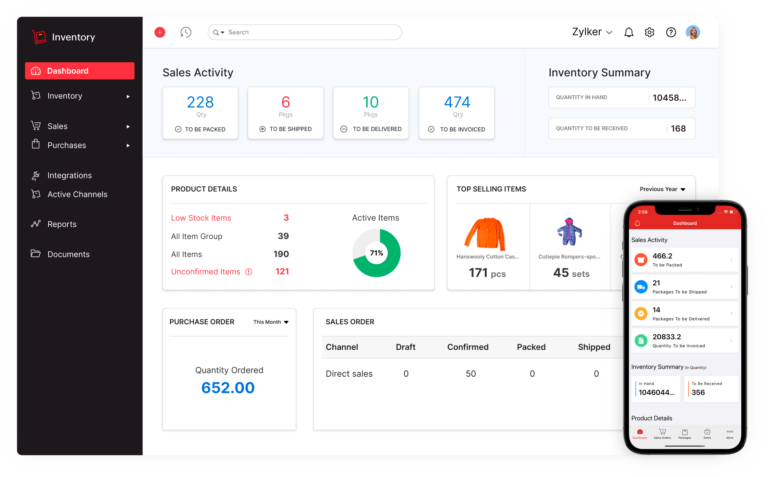
Zoho Inventory is one of the strongest free options for small ecommerce businesses because the free plan handles more than stock counts. It includes 50 orders per month, one user, one location, 20 purchase orders per month, composite items, dropshipment, and backordering.
Why I chose Zoho Inventory
Zoho provides many of the functions a small seller needs to move from a spreadsheet into a real inventory and order-management system. It is easier to get started with than Odoo and gives ecommerce businesses a clear path into paid plans as order volume increases.
The limitation is capacity. Fifty monthly orders is enough for a small seller or new business, but a successful store can outgrow the free plan quickly.
Zoho Inventory free plan at a glance
- Orders: 50/month
- Users: 1
- Locations: 1
- Purchase orders: 20/month
- Invoices: 50/month
- Key free tools: Composite items, dropshipment, backordering
- Biggest limitation: Monthly order cap
What’s in a Zoho Inventory free plan?
- Sales order management: Process up to 50 orders each month.
- Purchase orders: Create up to 20 purchase orders monthly.
- Composite items: Combine multiple inventory components into a sellable item.
- Dropshipment: Route orders through suppliers without stocking every item yourself.
- Backordering: Track demand when inventory is temporarily unavailable.
When to upgrade to a paid Zoho Inventory plan
Standard costs $39 per organization per month on monthly billing or $29 per month billed annually. It raises capacity to 500 orders, three users, and two locations.
Higher plans add tools such as batch tracking, serial number tracking, barcode generation, stock counting, bin locations, replenishment, and other warehouse functions.
Pros & Cons
| Pros | Cons |
|
|
SEE: Best Retail CRM: Features, Prices, Pros and Cons
Square Inventory: Best free inventory software for retailers

Our rating: 4.32 out of 5
Starting price: $0 for Square Free
Best fit: Choose Square if you want inventory tied directly to retail POS, payments, invoices, and online sales; skip it if you need warehouse routing, manufacturing tools, or advanced purchasing on the free plan.
Square is a better fit than a traditional inventory system for many small retailers because stock tracking sits inside the same platform used to make sales.
Square Free costs $0 per location and includes Square’s core POS, online selling, invoicing, and other commerce tools. Square Plus costs $49 per location and adds advanced inventory along with other paid functions.
Why I chose Square Inventory
Square eliminates one of the biggest pain points for small retailers: keeping the register, payments, online store, and inventory synchronized across different platforms. It works particularly well for shops whose inventory primarily changes when products are sold.
The free plan is less suited to distributors or warehouse operations. Purchasing, vendor workflows, and deeper inventory management are where businesses are more likely to need the paid tier.
Square Free inventory at a glance
- Monthly software: $0/location
- Inventory type: Basic POS-linked inventory
- Best free use: Product counts tied to sales
- Related free tools: POS, online selling, invoicing
- Biggest limitation: Advanced inventory sits in Square Plus
What’s in Square Free?
- Basic stock tracking: Monitor quantities for products in your Square item library.
- POS integration: Sales update inventory from the same platform used for checkout.
- Online sales: Sell products through Square’s online tools.
- Invoices: Square inventory and sales tools also sit alongside invoicing.
When to upgrade to Square Plus
Square Plus costs $49 per location per month. Square positions advanced inventory among the functions included beyond Square Free. Upgrade when the limits of basic stock tracking force you to manage purchasing or inventory elsewhere.

Pros & Cons
| Pros | Cons |
|
|
SEE: 5 Best Retail POS Systems
Loyverse Inventory: Best for mobile POS inventory

Our rating: 4.10 out of 5
Starting price: $0
Best fit: Choose Loyverse if you want free mobile POS with stock tracking, variants, composite items, and multi-store support; skip it if you need free purchase orders, stock transfers, or inventory valuation.
Loyverse includes its POS, Dashboard, essential inventory, loyalty program, Customer Display, Kitchen Display, multi-store management, and integrations at no monthly software charge.
The free inventory system includes real-time stock tracking, low-stock notifications, composite items, variants, and bulk CSV imports and exports.
Why I chose Loyverse Inventory
Loyverse has one of the more useful free combinations of POS and inventory tools on this list. Its free stock features go beyond a basic product count, including low-stock alerts, variants, composite products, and multi-store management. I particularly like it for smaller businesses that use smartphones or tablets as their primary checkout devices.
Its weak spot is in purchasing. Once you need suppliers, purchase orders, transfers, formal stock counts, valuation, or barcode label printing, you need the Advanced Inventory add-on.
Loyverse free plan at a glance
- POS: Free
- Stores: Multi-store management included
- Inventory: Real-time tracking and alerts
- Products: Variants and composite items
- Integrations: Included
- Biggest limitation: Advanced purchasing and stock controls are paid
What’s in a Loyverse free plan?
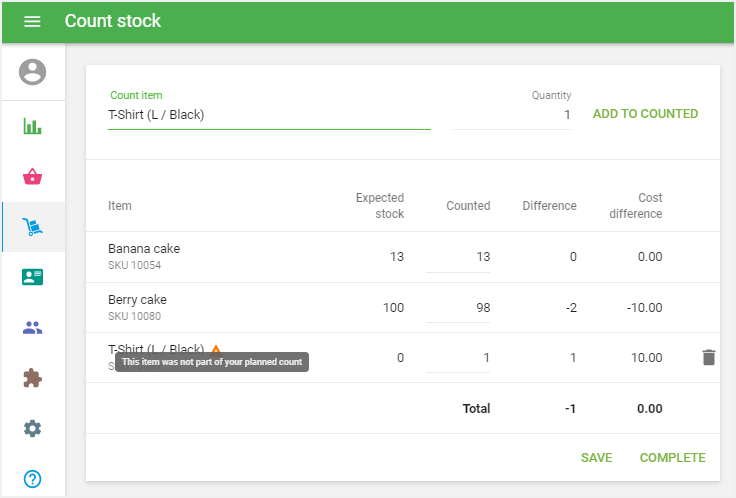
- Real-time inventory tracking: Stock adjusts as products are sold.
- Low-stock notifications: Receive alerts before products run out.
- Composite items: Track components used in a larger item.
- Variants: Manage options such as size or flavor.
- Multi-store management: Manage several stores from one account.
When to upgrade to Advanced Inventory
Upgrade Loyverse when you need purchase orders, inventory valuation reports, advanced stock management, employee management, or longer sales history. Advanced Inventory costs $25 per store per month or $250 per store per year.
Pros & Cons
| Pros | Cons |
|
|
SalesBinder: Best for small wholesalers and multi-location inventory

Our rating: 4.08 out of 5
Starting price: $0
Best fit: Choose SalesBinder if you need inventory alongside customers, suppliers, purchase orders, and invoices; skip it if 100 active records or one free user will be too restrictive.
SalesBinder’s Forever Free account includes 100 active records. Unlike a simple SKU limit, active records can include inventory and other business records, so businesses should consider how quickly their account will grow.
SalesBinder remains particularly useful for businesses that want inventory and CRM-style records in one system.
Why I chose SalesBinder
SalesBinder stands out because it combines inventory with the surrounding back-office work.
Instead of managing products in one system and suppliers, customers, invoices, and purchase orders elsewhere, a small wholesaler can keep them together.
It is also a stronger fit than POS-first platforms for businesses moving inventory between locations or managing supplier-driven workflows.
The 100-record limit is the biggest drawback. It makes the free plan best for very small operations or businesses evaluating whether the full platform is a good fit.
SalesBinder free plan at a glance
- Active records: 100
- Users: 1
- Inventory focus: Back-office inventory and order management
- Related tools: Customers, suppliers, purchase orders, invoices
- Biggest limitation: Low record capacity
What’s in a SalesBinder free plan?
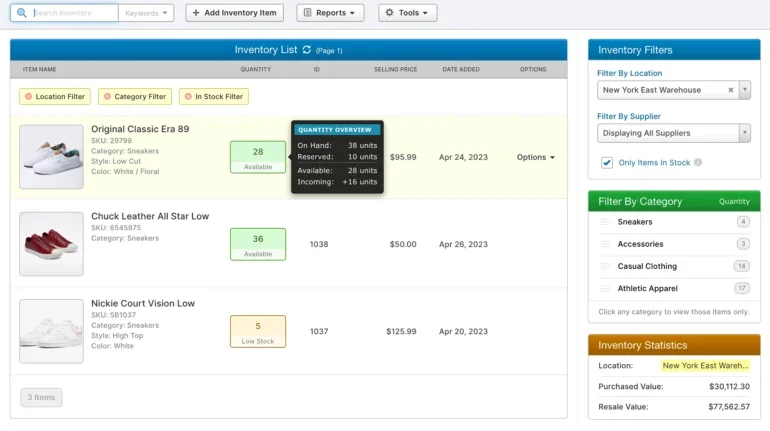
- Inventory management: Maintain item and stock records.
- Customers and suppliers: Keep account information alongside inventory.
- Purchase and sales workflows: Manage purchasing, sales orders, and invoices.
- Barcode scanning: SalesBinder provides barcode scanning functionality in its inventory platform.
When to upgrade to a paid SalesBinder plan
The Starter plan costs $9 per month and includes 2,500 active records and one user.
Bronze costs $19 per month and includes 5,000 active records, five user accounts, and one integration.
Upgrade when your free account’s 100-record capacity or single-user setup starts limiting normal work.
Pros & Cons
| Pros | Cons |
|
|
InvenTree: Best open-source inventory software for manufacturing

Our rating: 4.05 out of 5
Starting price: Free and open source
Best fit: Choose InvenTree if you need parts, BOMs, builds, supplier management, and open-source customization; skip it if you want a plug-and-play cloud system with little technical setup.
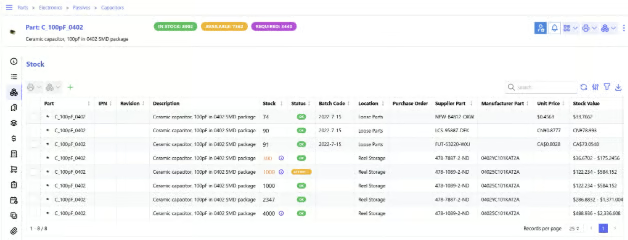
InvenTree is an open-source inventory management platform built around parts and stock control. Its core functions include parts organization, supplier management, stock tracking, bills of materials, build management, reporting, API access, and plugin-based customization.
It is a very different free option from Square or Zoho. You get more control over the software and data, but you also take on more technical work.
Why I chose InvenTree
InvenTree earned a place on this list because it covers a use case that the other products do not handle as well: technical and manufacturing inventory.
It treats inventory as more than finished products waiting to be sold. Businesses can manage individual parts, suppliers, bills of materials, components required for builds, and stock required for production.
It is also one of the strongest options for developers. InvenTree is designed for extension through an API and plugins, so technical teams can adapt it to internal workflows rather than waiting for a vendor to add a feature.
The tradeoff is clear in my scoring: ease of use is its weakest category. A business that simply wants to create products and start counting stock will probably be happier with Square, Loyverse, Zoho, or Backbar.
InvenTree free software at a glance
- Software: Open source
- Best use: Parts and manufacturing inventory
- Core tools: Stock, suppliers, BOMs, builds, reports
- Developer tools: API and plugin support
- Deployment: Flexible/self-hosted
- Biggest limitation: Technical setup and maintenance
What’s included with InvenTree?
- Part management: Organize parts into structured categories.
- Stock control: View stock for specific parts, locations, and builds.
- Supplier management: Connect suppliers and supplier items to inventory parts.
- Bills of materials: Build and manage component lists for manufactured items.
- Build management: Track the parts required to produce finished goods.
- API and plugins: Integrate InvenTree with external applications and extend its functions.
When to consider a paid alternative
InvenTree itself is open source, so there is no conventional feature-based upgrade tier comparable to Zoho or Square.
The point to consider paying is when the cost of hosting, installation, updates, internal maintenance, and technical support outweighs the savings from free software.
Businesses without internal technical resources may get better value from a hosted SaaS inventory platform even if the monthly price is higher.
Pros and cons
| Pros | Cons |
|
|
Backbar: Best free inventory software for bars and beverage businesses

Our rating: 3.97 out of 5
Starting price: $0 for Basic
Best fit: Choose Backbar if you manage beverage inventory and need mobile counts, purchasing, multiple storage areas, and unlimited users; skip it if you need multiple business locations or general-purpose retail inventory.
Backbar’s Basic plan costs $0 per month per location and includes web and mobile inventory, multiple inventory storage areas, unlimited users, purchasing, inventory and purchase reports, six months of history, and up to 10 recipes. Free accounts are limited to one business location.
This makes Backbar a much stronger fit for this list than a restaurant POS whose advanced inventory requires an additional paid product. Backbar’s free tier is built specifically around inventory work.
Why I chose Backbar
Backbar gives this list a strong food-and-beverage option without stretching the definition of free inventory management software.
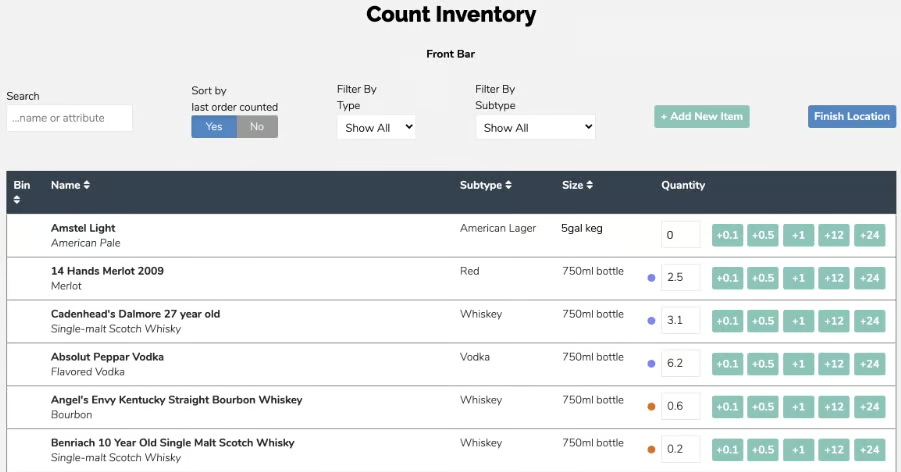
The free plan lets teams count inventory from mobile devices, organize several storage areas inside one venue, work with unlimited users, build purchase orders, and review inventory and purchasing reports.
Those functions match how bars and beverage-heavy restaurants actually manage stock better than general-purpose inventory systems.
Its specialization is also its biggest limitation. A clothing store, wholesaler, or ecommerce seller has little reason to choose Backbar over one of the broader products on this list.
Backbar Basic at a glance
- Software: $0/month
- Users: Unlimited
- Business locations: 1
- Inventory storage areas: Multiple
- Recipe limit: 10
- History: 6 months
- Support: Email
- Biggest limitation: Built specifically around beverage inventory and limited to one location on Basic
What’s in a Backbar free plan?
- Web and mobile inventory: Count inventory from a computer, iOS device, or Android device.
- Unlimited users: Multiple employees can participate in inventory work.
- Multiple storage areas: Track stock across storage areas within the same business location.
- Purchasing: Create and send purchase orders to vendors.
- Inventory and purchase reports: Review inventory and ordering data.
- Limited recipes: Create up to 10 recipes.
- Six months of history: Free accounts can view six months of inventory, order, and item transaction history.
When to upgrade to a paid Backbar plan
Upgrade when you need multiple business locations, unlimited recipes, longer reporting history, deeper costing tools, or more advanced beverage analytics.
Essential costs $99 per location per month with monthly billing or $79 per location per month on the annual plan. Professional costs $149 monthly or $129 per location per month when paid annually.
Pros and cons
| Pros | Cons |
|
|
Free vs paid inventory management software
Free inventory software is most useful while the way you buy, count, store, and sell products remains relatively simple.
Paid inventory software becomes worth the cost once free plan restrictions start creating more work than they save.
| Stay on free inventory software if... | Upgrade if... |
| One or a few employees can work within the plan's user limits. | More employees need individual logins, permissions, or audit trails. |
| Your catalog fits comfortably within the product or record limits. | Product, order, or record caps regularly interrupt work. |
| One primary sales workflow is enough. | POS, ecommerce, marketplaces, wholesale, and other channels need to stay synchronized. |
| You need basic counts, alerts, and reports. | You need forecasting, valuation, advanced purchasing, or serial/batch tracking. |
| Your locations fit the free tier. | You need more stores, warehouses, bins, or location-level reporting. |
| Manual adjustments remain manageable. | Your team spends significant time reconciling stock manually. |
When spreadsheets are still enough
Spreadsheets can still work well if you have a small catalog, one person responsible for updates, low sales volume, and no need for inventory to update automatically after every sale.
They are also useful while testing a new business idea. If the main question is simply what you bought, what you sold, and what remains, inventory software can be unnecessary.
The warning sign is usually not a particular number of SKUs. Problems start when multiple people edit inventory, products sell through several channels, stock sits in different locations, or inventory adjustments happen often enough that the spreadsheet no longer provides a dependable current count.
At that point, moving to free inventory software can give the business one source of stock data without requiring a large software budget.
When free inventory software becomes risky
Free inventory software can become expensive in indirect ways if the restrictions create workarounds.
- User limits: Zoho Inventory and SalesBinder are much harder to use as team systems when only one employee can access the free account.
- Order and record caps: Zoho’s 50-order monthly limit and SalesBinder’s 100-active-record allowance can be exhausted quickly.
- Missing purchasing tools: Some free POS inventory systems are good at deducting stock after a sale but less useful when the purchasing and supplier side of inventory becomes more structured.
- Weak audit controls: Shared accounts make it difficult to determine who changed inventory quantities.
- Disconnected business systems: If staff must constantly copy data among inventory, accounting, ecommerce, and POS platforms, free software may no longer be saving much time.
- Technical overhead: Open-source software such as InvenTree removes subscription fees but can create hosting, maintenance, and support work that a SaaS provider would otherwise handle.
How to choose the best free inventory management software
Choose free inventory management software by matching the tool to how your business actually sells, buys, stores, and counts products.
- Start with your sales channel. If you sell in person, start with Square, Toast, or Loyverse. If you sell online, compare Zoho and Square. If you manage warehouse workflows, start with Odoo or SalesBinder.
- Check the free plan limits first. Free plan limits matter more than headline features. Before signing up, check:
-
- Number of users.
- Product or record limits.
- Monthly order limits.
- Location limits.
- Whether barcode tools are free.
- Whether low-stock alerts are free.
- Whether purchase orders are free.
- Whether integrations are free or paid.
- Match the system to your inventory workflow. A small boutique may only need products, variants, counts, and alerts. A restaurant needs menu availability, ingredients, and supplier cost tools. A distributor needs POs, warehouses, customer records, and shipments.
- Test with real products. Do not test inventory software with sample items only. Add 10 to 20 real products, including variants, bundles, or items with different units of measure. Then test a sale, stock adjustment, return, low-stock alert, and report export.
- Review the upgrade path before you commit. The best free inventory software should still make sense when you outgrow the free plan. Look at the first paid tier and check whether it unlocks the specific feature you will need next, such as more users, locations, orders, POs, barcode labels, or integrations.
Frequently asked questions
What is free inventory software?
Free inventory software is a system that helps businesses track products, stock levels, locations, and inventory activity without a monthly software fee. Most free plans include limits, such as one user, a small number of orders, fewer locations, or fewer advanced tools.
What features should free inventory software include?
A useful free inventory system should include product records, stock adjustments, inventory counts, basic reporting, and some way to track low stock. Stronger free plans may also include barcode scanning, multi-location tracking, POS sync, ecommerce sync, purchase orders, or vendor records.
Is free inventory software suitable for small businesses?
Yes, free inventory software can work well for small businesses with simple stock needs, limited users, and lower order volume. It becomes less suitable when the business needs automation, advanced reporting, multi-user controls, purchase workflows, or multiple sales-channel integrations.
Can free inventory software integrate with other business tools?
Some free inventory systems integrate with POS, ecommerce, accounting, or shipping tools, but integrations are often limited on free plans. Check whether the integration you need is included for free or requires a paid plan, add-on, or API access.
What is the best free inventory management software overall?
Odoo is the best free inventory management software overall because it offers the strongest inventory feature set and the most flexibility for businesses that can handle setup. Square is the better choice for small retailers that want a free POS and inventory system in one.
When should I upgrade from free inventory software?
Upgrade when the free plan starts creating manual work, blocking team access, limiting order volume, or preventing accurate inventory decisions. Common upgrade triggers include needing more users, more locations, barcode labels, purchase orders, vendor management, accounting sync, advanced reports, or demand forecasting.