


Samsung’s Galaxy Z Fold8 Ultra combines the convenience of a smartphone with a larger screen for documents and multitasking. Open it to work across supported apps or use the outside display for messages and everyday tasks.
Advanced cameras and AI features extend its capabilities, but the Ultra is an expensive phone. Its folding design also brings considerations around app compatibility, durability, and long-term ownership costs.
This cheat sheet covers the Galaxy Z Fold8 Ultra’s features, specifications, pricing, availability, and limitations to help you decide whether it’s the right phone for you.
Galaxy Z Fold8 Ultra at a glance
| Release date | August 7, 2026 |
| Size and weight | Folded, 158.4 × 72.8 × 8.9 mm; unfolded, 158.4 × 143.2 × 4.1 mm; 215 g |
| Main display | 8-inch Dynamic AMOLED 2X; 2504 × 2256 resolution; 1–120Hz adaptive refresh rate |
| Cover display | 6.5-inch Dynamic AMOLED 2X; 1080 × 2520 resolution; 1–120Hz adaptive refresh rate |
| Processor | Snapdragon 8 Elite Gen 5 for Galaxy |
| Memory and storage | 12GB RAM with 256GB or 512GB storage; 16GB RAM with 1TB storage |
| Rear cameras | 200MP wide, 50MP ultrawide, 10MP telephoto with 3x optical zoom |
| Front cameras | 10MP cover camera; 10MP main-screen camera |
| Video recording | Up to 8K at 30 fps |
| Battery and charging | 5,000mAh; 45W wired; 20W wireless; Wireless PowerShare |
| Software | Android 17 with One UI 9 |
| Connectivity | 5G, Wi-Fi 7, Bluetooth 6.0, NFC, UWB |
| Water and dust resistance | IP48 |
| S Pen compatibility | Not supported |
| Colors | Violet Shadow, Graphite, Cream, Green Shadow |
| Starting US price | $2,099.99 |
Source: Samsung
Key features of the Galaxy Z Fold8 Ultra
Screen layout affects how applications work and how photographs are taken. Several features make use of the phone’s folding design in ways that conventional smartphones cannot.
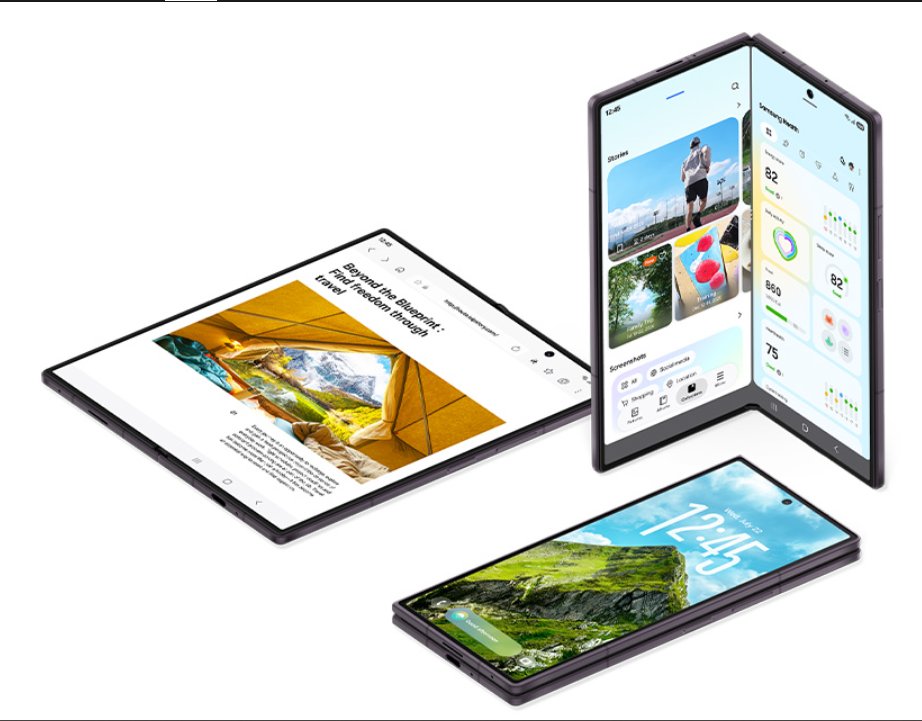
Design and display
Checking messages or following directions works comfortably on the cover screen. Opening the Ultra gives you a larger view for reading lengthy reports, reviewing photographs, or watching videos.
App Continuity keeps supported applications running as you move between displays. Flex mode also lets you prop the phone at an angle for hands-free activities, including video calls. Supported apps can display Flex mode controls on the lower portion of the screen.
Physical construction has changed as well. A slimmer Armor FlexHinge helps keep the device compact, and Flex Titanium technology reinforces the folding display to reduce crease visibility.
Protective glass covers the exterior surfaces, and an Armor Aluminum frame strengthens the body. IP48 protection covers freshwater exposure under specified conditions, but fine dust and sand can still cause problems.
Performance and multitasking
Snapdragon 8 Elite Gen 5 for Galaxy powers demanding applications and graphics-intensive tasks. Buyers can choose between 12GB and 16GB of RAM depending on storage configuration.
Multitasking is a major part of the Ultra’s software experience. Samsung’s Multi Window features provide ways to organize supported applications.
- Split View. Display two or three apps at once, such as a spreadsheet beside an email you’re preparing. Window sizes can be adjusted according to the task.
- Taskbar and App pairs. Access frequently used applications and save combinations you regularly use together, reducing the need to reopen each one individually.
- Pop-up windows. Keep smaller tools accessible over your main application. A calculator or messaging window can be moved around without closing what you’re working on.
Samsung DeX extends the experience to compatible external monitors. Using a keyboard and mouse, you can work with supported Android apps in a desktop-style environment.
App compatibility determines how much benefit you’ll get from these arrangements. Some applications restrict split-screen use or do not resize cleanly.
Camera features
Taking a group photo becomes easier when everyone can see how they’re positioned. Cover Screen Preview displays a live view on the outside screen, so people being photographed can check their framing before the picture is taken.
Other features take advantage of the folding layout.
- Capture View. Recently taken photographs appear beside the camera interface. You can review a shot without repeatedly switching to the gallery.
- Dual Screen. Both displays can show camera previews, helping the photographer and subject coordinate a shot.
- Video Reframe. AI can follow a selected person in recorded footage and create a reframed clip. It’s useful when you’ve filmed a wide scene and want to produce a video centered on one subject.
Features like Cover Screen Preview and Video Reframe give photographers additional ways to compose and edit their shots.
Camera hardware remains extensive. A 200MP main sensor supports high-resolution photography and cropping, while the dedicated telephoto camera provides 3x optical zoom for distant subjects. Optical stabilization helps reduce blur from small movements.
Video capabilities extend to 8K recording at 30 frames per second. APV codec support and Cine LUT controls give experienced creators additional options when preparing footage for editing.
Battery and charging
Long sessions on the unfolded display can put greater demands on battery life when you’re working on multiple apps. The Fold8 Ultra’s 5,000mAh battery is rated for up to 27 hours of video playback, though actual endurance will depend on screen brightness, connectivity, and daily usage.
When the battery runs low, a compatible 45W charger can restore approximately 67% in 30 minutes under Samsung’s test conditions, which had the screen and services switched off.
The adapter is sold separately. For everyday convenience, the Ultra also supports up to 20W wireless charging and can share battery power with compatible accessories, such as earbuds, through Wireless PowerShare.
One UI 9, Galaxy AI, and software support
One UI 9 brings AI assistance into everyday activities, including managing schedules, editing photographs, and handling recordings. Various tools work directly within supported applications.
Galaxy AI features
- Now Nudge. Recognizes useful information in supported conversations and suggests relevant actions. A meeting date could generate a calendar shortcut, or a shared location could prompt a mapping suggestion.
- Photo Assist. Uses written instructions to remove or reposition objects in photographs. The unfolded display also provides room to compare original and edited images.
- Gemini. Google’s AI assistant handles conversational requests and supported actions across applications, including tasks involving connected services.
- Audio Eraser. Reduces unwanted background noise in supported audio and video recordings, helping make speech easier to hear.
- Now Brief. Gathers personalized information into a daily summary, including supported reminders and upcoming events.
Feature availability depends on language, region, and supported services. Some functions also require an internet connection or account sign-in.
Privacy and software controls
Galaxy AI settings let users disable Now Nudge or restrict supported features to on-device processing. Enabling the latter prevents those features from sending data to the cloud, but functions requiring online processing may become unavailable.
One UI 9 also includes Privacy Alerts for potentially suspicious access to sensitive app permissions. Knox Vault separately provides hardware-backed protection for selected information stored on the phone.
Software support
Galaxy Z Fold8 Ultra receives seven generations of operating system upgrades and seven years of security updates, beginning from its initial global launch.
Price and availability
Galaxy Z Fold8 Ultra was introduced on July 22, 2026, with general US sales beginning Aug. 7. Buyers can purchase it through participating retailers and supported carriers or order through Samsung’s online store.
Pricing depends on the storage configuration.
Note: Prices reflect US retail listings. Promotional discounts and trade-in credits can reduce the amount paid.
Storage capacity requires some planning because the device has no microSD slot. Buyers who frequently record high-resolution video or download large files may prefer a higher-capacity configuration.
Repair costs and protection plans
Repair expenses can increase the cost of owning a foldable phone, especially if the main screen is damaged.
Current repair pricing lists a suggested $479 charge for eligible inner-screen-only repairs and $639 for an inner-screen module replacement. Repair methods cover different components, and final charges depend on the damage and services required.
Samsung Care+ can reduce eligible repair expenses, depending on the plan.
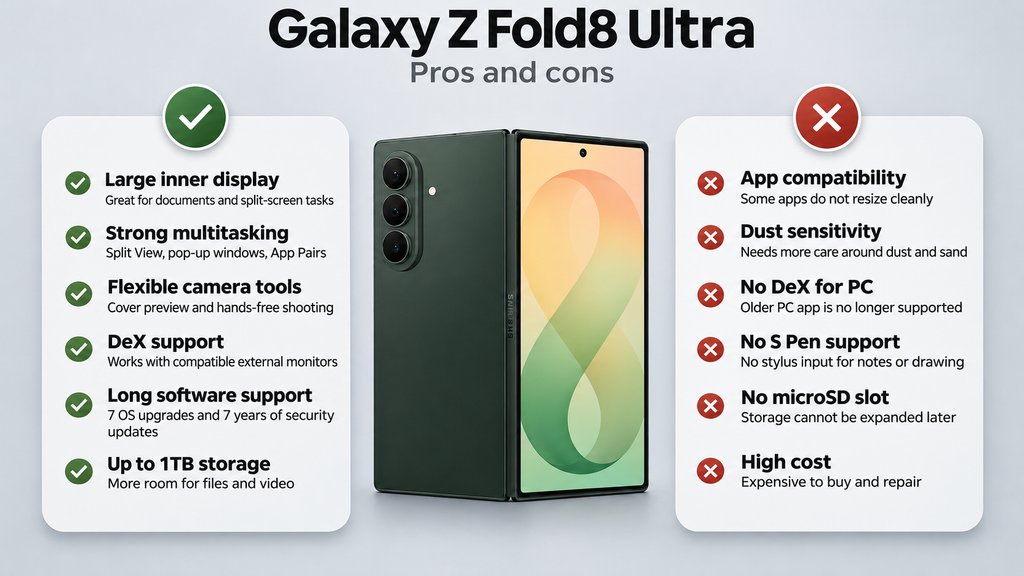
Galaxy Z Fold8 Ultra pros and cons
Several strengths make the Ultra useful for work and entertainment. Its folding hardware also introduces limitations that conventional smartphones may not have.
What to check before buying the Galaxy Z Fold8 Ultra for work
The Fold8 Ultra is most relevant to professionals who regularly need documents, messages or other applications visible together. Before buying, test a task you perform often rather than relying on a showroom demonstration.
- Test your actual apps. Open a spreadsheet beside email, enter text and switch between the cover and main displays. Check whether important controls remain accessible when the keyboard appears and whether document formatting survives edits.
- Check your company’s requirements. For managed deployments, pilot the phone with your work profile, VPN, authentication tools and approved applications. Confirm that employees can complete essential tasks under the organisation’s security policies.
- Try the intended DeX setup. Test the monitor, adapter, keyboard and mouse you expect to use. Confirm that the Android versions of your applications provide the functions your work requires.
- Review AI permissions. Check which tools use cloud processing and whether company information may be entered into them. Apply your organisation’s rules to meeting recordings, documents and other sensitive material.
- Budget for ownership and downtime. Include accessories, protection-plan charges and potential repairs. If the phone handles work calls or authentication, arrange a replacement option before it needs servicing.
Buyers who rely on handwriting should account for the absence of S Pen support. Compare the Ultra with the regular Fold8 and a conventional flagship using the same tasks. Its larger workspace is worth paying for when it removes a recurring obstacle in your working day.
Related reading: Explore how other foldable phones available in 2026 compare in portability, software features, and everyday usability.