


- GitLab: GitLab
- Bitbucket: Bitbucket
- SourceForge: SourceForge
GitHub is a popular version control and collaboration platform with a large, loyal following that helps software developers manage their code efficiently.
While GitHub excels in many areas, such as team collaboration, extensive documentation and support and seamless integrations, the developer tool also has some weaknesses, such as a steep learning curve, limited self-hosting, a high private repository cost and heavy reliance on integrations.
If these limitations are too detrimental to your needs, you may find the GitHub alternatives in this guide a better fit. We’ll break down the following GitHub alternatives in terms of their features, pros, cons and pricing:
- GitLab: Ideal for Agile developers seeking an all-in-one platform that offers self-hosting, free private repositories, integrated continuous integration/ continuous delivery, project management and DevOps workflows.
- Bitbucket: A solid pick for teams looking for a code hosting platform with free private repositories, solid collaboration and seamless integration with Jira and other Atlassian tools.
- SourceForge: A great choice for developers seeking a versatile GitHub alternative that offers source code repository hosting, issue tracking, version control, team collaboration and more.
GitLab
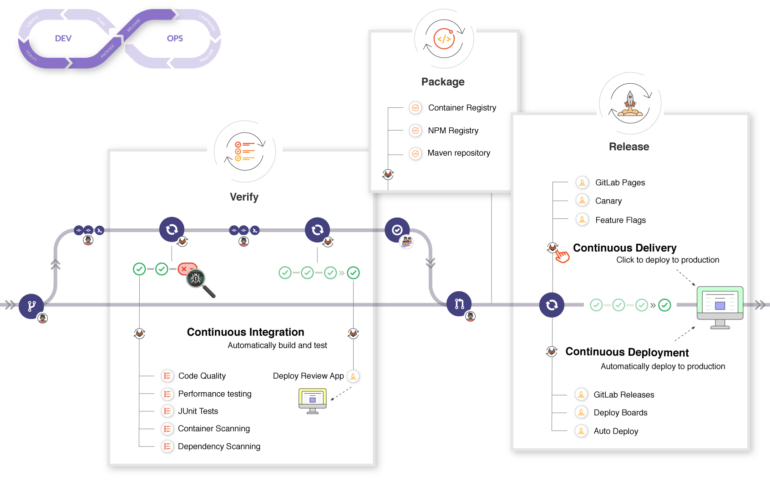
GitLab is an Agile-friendly, all-in-one DevSecOps platform that can help developers streamline their development lifecycle and improve communication with its collaborative, CI/CD and version control capabilities.
Features of GitLab
Some of GitLab’s top features for developers include:
- Auto DevOps.
- Issues feature.
- CI/CD.
- Team collaboration.
- Project management.
- Burndown charts.
- Merge requests.
- Third-party integrations.
GitLab’s Auto DevOps feature lets teams automate multiple stages of the development lifecycle so they can focus less on managing complex pipelines and more on coding. The issues feature offers task and bug tracking, while integrated CI/CD pipelines save time and minimize errors by automating the testing, building and deployment of code changes.
Must-read developer coverage
- What Powers Your Databases? Take This DZone Survey Today!
- Microsoft’s Historic 6502 BASIC Code is Now Open Source
- TIOBE Index: Top 10 Most Popular Programming Languages
- TechRepublic Exclusive: AWS Says Entry-Level Workers Need ‘Curiosity’ In the Age of AI
As for team collaboration, developers can spin up conversations on merge requests, epics, commits, issues and so on, and use wikis to keep notes and document meetings. Project management features include Scrum and kanban boards, a roadmap that mimics the popular Gantt chart, epics, milestones, groups and time tracking. There are also shareable burndown charts to help you track progress, pinpoint work gaps and meet deadlines, plus merge requests that make code review simple.
Last but not least, GitLab integrates with popular third-party programming tools and services including – but not limited to – Jenkins, Jira, Slack and Datadog.
Pros of GitLab
GitLab’s pros include:
- Versatility.
- Automation.
- Hosting options.
- Unlimited free private repositories.
- Enhanced security.
Thanks to GitLab’s status as an all-in-one DevSecOps platform, developers can enjoy ultimate versatility with a long list of features, including project management, CI/CD, issue tracking and more. Its integrated CI/CD and DevOps workflows offer the time-saving automation many developers crave, meanwhile the freedom to choose between a self-managed setup or SaaS is another huge plus.
SEE: 4 Best Automation Tools for Developers
Budget-minded software development teams will love GitLab’s unlimited free private repositories, for which GitHub charges a premium. Another GitLab pro is security – thanks to security features like vulnerability and compliance management and container scanning, the developer tool can secure your code better than GitHub can.
Cons of GitLab
GitLab’s cons include:
- Steep learning curve.
- Multiple interface issues.
- Limited extensibility.
- Sluggish performance.
While GitLab features an extensive set of capabilities, this can also serve as a weakness since beginners may find the developer tool overwhelming to begin with. The user interface compounds this issue by being outdated and unintuitive. GitLab could benefit from more third-party integrations, and its performance tends to struggle when dealing with large repositories or CI/CD workloads.
Pricing of GitLab
GitLab gives software development teams four pricing plans to choose from.
- Free: No cost for basic features and up to five users. GitLab’s Free plan comes with 400 monthly compute minutes, 5GB of storage and 10GB of monthly transfer.
- Premium: $29 per user, per month. Premium offers 10,000 monthly compute minutes, 50GB of storage, 100GB of monthly transfer, Agile planning, advanced CI/CD, protected branches, merge requests with approval rules, code ownership and customer support.
- Ultimate: $99 per user, per month. Ultimate offers 50,000 monthly compute minutes, 250GB of storage, 500GB of monthly transfer, free guests, suggested reviewers, container and dependency scanning, dynamic application security testing, multi-level epics and value stream management.
- Dedicated: Contact sales for custom pricing. If you can commit to 1,000 seats, GitLab’s Dedicated plan offers a fully managed solution with enterprise-grade security, data residency, regular upgrade cadence and full source code and data isolation.
Try GitLab
Bitbucket
Bitbucket is a widely used coding and CI/CD tool created for development teams using Jira, a popular project management platform from Atlassian. The GitHub alternative is ideal for developers looking for a code hosting platform that’s user-friendly, secure, provides solid collaboration, offers free private repositories, supports Git and Mercurial version control systems and integrates seamlessly with Jira.
Features of Bitbucket
Some of Bitbucket’s most noteworthy features as a code repository tool include:
- Code review.
- Team collaboration.
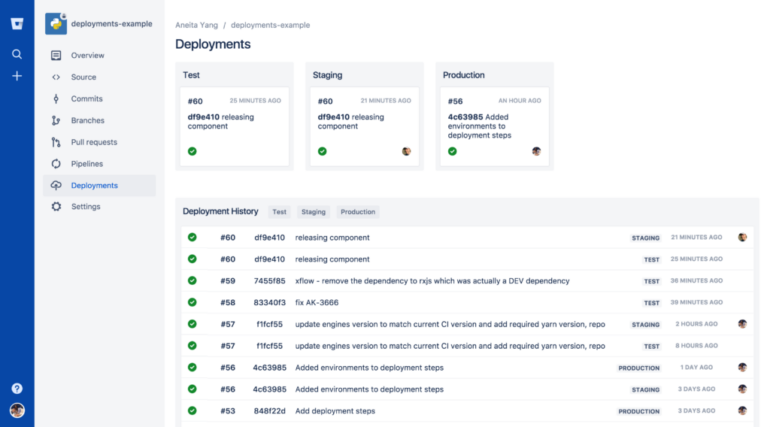
- Bitbucket Pipelines.
- Bitbucket Pipes.
- Third-party integrations.
- Git and Mercurial support.
- Enhanced security.
Bitbucket’s comprehensive code review lets developers improve code quality by finding and fixing bugs before deployment. A side-by-side view simplifies the process of reviewing large diffs and spotting bugs. Team collaboration is strong thanks to seamless integration with Atlassian’s Jira, a renowned project management tool. Jira’s built-in user interface lets developers add comments, make edits, view attachments and more, without having to switch to another app.
SEE: Best Practices for DevOps Pipelines
Bitbucket Pipelines lets developers automate code from test to production. The integrated CI/CD tool sits next to the code and eliminates time-consuming tasks like configuring user management, synchronizing code repositories, managing servers and so forth. Plus, with language-specific templates including PHP, Python, Ruby, JavaScript and numerous others, developers can enjoy straightforward CI/CD functionality with a simple two-step setup.
Bitbucket Pipes provides over 50 plug-and-play integrations (code quality, deployment, incident management, etc.) for extended CI/CD workflow automation. Speaking of integrations, Bitbucket integrates seamlessly with other Atlassian programming tools like Opsgenie and Confluence, as well as third-party tools like CircleCI, GitHub and Jenkins.
Bitbucket’s security is another feature worth mentioning. Bitbucket supports Git and Mercurial version control systems, and software development teams can enjoy enhanced security via data encryption, two-factor authentication, IP allowlisting, SAML SSO, etc.
Pros of Bitbucket
Bitbucket’s advantages include:
- Easy to use.
- Team collaboration.
- Integrations.
- Free private repositories.
- Version control flexibility.
Configuring and using Bitbucket is a breeze. The platform excels in team collaboration due to its seamless Jira integration, and it also integrates well with other Atlassian products and popular third-party developer tools.
Free private repositories are another of Bitbucket’s strengths. Small teams and individual developers will love this feature, which GitHub charges for. Bitbucket’s version control flexibility with Git and Mercurial is also a plus.
Cons of Bitbucket
Bitbucket’s disadvantages include:
- Outdated interface.
- Limited search.
- Large code repository performance.
- Cost for smaller teams.
The Bitbucket user interface could do with a modern facelift. The programmer tool’s search function could also use improvement, and it has been known to suffer performance-wise at times. Remember this if you have to deal with a large code repository or complex operations. Additionally, while the free private repositories are a plus, some smaller development teams may find Bitbucket a tad pricey.
Pricing of Bitbucket
Bitbucket’s pricing is split between its Cloud and Data Center offerings. The cloud-based pricing plans are as follows:
- Free: No cost for five users. The Free plan offers 50 monthly build minutes, 1GB of storage, code insights, unlimited private repositories, 10 deployment environments, Jira integration, CI/CD, merge checks, community support and unlimited pull request viewers.
- Standard: $3 per user, per month. The Standard plan includes 2,500 monthly build minutes, 5GB of storage, 50 deployment environments and standard support.
- Premium: $6 per user, per month. The Premium plan offers 3,500 monthly build minutes, 10GB of storage, 50 deployment environments, enforced merge checks, IP allowlisting, two-step verification, deployment permissions and premium support.
Software development teams requiring a self-managed solution can opt for the Bitbucket Data Center plan. It starts at $2,300 for an annual license and maintenance for 25 users and includes disaster recovery, SAML 2.0, OpenID Connect support and high availability.
For more information, read our full Bitbucket review.
Try Bitbucket
SourceForge
SourceForge is a web-based platform developers can use to host and manage software projects. The GitHub alternative is highly versatile and offers team collaboration, version control, issue tracking, source code repository hosting and more.
Features of SourceForge
Some of SourceForge’s top features include:
- Project hosting.
- Version control.
- Collaboration.
- Download distribution.
- Issue tracking.
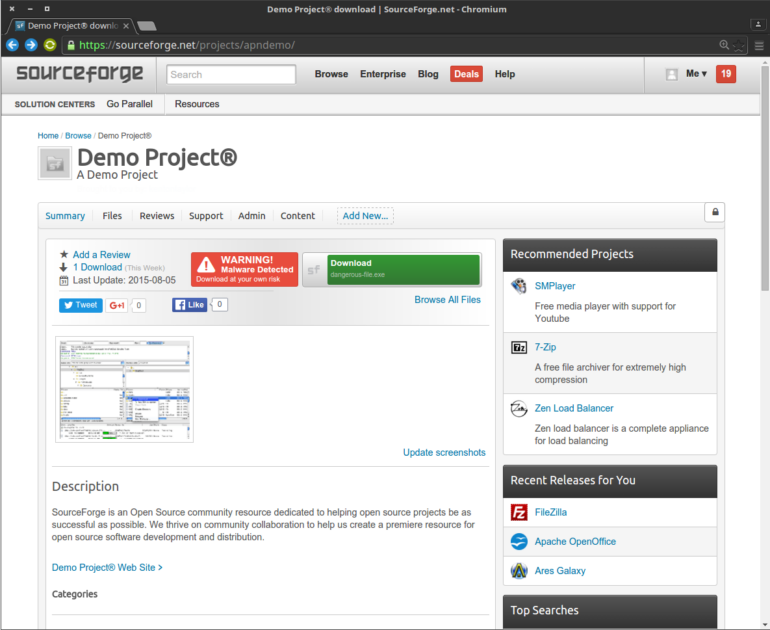
Developers can create project pages with descriptions, documentation and other resources on SourceForge and host their projects. The programmer tool supports popular version control systems like Git, Mercurial and Subversion, allowing developers to collaborate, host code repositories and track changes.
SourceForge offers blogs, wikis and file sharing for collaboration, while also offering the option to collaborate with project communities via mailing lists and discussion forums. Developers can host and distribute software releases on the platform so users can easily download and install packages. It also offers tools for issue tracking.
Pros of SourceForge
SourceForge’s strengths include:
- Free hosting.
- Project management.
- Version control flexibility.
- Large community.
As mentioned, GitHub charges for private repositories. SourceForge, on the other hand, offers free hosting for open-source projects. Open-source project developers or those looking to avoid premiums for private repositories should find SourceForge ideal. SourceForge also offers integrated project management capabilities for user feedback, collaboration, tracking bugs, etc.
Another SourceForge strength is version control. It offers flexibility and choice for developers seeking multiple version control options such as Git, Mercurial and Subversion, rather than just Git. If you’re looking for a large and diverse community for added support, SourceForge has that, too.
Cons of SourceForge
SourceForge’s weaknesses include:
- Outdated interface.
- Community support.
- Security.
SourceForge’s user interface works fine, but it could do with a modern overhaul to make it easier on the eye and give it a more intuitive feel. While it has a large community, SourceForge’s support is not as extensive or as quick as GitHub’s, which has the advantage of having millions of developers on the platform. SourceForge’s security is another shortcoming, as the platform has had past issues regarding bundled adware that could scare some users.
Pricing of SourceForge
Developers can use SourceForge to host open-source projects for free. Provided your open-source project meets their criteria, you can use the platform to host code repositories, manage issues, provide downloads and more at no cost.
SourceForge also has paid services for commercial projects that offer enhanced support and advanced features, such as increased customization, extra storage, etc. Pricing for these paid services will depend on your unique project needs.
Try SourceForge
What to look for in collaboration and version control software
There are several things to look for or consider when shopping for collaboration and version control tools such as GitHub, GitLab, Bitbucket and SourceForge. If you have a limited budget, you may want to opt for an open-source solution that’s free to use, or a tool that at least has a free plan with essential features. Read software reviews to ensure the tool is user-friendly and has solid support with a large community.
Hosting options (self-hosting or cloud-based), customization and scalability are other important considerations, as are features. Capabilities to look for include version control (Git, Mercurial, Subversion, etc.), integrations with popular third-party developer tools and CI/CD pipelines, collaboration (code reviews, pull requests, etc.), reporting and analytics and security.
Final thoughts on GitHub alternatives for developers
The tools listed above are some of the top GitHub alternatives for developers. Before choosing a GitHub alternative like GitLab, Bitbucket or SourceForge, make sure it fits your software development needs regarding user-friendliness, support, pricing and features.