


Ask an AI assistant to organize a folder, and it shouldn’t need the keys to the entire Mac. Yet some applications can receive far broader permissions than the job requires.
Apple introduced tighter controls in macOS 27.3 beta 2 on November 16, giving users more say over which files and applications third-party software can access. The changes address privacy concerns surrounding autonomous AI agents, though they also affect utilities that require extensive system permissions. Previously granted access will remain active.
How macOS 27.3 limits app access
In its November 16 developer announcement, Apple outlined six changes, including splitting Device Control and Data Access into two settings: System & App Protection Override and Accessibility. The separation clarifies when software is requesting broader system control rather than accessibility permissions.
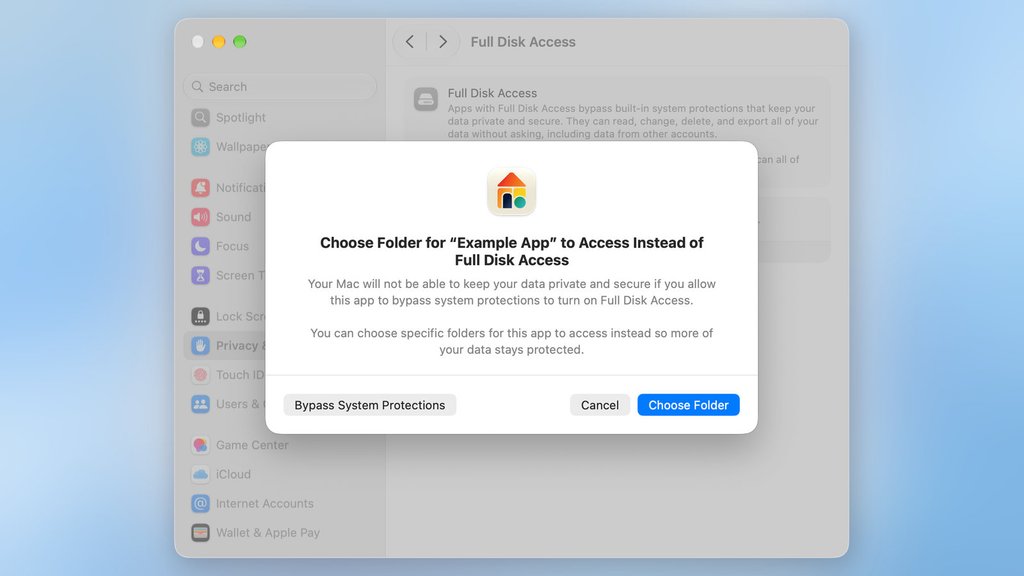
Users will select requesting applications from a standardized list. Where supported, they can grant access to specific folders through Full Disk Access or selected applications through System & App Protection Override instead of allowing unrestricted access.
Apple is also adding clearer warnings about broad permissions and two additional safeguards:
- Repeated approval: Users can choose Ask First when allowing an application to control another app, requiring approval before each interaction.
- Activity indicator: A new menu bar indicator shows when an application controls another through System & App Protection Override.
Apple’s permission guidance warns that unrestricted Full Disk Access can expose emails, messages, photos and other files to modification or export. System & App Protection Override can also allow software to control applications, view background windows and monitor keystrokes.
Users can still approve unrestricted access when necessary. Some backup and accessibility applications also have different approval options.
Apple previously warned in an October 2 announcement that some developers were requesting Full Disk Access in ways that could expose personal information. The company cited increasingly autonomous AI agents as a reason to strengthen permission controls.
Existing permissions still need attention
Applications with previously approved access will retain those permissions after the update. Users can review access under System Settings → Privacy & Security, where Apple provides options to remove permissions or change which protected folders and apps software can reach. Narrowing an existing unrestricted grant may require removing the app from the permissions list and adding it again.
Organizations managing Mac fleets should examine gaps in AI agent access controls, particularly for software handling confidential documents or interacting with multiple applications. IT teams should identify apps with broad permissions and test whether essential workflows can operate with restricted access.
These requirements vary by application. Understanding an assistant’s capabilities and available integrations and privacy controls can help determine which permissions are necessary before deployment.
Restricting permissions can reduce data exposure, but it cannot prevent harmful actions within an agent’s authorized access. Organizations still need AI agent governance and accountability, including activity monitoring and procedures for revoking access.
Developers must also prepare applications for limited permissions. Apple says disk-backup and assistive-technology developers can request special entitlements to preserve existing installation experiences, while known applications retain their current experience for now.
macOS 27.3 remains in beta, with no confirmed general-release date. Apple’s new controls will help users make more deliberate permission choices, but existing unrestricted access still needs attention.
Want to learn more AI tips, tricks, and prompting techniques? Let us teach you How to Talk to AI for free! Try our six-minute course at The Neuron Academy, our practical learning platform designed to help professionals use AI more confidently at work.
Learn a few simple ways to write better prompts and get more useful results from AI, or browse our other AI course for free for seven days. Check out all the lessons here →