



Hackers no longer need to break into WhatsApp accounts. They just let themselves in.
Cybersecurity researchers at technology firm Gen Digital have uncovered a new attack that quietly links an attacker’s browser to a victim’s WhatsApp account, giving them ongoing access without raising alarms.
The technique, known as “GhostPairing,” exploits WhatsApp’s device-linking feature, which allows users to connect multiple devices to a single account. By abusing this legitimate function through social engineering, attackers can remain invisible while monitoring messages and gathering personal information.
How it really works under the hood
WhatsApp has a convenient but risky feature that allows users to access their account on up to four devices simultaneously.
Gen Digital says that this allows users to sign in on any secondary device using either a phone number or a QR code pairing.
The hack begins with a target receiving a malicious link that deceptively leads them to a Facebook photo. According to MalwareBytes, the malicious link usually follows this text: “Hey, check this, I found your photo!” or a slightly tweaked variant.
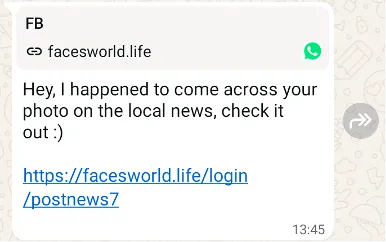
However, when they click the link, they are redirected to a fake Facebook login page. The page requests they enter their WhatsApp-linked phone number. The phone number is sent to the hackers via the backend.
The hackers then use this number to initiate a WhatsApp device pairing, displaying either an eight-digit code or a QR code on the new screen. The code is followed by an instruction to input the same code on WhatsApp.
By entering the code on their WhatsApp, an unsuspecting user would never know they’ve just given the attacker full access to their account.
Additional revelations from the report
The research team from Gen Digital stated in their report that the hackers typically lie dormant, extracting relevant information from their victims’ chats and getting to know the person well enough. They don’t lock the user out of their account or behave suspiciously. Instead, they sit and watch.
The information gathered from this reconnaissance can then be used to either obtain their next victims, impersonate victims, or blackmail them.
Must-read security coverage
- UK Police Convicts Pair in £5.5 Billion Bitcoin Launder Case
- Blackpoint Cyber vs. Arctic Wolf: Which MDR Solution is Right for You?
- How GitHub Is Securing the Software Supply Chain
- 8 Best Enterprise Password Managers
Protecting yourself from this form of attack
Social engineering has always been a potent form of cyberattack, and hackers aren’t relenting on it because it’s easy. However, a few checks can keep you safe from this form of attack and other similar ones:
- Never click on suspicious links, especially if you didn’t request it or don’t know the person sending it.
- Hover over any links you receive before clicking or check the link preview.
- When dealing with codes from Meta, be extra careful; most Meta codes are from verified accounts, except for direct WhatsApp pairing, which is a pop-up.
- If you’ve fallen victim, quickly inform your contacts that you have been compromised so that they can stay vigilant.
- Always check your linked device settings and delete any unknown devices.
To check linked devices, from your mobile phone or primary device (link): Enter settings (iOS) or tap on the three-dotted symbol (Android) → Linked devices → Check all linked devices.
Since WhatsApp allows only four devices to be linked to a WhatsApp account, those who exceed that limit will receive an error message, thereby voiding the hack.
Alongside new security concerns, WhatsApp is also updating voicemail features. See what’s coming next.