


In this showdown, I can say that Square and QuickBooks both come out as winners because the two can coexist in a business. As a CPA who has been writing about accounting software and related services since 2021, I see no clear winner or loser in this comparison.
Square excels in POS and payments, while QuickBooks serves as the backend accounting solution. Together, they complement each other by helping your business handle payments and bookkeeping more quickly and efficiently.
Why you can trust my advice
I use a rigorous evaluation framework to assess accounting software, focusing on the needs of tech-driven organizations. As a CPA, I combine hands-on testing with deep industry knowledge to deliver insights grounded in real-world application and not just surface-level research. All comparisons, inferences, and recommendations are valid only within the context of this article and should not be applied more generally.
Square vs QuickBooks: Quick comparison
 |  |
|
| Monthly pricing | ||
| Number of users | ||
| Invoicing & A/R | ||
| Billing & A/P | ||
| Banking & cash management | ||
| Payments processing | ||
| Point of sale (POS) system | ||
| Payroll | ||
Square vs QuickBooks: Pricing
Pricing between QuickBooks vs Square isn’t really comparable because the platforms serve different purposes. In my expert opinion, one is not more affordable than the other — it’s truly an apples-to-oranges comparison.
As a CPA, I see both coexisting within a business, each supporting different aspects of operations. If Square isn’t in your budget, use QuickBooks with a lower-cost Square alternative; if QuickBooks is too expensive, go with Square plus a more affordable QuickBooks alternative.
Square pricing
- Square POS: $0 per month
- Square Appointments: $0 to $69 per month
- Square for Retail: $0 to $89 per month
- Square for Restaurants: $0 to $165 per month
QuickBooks pricing
- Simple start: $38 per month
- Essentials: $75 per month
- Plus: $115 per month
- Advanced: $275 per month
Square vs QuickBooks: Features
As I’ve stated above, comparing Square vs QuickBooks is an apples-to-oranges comparison. For the sake of discussing features, I’ll focus on highlighting the strengths of each provider in that area, and there will be no winner mentioned. For transparency, I’ll also minimize direct comparisons between the two, especially in cases where it clearly puts one at a disadvantage over the other.
Invoicing & A/R
Both Square and QuickBooks made our list of the best invoicing software. Square gives businesses flexibility in how they accept and manage payments. Customers can pay in person or online using credit cards, Apple Pay, Google Pay, Cash App Pay, Cash App Afterpay, or ACH bank transfers.
You can accept in-person transactions, issue refunds from the Dashboard or POS app, and send digital invoices instantly via email, SMS, or a shareable link. Funds transfer to your bank account the next day for free or instantly for a fee, with the added option of using a free Square Checking account. Features like card-on-file, automated discounts and taxes, and tip collection make payments and billing more seamless.
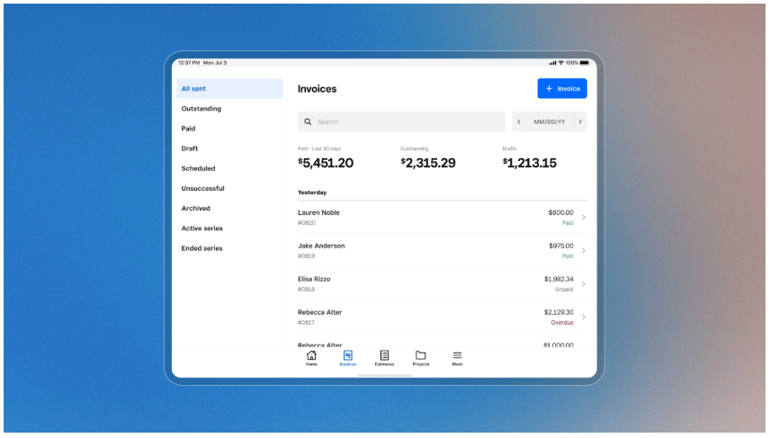
Square also streamlines projects and invoicing. You can do the following:
- Manage estimates, invoices, and contracts in one place
- Get tools like e-signatures and editable templates
- Build custom packages
- Add logos and brand colors
- Tailor invoices with fields for terms or messages
The platform supports recurring invoices, automated reminders, deposit requests, and flexible payment schedules. With batch invoicing, estimate-to-invoice conversion, and real-time invoice tracking, you gain more control. Insights across items, services, and payments further help you make data-driven decisions.
On the other hand, QuickBooks, one of our best accounting software for small businesses, makes it easy to create professional, custom invoices that reflect your brand. You can personalize invoice templates with your company logo, colors, and payment terms while also adding discounts, surcharges, or GST in seconds.
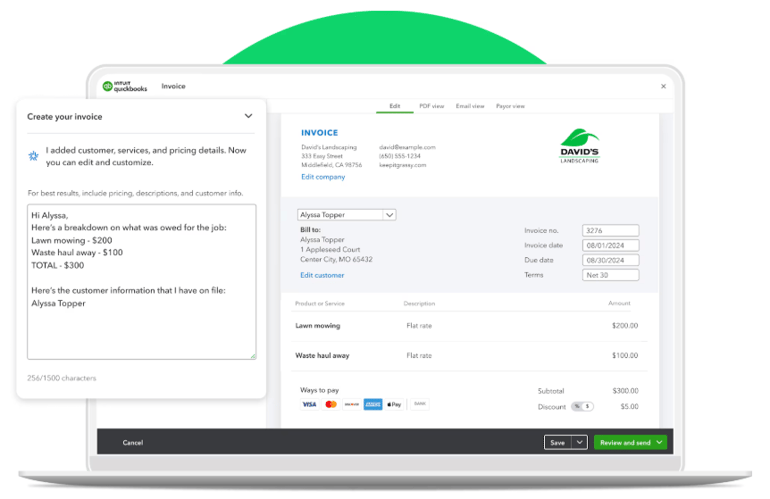
To save time, the invoicing process can be automated with the following:
- Recurring invoices for regular customers
- Batch invoicing for efficiency,
- Automatic reminders for late payers to help you stay on top of collections
Cash flow management is made simpler with progress invoicing. That allows you to bill customers at milestones, by percentage of work completed, or in multiple stages.
Flexible payment options and custom schedules give customers more ways to pay, whether by bank transfer, PayNow, or other methods you choose. With mobile access through the QuickBooks app, you can manage and send invoices from anywhere, keeping your accounts organized and your billing process running smoothly year-round.
Billing & A/P
For clarity, billing refers to managing and processing bills from vendors and suppliers. QuickBooks Online provides powerful tools to simplify accounts payable by keeping all bill-related data in one place. You can see exactly how much you owe and when payments are due, and once a bill is paid, the system automatically records the transaction to save time and reduce manual entry.
With QuickBooks Online, you can schedule payments, track outstanding bills, and even pay early to secure discounts, all of which help improve cash flow and maintain control over financial obligations. For better visibility into payables, you can also generate the following:
- Unpaid Supplier Report
- Accounts Payable Aging Report
- Supplier Detail Report
Square, on the other hand, has no built-in accounts payable or billing features.
Banking & cash management
Square offers banking features through Square Checking, where sales can be spent instantly using a debit card. Your business can issue up to five debit cards for team members to make purchases in person or digitally with Apple Pay or Google Pay. Funds are available right away, allowing bill payments via debit card, ACH, Bill Pay, or printable checks.
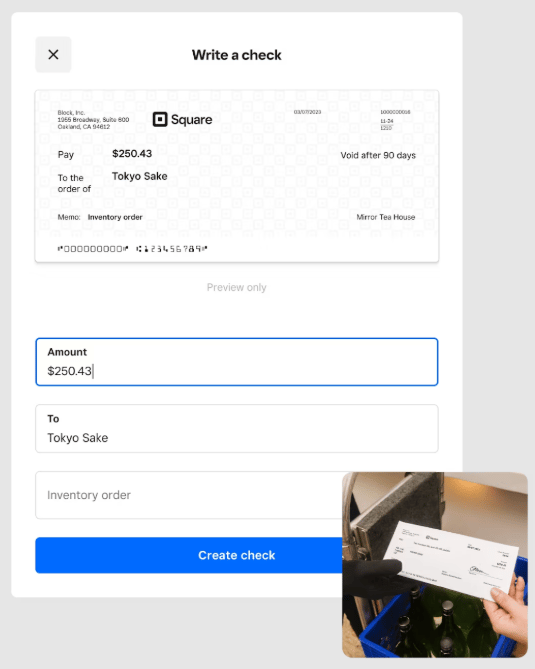
Vendors who prefer checks can receive printed versions or emailed PDFs. Square loans, once approved, are deposited instantly into your Square Checking account, and a Square Credit Card is also available for dedicated business expenses.
QuickBooks, on the other hand, focuses on simplifying bank feed connections and account reconciliation. By connecting to your bank, credit cards, PayPal, Square, and more, QuickBooks automatically imports transactions for easy matching. Reconciling is straightforward: select the account, compare transactions to your bank statement, and check them off one by one.
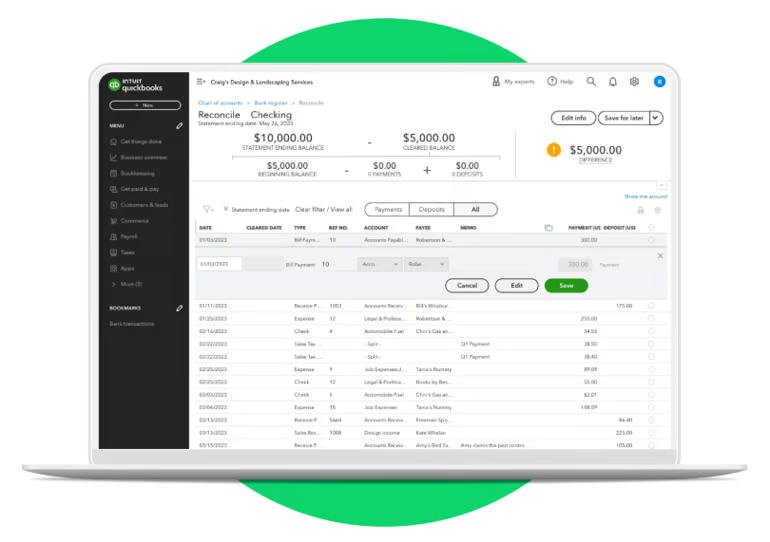
A running total ensures accuracy, and reconciliation is complete when the difference reaches zero. This process keeps financial data accurate and consistent with the bank’s records.
MY CLARIFICATIONS:
- Square offers banking services through Square Banking, which includes a bank account, debit card, and even a business credit card via Square Credit Card.
- QuickBooks Online, on the other hand, doesn’t provide banking services like Square. You need to connect your external bank or credit card to access bank feeds. Another Intuit service you can integrate is QuickBooks Checking, a business checking account that is separate from QuickBooks Online and must be connected first before you can use it within your QuickBooks account.
In my view, Square Banking makes sense if you want a dedicated bank account tied directly to your business operations. QuickBooks Online feels more “agnostic” since it connects with multiple bank accounts, such as those listed in our roundup of the best banks that integrate with QuickBooks, giving you flexibility if you have banking relationships you’d like to keep. The choice depends on whether you prefer an all-in-one provider like Square or the broader connectivity QuickBooks offers.
Our related resources:
Payment processing
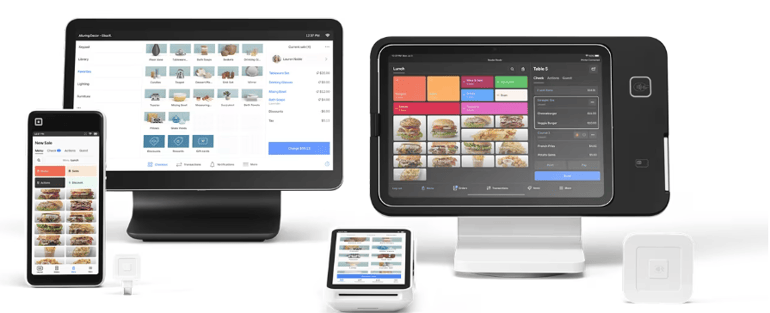
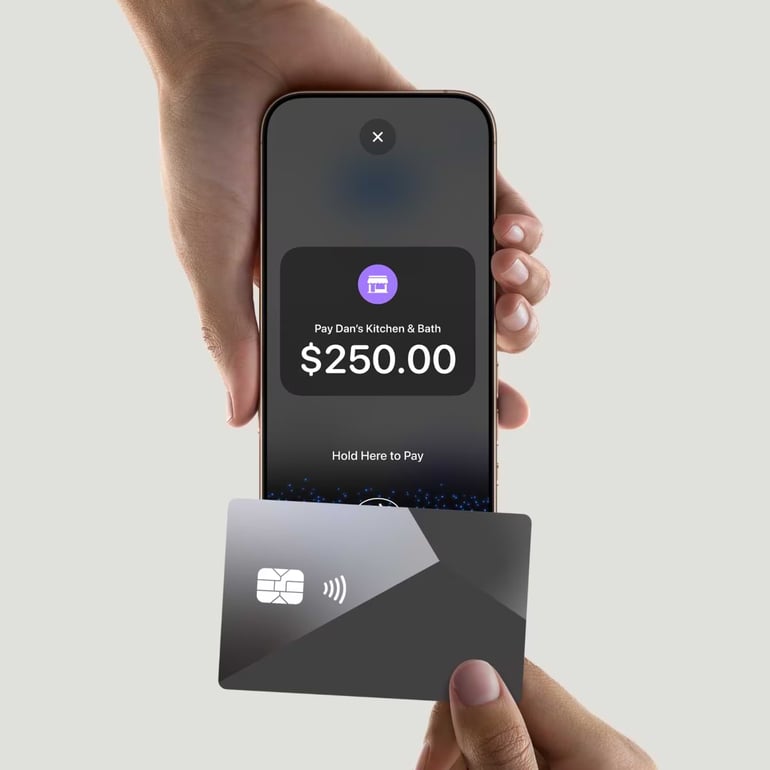
Square lets you accept payments at the counter or on the go with flexible hardware options that suit your business. You can set up a free online store, send payment links, or connect your existing online store or app using secure payment APIs. Customers also have the option to pay over time with Cash App Afterpay, where you get paid in full right away while they pay in four interest-free installments.
QuickBooks helps make payments more predictable by allowing you to track and schedule invoices that customers can pay online, with deposits arriving quickly. You get real-time tracking to see when invoices are viewed and paid, plus recurring payments that automatically charge customers on a set schedule to support cash flow planning. With a QuickBooks Checking account, eligible payments can also be deposited sooner and fee-free.
QuickBooks helps make payments more predictable by allowing you to track and schedule invoices that customers can pay online, with deposits arriving quickly. You get real-time tracking to see when invoices are viewed and paid, plus recurring payments that automatically charge customers on a set schedule to support cash flow planning. With a QuickBooks Checking account, eligible payments can also be deposited sooner and fee-free.
MY CLARIFICATIONS:
- Square excels in payments with its wide array of POS systems and flexible payment options.
- QuickBooks, on the other hand, is a dedicated accounting software designed to work behind the scenes, keeping business operations organized and compliant. QuickBooks Payments is another Intuit service you can add to your account. It doesn’t come built into QuickBooks Online, so you’ll need to set it up separately before you can start accepting payments through QuickBooks.
- Both play important roles, and the better approach is to integrate Square with QuickBooks so that they work together seamlessly in your business.
Square pros and cons
| Pros | Cons |
|---|---|
| ✅Low barrier to entry with a free plan, no long-term contracts, and quick setup for startups and pop-ups | ❌Processing fees add up for high-volume or high-ticket businesses |
| ✅User-friendly POS with integrated e-commerce, invoicing, and inventory | ❌Few advanced features at enterprise scale |
| ✅Transparent, flat-rate processing with clear online and in-person fees for easy cost forecasting | ❌No 24/7 support |
| ✅Strong omnichannel tools like free online store, synced inventory, and unified reporting across sales channels | ❌Not a full accounting suite |
QuickBooks pros and cons
| Pros | Cons |
|---|---|
| ✅Comprehensive accounting suite for small and midsize businesses | ❌Rising cost structure as subscriptions and add-ons like payroll, time tracking, and advanced reporting increase expenses |
| ✅Cloud access and real-time collaboration with multiuser logins and accountant access to streamline workflows | ❌Usage and user limits tied to plans |
| ✅Large app ecosystem integrating payments, payroll, e-commerce, expense, and A/P automation tools | ❌Learning curve and setup difficulty, especially for users with little accounting experience |
| ✅Comprehensive invoicing and billing with customizable invoices, recurring billing, reminders, online payments, and receipt capture | ❌No direct customer phone support line |
| ✅Multiple plans and add-ons, such as payroll, to expand capabilities |
Should your organization use Square or QuickBooks?
In this comparison, it’s not about choosing one over the other. I believe that both Square and QuickBooks Online are tools that can coexist within a business, each serving different but complementary roles.
With that in mind, I’ll outline the best use cases for each provider to help you determine whether your business needs only one solution or to use both to receive greater benefits.
Square is best for…
- Storefronts that focus on on-site sales but still want a simple online store with synced inventory
- Retailers and restaurants or barcode scanning, KDS, table mapping, and booking tools
- Pop-up markets that want to accept tap-to-pay and use offline mode for more accessibility
- Businesses seeking software that provides built-in invoicing, loyalty, marketing, scheduling, and basic banking without relying on multiple providers
QuickBooks is best for…
- Project tracking and accounting, especially in comparing actual costs with budgeted figures per project
- Businesses looking for an end-to-end accounting solution
- Finance-driven SMBs that rely on their accounting system for financial reporting and tracking
- Teams working with accountants or distributed staff who need real-time access
My methodology
In comparing QuickBooks vs Square, I focused on how each platform supports real-world business needs, whether you’re looking for a POS system to handle payments or an accounting solution to manage your books. I evaluated both tools across several core areas.
- Accessibility: I looked at how well the platform fits businesses at different stages of growth, from startups to established companies. I also considered how adaptable it is across industries and use cases.
- Ease of use: I focused on the overall user experience, including interface design, navigation clarity, onboarding, and guided workflows. I rated the platform higher when it minimizes the learning curve and reduces training time.
- Module capabilities: I paid attention to the depth and functionality of features, not just whether they exist. I also looked at how well modules like financials, inventory, and reporting work together within the system.
- Cost advantage: I didn’t consider just subscription pricing — I also factored in add-ons, implementation, and licensing. Platforms that bundle more core features make costs more predictable, while heavy reliance on extras can drive expenses up.
- Flexibility & integration: I evaluated how easily a system connects with other tools, what customization options it offers, and whether it provides APIs, app marketplaces, automation, and support for tailored workflows.
Frequently asked questions (FAQs)
Can Square handle accounting like QuickBooks?
No. Square focuses on POS, payments, invoicing, and basic dashboards; it lacks native A/P, full general ledger, and comprehensive reporting found in accounting suites. Pair it with an accounting system for complete books.
Does QuickBooks include payment processing like Square?
Yes. QuickBooks offers integrated payments (QuickBooks Payments) for invoices and in-person/phone payments, including cards, ACH, PayPal, and Venmo; setup and eligibility are required.
Which is cheaper: Square or QuickBooks?
It depends on the use case. For invoicing-only or POS-led needs, Square’s free plan plus flat processing can be cheaper. For full accounting, QuickBooks’ subscription replaces separate accounting tools but adds cost for tiers and add‑ons. High processing volume may favor negotiated rates via QuickBooks Payments or other processors.
Can I use both Square and QuickBooks together?
Yes. There is a native connector and third-party integrations that sync Square sales, fees, taxes, payouts, and locations into QuickBooks for reconciliation.
Which software is better for small business tax filing?
QuickBooks. It maintains complete financials (A/R, A/P, bank recs, reports) used for year‑end and tax prep and integrates with tax tools. Square does not manage full books required for filing.